https://github.com/iamnewton/dotfiles
UNIX-based system configuration for software development
https://github.com/iamnewton/dotfiles
bash dotfiles homebrew npm
Last synced: 11 months ago
JSON representation
UNIX-based system configuration for software development
- Host: GitHub
- URL: https://github.com/iamnewton/dotfiles
- Owner: iamnewton
- License: gpl-3.0
- Created: 2014-07-18T05:02:29.000Z (almost 12 years ago)
- Default Branch: main
- Last Pushed: 2025-07-09T20:08:51.000Z (12 months ago)
- Last Synced: 2025-07-09T21:12:29.742Z (12 months ago)
- Topics: bash, dotfiles, homebrew, npm
- Language: Shell
- Homepage: https://github.com/iamnewton/dotfiles#readme
- Size: 739 KB
- Stars: 9
- Watchers: 3
- Forks: 1
- Open Issues: 23
-
Metadata Files:
- Readme: README.md
- Changelog: CHANGELOG.md
- Contributing: .github/CONTRIBUTING.md
- Funding: .github/FUNDING.yml
- License: LICENSE
- Code of conduct: .github/CODE_OF_CONDUCT.md
- Codeowners: .github/CODEOWNERS
- Support: .github/SUPPORT.md
Awesome Lists containing this project
README
# 🛠 dotfiles(1)
A highly-configurable, cross-platform `dotfiles` setup built with:
- ✅ Idempotent, modular shell scripts
- 🐳 Docker test harness
- 🧪 Bash-based assertions
- 📦 Easy packaging
- ⚙️ GitHub Actions CI ready
Typically software you buy comes with some sort of installer, why not your dotfiles? After manually setting up my dotfiles and installation for years, I decided to take a page from [some](https://github.com/necolas) [other](https://github.com/mathiasbynens) [people's](https://github.com/cowboy) [books](http://dotfiles.github.io) and set up a script that will configure my machine to setup my bash profile and install a few core packages. Feel free to [poke around](https://github.com/iamnewton/dotfiles/commits/main) the repository, [fork it](https://github.com/iamnewton/dotfiles/fork) to make it your own, [suggest things](https://github.com/iamnewton/dotfiles/issues?labels=feature+request) for me to include, [log a bug](https://github.com/iamnewton/dotfiles/issues/new), or maybe checkout the [features list](#features) to see what's included.
**N.B.** This project has a [Code of Conduct](./.github/CODE_OF_CONDUCT.md). By interacting with this repository, organization, and/or community you agree to abide by its terms.
## Installation
:warning: This will overwrite existing dotfiles in your `$HOME` directory.
```bash
$ /bin/bash -c "$(curl -#fL https://raw.githubusercontent.com/iamnewton/dotfiles/main/bin/install)"
```
### Requirements
Ensure that you have the following dependencies installed on your system. If you're on MacOS then you already have these, but a Linux system may not come with all.
* [curl](http://curl.haxx.se)
* [git](http://git-scm.com)
:exclamation: N.B. If you wish to [fork this project](https://github.com/iamnewton/dotfiles/fork) and maintain your own dotfiles, you **MUST** substitute my username for your own in the above command and the variable (`$USERNAME`) found at the top of the `bin/install.sh` script.
## Features
Besides some [custom bash prompts](#shell-custom-bash-prompt), there are some [<tab> completion libraries](https://github.com/iamnewton/dotfiles/wiki/-tab--Completion) installed as well.
### Custom bash prompt
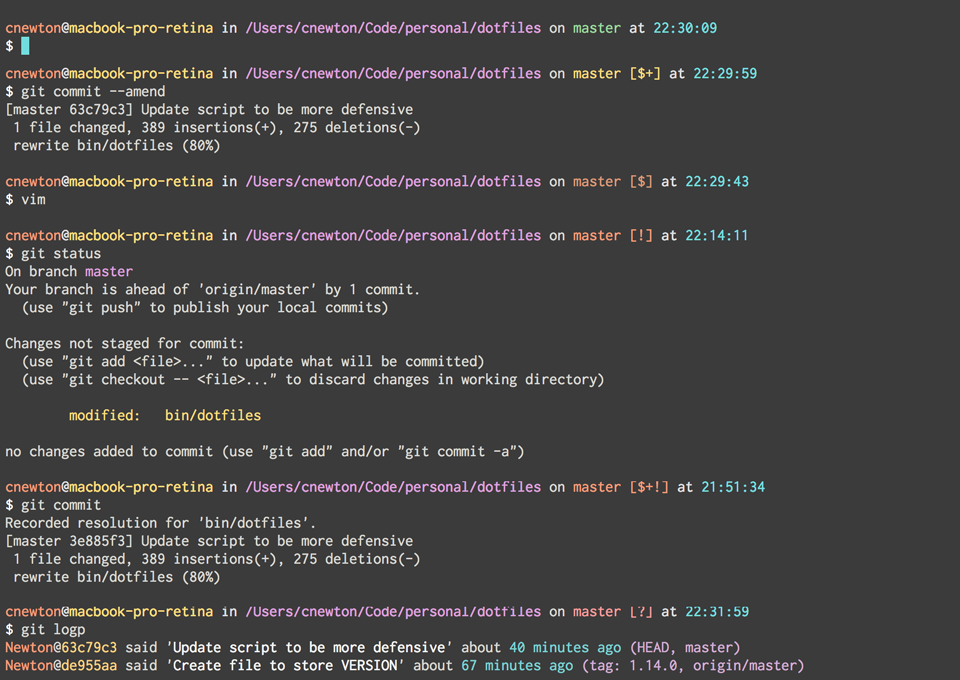
A custom bash prompt based on the [Seti UI color palette](https://github.com/jesseweed/seti-ui) and influenced by [@necolas](https://github.com/necolas), [@gf3](https://github.com/gf3) and [@cowboy](https://github.com/cowboy) custom prompts. When your current working directory is a Git repository, the `$PROMPT` will display the checked-out branch's name (and failing that, the commit SHA that `HEAD` is pointing to). The state of the working tree is reflected in the following way:
| Symbol | Meaning |
| :----: | :------------------------------- |
| + | Uncommitted changes |
| ! | Unstaged changes |
| ? | Untracked files |
| $ | Stashed files |
For best results with iTerm, you should install [the SETI color scheme for iTerm](https://github.com/willmanduffy/seti-iterm). Further details are in the `./conf/bash_prompt` file.
#### Screenshot
### Local/private configuration
Any private and custom Bash commands and configuration should be placed in a `$HOME/.bash_profile.local` file. This file will not be under version control or committed to a public repository. If `$HOME/.bash_profile.local` exists, it will be sourced for inclusion in `bash_profile`. The same goes for any local Git configuration but within the `$HOME/.gitconfig.local`
Here is an example `~/.bash_profile.local`:
```bash
# Github Issues library token
export GITHUB_TOKEN=""
# Aliases
alias code="cd ~/Code"
```
* * *
## Acknowledgements
Inspiration and code was taken from many sources, including (in lexicographical order):
* [@holman](https://github.com/holman) (Zach Holman) https://github.com/holman/dotfiles
* [@mathiasbynens](https://github.com/mathiasbynens) (Mathias Bynens) https://github.com/mathiasbynens/dotfiles
* [@necolas](https://github.com/necolas) (Nicolas Gallagher) https://github.com/necolas/dotfiles