https://github.com/iamnewton/dotvim
UNIX-based ViM setup for software development
https://github.com/iamnewton/dotvim
dotfiles vim vim-configuration vimrc
Last synced: 2 months ago
JSON representation
UNIX-based ViM setup for software development
- Host: GitHub
- URL: https://github.com/iamnewton/dotvim
- Owner: iamnewton
- License: gpl-3.0
- Created: 2021-06-28T17:37:16.000Z (almost 5 years ago)
- Default Branch: main
- Last Pushed: 2024-02-15T05:35:08.000Z (over 2 years ago)
- Last Synced: 2025-03-28T12:45:41.251Z (about 1 year ago)
- Topics: dotfiles, vim, vim-configuration, vimrc
- Language: Vim Script
- Homepage: https://github.com/iamnewton/dotvim#readme
- Size: 224 KB
- Stars: 0
- Watchers: 1
- Forks: 0
- Open Issues: 1
-
Metadata Files:
- Readme: README.md
- Contributing: .github/CONTRIBUTING.md
- Funding: .github/FUNDING.yml
- License: LICENSE
- Code of conduct: .github/CODE_OF_CONDUCT.md
- Codeowners: .github/CODEOWNERS
- Support: .github/SUPPORT.md
Awesome Lists containing this project
README
# dotvim(1)
My personal ViM setup.
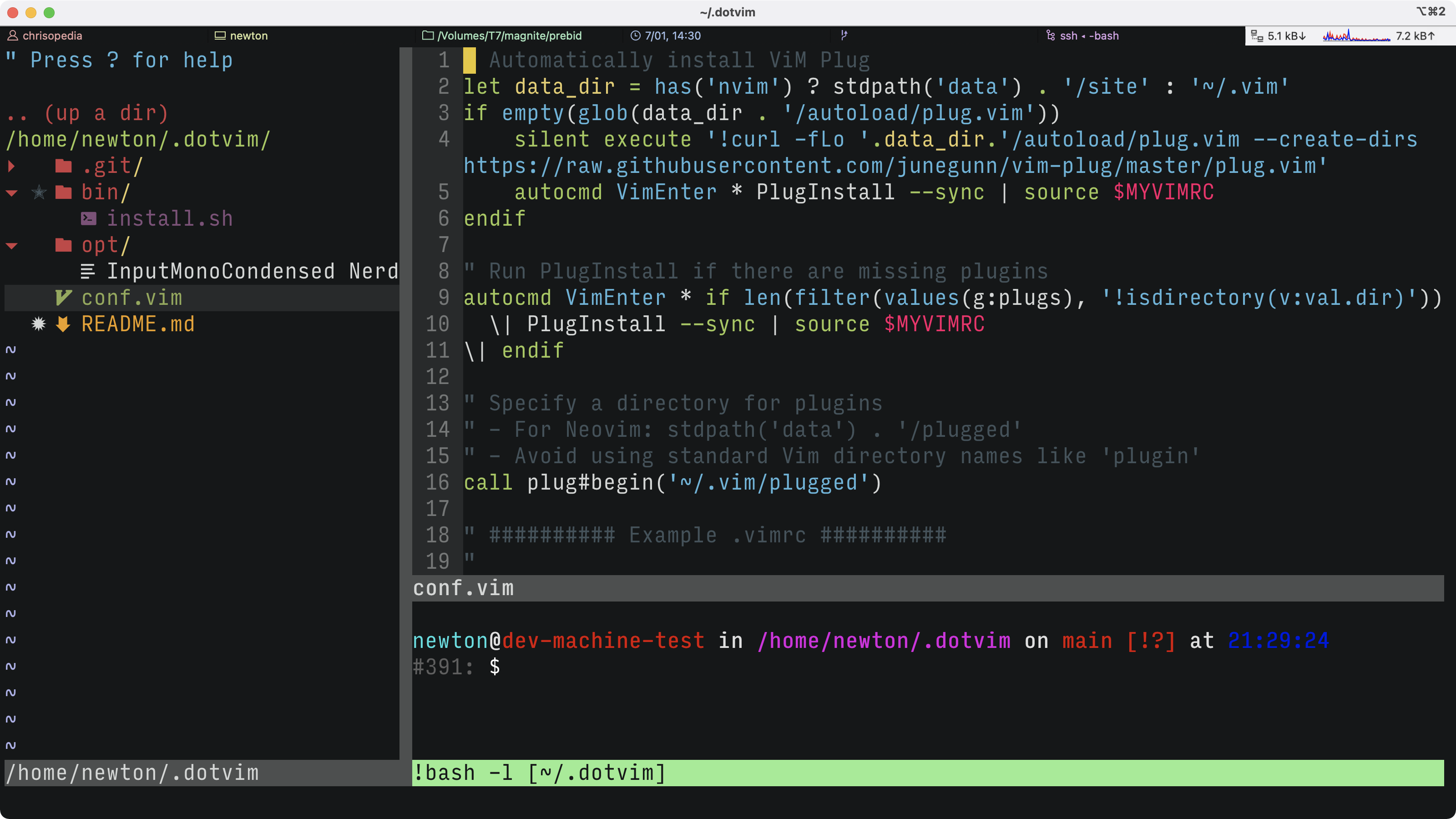
_[One Half ½](https://github.com/sonph/onehalf) with [Input Mono Condensed](https://input.djr.com) (patched as a [Nerd Font](https://www.nerdfonts.com))_
**N.B.** This project has a [Code of Conduct](./.github/CODE_OF_CONDUCT.md). By interacting with this repository, organization, and/or community you agree to abide by its terms.
## Installation
:warning: This will overwrite your existing `.vim` directory.
```bash
$ /bin/bash -c "$(curl -#fL https://raw.githubusercontent.com/iamnewton/dotvim/main/bin/dotvim)"
```
### Requirements
Ensure that you have the following dependencies installed on your system. If you're on MacOS then you already have these, but a Linux system may not come with all.
* [curl](http://curl.haxx.se)
* [git](http://git-scm.com)
## Features
* Tabs over spaces, [don't come at me!](https://lea.verou.me/2012/01/why-tabs-are-clearly-superior/)
* Automatic install of all plugins and plugin manager on launch
* File explorer always open to showcase directory structure, but focus on primary window
* Syntax highlighting, over 50 languages, loaded on-demand
* Autocomplete, specifically Bash, CSS, Git, HTML, JS/TS, JSON, SVG, YAML
* [Git](https://git-scm.com)/[GitHub](https://github.com) integration
## Plug Ins
* [vim-plug](https://github.com/junegunn/vim-plug) - plugin manager
### Syntax
* [Polyglot](https://github.com/sheerun/vim-polyglot) - syntax highlighter
* [UniCycle](https://github.com/jdiamond/UniCycle) - inserts smart quotes
* [EditorConfig](https://github.com/editorconfig/editorconfig-vim) - EditorConfig integration
* [Prettier](https://github.com/prettier/prettier-vim) - Prettier integration
* [C.O.C.](https://github.com/neoclide/coc.nvim) - autocomplete/code complete
* [Ale](https://github.com/dense-analysis/ale) - syntax engine
### File Management
* [FZF](https://github.com/junegunn/fzf) - fuzzy search for files
* [Denite](https://github.com/Shougo/denite.nvim) - Popover interface
* [NERDTree](https://github.com/preservim/nerdtree) - file explorer with plugins to decorate the source list with [icons](https://github.com/ryanoasis/vim-devicons) and [git status](https://github.com/Xuyuanp/nerdtree-git-plugin)
* [NERDTree/ViM Syntax Highlight](https://github.com/tiagofumo/vim-nerdtree-syntax-highlight) - Syntax highlighting based on file type
* [NERDTree/Git](https://github.com/Xuyuanp/nerdtree-git-plugin) - Git integration into NERDTree
### Git
* [Fugitive](https://github.com/tpope/vim-fugitive)/[rhubarb.vim](https://github.com/tpope/vim-rhubarb) - Git and GitHub wrapper (respectively)
* [GitGutter](https://github.com/airblade/vim-gitgutter) - `git diff` markers
### UI
* [Rainbow](https://github.com/luochen1990/rainbow) - shows levels of parentheses
* [Dev Icons](https://github.com/ryanoasis/vim-devicons0 - Adds icons to plugins, e.g. NERDTree
## Gotchas
* If you get the following error, `'redrawtime' exceeded, syntax highlighting disabled` and the code loses all syntax highlighting, then set the following command: `:set regexpengine=2` [source](https://github.com/fatih/vim-go/issues/3171#issuecomment-804504569).
* * *
## Acknowledgements
Inspiration and code was taken from the following sources (in lexicographical order):
* [How to Turn Vim Into a Lightweight IDE by Dane Bulat](https://dane-bulat.medium.com/how-to-turn-vim-into-a-lightweight-ide-6185e0f47b79)