https://github.com/iberianpig/chatgpt.vim
This Vim plugin allows direct interaction with ChatGPT within the Vim editor, enabling users to send selected text or code and receive AI-generated responses. It supports asynchronous operations, session logging, and assists with handling GitHub issues and pull requests.
https://github.com/iberianpig/chatgpt.vim
ai chatgpt vim vim-plugin
Last synced: about 1 year ago
JSON representation
This Vim plugin allows direct interaction with ChatGPT within the Vim editor, enabling users to send selected text or code and receive AI-generated responses. It supports asynchronous operations, session logging, and assists with handling GitHub issues and pull requests.
- Host: GitHub
- URL: https://github.com/iberianpig/chatgpt.vim
- Owner: iberianpig
- License: mit
- Created: 2025-02-01T09:46:04.000Z (over 1 year ago)
- Default Branch: main
- Last Pushed: 2025-02-12T16:20:17.000Z (over 1 year ago)
- Last Synced: 2025-02-12T16:45:51.134Z (over 1 year ago)
- Topics: ai, chatgpt, vim, vim-plugin
- Language: Vim Script
- Homepage:
- Size: 19.5 KB
- Stars: 0
- Watchers: 1
- Forks: 0
- Open Issues: 0
-
Metadata Files:
- Readme: README.md
- License: LICENSE
Awesome Lists containing this project
README
# Vim ChatGPT Plugin
This Vim plugin allows users to interact directly with OpenAI's ChatGPT from within their Vim text editor. It provides a convenient way to send code or text selections to ChatGPT and display responses within Vim.
[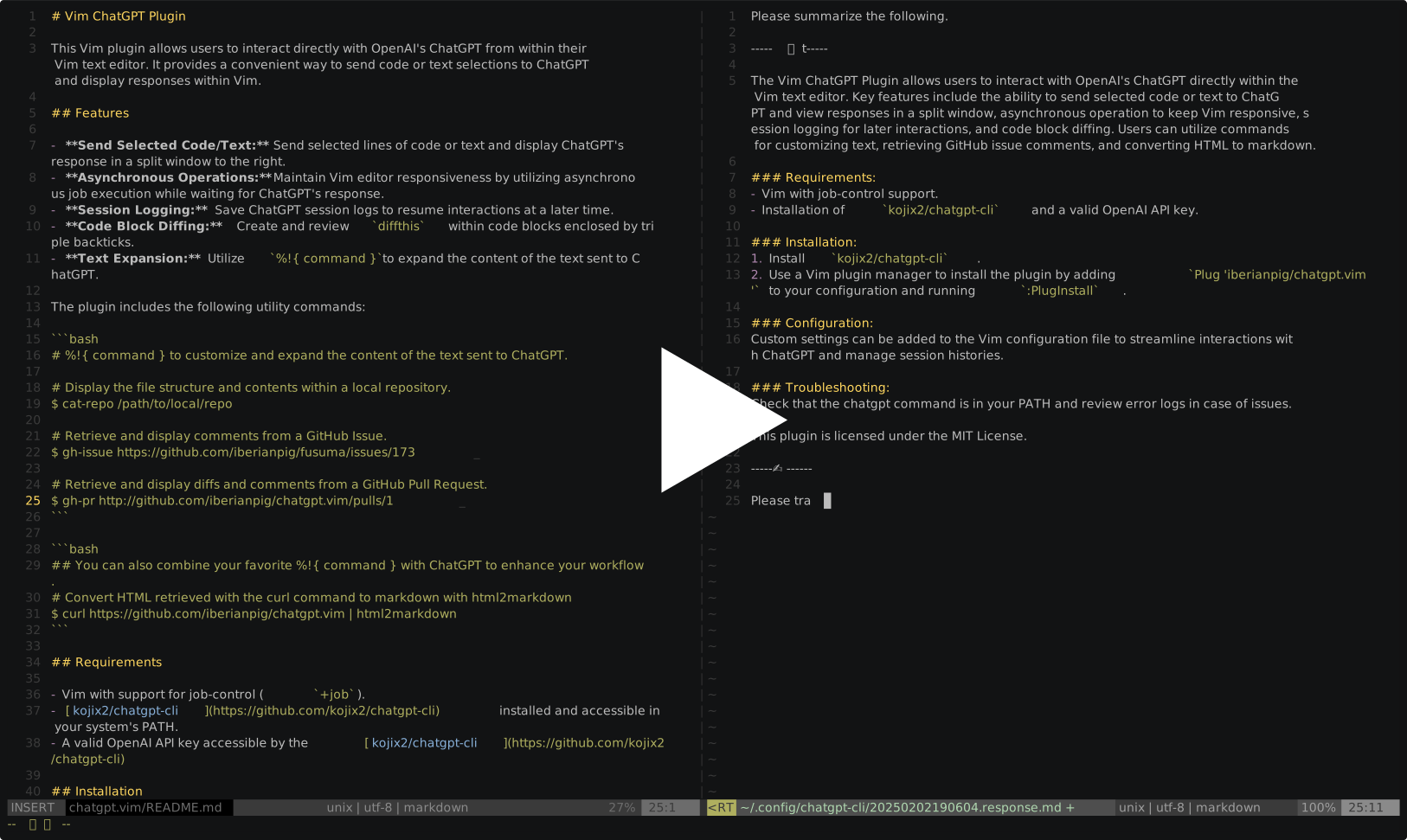](https://asciinema.org/a/701145?t=0:7)
## Features
- **Send Selected Code/Text:** Send selected lines of code or text and display ChatGPT's response in a split window to the right.
- **Asynchronous Operations:** Maintain Vim editor responsiveness by utilizing asynchronous job execution while waiting for ChatGPT's response.
- **Session Logging:** Save ChatGPT session logs to resume interactions at a later time.
- **Code Block Diffing:** Create and review `diffthis` within code blocks enclosed by triple backticks.
- **Text Expansion:** Utilize `%!{ command }` to expand the content of the text sent to ChatGPT.
## Requirements
- Vim with support for job-control (`+job`).
- [kojix2/chatgpt-cli](https://github.com/kojix2/chatgpt-cli) installed and accessible in your system's PATH.
- A valid OpenAI API key accessible by the [kojix2/chatgpt-cli](https://github.com/kojix2/chatgpt-cli)
## Installation
### Install kojix2/chatgpt-cli
Follow the installation instructions from the [kojix2/chatgpt-cli GitHub repository](https://github.com/kojix2/chatgpt-cli) and ensure it is in your system's PATH.
### Setup the Plugin
Using [Vim-Plug](https://github.com/junegunn/vim-plug) or another Vim plugin manager, add the following to your `.vimrc` or `init.vim`:
```vim
Plug 'iberianpig/chatgpt.vim'
```
Run `:PlugInstall` within Vim.
**Configuration:**
Add the following configurations to your Vim configuration file:
```vim
" Sample ChatGPT settings
let g:chatgpt_system_message = 'Please summarize the following. The response should be in "Japanese."'
let g:chatgpt_model = 'gpt-4o'
let g:chatgpt_system_marker = '-----🤖-----'
let g:chatgpt_user_marker = '-----✍------'
" Send selected text to ChatGPT
vnoremap ,a :ChatGPT
" Send current buffer to ChatGPT
noremap ,a :ChatGPT
" Create a diff within a code block
nnoremap ,d :DiffWithinCodeBlock
```
## Session Log Storage
ChatGPT interaction logs are automatically saved in a directory determined by your environment:
- **Inside a Git Repository:**
The plugin detects if the current file is part of a Git repo. If so, it creates (if necessary) a special `.chatgpt_history` directory at the repo's root and stores the session logs there.
- **Outside a Git Repository:**
Session logs are stored in `~/.config/chatgpt-cli/history`.
Two types of files are created:
- **User Interaction Markdown File**:
- Format: `YYYYMMDDHHMMSS.response.md`
- Content: Records the requests sent by the user and the responses from ChatGPT in Markdown format. This file is easy to review and edit, making it convenient for retrospective examination.
- Example: `20250204130907.response.md`
- **Session Data JSON File**:
- Format: `YYYYMMDDHHMMSS.response.md.post_data.json`
- Content: Contains detailed data about the requests sent to ChatGPT and the corresponding responses. This file is intended for internal system use, and direct editing is typically unnecessary.
- Example: `20250204130907.response.md.post_data.json`
If the directory does not exist, the plugin will create it automatically, so no special configuration is needed.
### Resuming ChatGPT Sessions from Logs
To resume a ChatGPT session from a previous log, open the desired `*response.md` file.
Below is the configuration for using [FZF](https://github.com/junegunn/fzf.vim) to search through ChatGPT session histories:
```vim
" Jump to ChatGPT session history
noremap ,h :ChatGPTHistories!
" Command for searching through ChatGPT session histories
command! -bang -nargs=* ChatGPTHistories
\ call fzf#vim#grep("rg --column --line-number --no-heading --color=always --smart-case --glob '*.md' ".shellescape(), 1,
\ fzf#vim#with_preview({'dir': expand('~/.config/chatgpt-cli/history'), 'options': ['--layout=reverse']}), 0)
```
## Utility Command Usage
This plugin includes several utility commands that can be executed within Vim.
These commands act as simple command-line interfaces and can be sent to ChatGPT using the `%!{COMMAND}` syntax. This allows you to write commands in the current buffer or within the `response.md` file used for ChatGPT sessions, and execute them to send the expanded contents to ChatGPT.
Additionally, you can use `:r !COMMAND` to inline insert results at the current cursor position.
(This is a built-in Vim feature and not specific to this plugin.)
### Built-in Commands
- **`cat-repo`**: Displays files in a specified Git repository.
- **`gh-issue`**: Retrieves and displays comments from a specified GitHub issue.
- **`gh-pr`**: Retrieves and displays diffs and comments from a specified GitHub pull request.
- **`gh-discussion`**: Fetches details from a specified GitHub discussion.
### 1. `cat-repo`
The `cat-repo` command displays the files in a specified Git repository.
**Usage in Markdown**:
```markdown
%!{ cat-repo [REPO_PATH] [PATTERN] }
```
- **REPO_PATH** (optional): The path to the Git repository. If not provided, the current directory is used.
- **PATTERN** (optional): Only files matching the given pattern will be processed.
**Example**:
```markdown
%!{ cat-repo /path/to/repo "*.py" }
```
This command will list all Python files in the specified repository and insert the output directly into your document.
### 2. `gh-issue`
You need to install [gh](https://cli.github.com/) to use this command.
The `gh-issue` command retrieves and displays comments from a specified GitHub issue.
**Usage in Markdown**:
```markdown
%!{ gh-issue }
```
**Example**:
```markdown
%!{ gh-issue https://github.com/iberianpig/fusuma/issues/173 }
```
This command will fetch the details and comments of the specified issue and insert them into your document.
### 3. `gh-pr`
The `gh-pr` command retrieves and displays diffs and comments from a specified GitHub pull request.
**Usage in Markdown**:
```markdown
%!{ gh-pr }
```
**Example**:
```markdown
%!{ gh-pr https://github.com/iberianpig/chatgpt.vim/pulls/1 }
```
This command will fetch the details and comments of the specified pull request, along with the diff if the number of lines is below the threshold, and insert them into your document.
### 4. `gh-discussion`
The `gh-discussion` command fetches details from a specified GitHub discussion.
**Usage**:
```
%!{gh-discussion }
```
**Example**:
```
%!{gh-discussion https://github.com/iberianpig/chatgpt.vim/discussions/1}
```
This command will retrieve the discussion title, author, body, and comments from the specified discussion.
### Custom Commands
**require 'html2markdown'**
see: https://github.com/JohannesKaufmann/html-to-markdown
#### curl | html2markdown | html2markdown | chatgpt
To fetch HTML from a URL and convert it to Markdown, you can use:
**Example**:
```markdown
%!{ curl https://github.com/iberianpig/chatgpt.vim | html2markdown }
```
This command retrieves the HTML content from the specified URL and converts it into Markdown format, which will then be inserted into your document.
### Notes
- Ensure that both `curl` and `html2markdown` are installed and accessible in your system's PATH.
- This method is beneficial for quickly converting web content into a more editable format for use within your Markdown files.
## Troubleshooting
- Ensure [chatgpt command](https://github.com/kojix2/chatgpt-cli/) is in your PATH. If not, check the path and adjust your shell configuration.
- Review error logs in `/tmp/vim-chatgpt-err.log` for job errors.
## License
This plugin is licensed under the MIT License. See the [LICENSE](./LICENSE) file for more information.