https://github.com/icflorescu/aspa
End of Life Notice - January 2014: Please use ASPAX instead.
https://github.com/icflorescu/aspa
Last synced: 2 months ago
JSON representation
End of Life Notice - January 2014: Please use ASPAX instead.
- Host: GitHub
- URL: https://github.com/icflorescu/aspa
- Owner: icflorescu
- Created: 2013-02-26T17:12:31.000Z (almost 13 years ago)
- Default Branch: master
- Last Pushed: 2014-01-18T19:59:04.000Z (almost 12 years ago)
- Last Synced: 2025-02-28T06:21:06.124Z (11 months ago)
- Language: CoffeeScript
- Homepage:
- Size: 376 KB
- Stars: 9
- Watchers: 3
- Forks: 1
- Open Issues: 0
-
Metadata Files:
- Readme: readme.md
Awesome Lists containing this project
README
# ASPA
[](http://badge.fury.io/js/aspa)
ASPA is a simple opinionated web application asset packager for Node.js.
## End of Life Notice - January 2014
If you like using this package, **please consider switching to [ASPAX](https://github.com/icflorescu/aspax)** for cleaner YML syntax, a smart plugin system to handle various source file types, and automatic watching of included files (i.e. Stylus `@import`s). Have a look at [aspax.github.io](http://aspax.github.io) for more information.
ASPA will remain in the npm repository, but it will no longer be maintained/updated.
---
Make sure to check ASPA-Express ( [github](https://github.com/icflorescu/aspa-express) | [npm](https://npmjs.org/package/aspa-express) ) for using packaged assets with [Express](http://expressjs.com).
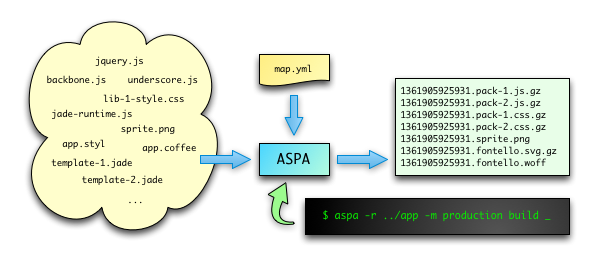
## Why?
There are certainly a number of other similar tools available in the Node.js ecosystem. However, in my opinion:
- some of them are a bit too complex and complicated (and thus 'overkill' for small projects);
- some will perform the necessary asset file processing on application start-up, which isn't always the best approach when you're deploying in the cloud;
- related to the point above, if you're using Stylus or you're only writing the **client-side** app in CoffeeScript/IcedCoffeeScript, you should still be able to keep a lean deployment size and you shouldn't **have** to make your server-side app dependant on those packages;
- not all of them feature concatenation, optimization, compression and fingerprinting for scripts, stylesheets and other deployable assets (such as web fonts);
- not all of them are processing the CSS files to correctly rewrite the URLs pointing to other fingerprinted assets.
While certainly not aiming to be a silver bullet, ASPA tries to address the above issues by providing a little a command-line utility which you can run during development or before deployment. The configuration is centralized in a single YML map file (aspa.yml) residing in the root of your folder.
## Features
- Map-file based (asset map uses a subset of [YAML](http://en.wikipedia.org/wiki/YAML) syntax);
- Accepts .css, .styl and .less input for stylesheets;
- Accepts .js, .coffee, .iced ([IcedCoffeeScript](http://maxtaco.github.com/coffee-script/)), .co ([Coco](https://github.com/satyr/coco#readme)) and .ls ([LiveScript](http://livescript.net/)) input for scripts;
- Concatenates multiple script/style source files per output file;
- [Fingerprints](http://guides.rubyonrails.org/asset_pipeline.html#what-is-fingerprinting-and-why-should-i-care) and gzips assets in production mode.
## Installation
npm install aspa
## Usage
I. **Keep your asset files in a separate folder** outside your main web application directory.
**Warning: _Don't put anything directly in the public web folder, as it will be overwritten during the build process!_**
Sample folder structure:
/work/server -> web application root folder
/work/server/public -> publicly-visible folder
/work/client -> root of the asset folder
/work/client/lib -> various libraries, such as...
/work/client/lib/select2 -> ...select2
/work/client/templates -> client-side jade templates
/work/client/scripts -> script files
/work/client/styles -> styleheet files
II. **Create aspa.yml map file** in the root of the asset folder (`/work/client` in the example above), describing the structure of your deployment.
Sample aspa.yml file (syntax should be quite self-explanatory):
js/main.js:
from:
lib/underscore.js : ~
lib/backbone.js : ~
lib/select2.js : ~
lib/iced-runtime.js : ~
lib/jade-runtime.js : ~
scripts/jst-namespace.coffee : { bare: true }
templates/item.jade : ~
templates/collection.jade : ~
scripts/main.coffee : ~
css/main.css:
from:
lib/fontello/css/fontello.css : ~
styles/main.styl : { nib: true }
styles/item.styl : { skip: true }
fonts/fontello.eot : { from: lib/fontello/font }
fonts/fontello.svg : { from: lib/fontello/font, compress: true }
fonts/fontello.ttf : { from: lib/fontello/font, compress: true }
fonts/fontello.woff : { from: lib/fontello/font }
images/sprite.png : ~
images/sprite@2x.png : ~
favicon.ico : { raw: true }
**A few observations**:
* `bare: true` means compile that file without the top-level function safety wrapper, see more about this [here](http://coffeescript.org/#usage);
* .jade templates are transformed to JavaScript templating functions in JST namespace (i.e. `templates/item.jade` compiles to `JST['templates/item']` function);
* `nib: true` refers to [this](http://visionmedia.github.com/nib/);
* `skip: true` means don't include that file in the compiled output, just watch it for changes (in the example above, item.styl is dynamically imported into main.styl, so you don't want to include it again but you want to trigger a rebuild when its content changes;
* if you use .jade templates, don't forget to include [this runtime](https://github.com/visionmedia/jade/blob/master/runtime.js) before;
* if you use .iced (IcedCoffeeScript) scripts, don't forget to include [this runtime](https://gist.github.com/icflorescu/5198453) before; the runtime can also be generated with `iced -I window -F -p -e '' > iced-runtime.js`;
* `fonts/fontello.eot: { from: lib/fontello/font }` means copy `/client/lib/fontello/font/fontello.eot` to `/server/public/fonts/fontello.eot`;
* .js and .css files are gzipped automatically in production mode, but other "compressible" assets must be explicitely marked with a `compress: true` option;
* `raw: true` means don't fingerprint this file in production.
III. **Run the aspa utility in the assets root folder** to build and deploy.
**During development**:
`aspa -r ../server`
Build for development, deploying to `../server/public` (/public is the default).
`aspa -r ../server -p pub`
Build for development, deploying to `../server/pub`.
`aspa -r ../server cleanup`
Clean-up `../server/public` and `../server/aspa.json`.
`aspa -r ../server watch`
Watch the asset folder and rebuild automatically when a source file changes. Use this during development.
**For production**:
`aspa -r ../server -m production`
Build for **production**, deploying to `../server/public`.
**Note**: Building for production also:
* creates an output map named `../server/aspa.json`;
* fingerprints generated asset packages (by prefixing them with a UNIX-timestamp string), except the ones marked with `raw: true` in aspa.yml;
* compresses .js, .css and any other assets marked with `compress: true` in aspa.yml.
Running `aspa -r ../server` in the above context will generate the following output:
/work/server/public/js/main.js
/work/server/public/css/main.js
/work/server/public/fonts/fontello.eot
/work/server/public/fonts/fontello.svg
/work/server/public/fonts/fontello.ttf
/work/server/public/fonts/fontello.woff
/work/server/public/images/sprite.png
/work/server/public/images/sprite@2x.png
/work/server/public/favicon.ico
...while running `aspa -r ../server -m production` could produce this:
/work/server/public/js/1361917868718.main.js.gz
/work/server/public/css/1361917868718.main.js.gz
/work/server/public/fonts/1361917868718.fontello.eot
/work/server/public/fonts/1361917868718.fontello.svg.gz
/work/server/public/fonts/1361917868718.fontello.ttf.gz
/work/server/public/fonts/1361917868718.fontello.woff
/work/server/public/images/1361917868718.sprite.png
/work/server/public/images/1361917868718.sprite@2x.png
/work/server/public/favicon.ico
/work/server/aspa.json
## Notes
ASPA was written almost entirely in [IcedCoffeeScript](http://maxtaco.github.com/coffee-script/), a superset of CoffeeScript adding `await` and `defer` keywords to simply and powerfully streamline asynchronous control flow.
## Contributing
If you find a bug or have an idea about a new feature, please don't be shy, just issue a pull request.
## Endorsing the author
If you find this module useful, please endorse me on Coderwall using the link below! Thanks :-)
[](https://coderwall.com/icflorescu)
## License
(The MIT License)
Copyright (c) 2013 Ionut-Cristian Florescu <ionut.florescu@gmail.com>
Permission is hereby granted, free of charge, to any person obtaining a copy of this software and associated documentation files (the 'Software'), to deal in the Software without restriction, including without limitation the rights to use, copy, modify, merge, publish, distribute, sublicense, and/or sell copies of the Software, and to permit persons to whom the Software is furnished to do so, subject to the following conditions:
The above copyright notice and this permission notice shall be included in all copies or substantial portions of the Software.
THE SOFTWARE IS PROVIDED 'AS IS', WITHOUT WARRANTY OF ANY KIND, EXPRESS OR IMPLIED, INCLUDING BUT NOT LIMITED TO THE WARRANTIES OF MERCHANTABILITY, FITNESS FOR A PARTICULAR PURPOSE AND NONINFRINGEMENT. IN NO EVENT SHALL THE AUTHORS OR COPYRIGHT HOLDERS BE LIABLE FOR ANY CLAIM, DAMAGES OR OTHER LIABILITY, WHETHER IN AN ACTION OF CONTRACT,
TORT OR OTHERWISE, ARISING FROM, OUT OF OR IN CONNECTION WITH THE SOFTWARE OR THE USE OR OTHER DEALINGS IN THE SOFTWARE.