https://github.com/ics-software-engineering/play-example-login
A simple example of authentication and authorization in Play
https://github.com/ics-software-engineering/play-example-login
Last synced: 11 months ago
JSON representation
A simple example of authentication and authorization in Play
- Host: GitHub
- URL: https://github.com/ics-software-engineering/play-example-login
- Owner: ics-software-engineering
- Created: 2013-10-21T21:05:45.000Z (over 12 years ago)
- Default Branch: master
- Last Pushed: 2016-07-05T05:50:54.000Z (almost 10 years ago)
- Last Synced: 2024-03-27T04:19:22.682Z (about 2 years ago)
- Language: Java
- Size: 867 KB
- Stars: 24
- Watchers: 7
- Forks: 23
- Open Issues: 1
-
Metadata Files:
- Readme: README.md
Awesome Lists containing this project
README
Overview
--------
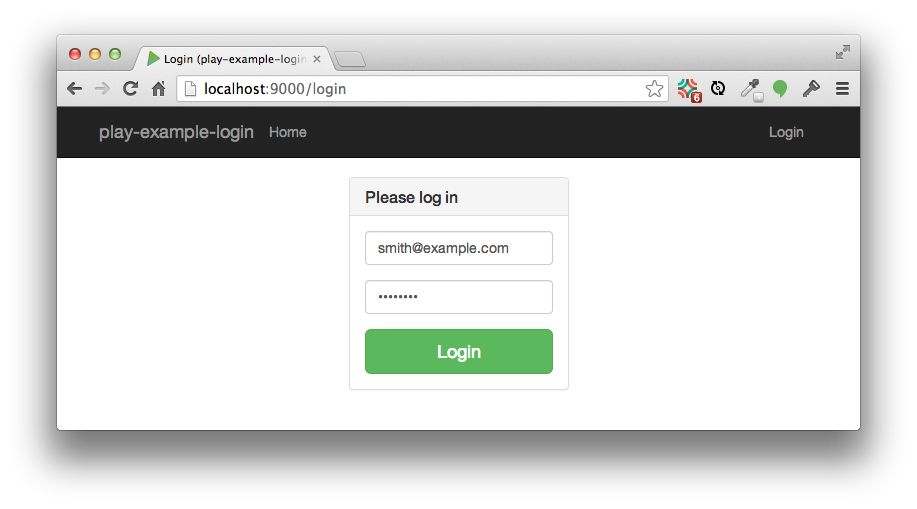
This is a Play application illustrating a simple approach to authentication and authorization.
**Authentication is done in the following way:**
* The [models package](https://github.com/ics-software-engineering/play-example-login/tree/master/app/models) implements
the UserInfo and UserInfoDB classes to hold credential information. Credentials are initialized in the
[Global](https://github.com/ics-software-engineering/play-example-login/blob/master/app/Global.java) class.
* The [Login view](https://github.com/ics-software-engineering/play-example-login/blob/master/app/views/Login.scala.html)
provides a simple login form. The [LoginFormData.validate() method](https://github.com/ics-software-engineering/play-example-login/blob/master/app/views/formdata/LoginFormData.java#L28-38)
determines if the login succeeds and raises ValidationErrors if invalid credentials are entered.
* The [Login controller method](https://github.com/ics-software-engineering/play-example-login/blob/master/app/controllers/Application.java#L36-59)
adds the authenticated user's email to the session object, or else returns the Login view with errors.
**Authorization is done in the following way:**
* The [Secured class](https://github.com/ics-software-engineering/play-example-login/blob/master/app/controllers/Secured.java)
supports authorization by extending the Security.Authenticator class and overriding the getUsername() and onUnauthorized()
methods. These methods are used to restrict access to the profile page.
This class also implements helper methods (getUser(), isLoggedIn(), and getUserInfo()) that enable controllers to
adjust the view depending upon whether the user is logged in or not.
* The [Application controller class](https://github.com/ics-software-engineering/play-example-login/blob/master/app/controllers/Application.java)
annotates the controller methods that requires authenticated users (logout() and profile())
with @Security.Authenticated(Secured.java).
* The [Main.scala.html template](https://github.com/ics-software-engineering/play-example-login/blob/master/app/views/Main.scala.html)
implements a [context sensitive navbar](https://github.com/ics-software-engineering/play-example-login/blob/master/app/views/Main.scala.html#L34-47)
that displays different links depending upon whether the user is authenticated or unauthenticated.
**Obvious shortcomings of this approach:**
* Credentials sent "in the clear" (i.e. via http, not https).
* Credentials stored "in the clear".
* No registration workflow (i.e. email confirmation.)
* No support for third-party authentication (google, facebook, etc.)
If you require "production quality" authentication and authorization, you should consider a Play plugin
such as [play-authenticate](http://joscha.github.io/play-authenticate/), [SecureSocial](http://securesocial.ws/),
and/or [Deadbolt 2](https://github.com/schaloner/deadbolt-2).
They are slightly more complicated to use but provide mechanisms to address these issues.
Screencast
----------
Click the image below to watch a 15 minute walkthrough of this system.
[ ](http://www.youtube.com/watch?v=L3yudzFXjxg)