https://github.com/ideal-postcodes/uk-clear-addressing
Converts UK address fragments into a properly formatted address recognised by Royal Mails Clear Addressing Guidelines
https://github.com/ideal-postcodes/uk-clear-addressing
Last synced: 12 months ago
JSON representation
Converts UK address fragments into a properly formatted address recognised by Royal Mails Clear Addressing Guidelines
- Host: GitHub
- URL: https://github.com/ideal-postcodes/uk-clear-addressing
- Owner: ideal-postcodes
- License: mit
- Created: 2013-08-06T11:32:05.000Z (almost 13 years ago)
- Default Branch: master
- Last Pushed: 2024-02-07T23:29:51.000Z (over 2 years ago)
- Last Synced: 2025-04-02T23:35:19.754Z (about 1 year ago)
- Language: TypeScript
- Homepage: https://uk-clear-addressing.ideal-postcodes.dev
- Size: 1.77 MB
- Stars: 34
- Watchers: 8
- Forks: 2
- Open Issues: 3
-
Metadata Files:
- Readme: README.md
- Changelog: CHANGELOG.md
- License: LICENSE
Awesome Lists containing this project
README
> Correctly parse and format UK Addresses in Royal Mail's Postcode Address File


[](https://npm.runkit.com/uk-clear-addressing)
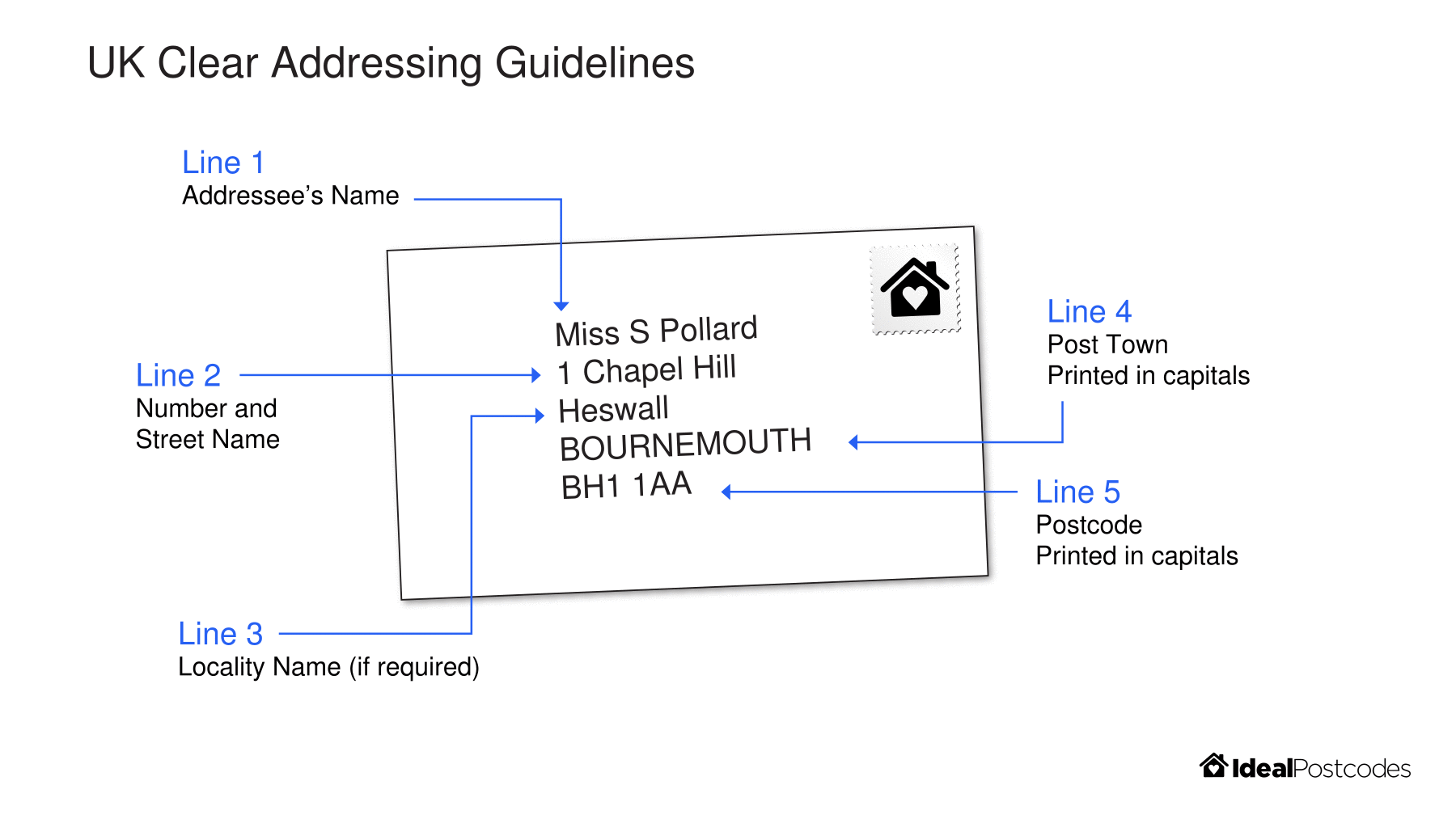
Parses Postcode Address File records into correctly formatted address recognised by Royal Mail according to its Clear Addressing Guidelines.
Produces consistent address lines, a post town line and a postcode line.
## Features
- Correctly format UK addresses using Royal Mail's Postcode Address File
- Produces 3 address lines suitable for general use (i.e. mailing)
- Produces a `premise`, `number` and `unit` attribute, which is a sensible almagamation of `building_name`, `sub_building_name` and `building_number`
- Address sorting function
- Extensive test suite, including documented and newly discovered corner cases
## Links
- [API Documentation](https://uk-clear-addressing.ideal-postcodes.dev)
- [More information on Postcode Address File data attributes](https://ideal-postcodes.co.uk/documentation/paf-data)
- [PAF Programmer's Guide](https://js.ideal-postcodes.co.uk/guide.pdf)
- [Try uk-clear-addressing on RunKit](https://npm.runkit.com/uk-clear-addressing)
- [Consume this library as a HTTP Service with PAF API](https://github.com/ideal-postcodes/paf-api)
## Getting Started
### Installation
```bash
npm install uk-clear-addressing
```
### Formatting Addresses
#### Extract formatted address lines
Use the [Address](https://uk-clear-addressing.ideal-postcodes.dev/classes/index.address.html) class to parse a [PAF Record](https://uk-clear-addressing.ideal-postcodes.dev/interfaces/pafrecord.html)
[Formatted address lines](https://uk-clear-addressing.ideal-postcodes.dev/interfaces/formattedaddress.html) can be extracted using instance accessors like `line_1`, `line_2`, `line_3`, `premise`, `number` and `unit`
```javascript
const { Address } = require("uk-clear-addressing");
const pafRecord = {
postcode: "WS11 5SB",
post_town: "CANNOCK",
thoroughfare: "Pye Green Road",
building_name: "Flower House 189A",
organisation_name: "S D Alcott Florists",
};
const {
line_1,
line_2,
line_3,
premise,
number,
unit,
post_town,
postcode
} = new Address(pafRecord);
```
#### Extract a formatted address object
Alternatively, extract a [formatted address object](https://uk-clear-addressing.ideal-postcodes.dev/interfaces/formattedaddress.html) using the [`formattedAddress`](https://uk-clear-addressing.ideal-postcodes.dev/classes/index.address.html#formattedaddress) method.
```javascript
const { Address } = require('uk-clear-addressing');
const address = new Address({
postcode: "WS11 5SB",
post_town: "CANNOCK",
thoroughfare: "Pye Green Road",
building_name: "Flower House 189A",
organisation_name: 'S D Alcott Florists',
});
console.log(address.formattedAddress());
// {
// postcode: "WS11 5SB",
// post_town: "CANNOCK",
// line_1: "S D Alcott Florists",
// line_2: "Flower House",
// line_3: "189a Pye Green Road",
// number: "189a",
// unit: "",
// premise: "Flower House, 189a"
// }
```
### Non-PAF Computed Attributes
`building_number`, `building_name` and `sub_building_name` represent raw data from Royal Mail's PAF and can be difficult to parse if you are unaware of how the PAF premise fields work together. For this reason, `uk-clear-addressing` also provides computed attributes, which attempt to reasonable capture common premise concepts like building number and unit.
Due to years of accumulated complexity, few assumptions should be made of ways UK addresses can be described in terms of number, name and unit. It's recommeded to simply consume the address lines (`line_1`, `line_2`, `line_3`) outlined in [Royal Mail's Programmers Guide](https://js.ideal-postcodes.co.uk/guide.pdf). Building number, unit and PAF premise attributes should be stored as useful extras.
Some examples of this complexity include:
- Alphanumeric identifiers like `10A` are not necessarily the building number. In some instances they represent a premise with building number `10` and sub building idenitifer `A`
- The `building_number` of an address may be split across `building_name`, `building_number` and `sub_building_name`
- Some addresses may be identified as a unit `sub_building_name` but no building number or name
- Some apparent building numbers cannot be separated from the building name. For instance, `1 Ashgate Rise, Raw Gap, HG50HZ`, `1 Ashgate Rise` appears in `building_name`. The numeric element should not be separated into `number` because the property is numbered into the building and not the thoroughfare
Further keep in mind that UK addresses are manually added and updated by thousands of postal workers, thousands of times a day across this UK. Although Royal Mail strives to keep address formatting in accordance with its internal guidance, it is possible for building numbers and units may be incorrectly designated for a time.
#### `premise` attribute
The `premise` attribute is designed to capture *only* the premise specific elements of an address (i.e. no thoroughfare, localities, etc). It attempts to sensibly combine `building_number`, `building_name` and `sub_building_name`.
`premise` omits organisation, department and PO boxes.
Examples include:
```text
10B Barry Tower, 13
Flat 1-3, 10
Flat 3, Nelson House, 2
Mansion House
Suite 1-3
```
#### `number` attribute
The `number` attribute attempts to capture the building number element of an address, in other words how a premise is numbered into a thoroughfare. For simple use cases, this attribte may be prefered over Royal Mail's `building_number` attribute.
Royal Mail's `building_number` field is not suited to this task as the upstream data schema only allows this to be integers. Therefore, mixed numbers (like e.g. `1A` and `1-3`) and ordinal building identifiers (like `A`,`B`,`C`, etc) are not captured in `building_number`.
Examples include:
```text
10
A
1-3
10A
```
#### `unit` attribute
The `unit` attribute attempts to capture the "sub building" element of a building with its own number, name or both. For simple use cases, this attribute may be preferred to Royal Mail's `sub_building_name` field.
Examples include:
```text
A
Flat 1
Basement Flat
Caretakers Flat
```
### Sorting Addresses
[`Address.sort`](https://uk-clear-addressing.ideal-postcodes.dev/modules/sort.html#sort-1) implements a comparison function, which allows you to compare [`Address`](https://uk-clear-addressing.ideal-postcodes.dev/classes/index.address.html) instances. This can readily be passed into `Array.prototype.sort`
```javascript
const addresses = await query("SELECT * FROM postcode_address_file LIMIT 10");
addresses
.map(address => new Address(address)) // Instantiate an `Address` instances
.sort(Address.sort) // Now sort
// Print an example to console
.forEach(address => console.log(address.line_1));
// "190 Elm Road"
// "190a Elm Road"
// "191 Elm Road"
// "191a Elm Road"
// "192 Elm Road"
// "193 Elm Road"
// "193a Elm Road"
// "197 Elm Road"
// "197a Elm Road"
// "199 Elm Road"
```
## Testing
Many of the regular and edge cases are documented in the test. To run the test suite:
```bash
npm test
```
If you find an edge case, please feel free to make a pull request. However be sure to include a test which documents the specific case being handled.
## Parameters
Below is a list of address fragments. For the address to be properly formatted, you need to pass in all the address fragments available to you.
### Premises Elements
- Sub Building Name (e.g. ‘Flat 1’)
- Building Name (e.g. ‘Rose Cottage’)
- Building Number (e.g. ‘22’)
- Organisation Name (e.g. ‘Cath’s Cakes’)
- PO Box number
### Thoroughfare Elements
- Dependant Thoroughfare Name (e.g. ‘Cheshunt’)
- Dependant Thoroughfare Descriptor (e.g. ‘Mews’ or ‘Court’)
- Thoroughfare Name (e.g. ‘Cypress’)
- Thoroughfare Descriptor (e.g. ‘Road’ or ‘Street’)
### Locality Elements
- Double Dependant Locality (e.g. ‘Tyre Industrial Estate’)
- Dependant Locality (e.g. ‘Blantyre’)
- Post Town (e.g. ‘GLASGOW’)
## Licence
MIT