https://github.com/idw111/use-google-spreadsheet
react hook for using google spreadsheet as a data table (API endpoint)
https://github.com/idw111/use-google-spreadsheet
google-spreadsheet react react-hook
Last synced: 3 months ago
JSON representation
react hook for using google spreadsheet as a data table (API endpoint)
- Host: GitHub
- URL: https://github.com/idw111/use-google-spreadsheet
- Owner: idw111
- Created: 2020-01-20T04:03:14.000Z (over 6 years ago)
- Default Branch: main
- Last Pushed: 2023-05-04T09:00:10.000Z (about 3 years ago)
- Last Synced: 2025-10-26T23:20:37.047Z (8 months ago)
- Topics: google-spreadsheet, react, react-hook
- Language: TypeScript
- Homepage:
- Size: 616 KB
- Stars: 104
- Watchers: 2
- Forks: 7
- Open Issues: 3
-
Metadata Files:
- Readme: README.md
- Changelog: CHANGELOG.md
Awesome Lists containing this project
README
# use-google-spreadsheet
> helps developers use google spreadsheet as their data table (backend endpoint)
[Live Demo](https://idw111.github.io/use-google-spreadsheet/example/)
## install
```bash
npm install use-google-spreadsheet
```
## usage
1. Configure Google Cloud Console to get API key for Google Sheets API (API_KEY)
- It uses Google Sheets API v4, when API_KEY is given
- If API_KEY is not given, it falls back to Google Sheets API v3 which would be deprecated soon
2. Create a google spreadsheet
- Insert keys in the first row
- Insert values after first row
3. Publish the spreadsheet to web (File > Publish to Web)
4. Use the share url to fetch the data (File > Share)
5. You'll fetch the spreadsheet as the following
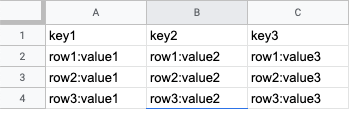
```json
// fetched data (rows)
[
{ "key1": "row1:value1", "key2": "row1:value2", "key3": "row1:value3" },
{ "key2": "row2:value1", "key2": "row2:value2", "key3": "row2:value3" },
{ "key3": "row3:value1", "key2": "row3:value2", "key3": "row3:value3" }
]
```
## example
```javascript
import useGoogleSpreadsheet from 'use-google-spreadsheet';
const SomeComponent = ({}) => {
const API_KEY = 'XXXXXXXXXXXX';
const shareUrl = 'https://docs.google.com/spreadsheets/d/1W5D9WvlrXvndEc0b42OsdzJTT1M-MxKVYdPEtleqRQY/edit?usp=sharing';
const { rows, isFetching } = useGoogleSpreadsheet(shareUrl, API_KEY);
return isFetching ? (
) : rows ? (
-
{Object.keys(row).map((key, i) => (
{key}: {row[key]}
))}
{rows.map((row, i) => {
return (
);
})}
) : (
No Data
);
};
```
## api
### useGoogleSpreadsheet
- params @{string} shareUrl or sheetId
- params @{string} apiKey (optional)
- returns @{object}
- rows @{array}
- isFetching @{boolean}