https://github.com/ifeelgarv/qr-tool
Tool for generating qr.
https://github.com/ifeelgarv/qr-tool
eslint nextjs qrcode-generator talwindcss typescript
Last synced: 3 months ago
JSON representation
Tool for generating qr.
- Host: GitHub
- URL: https://github.com/ifeelgarv/qr-tool
- Owner: ifeelgarv
- License: mit
- Created: 2025-08-27T15:03:51.000Z (11 months ago)
- Default Branch: main
- Last Pushed: 2025-09-03T10:22:17.000Z (11 months ago)
- Last Synced: 2025-10-09T11:58:57.806Z (10 months ago)
- Topics: eslint, nextjs, qrcode-generator, talwindcss, typescript
- Language: TypeScript
- Homepage: https://tool.qr.gauravsingh.co.in/
- Size: 93.8 KB
- Stars: 3
- Watchers: 0
- Forks: 1
- Open Issues: 0
-
Metadata Files:
- Readme: README.md
Awesome Lists containing this project
README
## QRTool : A Nextjs tool for generating QR.
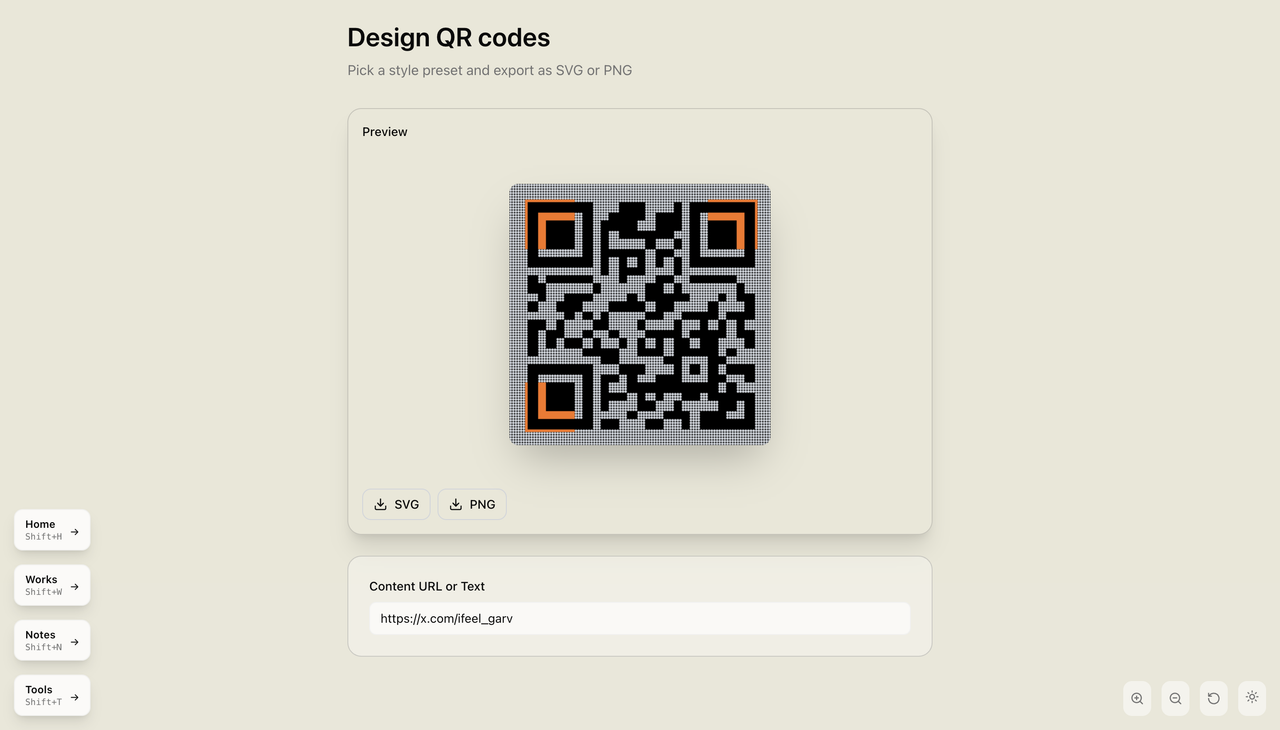
Welcome to, A simple and efficient QR Code tool built with modern tech stack, easily create QR codes for links and text with a clean and responsive UI.
### Features :
- Generate QR codes instantly
- Download QR codes as images
- Customizable size and styles
- Responsive and minimal UI
- Built with performance in mind
**Frontend:**
- **Next.js 15.3.3** - React framework with App Router
- **TypeScript** - Type-safe JavaScript
- **Tailwind CSS 4** - Utility-first CSS framework
- **Motion** - Animation library
- **shadcn/ui** - Pre-built components
**Development Tools:**
- **NPM** - Package manager and runtime
- **ESLint** - Code linting
- **Prettier** - Code formatting
## Contributing & Installation
### Installation
1. **Clone the repository**
```bash
git clone https://github.com/ifeelgarv/qr-tool.git
cd qr-generator
```
2. **Install dependencies**
```bash
npm install
```
3. **Start development server**
```bash
npm run dev
```
### Folder Structure
```
qr-tool/
├── .next/ # Next.js build output
├── node_modules/ # Installed dependencies
├── public/ # Static assets
│ ├── fonts/ # Custom fonts
│ ├── file.svg
│ ├── globe.svg
│ ├── next.svg
│ ├── vercel.svg
│ └── window.svg
├── src/ # Application source code
│ ├── app/ # Next.js App Router
│ │ ├── favicon.ico
│ │ ├── globals.css # Global styles
│ │ ├── layout.tsx # Root layout
│ │ └── page.tsx # Home page
│ ├── components/ # Reusable components
│ │ └── ui/ # UI components
│ │ ├── button.tsx
│ │ ├── input.tsx
│ │ ├── select.tsx
│ │ ├── theme-provider.tsx
│ │ └── theme-toggle.tsx
│ └── lib/ # Utility functions
│ └── utils.ts
├── .gitignore
├── components.json
├── eslint.config.mjs
├── next-env.d.ts
├── next.config.ts
├── package-lock.json
├── package.json
├── postcss.config.mjs
├── README.md
└── tsconfig.json
```
### Contribution
1. **Fork the repository**
```bash
Click the **Fork** button at the top right of this repository to create your own copy.
```
2. **Create a new branch**
```bash
git checkout -b feature/your-feature
```
3. **Make your changes**
```bash
Implement your feature, fix, or improvement.
```
4. **Commit your changes**
```bash
git commit -m "feat: add new feature"
```
5. **Push to your branch**
```bash
git push origin feature/your-feature
```
6. **Open a Pull Request**
```bash
Go to the original repository and open a PR from your forked branch.
```