https://github.com/igorkasyanchuk/wrapped_print
Easy print debug information to your console in Ruby/Rails app.
https://github.com/igorkasyanchuk/wrapped_print
ruby ruby-on-rails
Last synced: 10 months ago
JSON representation
Easy print debug information to your console in Ruby/Rails app.
- Host: GitHub
- URL: https://github.com/igorkasyanchuk/wrapped_print
- Owner: igorkasyanchuk
- License: mit
- Created: 2021-06-17T21:30:25.000Z (about 5 years ago)
- Default Branch: main
- Last Pushed: 2025-05-12T21:04:30.000Z (about 1 year ago)
- Last Synced: 2025-08-28T17:53:04.771Z (11 months ago)
- Topics: ruby, ruby-on-rails
- Language: Ruby
- Homepage: https://www.railsjazz.com/
- Size: 330 KB
- Stars: 25
- Watchers: 2
- Forks: 2
- Open Issues: 0
-
Metadata Files:
- Readme: README.md
- License: LICENSE.txt
Awesome Lists containing this project
README
# WrappedPrint
[](https://www.railsjazz.com)
[](https://www.patreon.com/igorkasyanchuk)
[](https://buymeacoffee.com/igorkasyanchuk)
How usually you debug your code? Binding.pry, byebug, puts, ...
How ofter do you write a code something like:
```ruby
puts "="*50
puts current_user.full_name
puts "="*50
```
I do this at least few times per week, sometimes per day.
This is annoying. It's need to be automated. And this gem is a simple solution.
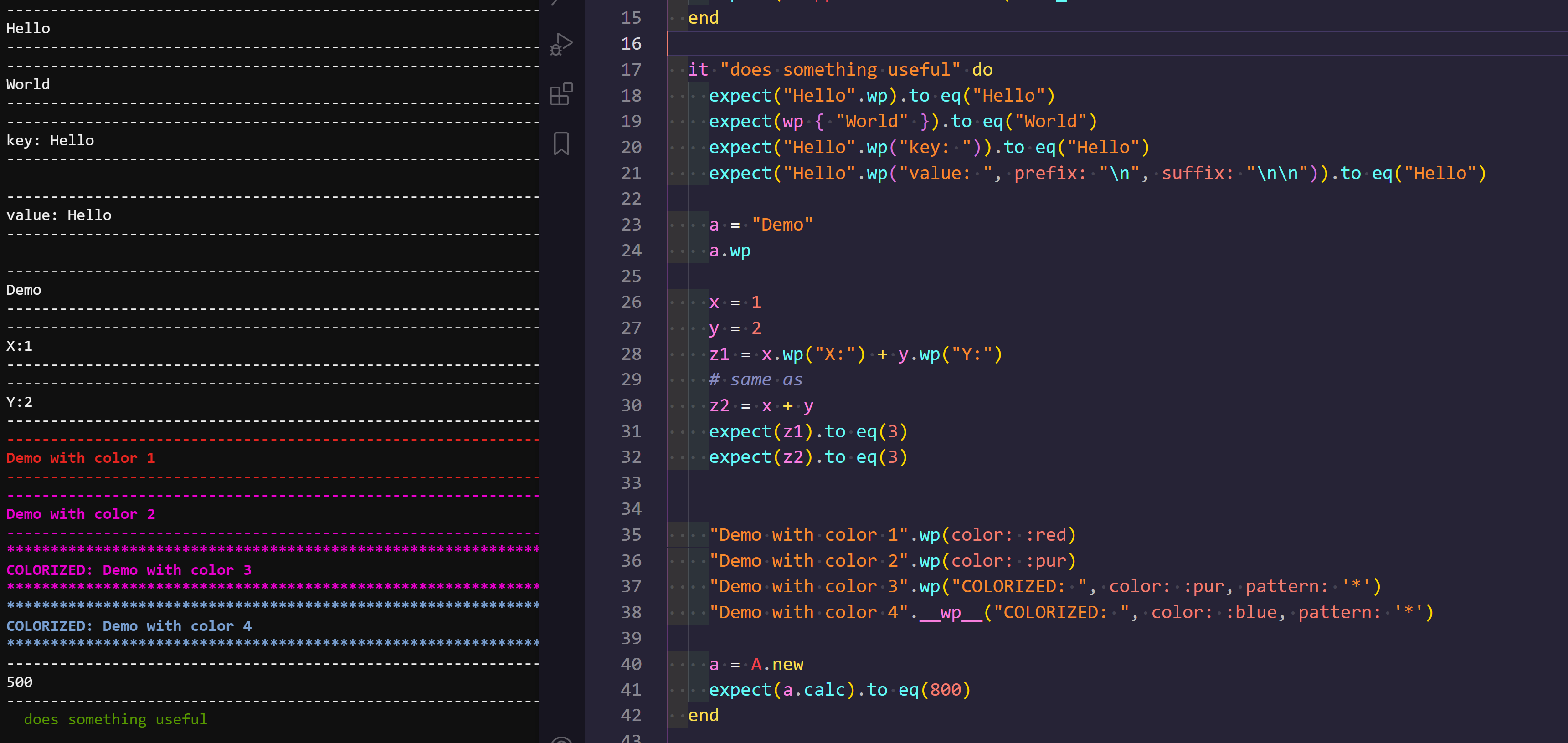
Just add this gem and use a global method `.wp` to see in the console value of your object or wrap code in block with `wp { ... }`.
```ruby
def index
# to get list of emails and print them in console
# .wp method prints in console and returns same object
@emails = User.pluck(:emails).wp
end
```
See screenshot below with examples of usage (gem can be used not only in specs, this is just an example).
[ ](https://raw.githubusercontent.com/igorkasyanchuk/wrapped_print/main/docs/demo_print.png)
## Installation
Add this line to your application's Gemfile:
```ruby
gem 'wrapped_print'
```
And then execute:
$ bundle install
Or install it yourself as:
$ gem install wrapped_print
And then `require "wrapped_print"`
## Usage
You can do a simple configuration to the gem (config/initializers/wrapped_print.rb):
```ruby
WrappedPrint.setup do |config|
# config.log_to = :console # simply puts
config.log_to = :logs # e.g. Rails.logger.info....
# config.log_to = ActiveSupport::Logger.new($stdout) # custom logger
# # applicable only for Logger (not console)
config.level = :debug
# config.level = :info
end if defined?(WrappedPrint)
```
You can print using `puts` or to `Rails.logger`.
Output could be customized with several options:
```ruby
wp(label = nil, pattern: "-", count: 80, prefix: nil, suffix: nil, color: nil)
```
For example:
```ruby
"Demo with color 3".wp("COLORIZED: ", color: :pur, pattern: '*')
```
or
```ruby
#
# see how .wp is called. This method `.wp` returning the original value, so you can use it as normal variable.
#
class A
def calc
z = balance.wp # same as z = balance
100 + 200 + z
end
def balance
500
end
end
```
## Development
After checking out the repo, run `bin/setup` to install dependencies. Then, run `rake spec` to run the tests. You can also run `bin/console` for an interactive prompt that will allow you to experiment.
To install this gem onto your local machine, run `bundle exec rake install`. To release a new version, update the version number in `version.rb`, and then run `bundle exec rake release`, which will create a git tag for the version, push git commits and tags, and push the `.gem` file to [rubygems.org](https://rubygems.org).
## Contributing
Bug reports and pull requests are welcome on GitHub at https://github.com/igorkasyanchuk/wrapped_print.
## License
The gem is available as open source under the terms of the [MIT License](https://opensource.org/licenses/MIT).
[ ](https://www.railsjazz.com/?utm_source=github&utm_medium=bottom&utm_campaign=wrapped_print)
[](https://buymeacoffee.com/igorkasyanchuk)