https://github.com/igorkulman/lunchbuddy-bot
Slack bot providing daily menus for configured restaurants.
https://github.com/igorkulman/lunchbuddy-bot
bot daily-menus nodejs slack zomato-api
Last synced: about 1 year ago
JSON representation
Slack bot providing daily menus for configured restaurants.
- Host: GitHub
- URL: https://github.com/igorkulman/lunchbuddy-bot
- Owner: igorkulman
- License: mpl-2.0
- Created: 2016-03-26T12:04:37.000Z (about 10 years ago)
- Default Branch: master
- Last Pushed: 2016-08-19T12:24:58.000Z (almost 10 years ago)
- Last Synced: 2025-03-26T05:41:51.744Z (about 1 year ago)
- Topics: bot, daily-menus, nodejs, slack, zomato-api
- Language: JavaScript
- Size: 106 KB
- Stars: 3
- Watchers: 2
- Forks: 4
- Open Issues: 0
-
Metadata Files:
- Readme: README.md
- License: LICENSE
Awesome Lists containing this project
README
# Lunchbuddy
Lunchbuddy is a [Slack](http://slack.com) bot providing daily lunch menus for configured restaurants.
### Configuration
To make Lunchbuddy work, you need to edit the `config.json` file. It contains 3 configuration items.
`token` - bot token that you get when creating the bot in Slack
`name` - the name of the Slack bot
`zomato_key` - Zomato API key
No need to get and configure the [Zomato](http://zomato.com) API key when yo do not want to use this service.
### Installation
Lunchbuddy is a regular Node.js app (although it does not use left-pad :), so just do `npm install` and `npm start` and the bot will start and connect to Slack (if configured properly).
### Usage
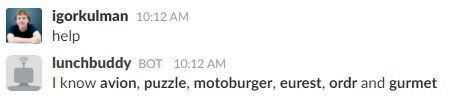
You can invoke Lunchbuddy by mentioning him in any channel you invite it to or you can write it direct messages. It responds to `help` and shows you all the restuarants it is configured to fetch the menu for.
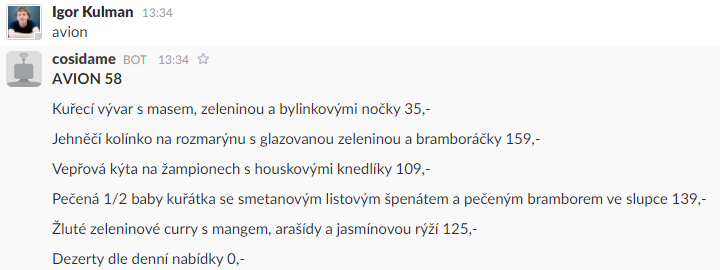
If you write to Lunchbuddy a name of a configured restaurant, it will respond with the daily lunch menu for this restaurant.
### Getting started
Lunchbuddy contains a few restaurants and delivery services to get you started and show you how to use [Zomato API](https://developers.zomato.com/api?lang=en), how to scrape web ([Avion58](http://avion58.cz/), [Motoburger](http://www.motoburger.cz/)) or how to parse JSON data ([Ordr.cz](https://www.ordr.cz/)).
### Adding a new restaurant
The easiest way to add a new restaurant is to add a restaurant available in Zomato. You just need to add a new item to the `zomato.json` config
````
{
"restaurants": [{
"id": 16507044,
"name": "GURMET",
"keyword": "gurmet"
}]
}
````
If you want to add a custom restaurant, take a look at the `custom.js` module to see samples of scraping web to get the daily lunch menu.