https://github.com/igorlima/twitter-rest-api-server
This is a public HTTP API to retrieve Twitter user timelines. An example for learning how to test our code in a manner to (i) inject mocks for other modules, (ii) to leak private variables or (iii) override variables within the module.
https://github.com/igorlima/twitter-rest-api-server
Last synced: about 1 year ago
JSON representation
This is a public HTTP API to retrieve Twitter user timelines. An example for learning how to test our code in a manner to (i) inject mocks for other modules, (ii) to leak private variables or (iii) override variables within the module.
- Host: GitHub
- URL: https://github.com/igorlima/twitter-rest-api-server
- Owner: igorlima
- Created: 2015-03-18T13:16:21.000Z (over 11 years ago)
- Default Branch: master
- Last Pushed: 2015-03-18T13:22:51.000Z (over 11 years ago)
- Last Synced: 2025-06-22T11:06:21.837Z (about 1 year ago)
- Language: JavaScript
- Size: 117 KB
- Stars: 7
- Watchers: 2
- Forks: 4
- Open Issues: 0
-
Metadata Files:
- Readme: README.md
Awesome Lists containing this project
README
[](https://gratipay.com/igorribeirolima/)
# JS unit testing using dependency injection
You probably know that to do JavaScript testing is good and some hurdles to overcome is how to test our code in a manner to *(i)* inject mocks for other modules, *(ii)* to leak private variables or *(iii)* override variables within the module.
[rewire](https://github.com/jhnns/rewire) is a tool for helping us on overcoming these hurdles. It provides us an easy way to dependency injection for unit testing and adds a special setter and getter to modules so we can modify their behaviour for better unit testing. What [rewire](https://github.com/jhnns/rewire) does is to not load the file and eval the contents to emulate the load mechanism.
To get started with dependency injection, we'll create [a twitter rest api server](https://gist.github.com/igorlima/b31f1a26a5b100186a98) and do unit tests using mocks and overriding variables within modules. This example will focus on back-end unit testing but if you want to use [rewire](https://github.com/jhnns/rewire) also on the client-side take a look at [client-side bundlers](https://github.com/jhnns/rewire#client-side-bundlers).
## An example
This example is a public HTTP API to retrieve Twitter user timelines. It has basically two files: [server.js](https://gist.github.com/igorlima/b31f1a26a5b100186a98#file-server-js) and [twitter.js](https://gist.github.com/igorlima/b31f1a26a5b100186a98#file-twitter-js).
The first file creates [an basic instance](http://expressjs.com/starter/hello-world.html) of [express](http://expressjs.com) and defines [a route for a GET request method](http://expressjs.com/starter/basic-routing.html), which is ``/twitter/timeline/:user``.
The second one is a module responsible for retrieving data from Twitter. It requires:
* [**twit**](https://github.com/ttezel/twit): Twitter API Client for node
* [**async**](https://github.com/caolan/async): is a utility module which provides straight-forward, powerful functions for working with asynchronous JavaScript
* [**moment**](http://momentjs.com): a lightweight JavaScript date library for parsing, validating, manipulating, and formatting dates.
Part of these modules will be mocked and overridden in our tests.
## Running the example
This example is already running [in a cloud](https://social-media-rest-api.herokuapp.com). So you can reach the urls below and see it working:
* [igorribeirolima timeline](https://social-media-rest-api.herokuapp.com/twitter/timeline/igorribeirolima)
* [strongloop timeline](https://social-media-rest-api.herokuapp.com/twitter/timeline/strongloop)
* [tableless timeline](https://social-media-rest-api.herokuapp.com/twitter/timeline/tableless)
To run it locally, clone [this gist](https://gist.github.com/igorlima/b31f1a26a5b100186a98) by ``git clone https://gist.github.com/b31f1a26a5b100186a98.git twitter-rest-api-server`` and set five environment variables. Those envs are listed below. For secure reason I won't share my token. To get yours, access [Twitter developer documentation](https://dev.twitter.com/overview/documentation), [create a new app](https://apps.twitter.com) and set up your credentials.
For [Mac users](http://stackoverflow.com/questions/7501678/set-environment-variables-on-mac-os-x-lion), you can simply type:
```
export TwitterConsumerKey="xxxx"
export TwitterConsumerSecret="xxxx"
export TwitterAccessToken="xxxx"
export TwitterAccessTokenSecret="xxxx"
export MomentLang="pt-br"
```
For [Windows users](http://stackoverflow.com/questions/21606419/set-windows-environment-variables-with-commandline-cmd-commandprompt-batch-file), do:
```
SET TwitterConsumerKey="xxxx"
SET TwitterConsumerSecret="xxxx"
SET TwitterAccessToken="xxxx"
SET TwitterAccessTokenSecret="xxxx"
SET MomentLang="pt-br"
```
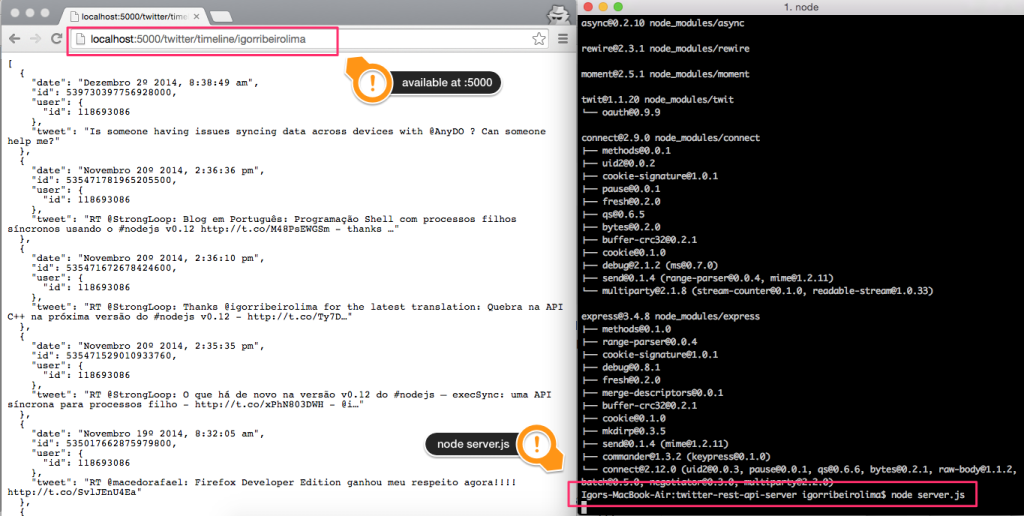
After setting up the environment variables, go to ``twitter-rest-api-server`` folder, install all node dependencies by ``npm install``, then run via terminal ``node server.js``. It should be available at the port ``5000``. Go to your browser and reach ``http://localhost:5000/twitter/timeline/igorribeirolima``.
## Writing unit tests
[Mocha](http://mochajs.org) is the JavaScript test framework running we gonna use. It makes asynchronous testing simple and fun. [Mocha](http://mochajs.org) allows you to use any assertion library you want, if it throws an error, it will work! In this example we are gonna utilize [node's regular assert](https://nodejs.org/api/assert.html) module.
Imagine you want to test this code [twitter.js](https://gist.github.com/igorlima/b31f1a26a5b100186a98#file-twitter-js):
```javascript
var Twit = require('twit'),
async = require('async'),
moment = require('moment'),
T = new Twit({
consumer_key: process.env.TwitterConsumerKey || '...',
consumer_secret: process.env.TwitterConsumerSecret || '...',
access_token: process.env.TwitterAccessToken || '...',
access_token_secret: process.env.TwitterAccessTokenSecret || '...'
}),
mapReducingTweets = function(tweet, callback) {
callback(null, simplify(tweet));
},
simplify = function(tweet) {
var date = moment(tweet.created_at, "ddd MMM DD HH:mm:ss zz YYYY");
date.lang( process.env.MomentLang );
return {
date: date.format('MMMM Do YYYY, h:mm:ss a'),
id: tweet.id,
user: {
id: tweet.user.id
},
tweet: tweet.text
};
};
module.exports = function(username, callback) {
T.get("statuses/user_timeline", {
screen_name: username,
count: 25
}, function(err, tweets) {
if (err) callback(err);
else async.map(tweets, mapReducingTweets, function(err, simplified_tweets) {
callback(null, simplified_tweets);
});
})
};
```
To do that in a easy and fun way, let load this module using [rewire](https://github.com/jhnns/rewire). So within your test module [twitter-spec.js](https://gist.github.com/igorlima/b31f1a26a5b100186a98#file-twitter-spec-js):
```javascript
var rewire = require('rewire'),
assert = require('assert'),
twitter = rewire('./twitter.js'),
mock = require('./twitter-spec-mock-data.js');
```
[rewire](https://github.com/jhnns/rewire) acts exactly like *require*. Just with one difference: Your module will now export a special setter and getter for private variables.
```javascript
myModule.__set__("path", "/dev/null");
myModule.__get__("path"); // = '/dev/null'
```
This allows you to mock everything in the top-level scope of the module, like the *twitter module* for example. Just pass the variable name as first parameter and your mock as second.
You may also override globals. These changes are only within the module, so you don't have to be concerned that other modules are influenced by your mock.
```javascript
describe('twitter module', function(){
describe('simplify function', function(){
var simplify;
before(function() {
simplify = twitter.__get__('simplify');
});
it('should be defined', function(){
assert.ok(simplify);
});
describe('simplify a tweet', function(){
var tweet, mock;
before(function() {
mock = mocks[0];
tweet = simplify(mock);
});
it('should have 4 properties', function() {
assert.equal( Object.keys(tweet).length, 4 );
});
describe('format dates as `MMMM Do YYYY, h:mm:ss a`', function() {
describe('English format', function() {
before(function() {
revert = twitter.__set__('process.env.MomentLang', 'en');
tweet = simplify(mock);
});
it('should be `March 6th 2015, 2:29:13 am`', function() {
assert.equal(tweet.date, 'March 6th 2015, 2:29:13 am');
});
after(function(){
revert();
});
});
describe('Brazilian format', function() {
before(function() {
revert = twitter.__set__('process.env.MomentLang', 'pt-br');
tweet = simplify(mock);
});
it('should be `Março 6º 2015, 2:29:13 am`', function() {
assert.equal(tweet.date, 'Março 6º 2015, 2:29:13 am');
});
after(function(){
revert();
});
});
});
});
});
describe('retrieve timeline feed', function() {
var revert;
before(function() {
revert = twitter.__set__("T.get", function( api, query, callback ) {
callback( null, mocks);
});
});
describe('igorribeirolima timeline', function() {
var tweets;
before(function(done){
twitter('igorribeirolima', function(err, data) {
tweets = data;
done();
});
});
it('should have 19 tweets', function() {
assert.equal(tweets.length, 19);
});
});
after(function() {
revert();
});
});
});
```
`__set__` returns a function which reverts the changes introduced by this particular `__set__` call.
## Running unit tests
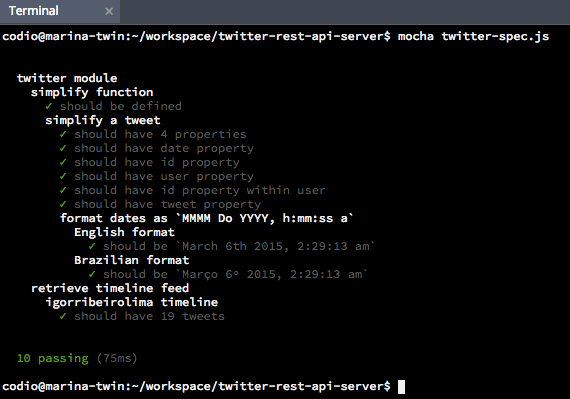
Before we get into the test and walk through it, let install mocha CLI by ``npm install -g mocha``. It will support us on running our tests just typing ``mocha twitter-spec.js``. The following is an image that illustrates the test result.
Take a look on this [video](http://showterm.io/3c970843502e140bcfabd#slow) and see step by step in detail everything discussed so far.
## Conclusion
As you can see it's not painful on overcoming hurdles like *(i)* injecting mocks for other modules, *(ii)* leaking private variables or *(iii)* overriding variables within the module. That's it folks. Hope you catch the idea on how simple and fun is to do dependency injection for unit testing. Thanks for reading.