https://github.com/ihorsylakov/softswiss-assignment
This is a test assignment for the position of frontend developer with a bias towards layout at Softswiss. The task is to layout one SPA page of a fictional application. It was recommended to use create-react-app to create the project.
https://github.com/ihorsylakov/softswiss-assignment
adaptive-layout assignments markup react scss typescript
Last synced: about 1 month ago
JSON representation
This is a test assignment for the position of frontend developer with a bias towards layout at Softswiss. The task is to layout one SPA page of a fictional application. It was recommended to use create-react-app to create the project.
- Host: GitHub
- URL: https://github.com/ihorsylakov/softswiss-assignment
- Owner: IhorSylakov
- Created: 2024-04-02T15:18:03.000Z (about 2 years ago)
- Default Branch: main
- Last Pushed: 2024-05-21T17:32:46.000Z (about 2 years ago)
- Last Synced: 2025-01-10T03:49:01.610Z (over 1 year ago)
- Topics: adaptive-layout, assignments, markup, react, scss, typescript
- Language: SCSS
- Homepage: https://ihorsylakov.github.io/softswiss-assignment/
- Size: 2.21 MB
- Stars: 0
- Watchers: 1
- Forks: 0
- Open Issues: 0
-
Metadata Files:
- Readme: README.md
Awesome Lists containing this project
README
# Softswiss test task
[design in figma](https://www.figma.com/design/kYELd72SGG1AZzasjSbW69/Softswiss-assignment?node-id=0-1&t=NJDOdxSmdNmVbv3d-0)
## Levels of implementation
### Standard Level:
Adaptive layout of all page elements using the SASS preprocessor.
### Intermediate Level:
Adaptive layout using the SASS preprocessor, implementation of interactive elements on hover, implementation of burger menu logic for mobile devices using JavaScript.
### Advanced Level:
Adaptive layout, implementation of interactive elements on hover, implementation of burger menu logic for mobile devices without using JavaScript (using CSS).
## Requirements:
1. The layout must exactly match the design and be fully adaptive. The design includes three viewports, so you should focus on them.
2. The use of any frameworks or libraries for creating adaptive design is prohibited.
3. Use flex/grid for creating layouts.
4. It is recommended to use Multiple Backgrounds for background implementation.
5. Images must be optimized and, if possible, use SVG.
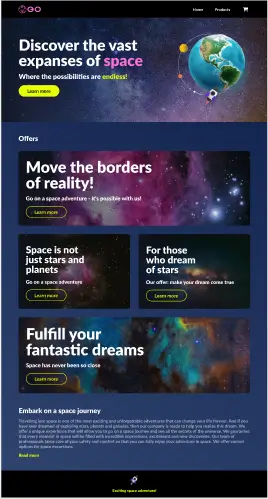
## App preview
## Available Scripts
In the project directory, you can run:
### `npm start`
Runs the app in the development mode.\
Open [http://localhost:3000](http://localhost:3000) to view it in the browser.
The page will reload if you make edits.\
You will also see any lint errors in the console.
### `npm test`
Launches the test runner in the interactive watch mode.\
See the section about [running tests](https://facebook.github.io/create-react-app/docs/running-tests) for more information.
### `npm run build`
Builds the app for production to the `build` folder.\
It correctly bundles React in production mode and optimizes the build for the best performance.
The build is minified and the filenames include the hashes.\
Your app is ready to be deployed!!!
See the section about [deployment](https://facebook.github.io/create-react-app/docs/deployment) for more information.