https://github.com/iicky/homeassistant-mta-subway
A sensor to provide MTA Subway service statuses for Home Assistant.
https://github.com/iicky/homeassistant-mta-subway
api home-automation homeassistant iot nyc nyc-subway-data sensors trains transportation
Last synced: 3 months ago
JSON representation
A sensor to provide MTA Subway service statuses for Home Assistant.
- Host: GitHub
- URL: https://github.com/iicky/homeassistant-mta-subway
- Owner: iicky
- License: apache-2.0
- Created: 2018-09-21T19:54:46.000Z (almost 8 years ago)
- Default Branch: main
- Last Pushed: 2024-12-02T16:17:16.000Z (over 1 year ago)
- Last Synced: 2024-12-02T17:28:21.874Z (over 1 year ago)
- Topics: api, home-automation, homeassistant, iot, nyc, nyc-subway-data, sensors, trains, transportation
- Language: Python
- Homepage:
- Size: 358 KB
- Stars: 25
- Watchers: 4
- Forks: 6
- Open Issues: 1
-
Metadata Files:
- Readme: README.md
- License: LICENSE
Awesome Lists containing this project
README
# Home Assistant MTA Subway Service Status Sensor
[](https://github.com/hacs/integration)
## Overview
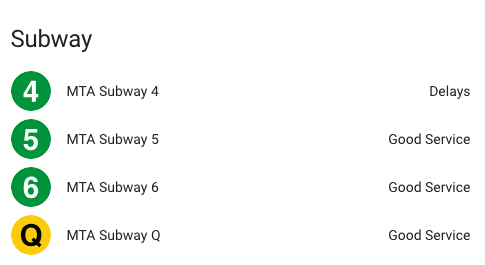
A sensor to provide MTA Subway service statuses for Home Assistant. The sensor reads from the [goodservice.io](https://goodservice.io) API and provides both the overall line status as a sensor state as well as status descriptions and route directions as sensor attributes. The train line states are updated every minute from the detailed [goodservice.io](https://www.goodservice.io/api/routes?detailed=1) route endpoint.
Credit for the line icons goes to [louh](https://github.com/louh) and his great [NYC Subway Icons repo](https://github.com/louh/nyc-subway-icons) (used with some slight renaming).
### Sensor States
- Good Service
- Planned Work
- Slow
- Not Good
- Delays
- Service Change
### Sensor Attributes
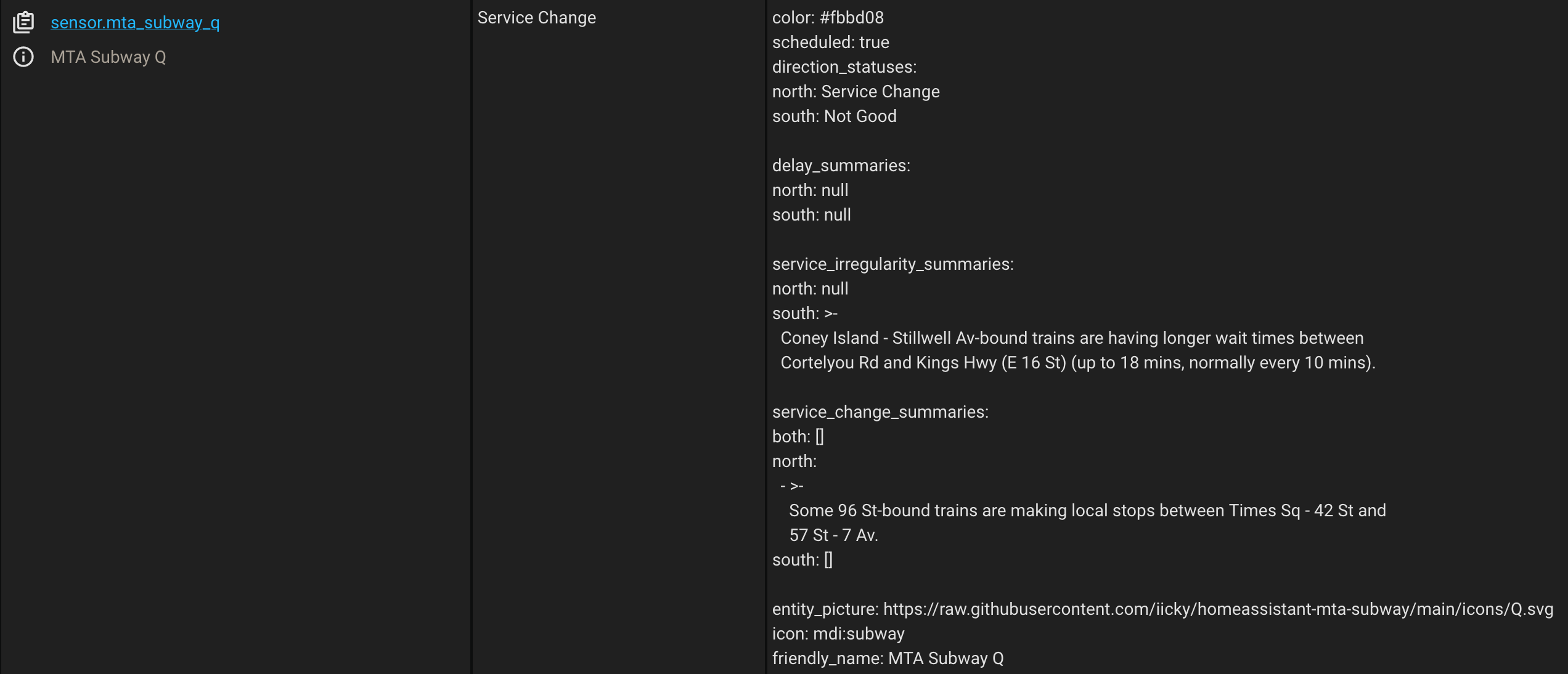
**Color**
Indicates the color of the subway line.
**Scheduled**
Indicates whether the route is scheduled or not.
**Direction statuses**
Indicates the route status for both route directions.
**Delay summaries**
A full description of route delays for both directions.
**Service irregularity summaries**
A full description of any service irregularity summaries currently occuring on the line for both route directions.
**Service change summaries**
A full description of any planned work currently for both directions individually and combined.
## Installation
To install the sensor, copy the `mta_subway` folder under `custom_components` to a directory called `custom_components` in your Home Assistant configuration directory.
To use, add the following configuration to your `configuration.yaml` file for Home Assistant, removing any lines that you do not want to monitor:
```
sensor:
- platform: mta_subway
line:
- '1'
- '2'
- '3'
- '4'
- '5'
- '6'
- '6X'
- '7'
- '7X'
- 'A'
- 'B'
- 'C'
- 'D'
- 'E'
- 'F'
- 'FX'
- 'G'
- 'J'
- 'L'
- 'M'
- 'N'
- 'Q'
- 'R'
- 'GS'
- 'FS'
- 'H'
- 'SI'
- 'W'
- 'Z'
```