https://github.com/ilovenooodles/minehati
Tugas Besar Object Oriented Programming
https://github.com/ilovenooodles/minehati
cli design-patterns game oop
Last synced: about 1 year ago
JSON representation
Tugas Besar Object Oriented Programming
- Host: GitHub
- URL: https://github.com/ilovenooodles/minehati
- Owner: IloveNooodles
- Created: 2022-03-02T10:28:51.000Z (over 4 years ago)
- Default Branch: main
- Last Pushed: 2022-03-25T15:15:17.000Z (about 4 years ago)
- Last Synced: 2025-02-06T08:44:33.628Z (over 1 year ago)
- Topics: cli, design-patterns, game, oop
- Language: C++
- Homepage:
- Size: 1.35 MB
- Stars: 0
- Watchers: 2
- Forks: 1
- Open Issues: 0
-
Metadata Files:
- Readme: README.md
Awesome Lists containing this project
README
# Mine Hati
MineHati is a minecraft-like CLI game made using C++ that applies Object Oriented Programming (OOP) Paradigm. This project was made to fulfull Tubes 1 Object Oriented Programming 2022. Several concept implementation of OOP is Polymorphism, Inheritance, Abstract Base Class, Method and Operator Overloading, and Template & Generics. This project also includes exception handling and STL library for its algorithm.
## Authors
| Nama | NIM |
| ------------------------------ | -------- |
| Muhammad Garebaldhie ER Rahman | 13520029 |
| Rifqi Naufal Abdjul | 13520062 |
| Muhammad Naufal Satriandana | 13520068 |
| Aira Thalca Avila Putra | 13520101 |
| Marchotridyo | 13520119 |
## General Infornation & Features
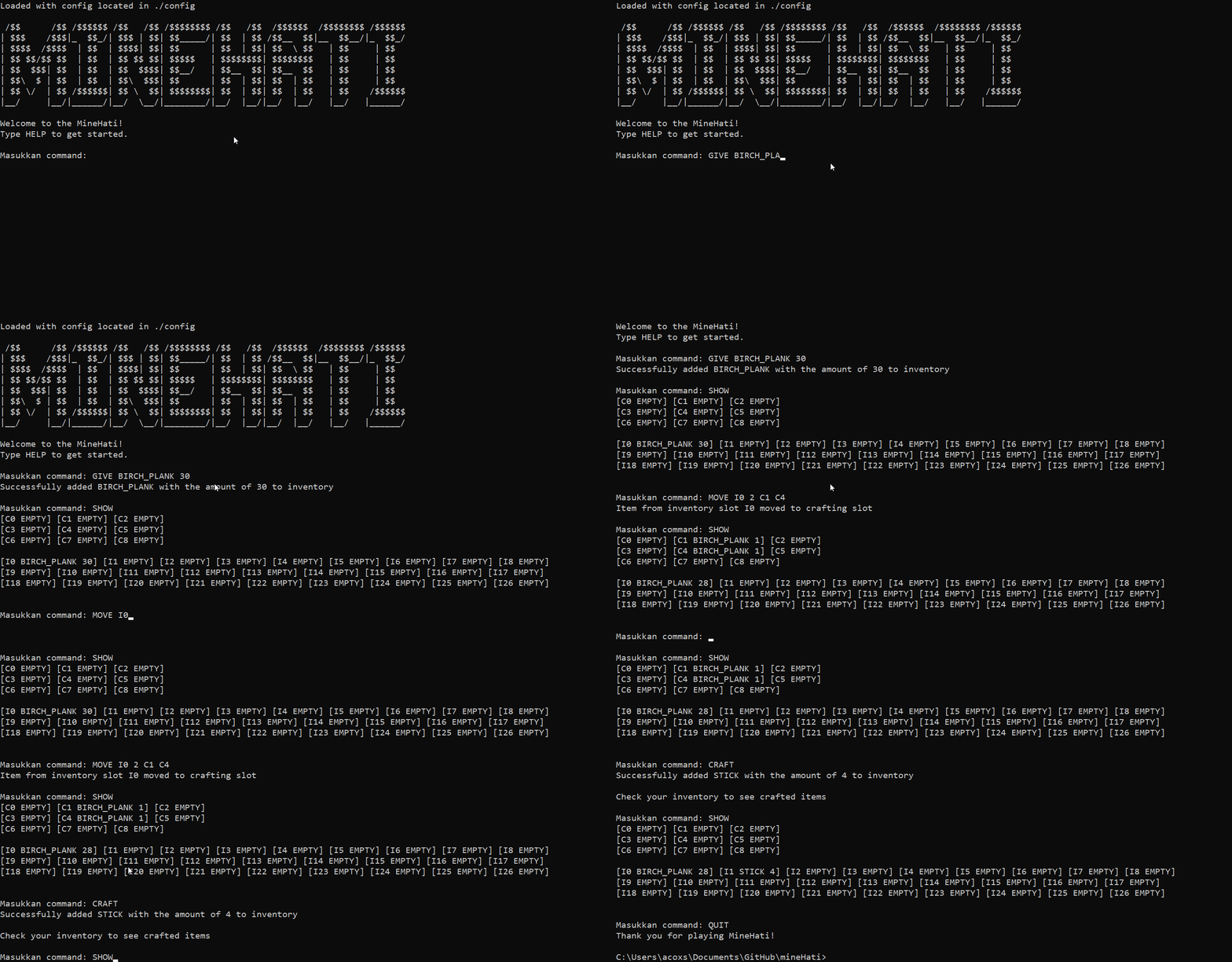
As a continuation of previous projects, MineHati focuses on Mobita's story who is now bored because of the pandemic. To amuse Mobita, Doraemongais made a Minecraft-like game for Mobita to get rid of the boredom. To put it simply, MineHati mimics Minecraft's crafting aspects. There is an inventory where players can fill it by using the command 'GIVE'. Items stored in the inventory can be then moved into the crafting table by using the command 'MOVE'. If the configuration of items inside the crafting table are correct, the player can call the command 'CRAFT' to craft a new item, consuming the items that were put in the crafting table.
## Demo
## Program Requirements
1. [GCC 7 or higher (that support c++17)](https://gcc.gnu.org/install/binaries.html)
2. [Makefile (GNU Make)](https://www.gnu.org/software/make/)
To run this program in any operating system, you must have gcc that support c++17 installed in your OS and also Makefile to compile manually or you can just run the provided binary/exe file.
## How to build
1. Clone the directory using `git clone https://github.com/IloveNooodles/MineHati.git`
2. Move to the directory using `cd` command
3. In the program directory run `make compile run` to run the program
Alternatively 4. You can compile manually using `make compile` 5. After compiling, the program should appear in current directory 6. run `./main` to run the program
## How to test
1. Put testcase (with .in extension) and the expected output (with .ans extension) inside tests directory
2. Compile the program by running `make compile` on base directory
3. Run `make test` on base directory to generate output on tests directory
## How to show code coverage
1. In the program directory run `make coverage_all` to run the program
2. To look at the coverage result, open `index.html` inside html on coverage directory
## Usage
After running the program, there are several commands that players can use. Type HELP to print all of the available commands, which are:
1. SHOW: Show inventory and craft
2. DISCARD : Discard item(s) in inventory. Quantity refers to how much of the item from that slot will be discarded
3. USE : Use a tool in inventory, therefore reducing it's durability
4. GIVE : Add specific item(s) to the inventory with some quantity
5. MOVE / N / ... : Move item(s) in craft and inventory
6. CRAFT: Consume items inside the crafting table to make a new item if the configuration is recognized by a recipe
7. EXPORT : Export inventory and craft into a file
8. RECIPES: See all available recipe
9. HELP: To see list of commands
10. QUIT: To exit the game
## Room for improvement
1. Make a GUI for the program for ease of use
2. Add more items and recipe to amplify the Minecraft crafting experience