https://github.com/im-rises/digit_recognizer_ml
MNIST digit recognition made in python with Machine Learning.
https://github.com/im-rises/digit_recognizer_ml
ai kaggle machine-learning mnist python sklearn
Last synced: 11 months ago
JSON representation
MNIST digit recognition made in python with Machine Learning.
- Host: GitHub
- URL: https://github.com/im-rises/digit_recognizer_ml
- Owner: Im-Rises
- License: mit
- Created: 2022-05-25T15:40:10.000Z (almost 4 years ago)
- Default Branch: main
- Last Pushed: 2023-02-19T19:31:06.000Z (about 3 years ago)
- Last Synced: 2025-02-17T04:26:22.338Z (about 1 year ago)
- Topics: ai, kaggle, machine-learning, mnist, python, sklearn
- Language: Jupyter Notebook
- Homepage:
- Size: 1.3 MB
- Stars: 2
- Watchers: 2
- Forks: 0
- Open Issues: 0
-
Metadata Files:
- Readme: README.md
- License: LICENSE
Awesome Lists containing this project
README
# digit_recognizer



## Description
AI programmed in python to recognize digits.
The goal is to reach the max score using only Machine Learning.
I try to use a wide variety of models. I get the best score using SVC model with `98.985%` test accuracy which is a
pretty good score for a Machine Learning model.
I also tried KNN, RandomForest, but I didn't reach a better score than SVC :
- KNN's Score = 97.882%
- RandomForest's Score = 98.064%
For each model training I use scaling and data augmentation. For data augmentation I created functions ti shift, rotate
and zoom the images.
I ended up not using the zoom because it wasn't increasing the performance of the model.
The MNIST dataset I used is a sliced one for the Kaggle competition, you can find the information in the section
below `Kaggle competition`.
**Note**
> A Deep Learning CNN model could have reach that max score easily, but I wanted to test what might reach the common
> Machine Learning classifier.
## Kaggle competition
The app was made for the Kaggle Competition, you can find the link of my Notebook below:
I got a `98.975%` which is superb score for a Machine Learning model on MNIST dataset. I only used the provided
part of the MNIST dataset, this MNIST dataset is composed of 42 000 images (the real MNIST dataset as around 60 000
images for training).
## Quick start
The project is composed of three main files I found the best for MNIST classification. All at the root of the project.
- main_svc.ipynb
- main_knn.ipynb
- main_random_forest.ipynb
They are Jupyter Notebook files, the outputs are still available in the file, but you can start it to re-train the
models.
Before, you need to install the Python Packages, you can find them all in the `requirements.txt` file. To install them
all directly type the following command in your terminal:
```bash
pip install -r requirements.txt
```
You also need to have an IDE or use the Jupyter Notebook server directly.
## MNIST images

## Study images
| Confusion Matrix | ROC curve|
|---|---|
| 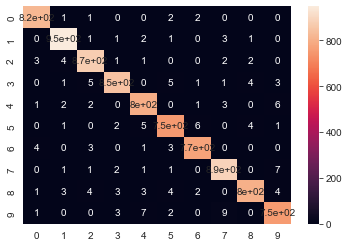 | 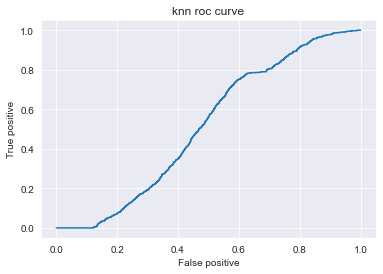 |
## MNIST dataset
MNIST Kaggle dataset :
## Documentations
Wikipedia MNIST:
Tutorial from Benoit Cayla:
Models for MNIST best score by Chris Deotte:
## Libraries and languages
Python:
Jupyter Notebook:
Scikit-Learn:
## Contributors
Quentin MOREL :
- @Im-Rises
-
[](https://github.com/Im-Rises/page_rank/graphs/contributors)