https://github.com/imcuttle/slider-doc
Make html element to be slider view
https://github.com/imcuttle/slider-doc
Last synced: about 1 year ago
JSON representation
Make html element to be slider view
- Host: GitHub
- URL: https://github.com/imcuttle/slider-doc
- Owner: imcuttle
- License: mit
- Created: 2020-11-12T12:58:47.000Z (over 5 years ago)
- Default Branch: master
- Last Pushed: 2022-01-07T14:13:48.000Z (over 4 years ago)
- Last Synced: 2025-06-17T05:39:23.439Z (about 1 year ago)
- Language: HTML
- Size: 2.56 MB
- Stars: 5
- Watchers: 1
- Forks: 0
- Open Issues: 1
-
Metadata Files:
- Readme: README.md
- Changelog: CHANGELOG.md
- License: License
Awesome Lists containing this project
README
# slider-doc
[](https://travis-ci.org/imcuttle/slider-doc)
[](https://codecov.io/github/imcuttle/slider-doc?branch=master)
[](https://www.npmjs.com/package/slider-doc)
[](https://www.npmjs.com/package/slider-doc)
[](https://prettier.io/)
[](https://conventionalcommits.org)
> Make html element to be slider view
一建转换文档为 PPT 演示
[在线 DEMO](http://imcuttle.github.io/slider-doc)
**快捷键列表:**
- ESC / O : 打开整体预览模式
- Cmd + ESC / Ctrl + ESC: 退出 PPT 模式
- 方向键:PPT 翻页
## 原理
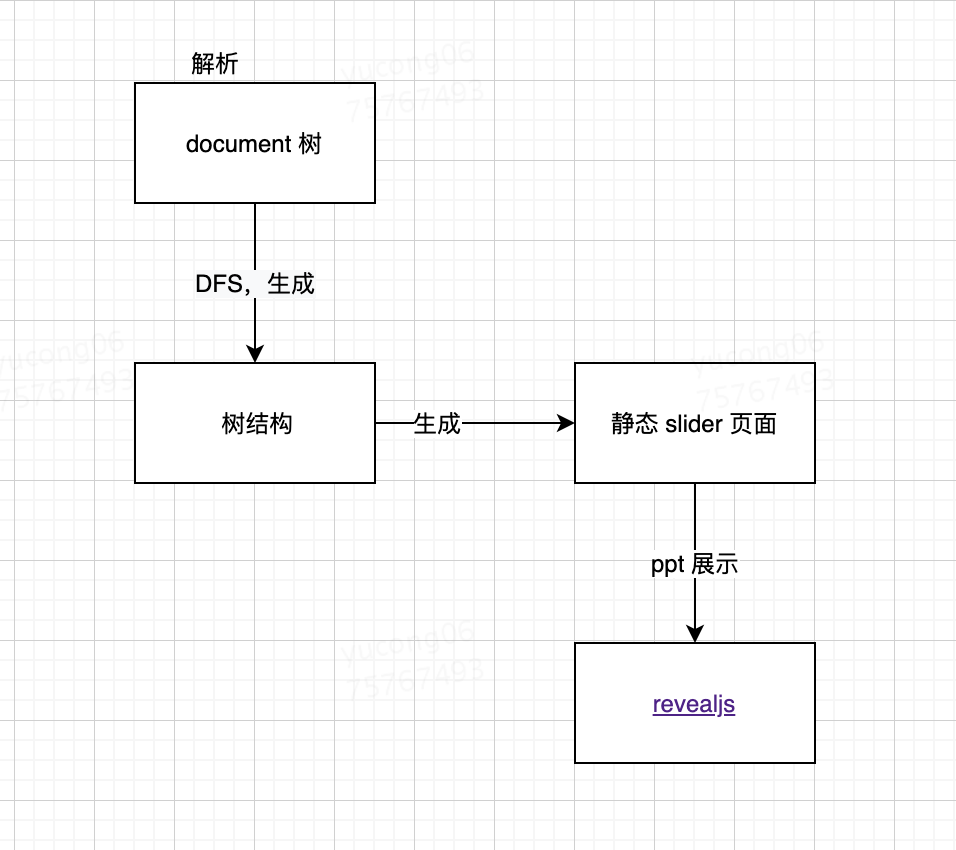
解析 DOM 树,生成树结构如下:
```html
标题
内容
标题2
内容2
```
会解析成
```json5
{
type: 'lvl',
level: 1,
value: '标题',
children: [
{
type: 'text',
value: '内容'
},
{
type: 'lvl',
level: 2,
value: '标题2',
children: [
{
type: 'text',
value: '内容2'
}
]
}
]
}
```
## Installation
```bash
npm install slider-doc
# or use yarn
yarn add slider-doc
```
## Usage
```javascript
import sliderDoc from 'slider-doc'
const silder = sliderDoc({
lvl0: '.doc h1',
lvl1: '.doc h2',
lvl2: '.doc h3',
lvl3: '.doc h4',
lvl4: '.doc h5'
})
```
## API
### `sliderDoc(selectors, options?)`
#### `selectors`
- **Type:** [Selectors](https://github.com/big-wheel/wowsearch/tree/master/packages/wowsearch#selectors-1)
同时扩展了 code 类型的 text selector,方便展示代码块
```json5
{
code: '.post pre'
}
```
#### `options`
##### `document`
- **Type:** `Document`
- **Default:** `document`
##### `excludes`
解析 dom 之前,需要剔除的 element
- **Type:** `Selector[]` - see [Selector](https://github.com/big-wheel/wowsearch/tree/master/packages/wowsearch#selector)
- **Default:** `[]`
##### `revealConfig`
Reveal.js 的[配置](https://revealjs.com/config/)
##### `mountContainer`
Reveal.js 挂载的节点
- **Type:** `Element`
- **Default:** `document.body`
##### `renderers`
自定义渲染
- **Type:** `Array<(vNode, ctx, next) => string>`
- **Default:** `[]`
- **Example:**
```js
;[
(vNode, ctx, next) => {
if (vNode.type === 'text') {
return `${vNode.value}`
}
return next()
}
]
```
##### `renderSectionAttrs`
渲染外层 Section 时候注入的属性
- **Type:** `(vNode, ctx) => string`
- **Default:** `() => 'data-transition="fade-in slide-out"'`
## Todo
- [ ] Feat: 生成 reveal.js 的 dom 实例,而不是 html,可以带上 dom 交互(如 React 组件)
## Contributing
- Fork it!
- Create your new branch:
`git checkout -b feature-new` or `git checkout -b fix-which-bug`
- Start your magic work now
- Make sure npm test passes
- Commit your changes:
`git commit -am 'feat: some description (close #123)'` or `git commit -am 'fix: some description (fix #123)'`
- Push to the branch: `git push`
- Submit a pull request :)
## Authors
This library is written and maintained by imcuttle, imcuttle@163.com.
## License
MIT - [imcuttle](https://github.com/imcuttle) 🐟