https://github.com/imgcook/imgcook-cli
Using Imgcook force in your terminal
https://github.com/imgcook/imgcook-cli
design-to-code
Last synced: about 1 year ago
JSON representation
Using Imgcook force in your terminal
- Host: GitHub
- URL: https://github.com/imgcook/imgcook-cli
- Owner: imgcook
- License: mit
- Created: 2019-04-25T12:30:41.000Z (about 7 years ago)
- Default Branch: master
- Last Pushed: 2022-12-12T10:23:33.000Z (over 3 years ago)
- Last Synced: 2025-03-29T04:32:03.747Z (about 1 year ago)
- Topics: design-to-code
- Language: JavaScript
- Homepage:
- Size: 264 KB
- Stars: 58
- Watchers: 5
- Forks: 13
- Open Issues: 6
-
Metadata Files:
- Readme: README.md
- Changelog: CHANGELOG.md
- License: LICENSE
Awesome Lists containing this project
README
# imgcook-cli
[](https://github.com/imgcook/imgcook-cli/blob/master/LICENSE)
[]()
[](https://travis-ci.org/imgcook/imgcook-cli)
[](https://www.npmjs.com/package/@imgcook/cli)
[]()
imgcook-cli can combine the capabilities of Plugin to place the code products generated by the imgcook platform into your local project project, and seamlessly integrate into your development process. Upload pictures to your own bed, file directory conversion, etc.), imgcook-cli is a very good choice for you.
## Getting Started
## Install
> The imgcook-cli installation depends on Node.js and NPM. It is recommended to use Node.js version 9.x
```shell
# npm
npm install -g @imgcook/cli
# yarn
yarn global add @imgcook/cli
```
## Use
### Common command
#### imgcook config
> User settings configuration, default initialization generates official configuration
```shell
# Setting config
imgcook config set
# View config
imgcook config ls
# Open configuration file directly
imgcook config edit
```
> DSL config:
> React D2C Schema:41
> Vue 开发规范:29
> 微信小程序开发规范:21
> React 开发规范:12
> H5 标准开发规范:5
> Rax 标准开发规范:1
>
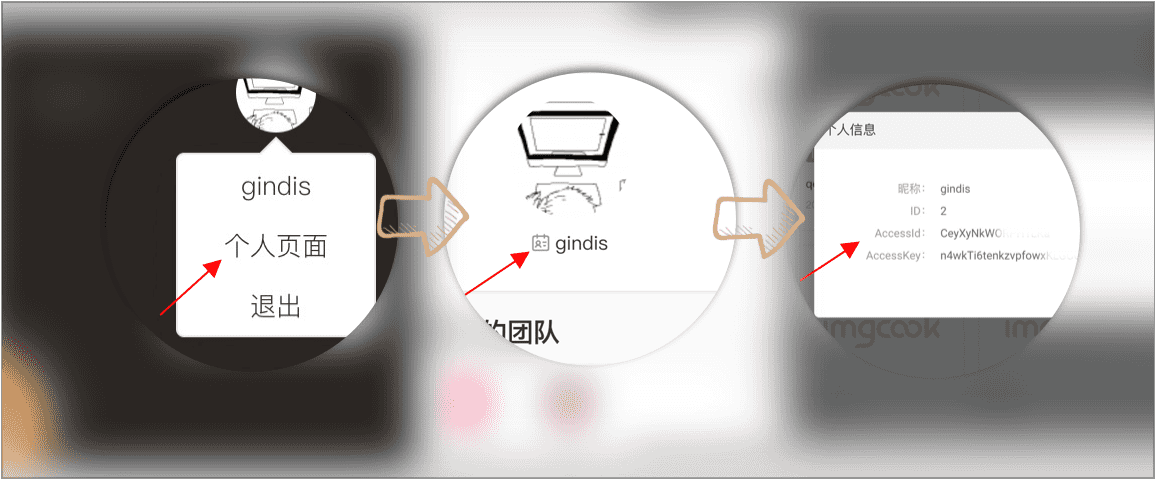
> Get accessId :Official website top right corner avatar -> Personal page -> Top left Icon
> 
#### imgcook pull
> Pull module code
```shell
# Pull a module code to a local path
imgcook pull --path
# Example
imgcook pull 17108 --path mod
```
#### imgcook install
> Plugins required to install imgcook-cli
```shell
# Install all configured plugins by default
imgcook install
# Install the specified plugin
imgcook install plugin --name
# Example
imgcook install plugin --name @imgcook/plugin-images
```
### Options
#### imgcook --version
> Display version information
```shell
imgcook --version
imgcook -v
```
#### imgcook --help
> Show command usage help
```shell
imgcook --help
imgcook -h
```
## License
[MIT](https://github.com/imgcook/imgcook-cli/blob/master/LICENSE)