https://github.com/imgix/imgix-java
A Java client library for generating URLs with imgix
https://github.com/imgix/imgix-java
images imgix java signing-imgix-urls src srcset url-builder
Last synced: over 1 year ago
JSON representation
A Java client library for generating URLs with imgix
- Host: GitHub
- URL: https://github.com/imgix/imgix-java
- Owner: imgix
- License: bsd-2-clause
- Created: 2014-09-09T01:34:27.000Z (almost 12 years ago)
- Default Branch: main
- Last Pushed: 2022-11-08T20:01:24.000Z (over 3 years ago)
- Last Synced: 2023-07-27T14:34:40.976Z (almost 3 years ago)
- Topics: images, imgix, java, signing-imgix-urls, src, srcset, url-builder
- Language: Java
- Homepage: https://www.imgix.com
- Size: 595 KB
- Stars: 17
- Watchers: 13
- Forks: 10
- Open Issues: 2
-
Metadata Files:
- Readme: README.md
- Changelog: CHANGELOG.md
- Contributing: CONTRIBUTING.MD
- License: LICENSE
- Code of conduct: CODE-OF-CONDUCT.md
- Codeowners: .github/CODEOWNERS
Awesome Lists containing this project
README

`imgix-java` is a client library for generating image URLs with [imgix](https://www.imgix.com/).
[ ](https://bintray.com/imgix/maven/imgix-java/_latestVersion)
[](https://search.maven.org/search?q=g:%22com.imgix%22%20AND%20a:%22imgix-java%22)
[](https://travis-ci.com/imgix/imgix-java)
[](https://github.com/imgix/imgix-java/blob/main/LICENSE)
[](https://app.fossa.com/projects/git%2Bgithub.com%2Fimgix%2Fimgix-java?ref=badge_shield)
---
- [Installation](#installation)
* [Dependencies](#dependencies)
* [Install Options](#install-options)
+ [Gradle & JCenter](#gradle--jcenter)
+ [Creating a Jar](#creating-a-jar)
- [Usage](#usage)
- [Signed URLs](#signed-urls)
- [Srcset Generation](#srcset-generation)
* [Fixed-Width Images](#fixed-width-images)
* [Fluid-Width Images](#fluid-width-images)
+ [Custom Widths](#custom-widths)
+ [Width Ranges](#width-ranges)
+ [Width Tolerance](#width-tolerance)
- [Running Tests](#running-tests)
- [License](#license)
## Installation
### Dependencies
The library itself has no external dependencies. Although if you want to build from source (or run tests) then you need `ant` and the `JDK 1.6+`.
### Install Options
#### Gradle & JCenter
To add Imgix-Java to your project, include the following in your project's build.gradle:
```
dependencies {
compile "com.imgix:imgix-java:2.3.2"
}
```
And if this is your first external MavenCentral dependency you'll need to add, again to your project level build.gradle, the following:
```
buildscript {
repositories {
mavenCentral()
}
}
```
#### Creating a Jar
To create a jar from source:
```
gradle build
```
This creates `imgix-java-{VERSION_NUMBER}.jar` under `./build/libs`
Once a new version has been merged into main on GitHub (don't forget to update the version numbers in build.gradle first!), it can be deployed to Bintray with `gradle build && gradle bintrayUpload`. After that, the new version can be viewed via the [Bintray web interface](https://bintray.com/imgix/maven/imgix-java).
## Usage
To begin creating imgix URLs, add the jar to your project's classpath and import the imgix library. The URL builder can be reused to create URLs for any images on the domains it is provided.
```java
import com.imgix.URLBuilder;
import java.util.Map;
import java.util.HashMap;
public class ImgixExample {
public static void main(String[] args) {
URLBuilder builder = new URLBuilder("demos.imgix.net");
Map params = new HashMap();
params.put("w", "100");
params.put("h", "100");
System.out.println(builder.createURL("bridge.png", params));
// http://demos.imgix.net/bridge.png?h=100&w=100
}
}
```
HTTPS support is available by default. However, if you need HTTP support, call setUseHttps on the builder:
```java
import com.imgix.URLBuilder;
import java.util.Map;
import java.util.HashMap;
public class ImgixExample {
public static void main(String[] args) {
URLBuilder builder = new URLBuilder("demos.imgix.net");
builder.setUseHttps(false); // use http
Map params = new HashMap();
params.put("w", "100");
params.put("h", "100");
System.out.println(builder.createURL("bridge.png", params));
// https://demos.imgix.net/bridge.png?h=100&w=100
}
}
```
## Signed URLs
To produce a signed URL, you must enable secure URLs on your source and then provide your signature key to the URL builder.
```java
import com.imgix.URLBuilder;
import java.util.Map;
import java.util.HashMap;
public class ImgixExample {
public static void main(String[] args) {
URLBuilder builder = new URLBuilder("demos.imgix.net");
builder.setSignKey("test1234"); // set sign key
Map params = new HashMap();
params.put("w", "100");
params.put("h", "100");
System.out.println(builder.createURL("bridge.png", params));
// http://demos.imgix.net/bridge.png?h=100&w=100&s=bb8f3a2ab832e35997456823272103a4
}
}
```
## Srcset Generation
The imgix-java library allows for generation of custom `srcset` attributes, which can be invoked through `createSrcSet()`. By default, the `srcset` generated will allow for responsive size switching by building a list of image-width mappings.
```java
URLBuilder ub = new URLBuilder("demos.imgix.net", true, "my-token", false);
String srcset = ub.createSrcSet("bridge.png");
System.out.println(srcset);
```
The above will produce the following srcset attribute value which can then be served to the client:
```html
https://demos.imgix.net/bridge.png?w=100&s=494158d968e94ac8e83772ada9a83ad1 100w,
https://demos.imgix.net/bridge.png?w=116&s=6a22236e189b6a9548b531330647ffa7 116w,
https://demos.imgix.net/bridge.png?w=135&s=cbf91f556dd67c0b9e26cb9784a83794 135w,
...
https://demos.imgix.net/bridge.png?w=7401&s=503e3ba04588f1c301863c9a5d84fe91 7401w,
https://demos.imgix.net/bridge.png?w=8192&s=152551ce4ec155f7a03f60f762a1ca33 8192w
```
### Fixed-Width Images
In cases where enough information is provided about an image's dimensions, `createSrcSet()` will instead build a `srcset` that will allow for an image to be served at different resolutions. The parameters taken into consideration when determining if an image is fixed-width are `w` (width) and `h` (height).
By invoking `createSrcSet()` with either a width **or** height provided, a different `srcset` will be generated for a fixed-size image instead.
```java
URLBuilder ub = new URLBuilder("demos.imgix.net", true, "my-token", false);
HashMap params = new HashMap ();
params.put("h", "200");
params.put("ar", "3:2");
params.put("fit", "crop");
String srcset = ub.createSrcSet("bridge.png", params);
System.out.println(srcset);
```
Will produce the following attribute value:
```html
https://demos.imgix.net/bridge.png?ar=3%3A2&dpr=1&fit=crop&h=200&s=4c79373f535df7e2594a8f6622ec6631 1x,
https://demos.imgix.net/bridge.png?ar=3%3A2&dpr=2&fit=crop&h=200&s=dc818ae4522494f2f750651304a4d825 2x,
https://demos.imgix.net/bridge.png?ar=3%3A2&dpr=3&fit=crop&h=200&s=ba1ec0cef6c77ff02330d40cc4dae932 3x,
https://demos.imgix.net/bridge.png?ar=3%3A2&dpr=4&fit=crop&h=200&s=b51e497d9461be62354c0ea12b6524fb 4x,
https://demos.imgix.net/bridge.png?ar=3%3A2&dpr=5&fit=crop&h=200&s=dc37c1fbee505d425ca8e3764b37f791 5x
```
For more information to better understand `srcset`, we recommend [Eric Portis' "Srcset and sizes" article](https://ericportis.com/posts/2014/srcset-sizes/) which goes into depth about the subject.
##### Variable Quality
This library will automatically append a variable `q` parameter mapped to each `dpr` parameter when generating a [fixed-width image](#fixed-width-images) srcset. This technique is commonly used to compensate for the increased file size of high-DPR images.
Since high-DPR images are displayed at a higher pixel density on devices, image quality can be lowered to reduce overall file size without sacrificing perceived visual quality. For more information and examples of this technique in action, see [this blog post](https://blog.imgix.com/2016/03/30/dpr-quality).
This behavior will respect any overriding `q` value passed in as a parameter. Additionally, it can be disabled altogether by passing `disableVariableQuality = true` to `createSrcSet`.
This behavior specifically occurs when a [fixed-width image](#fixed-width-images) is rendered, for example:
```java
URLBuilder ub = new URLBuilder("demo.imgix.net", true, "", false);
HashMap params = new HashMap();
params.put("w", "100");
String actual = ub.createSrcSet("image.jpg", params, false);
```
The above will generate a srcset with the following `q` to `dpr` query `params`:
```html
https://demo.imgix.net/image.jpg?dpr=1&q=75&w=100 1x,
https://demo.imgix.net/image.jpg?dpr=2&q=50&w=100 2x,
https://demo.imgix.net/image.jpg?dpr=3&q=35&w=100 3x,
https://demo.imgix.net/image.jpg?dpr=4&q=23&w=100 4x,
https://demo.imgix.net/image.jpg?dpr=5&q=20&w=100 5x
```
### Fluid-Width Images
#### Custom Widths
In situations where specific widths are desired when generating `srcset` pairs, a user can specify them by passing an array of positive integers as `widths`:
``` java
URLBuilder ub = new URLBuilder("demo.imgix.net", true, "", false);
HashMap params = new HashMap();
Integer[] widths = new Integer[] {144, 240, 320, 446, 640};
String srcset = ub.createSrcSet("image.jpg", params, widths);
```
```html
https://demo.imgix.net/image.jpg?w=144 144w,
https://demo.imgix.net/image.jpg?w=240 240w,
https://demo.imgix.net/image.jpg?w=320 320w,
https://demo.imgix.net/image.jpg?w=446 446w,
https://demo.imgix.net/image.jpg?w=640 640w
```
**Note**: in situations where a `srcset` is being rendered as a [fixed image](#fixed-image-rendering), any custom `widths` passed in will be ignored.
Additionally, if both `widths` and a width `tol`erance are passed to the `createSrcSet` method, the custom widths list will take precedence.
#### Width Ranges
In certain circumstances, you may want to limit the minimum or maximum value of the non-fixed (fluid-width) `srcset` generated by the `createSrcSet` method. To do this, you can specify the widths at which a srcset should `begin` and `end`:
```java
URLBuilder ub = new URLBuilder("demo.imgix.net", true, "", false);
HashMap params = new HashMap();
String actual = ub.createSrcSet("image.jpg", params, 500, 2000);
```
Formatted version of the above srcset attribute:
``` html
https://demo.imgix.net/image.jpg?w=500 500w,
https://demo.imgix.net/image.jpg?w=580 580w,
https://demo.imgix.net/image.jpg?w=673 673w,
https://demo.imgix.net/image.jpg?w=780 780w,
https://demo.imgix.net/image.jpg?w=905 905w,
https://demo.imgix.net/image.jpg?w=1050 1050w,
https://demo.imgix.net/image.jpg?w=1218 1218w,
https://demo.imgix.net/image.jpg?w=1413 1413w,
https://demo.imgix.net/image.jpg?w=1639 1639w,
https://demo.imgix.net/image.jpg?w=1901 1901w,
https://demo.imgix.net/image.jpg?w=2000 2000w
```
#### Width Tolerance
The `srcset` width `tol`erance dictates the maximum `tol`erated difference between an image's downloaded size and its rendered size.
For example, setting this value to 0.1 means that an image will not render more than 10% larger or smaller than its native size. In practice, the image URLs generated for a width-based srcset attribute will grow by twice this rate.
A lower tolerance means images will render closer to their native size (thereby increasing perceived image quality), but a large srcset list will be generated and consequently users may experience lower rates of cache-hit for pre-rendered images on your site.
By default, srcset width `tol`erance is set to `0.08` (8 percent), which we consider to be the ideal rate for maximizing cache hits without sacrificing visual quality. Users can specify their own width tolerance by providing a positive scalar value as width `tol`erance:
```java
URLBuilder ub = new URLBuilder("test.imgix.net", false, "", false);
HashMap params = new HashMap();
String srcset = ub.createSrcSet("image.png", params, 100, 384, 0.20);
```
In this case, the width `tol`erance is set to 20 percent, which will be reflected in the difference between subsequent widths in a srcset pair:
```html
https://demo.imgix.net/image.jpg?w=100 100w,
https://demo.imgix.net/image.jpg?w=140 140w,
https://demo.imgix.net/image.jpg?w=196 196w,
https://demo.imgix.net/image.jpg?w=274 274w,
https://demo.imgix.net/image.jpg?w=384 384w
```
## Running Tests
To run tests clone this project and run:
```
gradle test
```
Dependencies for running tests (junit, etc) are provided (in `test/lib` and referenced in the build config).
## License
[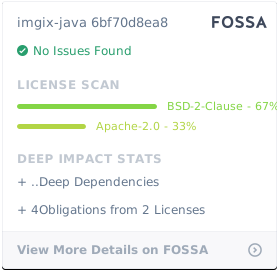](https://app.fossa.com/projects/git%2Bgithub.com%2Fimgix%2Fimgix-java?ref=badge_large)