https://github.com/imgix/imgix-management-js
A Javascript library that wraps the imgix management API
https://github.com/imgix/imgix-management-js
api imgix javascript management nodejs
Last synced: about 1 year ago
JSON representation
A Javascript library that wraps the imgix management API
- Host: GitHub
- URL: https://github.com/imgix/imgix-management-js
- Owner: imgix
- License: bsd-2-clause
- Created: 2020-04-13T20:15:59.000Z (over 6 years ago)
- Default Branch: main
- Last Pushed: 2025-04-12T15:01:38.000Z (over 1 year ago)
- Last Synced: 2025-06-04T12:45:09.022Z (about 1 year ago)
- Topics: api, imgix, javascript, management, nodejs
- Language: JavaScript
- Homepage: https://www.imgix.com
- Size: 639 KB
- Stars: 7
- Watchers: 8
- Forks: 1
- Open Issues: 11
-
Metadata Files:
- Readme: README.md
- Changelog: CHANGELOG.md
- License: LICENSE.md
Awesome Lists containing this project
README
⚠️ **This library is currently marked as experimental. We plan to eventually integrate it as its own module in [`@imgix/js-core`](https://github.com/imgix/js-core).**

`imgix-management-js` is a JavaScript client library for making requests against the [imgix](https://www.imgix.com/) Management API.
[](https://www.npmjs.com/package/imgix-management-js)
[](https://circleci.com/gh/imgix/imgix-management-js)
[](https://www.npmjs.com/package/imgix-management-js)
[](https://bundlephobia.com/result?p=imgix-management-js)
[](https://github.com/imgix/imgix-management-js/blob/main/LICENSE.md)
[](https://github.com/prettier/prettier)
[](https://app.fossa.com/projects/git%2Bgithub.com%2Fimgix%2Fimgix-management-js?ref=badge_shield)
---
- [Installation](#installation)
* [CommonJS](#commonjs)
- [Configuration](#configuration)
- [API](#api)
* [`ImgixAPI.request(path, options)`](#imgixapirequestpath-options)
- [Usage Examples](#usage-examples)
* [Retrieve a list of images](#retrieve-a-list-of-images)
* [Retrieve all details for a single image](#retrieve-all-details-for-a-single-image)
* [Retrieve custom fields for a single image](#retrieve-custom-fields-for-a-single-image)
* [Update custom fields for a single image](#update-custom-fields-for-a-single-image)
* [Upload an image](#upload-an-image)
* [Retrieve all sources](#retrieve-all-sources)
* [Specify the fields returned](#specify-the-fields-returned)
* [Paging by page number and size](#paging-by-page-number-and-size)
* [Sorting lists of objects](#sorting-lists-of-objects)
* [Filtering lists of objects](#filtering-lists-of-objects)
* [Create an object](#create-an-object)
- [License](#license)
## Installation
`npm install imgix-management-js`
`imgix-management-js` exposes a class `ImgixAPI`:
### CommonJS
```js
const ImgixAPI = require("imgix-management-js");
const imgix = new ImgixAPI({
apiKey: `${yourApiKey}`
});
```
## Configuration
The following options can be used when creating an instance of `ImgixAPI`:
- `apiKey`: String, required. The token used to authenticate API requests.
- `version`: Integer. The version of the API that will be requested against. Defaults to `1`.
## API
### `ImgixAPI.request(path, options)`
- `path`: String, required. A partial path representing the relative URL endpoint to request. This will typically require a `sourceId`.
- `options`: Object. Any custom HTTP(S) settings to be applied to a request.
* `method`: String, required. The request [method](https://developer.mozilla.org/en-US/docs/Web/HTTP/Methods), defaults to 'GET'.
* `headers`: Object. Additional [information](https://developer.mozilla.org/en-US/docs/Web/HTTP/Headers) included with a request.
* `body`: Object, String, or Buffer. A resource, such as binary data or a file, included with the request.
Makes a request against the specified imgix Management API endpoint.
**Returns**: `Promise<[Response]>`
The supplied `path` should be a relative URL, such as `assets/{sourceId}`. Using this path, the full API URL will be constructed at the time that the request is made, saving users the need to provide the full URL themselves each time.
`ImgixAPI` will intelligently populate any necessary headers prior to completing the request. This includes fields such as `Content-Type` and `Authorization`. Outside of that, the `options` argument can be used to override certain defaults, such as the HTTP request method, or provide a file for uploading.
## Usage Examples
The following sections demonstrate how to use this library to make API requests for common use cases. For a full list of endpoints and operations, see the [management API docs](https://docs.imgix.com/apis/management).
### Retrieve a list of images
```js
imgix.request(`assets/${sourceId}`)
.then(response => console.log(JSON.stringify(response, null, 2)));
```
### Retrieve all details for a single image
```js
imgix.request(`assets/${sourceId}/${originPath}`)
.then(response => console.log(JSON.stringify(response, null, 2)));
```
### Retrieve custom fields for a single image
```js
var customFields;
imgix.request(`assets/${sourceId}/uploads/pecanpie.jpg`)
.then(response => {
customFields = response.data.attributes.customFields;
console.log(customFields);
});
```
### Update custom fields for a single image
```js
var document = {
'data': {
'id': `${sourceId}/pecanpie.jpg`,
'type': 'assets',
'attributes': {}
}
};
imgix.request(`sources/${sourceId}/assets/pecanpie.jpg`)
.then(response => {
/*
** Populate `document` with all pre-existing fields
** so as to not overwrite them when sending a PATCH request
*/
document.data.attributes.custom_fields = response.data.attributes.custom_fields;
document.data.attributes.custom_fields.type = 'dessert';
// PATCH request to write in new custom field
imgix.request(`sources/${sourceId}/assets/pecanpie.jpg`, {
method: 'PATCH',
body: document
})
.then(response => console.log(response.data.attributes))
})
```
### Upload an image
```js
const data = fs.readFileSync('./src/monstera.jpg');
imgix.request(`sources/upload/${sourceId}/monstera.jpg`, {
method: 'POST',
body: data
})
.then(response => console.log(JSON.stringify(response, null, 2)));
```
### Retrieve all sources
```js
imgix.request(`sources`)
.then(response => console.log(JSON.stringify(response, null, 2)));
```
### Specify the fields returned
```js
// To request a deeply-nested field, use dot notation
imgix.request(`sources/${sourceId}?fields[sources]=name,deployment_status,deployment.default_params`)
.then(resp => console.log(resp));
```
### Paging by page number and size
```js
imgix.request(`assets/${sourceId}?page[number]=0&page[size]=1`)
.then(resp => console.log(resp))
```
### Sorting lists of objects
```js
// To sort a field in descending order, prepend a dash “-” to the field name.
imgix.request('sources?sort=name&fields[sources]=name')
.then(resp => console.log(resp))
```
### Filtering lists of objects
```js
imgix.request('sources?filter[name]=staging&filter[deployment.type]=s3')
.then(resp => console.log(resp))
```
### Create an object
```js
var data = {
"data": {
"attributes": {
"name": "New Web Folder Source",
"deployment": {
"type": "webfolder",
"webfolder_base_url": "https://my-domain.com/images/",
"imgix_subdomains": [
"my-unique-imgix-subdomain"
]
}
},
"type": "sources"
},
"jsonapi": {
"version": "1.0"
}
}
imgix.request(`sources`, {
method: 'POST',
body: data
})
.then(response => console.log(JSON.stringify(response, null, 2)));
```
## License
[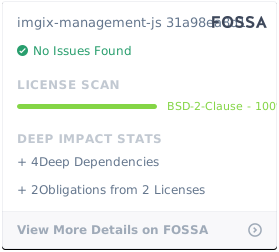](https://app.fossa.com/projects/git%2Bgithub.com%2Fimgix%2Fimgix-management-js?ref=badge_large)