https://github.com/imixs/imixs-process-manager
Imixs Business Process Manager
https://github.com/imixs/imixs-process-manager
bpmn bpmn-engine business-process-management worklfow
Last synced: 4 months ago
JSON representation
Imixs Business Process Manager
- Host: GitHub
- URL: https://github.com/imixs/imixs-process-manager
- Owner: imixs
- Created: 2020-06-26T06:46:55.000Z (almost 6 years ago)
- Default Branch: master
- Last Pushed: 2025-11-21T11:46:08.000Z (7 months ago)
- Last Synced: 2025-11-21T12:22:22.327Z (7 months ago)
- Topics: bpmn, bpmn-engine, business-process-management, worklfow
- Language: Java
- Homepage:
- Size: 18.8 MB
- Stars: 13
- Watchers: 3
- Forks: 11
- Open Issues: 2
-
Metadata Files:
- Readme: README.md
Awesome Lists containing this project
README
[](https://github.com/imixs/imixs-process-manager/actions/workflows/maven.yml)
[](https://github.com/imixs/imixs-workflow/discussions)
# The Imixs Process Manager
The digitization of business processes has become a key challenge for modern application design.
Essentially, you only need two things to do this.
- a process description - which you ideally create using the BPMN 2.0 standard
- a runtime environment - which allows you to execute and persist your process instances in a secure way
The Open Source project [Imixs-Workflow](http://www.imixs.org) provides you with an open and powerful workflow management platform that combines the design and the execution of business processes in a highly scalable and easy to use environment.
With the _Imixs Process Manager_ you can start quickly and develop and test your own business process. And of course you can customize and extend this platform and use it for development as well as for production.
## How to Install
The _Imixs Process Manager_ comes with a Docker profile which enables you to start within seconds. If you haven't already installed Docker, follow the instructions [here](https://docs.docker.com/get-docker/).
Download the [docker-compose.yml](https://raw.githubusercontent.com/imixs/imixs-process-manager/master/docker-compose.yml) file...
```yaml
version: "3.6"
services:
imixs-db:
image: postgres:13.11
environment:
POSTGRES_PASSWORD: adminadmin
POSTGRES_DB: workflow-db
volumes:
- dbdata:/var/lib/postgresql/data
imixs-app:
image: imixs/imixs-process-manager:latest
environment:
TZ: "CET"
LANG: "en_US.UTF-8"
JAVA_OPTS: "-Dnashorn.args=--no-deprecation-warning"
POSTGRES_USER: "postgres"
POSTGRES_PASSWORD: "adminadmin"
POSTGRES_CONNECTION: "jdbc:postgresql://imixs-db/workflow-db"
ports:
- "8080:8080"
- "8787:8787"
- "9990:9990"
volumes:
dbdata:
```
... and run
$ docker-compose up
After a few seconds the Imixs Process Manager is up and running. You can access it from your web browser at: [http://localhost:8080/](http://localhost:8080/)

You can upload your own process model and create customized forms. You can view and search running process instances.

## Authentication and Authorization
Imixs-Workflow is a human-centric workflow engine which means that each actor need to authenticate against the service to interact.
The _Imixs Process Manager_ provides a user and team management. The users are stored in a database and used for authentication.
If you first deploy the system the application will create a default user:
| User | Role | Password |
| ----- | ---------------------- | ---------- |
| admin | IMIXS-WORKFLOW-Manager | adminadmin |
For testing you can create the following additional test accounts to see the different behavior :
| User | Role | Password |
| ------- | ---------------------- | -------- |
| alex | IMIXS-WORKFLOW-Manager | password |
| marty | IMIXS-WORKFLOW-Author | password |
| melman | IMIXS-WORKFLOW-Author | password |
| gloria | IMIXS-WORKFLOW-Author | password |
| skipper | IMIXS-WORKFLOW-Reader | password |
You will find more information about the security concept in the [Imixs-Workflow Deployent guide](https://www.imixs.org/doc/deployment/index.html).
## Teams
You can group users to teams using the user/team management section.

Each team supports the roles 'Manager', 'Team' and 'Assist'. These teams are solved by the Plugin class `org.imixs.marty.team.TeamPlugin` if a team reference is assigned to a workitem named `space.ref`. You can see the example in the BPMN model 'ticket.bpmn'
## Process Design
You can define your own business process models using the [Imixs-BPMN modeller tool](https://www.imixs.org/doc/modelling/index.html) and you can upload and execute your models directly within Imixs Process Manager. General information about how to model can be found [here](https://www.imixs.org/doc/modelling/howto.html).
The Imixs Process Manager allows you to define custom forms for your business process without programming. By defining an XML template, you can store forms directly in a BPMN 2.0 model.
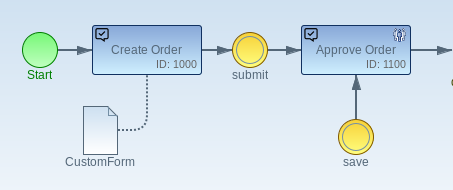
Example:
```xml
```
You can create and change your models at runtime without interrupting your workflow instance.
## Jakarta EE 10
**Note:** Imixs-Workflow and the Imixs-Process-Manager are based on [Jakarta EE 10](https://jakarta.ee/). The project is currently developed based on [Wildfly version 27.0.0.Final](https://wildfly.org).
## Build
To build the artifact from sources run:
$ mvn clean install
To build the new Docker Image run:
$ mvn clean install -Pdocker
To run Wildfly Server in debug mode (port 8787) you can build the Docker Image with:
$ mvn clean install -Pdebug
### Run
To start the Imixs-Process Manger with docker-compose, run:
$ docker-compose -f docker-compose-dev.yaml up
## Autodeploy & Hot Deploy
We use the [Manik Hot-Deploy Plugin](https://manik.imixs.org/) to auto deploy the application during development.
To update the deployment just run:
$ mvn install
During development of Jakarta EE Faces you can run the autodeploy mode to update your Web Frontend autoamtically:
$ mvn manik-hotdeploy:hotdeploy
In this mode the Manik-Plugin will detect updates of the Web Frontend and updates your running applicaton.
## Open Liberty
To run the application on the Open Liberty Application Server with Docker run:
$ mvn clean install -Pdocker-openliberty
$ docker-compose -f docker-compose-openliberty.yaml up
The application running on OpenLiberty is available from:
http://localhost:9080/
You can find the configuration details in the server section [OpenLiberty](/docker/configuration/openliberty/README.md)