https://github.com/immobiliare/backstage-plugin-gitlab
Backstage plugins to interact with GitLab
https://github.com/immobiliare/backstage-plugin-gitlab
backstage backstage-plugin gitlab gitlab-ci hacktoberfest plugin
Last synced: 4 months ago
JSON representation
Backstage plugins to interact with GitLab
- Host: GitHub
- URL: https://github.com/immobiliare/backstage-plugin-gitlab
- Owner: immobiliare
- License: apache-2.0
- Created: 2022-05-30T10:21:07.000Z (about 4 years ago)
- Default Branch: main
- Last Pushed: 2025-03-31T12:48:27.000Z (over 1 year ago)
- Last Synced: 2025-03-31T20:05:29.308Z (over 1 year ago)
- Topics: backstage, backstage-plugin, gitlab, gitlab-ci, hacktoberfest, plugin
- Language: TypeScript
- Homepage:
- Size: 7.93 MB
- Stars: 122
- Watchers: 6
- Forks: 44
- Open Issues: 10
-
Metadata Files:
- Readme: README.md
- Changelog: CHANGELOG.md
- Contributing: CONTRIBUTING.md
- License: LICENSE
- Codeowners: .github/CODEOWNERS
Awesome Lists containing this project
README

Backstage GitLab



> [Backstage](https://backstage.io/) plugins to interact with [GitLab](https://gitlab.com/)
> **Note:** This version works on Backstage 1.48+. If you are using an older version of Backstage, please use the older v4 of this plugin.
## Table of contents
- [Features](#features)
- [Screenshots](#screenshots)
- [Setup](#setup)
- [Requirements](#requirements)
- [Setup Frontend Plugin](#setup-frontend-plugin)
- [New Frontend System (Alpha)](#new-frontend-system-alpha)
- [Setup Backend Plugin](#setup-backend-plugin)
- [Extra OIDC/OAuth](#extra-oidcoauth)
- [Register To The New Backend System](#register-to-the-new-backend-system)
- [Annotations](#annotations)
- [Code owners file](#code-owners-file)
- [Old/New GitLab Versions](#oldnew-gitlab-versions)
- [Migration guides](#migration-guides)
- [Support & Contribute](#support--contribute)
- [License](#license)
## Features
- List top 20 builds for a project
- List top 20 Merge Requests for a project
- List top 20 Issues for a project
- List last releases
- View Code Owners for a project
- View Contributors for a project
- View Languages used for a project
- View Pipeline status for a project
- View README for a project (with partial support for GLFM)
- Works for both project and personal tokens
- Pagination for builds
- Pagination for Merge Requests
- Merge Requests Statistics
- Support for Olds/New GitLab APIs version
- Support for multi GitLab Instance
## Screenshots
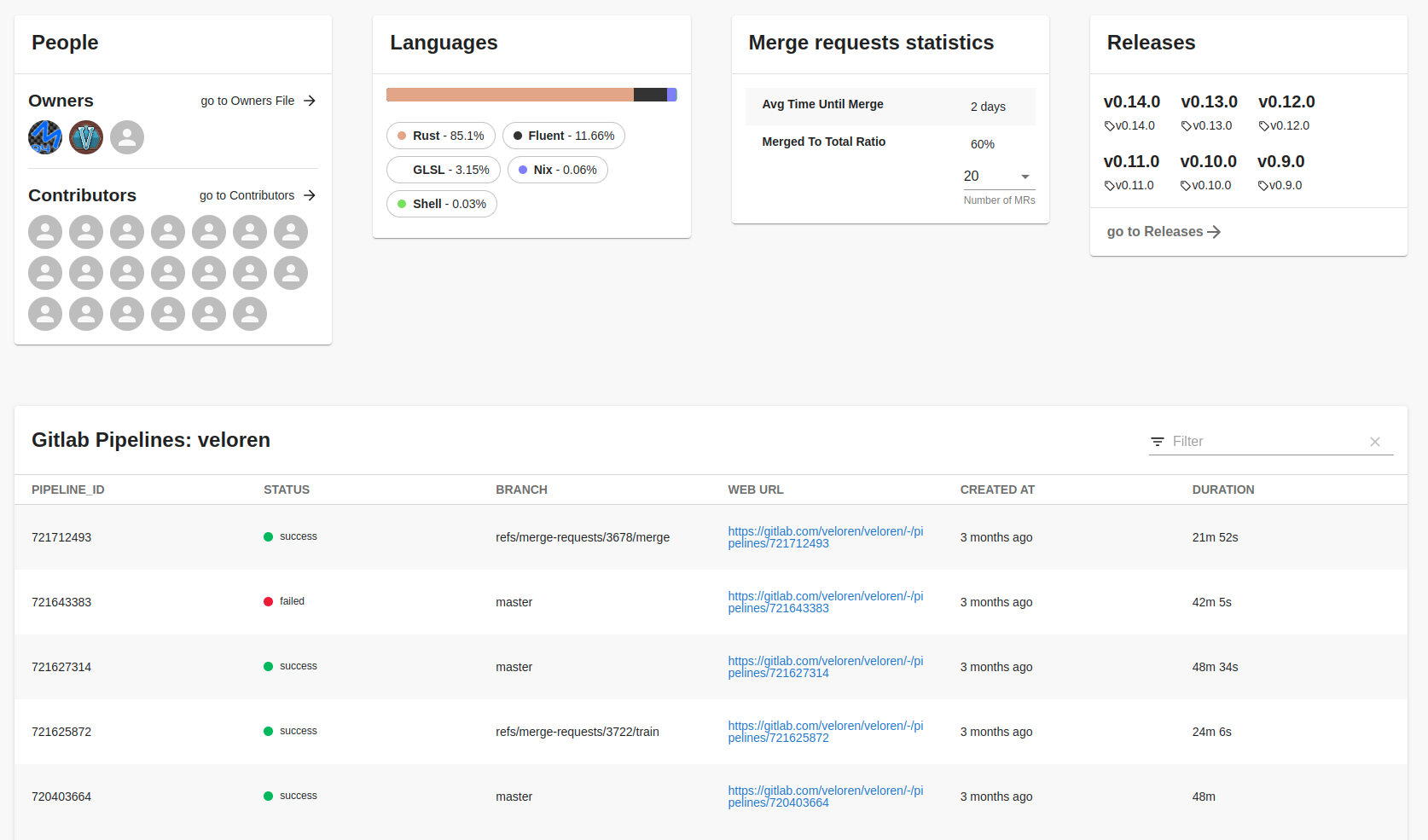
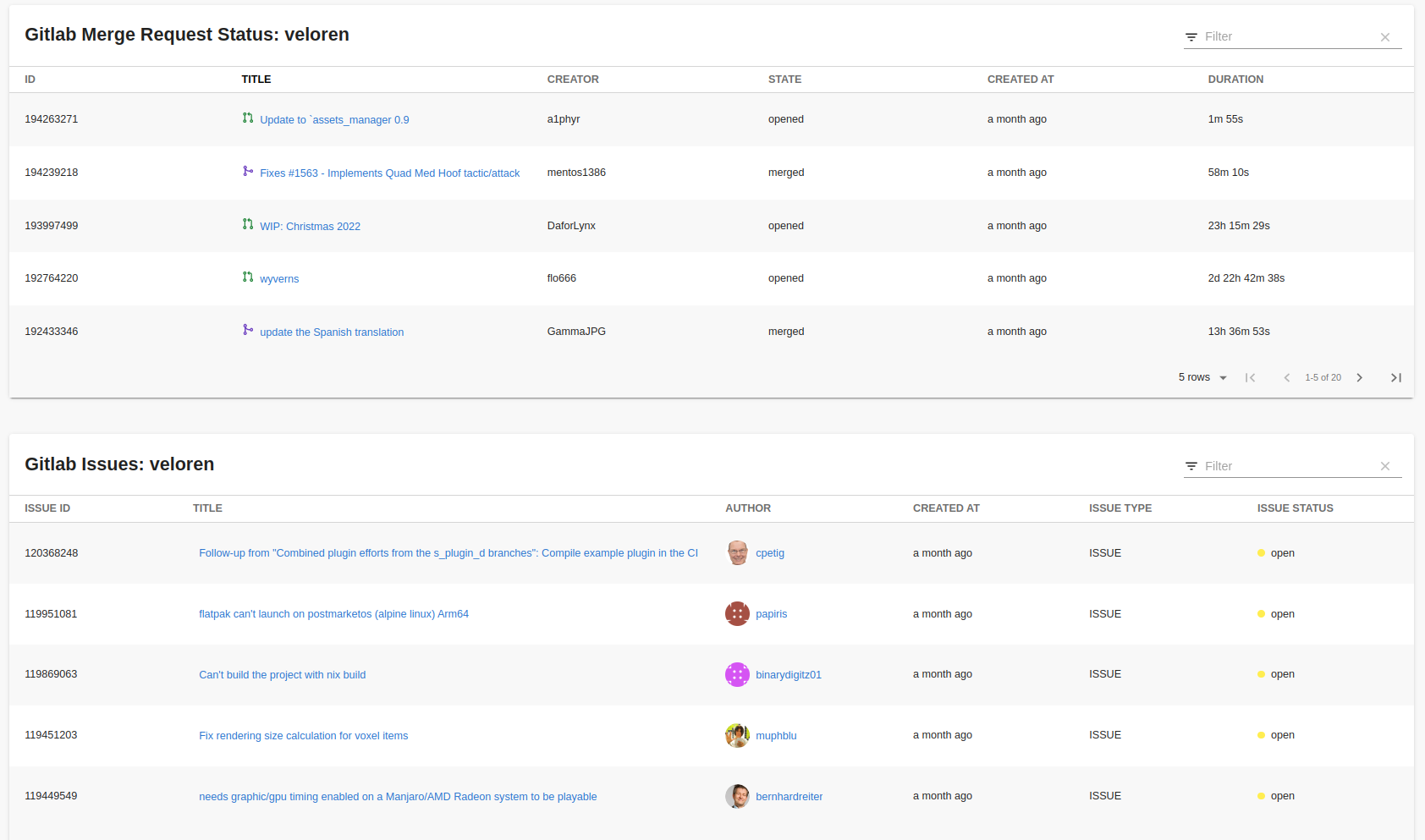
## Setup
1. Install packages:
```bash
# From your Backstage root directory
yarn --cwd packages/app add @immobiliarelabs/backstage-plugin-gitlab
yarn --cwd packages/backend add @immobiliarelabs/backstage-plugin-gitlab-backend
```
### Requirements
| Tool | Version | Notes |
| ---------- | ----------------------------------- | ------------------------------------------------------------ |
| Node.js | >=24.0.0 (pinned 24.14.1 via Volta) | See `engines` and `volta` in root `package.json` |
| Yarn | 4.3.1 (Berry) | `node-modules` linker — not PnP |
| TypeScript | ~6.0.2 | Strict mode; `noUnusedLocals`, `noUnusedParameters` enforced |
### Setup Frontend Plugin
1. Add a new GitLab tab to the entity page.
> NOTE: By default the EntityGitlabContent does not load the README, see the Optional section.
`packages/app/src/components/catalog/EntityPage.tsx`
```tsx
// packages/app/src/components/catalog/EntityPage.tsx
import {
isGitlabAvailable,
EntityGitlabContent,
} from "@immobiliarelabs/backstage-plugin-gitlab";
// Farther down at the serviceEntityPage declaration
const serviceEntityPage = (
{/* Place the following section where you want the tab to appear */}
);
```
> NOTE: CI uses **Node 24.x** (GitHub Actions `actions/setup-node`). Update `test.yml` when the Node version changes.
2. (**Optional**) Add the GitLab cards to the Overview tab on the entity page.
`packages/app/src/components/catalog/EntityPage.tsx`
```tsx
// packages/app/src/components/catalog/EntityPage.tsx
import {
isGitlabAvailable,
EntityGitlabContent,
EntityGitlabLanguageCard,
EntityGitlabMergeRequestsTable,
EntityGitlabMergeRequestStatsCard,
EntityGitlabPeopleCard,
EntityGitlabPipelinesTable,
EntityGitlabReadmeCard,
EntityGitlabReleasesCard,
} from "@immobiliarelabs/backstage-plugin-gitlab";
//Farther down at the overviewContent declaration
//You can add only selected widgets or all of them.
const overviewContent = (
);
```
3. Add the integration:
`app-config.yaml` add the integration for gitlab:
```yaml
integrations:
gitlab:
- host: gitlab.com
token: ${GITLAB_TOKEN}
```
**Note:** You can have more than one GitLab instance.
#### New Frontend System (Alpha)
The Gitlab plugin currently support the New Frontend System via an `/alpha` export, here's how to use it:
1. Install the frontend plugin:
```bash
# From your Backstage root directory
yarn --cwd packages/app add @immobiliarelabs/backstage-plugin-gitlab
```
2. If you have [Feature Discovery](https://backstage.io/docs/frontend-system/architecture/app#feature-discovery) enabled, no additional configuration is required. Otherwise, you should be able to enable the plugin in your `packages/app(-next)/src/App.tsx`:
```diff
+ import gitlabPlugin from '@immobiliarelabs/backstage-plugin-gitlab/alpha';
export const app = createApp({
features: [
catalogPlugin,
catalogImportPlugin,
userSettingsPlugin,
+ gitlabPlugin,
// ...
],
});
```
3. To display specific GitLab cards on the overview page, list them in your `app-config.yaml` under the `app.extensions` section. For example:
```yaml
app:
extensions:
- entity-card:gitlab/people
- entity-card:gitlab/languages
- entity-card:gitlab/merge-requests-stats
- entity-card:gitlab/releases
- entity-card:gitlab/coverage
- entity-card:gitlab/readme
```
Add or remove cards as needed to customize your overview page.
### Setup Backend Plugin
> NOTE: Currently backstage supports a new way to register backend plugins, see the [Register To The New Backend System](#register-to-the-new-backend-system) section.
1. Add the GitLab Filler Processor, this allows auto-filling of the annotations like the project id and slug:
`packages/backend/src/plugins/catalog.ts`
```ts
// packages/backend/src/plugins/catalog.ts
import { GitlabFillerProcessor } from "@immobiliarelabs/backstage-plugin-gitlab-backend";
export default async function createPlugin(
env: PluginEnvironment,
): Promise {
const builder = await CatalogBuilder.create(env);
//...
// Add this line
builder.addProcessor(new GitlabFillerProcessor(env.config));
//...
const { processingEngine, router } = await builder.build();
await processingEngine.start();
return router;
}
```
This allows auto-filling of the annotations.
2. Add the `gitlab` route by creating the file `packages/backend/src/plugins/gitlab.ts`:
`packages/backend/src/plugins/gitlab.ts`
```ts
// packages/backend/src/plugins/gitlab.ts
import { PluginEnvironment } from "../types";
import { Router } from "express-serve-static-core";
import { createRouter } from "@immobiliarelabs/backstage-plugin-gitlab-backend";
export default async function createPlugin(
env: PluginEnvironment,
): Promise {
return createRouter({
logger: env.logger,
config: env.config,
});
}
```
then you have to add the route as follows:
`packages/backend/src/index.ts`
```ts
// packages/backend/src/index.ts
import gitlab from "./plugins/gitlab";
async function main() {
//...
const gitlabEnv = useHotMemoize(module, () => createEnv("gitlab"));
//...
apiRouter.use("/gitlab", await gitlab(gitlabEnv));
//...
}
```
3. (**Optional**): You can also add plugin configurations in `app-config.yaml` file:
`app-config.yaml`
```yaml
# app-config.yaml
# ...
gitlab:
# Default path for CODEOWNERS file
# Default: CODEOWNERS
defaultCodeOwnersPath: .gitlab/CODEOWNERS
# Default path for README file
# Default: README.md
defaultReadmePath: .gitlab/README.md
# Entity Kinds to which the plugin works, if you want to render gitlab
# information for one Kind you have to add it in this list.
# Default: ['Component']
allowedKinds: ["Component", "Resource"]
# This parameter controls SSL Certs verification
# Default: true
proxySecure: false
# Activate Oauth/OIDC
# Default: false
useOAuth: false
# Cache configuration
cache:
# Enable caching for the Gitlab plugin
# Default: false
enabled: true
# Cache TTL for the Gitlab plugin in seconds
# Default: 300
ttl: 300
```
### Extra OIDC/OAuth
By default, this plugin utilizes the token specified in the configuration file `app-config.yaml` under the key: `integrations.gitlab[i].token`. However, you can opt out of using this token by activating OIDC as shown below:
```yaml
gitlab:
useOAuth: true
```
**Note:**: To use OIDC you have to configure the `@backstage/plugin-auth-backend-module-gitlab-provider` plugin.
**Note:**: OIDC does not allow multi GitLab instances!
### Register To The New Backend System
If you're already using the [New Backend System](https://backstage.io/docs/backend-system/), registering backend plugins will become much easier:
`packages/backend/src/index.ts`
```ts
// packages/backend/src/index.ts
import {
gitlabPlugin,
catalogPluginGitlabFillerProcessorModule,
} from "@immobiliarelabs/backstage-plugin-gitlab-backend";
async function start() {
const backend = createBackend();
// ...
backend.add(gitlabPlugin);
backend.add(catalogPluginGitlabFillerProcessorModule);
// ...
}
```
## Annotations
By default, the plugin automatically shows the project info corresponding to the location of the `catalog.yaml` file. But you could need some time to force another project, you can do it with the annotations `gitlab.com/project-id` or `gitlab.com/project-slug`:
```yaml
# Example catalog-info.yaml entity definition file
apiVersion: backstage.io/v1alpha1
kind: Component
metadata:
# ...
annotations:
gitlab.com/project-id: "project-id" #1234. This must be in quotes and can be found under Settings --> General
# or
gitlab.com/project-slug: "project-slug" # group_name/project_name
# or
gitlab.com/instance: gitlab.internal.abcd # abcd, represents local instance used
spec:
type: service
# ...
```
It's possible to disable the GitLab plugins and cards by setting these annotations to an empty string.
This is useful if the entity (catalog-info.yaml) is hosted on GitLab but the actual source code is hosted
somewhere else or GitLab isn't used for issue tracking.
```yaml
# Example catalog-info.yaml entity definition file
apiVersion: backstage.io/v1alpha1
kind: Component
metadata:
# ...
annotations:
gitlab.com/instance: "" # don't show the issue and merge requests cards
gitlab.com/project-slug: ""
spec:
type: service
# ...
```
### Code owners file
The plugins support also the `gitlab.com/codeowners-path` annotation:
```yaml
# Example catalog-info.yaml entity definition file
apiVersion: backstage.io/v1alpha1
kind: Component
metadata:
# ...
annotations:
# You can change the CODEOWNERS path
# if it is not passed default specified in `app-config.yaml` is used
gitlab.com/codeowners-path: "somewhere/CODEOWNERS"
spec:
type: service
# ...
```
## Old/New GitLab Versions
If you have an old GitLab version, or a new one, we allow you to extend the GitLab Client as follows:
`packages/app/src/api.ts`
```ts
import { GitlabCIApiRef } from "@immobiliarelabs/backstage-plugin-gitlab";
import { CustomGitlabCIClient } from "@immobiliarelabs/backstage-plugin-gitlab";
import { discoveryApiRef, configApiRef } from "@backstage/core-plugin-api";
import { CustomGitlabCIClient } from "packages/app/src/myCustomClient.ts";
export const apis: AnyApiFactory[] = [
createApiFactory({
api: GitlabCIApiRef,
deps: { configApi: configApiRef, discoveryApi: discoveryApiRef },
factory: ({ configApi, discoveryApi }) =>
CustomGitlabCIClient.setupAPI({
discoveryApi,
codeOwnersPath: configApi.getOptionalString(
"gitlab.defaultCodeOwnersPath",
),
readmePath: configApi.getOptionalString("gitlab.defaultReadmePath"),
}),
}),
];
```
`packages/app/src/myCustomClient.ts`
```ts
import { GitlabCIClient } from '@immobiliarelabs/backstage-plugin-gitlab';
export class CustomGitlabCIClient extends GitlabCIClient {
// Override methods
async getPipelineSummary(projectID: string | undefined): Promise {
this.callApi(...)
.
.
.
}
}
```
see [here](./packages/gitlab/src/api/GitlabCIClient.ts).
## Migration guides
If you have an old gitlab-plugin version, you can consult the [migration guide](./docs/migration-guides.md).
## Support & Contribute
Made with ❤️ by [ImmobiliareLabs](https://github.com/immobiliare) & [Contributors](./CONTRIBUTING.md#contributors)
We'd love for you to contribute to Backstage GitLab Plugin! [Here](./CONTRIBUTING.md) some tips on how to contribute.
If you have any questions on how to use Backstage GitLab Plugin, bugs and enhancement please feel free to reach out by opening a [GitHub Issue](https://github.com/immobiliare/backstage-plugin-gitlab/issues).
## License
This plugin is based on the original work of [loblaw-sre/backstage-plugin-gitlab](https://github.com/loblaw-sre/backstage-plugin-gitlab) by [satrox28](https://github.com/satrox28) and [balasundaram](https://github.com/Balasundaram)
This plugin is under [Apache 2.0 license](LICENSE), see [NOTICE](NOTICE) for copyright.