https://github.com/imnexerio/portfolio
This is a Portfolio website which populates it content from GitHub.
https://github.com/imnexerio/portfolio
automation github imnexerio portfolio-website protfolio
Last synced: 5 months ago
JSON representation
This is a Portfolio website which populates it content from GitHub.
- Host: GitHub
- URL: https://github.com/imnexerio/portfolio
- Owner: imnexerio
- License: agpl-3.0
- Created: 2025-04-16T12:37:54.000Z (over 1 year ago)
- Default Branch: main
- Last Pushed: 2026-02-01T13:52:09.000Z (6 months ago)
- Last Synced: 2026-02-01T23:27:17.608Z (6 months ago)
- Topics: automation, github, imnexerio, portfolio-website, protfolio
- Language: JavaScript
- Homepage: https://imnexerio.github.io/portfolio/
- Size: 3.6 MB
- Stars: 0
- Watchers: 1
- Forks: 0
- Open Issues: 0
-
Metadata Files:
- Readme: README.md
- License: LICENSE
Awesome Lists containing this project
README
# 🌟 Modern GitHub Portfolio Website







**A modern, responsive portfolio website that dynamically displays your GitHub projects and statistics**
> 💡 This portfolio is designed to showcase your skills, projects, and professional information in an elegant and interactive way.
---
## 📋 Table of Contents
- [✨ Features](#-features)
- [🖥️ Demo](#️-demo)
- [🚀 Quick Start](#-quick-start)
- [🔄 GitHub Actions Deployment](#-github-actions-deployment-recommended)
- [🛠️ Configuration](#️-configuration)
- [📋 Project Structure](#-project-structure)
- [🎨 Customization](#-customization)
- [🔧 Website Generator](#-website-generator)
- [📱 Responsive Design](#-responsive-design)
- [📑 README Preview](#-readme-preview)
- [🖼️ Modal Enhancements](#️-modal-enhancements)
- [🧪 Local Development](#-local-development-with-environment-variables)
- [📄 License](#-license)
- [🙏 Acknowledgements](#-acknowledgements)
---
## ✨ Features

GitHub Integration
Auto-fetch repositories, contributions & stats

Responsive Design
Works perfectly on all devices

Light/Dark Mode
Toggle between light and dark themes

Custom Themes
Multiple color themes available

Modern Effects
Parallax scrolling & 3D effects

Dynamic Profile Viewer
View any GitHub user's profile via URL
### 🔥 **NEW: Dynamic Profile Viewer**
View **any GitHub user's profile** using clean hash-based URLs:
```
https://yoursite.com/#octocat → View Octocat's profile
https://yoursite.com/#torvalds → View Linus Torvalds' profile
https://yoursite.com/ → View default profile
```
**Alternative formats also supported:**
```
https://yoursite.com/#user=octocat → Explicit hash format
https://yoursite.com/?user=octocat → Query parameter format
```
**Features:**
- ✅ Real-time GitHub data fetching for any user
- ✅ Clean hash-based URLs (e.g., `#octocat`)
- ✅ Automatic error handling for non-existent users
- ✅ Security validation to prevent malicious input
- ✅ Guest profile indicator showing whose profile is being viewed
- ✅ Social links hidden for guest profiles (privacy)
- ✅ Generated portfolios are locked to owner (no URL override)
- ✅ Works on all static hosting platforms (GitHub Pages, Netlify, Vercel)
**Note:** The demo site allows dynamic viewing, but portfolios generated via the website generator are locked to the owner's profile for security.
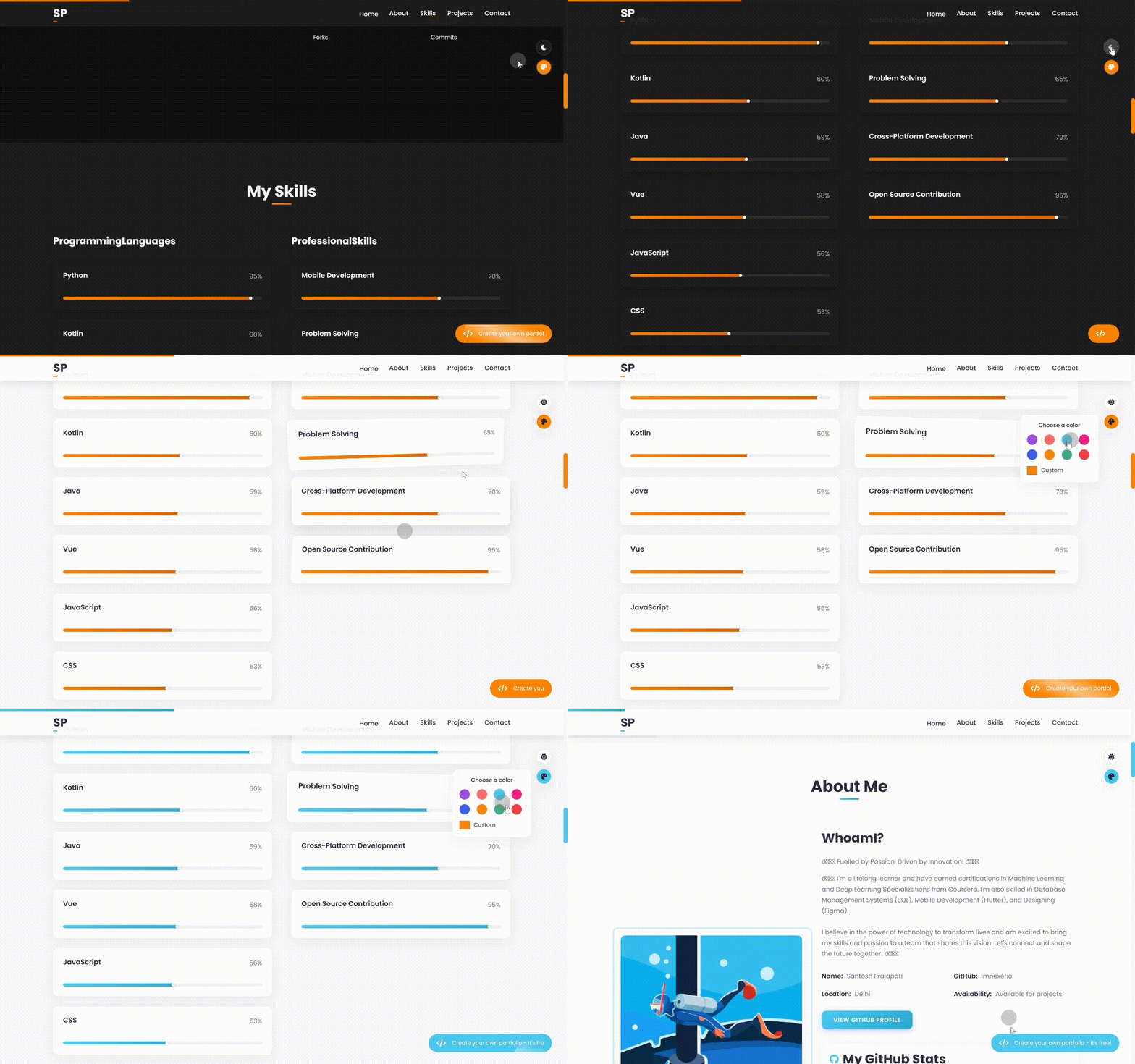
## 🖥️ Demo

## 🚀 Quick Start
- Clone this repository
git clone https://github.com/imnexerio/portfolio.git
- Open
js/github-config.js and update your GitHub username
- Customize your personal information in the profile sections
- Deploy to your preferred hosting service (GitHub Pages, Netlify, Vercel, etc.)
## 🔄 GitHub Actions Deployment (Recommended)
This portfolio includes a GitHub Actions workflow for automatic deployment to GitHub Pages:
1. Fork this repository
2. Go to your repository's Settings > Secrets and variables > Actions
3. Add a new repository secret named `PAT_GITHUB` with your GitHub token
4. Add another secret named `FORMSPREE_ID` with your Formspree form ID (see Contact Form setup below)
5. Add a secret named `GOOGLE_VERIFICATION_CONTENT` with your Google site verification code (without the .html extension)
6. Go to Settings > Pages and set the source to "GitHub Actions"
7. Any push to the main branch will automatically deploy your portfolio
The deployment workflow will:
- Build and deploy your site to GitHub Pages
- Make your PAT_GITHUB and FORMSPREE_ID tokens available during the build process
- Create your Google site verification file for Search Console verification
- Keep your tokens secure by using GitHub's secret management
## 📞 Contact Form Setup
The contact form uses [Formspree](https://formspree.io) to handle form submissions:
1. Sign up at [Formspree.io](https://formspree.io)
2. Create a new form and get your form ID (it looks like `abcdefgh`)
3. Set up the form ID in **one** of these ways:
**For GitHub Actions deployment:**
- Add a repository secret named `FORMSPREE_ID` with your form ID
**For manual deployment:**
- Open `index.html` and update the contact form with your Formspree ID:
```html
```
**For local development:**
- Create a `.env` file in the root directory:
```
PAT_GITHUB=your_github_personal_access_token
FORMSPREE_ID=your_formspree_id
```
## 🔍 Setting Up Google Site Verification
Adding your site to Google Search Console requires verifying ownership through a verification file.
1. **Get Your Google Verification Code**:
- Go to [Google Search Console](https://search.google.com/search-console/welcome)
- Enter your website URL (e.g., `https://yourusername.github.io/portfolio`)
- Choose "HTML file" verification method
- Google will provide a verification filename that looks like: `google1234567890abcdef.html`
- Note down the filename **without** the `.html` extension (e.g., `google1234567890abcdef`)
2. **Add as GitHub Secret**:
- Go to your GitHub repository
- Navigate to Settings > Secrets and Variables > Actions
- Click on "New repository secret"
- Name: `GOOGLE_VERIFICATION_CONTENT`
- Value: Your verification code (without `.html` extension)
- Click "Add secret"
3. **How It Works**:
- The GitHub Actions workflow automatically creates your verification file during deployment
- The file will be created at the root of your site with the correct content
- Google Search Console can then verify your ownership of the site
4. **Troubleshooting**:
- If verification fails, ensure the code is entered correctly without the `.html` extension
- Check that the workflow ran successfully and deployed your site
- Verify the file exists by visiting `https://yourusername.github.io/portfolio/google1234567890abcdef.html`
## 🛠️ Configuration
### GitHub Integration
Edit the `js/github-config.js` file to set your GitHub username:
```javascript
// Private GitHub credentials
const _username = 'your-github-username';
// Leave token empty - use GitHub Actions workflow for secure deployment
const _token = ''; // Token should be set as PAT_GITHUB in GitHub repository secrets
```
> **Security Best Practice**: Never include your GitHub token directly in code. Use the GitHub Actions workflow to securely use your token from repository secrets.
### Social Links
Configure your social media links in `js/social-links.js`:
```javascript
const socialLinks = [
{ platform: 'github', url: 'https://github.com/your-username' },
{ platform: 'linkedin', url: 'https://linkedin.com/in/your-profile' },
// Add more platforms as needed
];
```
## 📋 Project Structure
Click to expand file structure
```
portfolio/
├── index.html # Main HTML file
├── css/ # Styling files
│ ├── modern-styles.css # Base styles
│ ├── advanced-animations.css # Animation effects
│ ├── wow-effects.css # Scroll effects
│ ├── consolidated-responsive.css # Responsive design
│ ├── github-stats.css # GitHub statistics styling
│ ├── github-readme.css # GitHub README styling
│ └── website-generator.css # Generator styling
├── js/ # JavaScript files
│ ├── github-config.js # GitHub configuration
│ ├── github-stats.js # GitHub data fetching and display
│ ├── optimized-main.js # Main functionality
│ ├── social-links.js # Social media links handler
│ ├── readme-preview.js # README rendering functionality
│ ├── modal-override.js # Enhanced modal functionality
│ ├── env-loader.js # Environment variables loader
│ └── website-generator.js # Portfolio generator
└── LICENSE # AGPL License file
```
## 🎨 Customization
### Themes
The portfolio includes several built-in themes:
- Light theme (default)
- Dark theme
- Multiple custom color options
To change the default theme, modify the `data-theme` attribute in the HTML tag:
```html
```
### Sections
The portfolio includes the following sections:
- Hero/Introduction
- About Me
- Skills & Expertise
- Projects (automatically populated from GitHub)
- GitHub Statistics
- Contact Information
Each section can be customized or hidden based on your preferences.
## 🔧 Website Generator
This portfolio includes a built-in generator that allows visitors to create their own customized version. The generator:
1. Collects user information
2. Customizes the portfolio with that information
3. Generates a downloadable ZIP file with the complete website
## 📱 Responsive Design
The portfolio is fully responsive and optimized for:
- Desktop screens
- Tablets
- Mobile devices
## 📑 README Preview
The new README preview feature allows for:
- Live rendering of GitHub README files directly in project cards
- Support for GitHub-flavored markdown syntax
- Syntax highlighting for code blocks
- Automatic rendering of tables, images, and other markdown elements
- Custom styling that matches GitHub's appearance
To use this feature:
```javascript
// The README content is automatically loaded from your GitHub repositories
// No additional configuration required!
```
## 🖼️ Modal Enhancements
The enhanced modal system provides:
- Smooth open/close animations
- Keyboard navigation (Escape to close, arrow keys for navigation)
- Touch-friendly swipe gestures on mobile
- Dynamic content loading
- Responsive layout that works on all screen sizes
- Advanced image gallery for project screenshots
## 🧪 Local Development with Environment Variables
This portfolio uses an environment variable loader system for secure local development:
### 🔐 Using env-loader.js
The `env-loader.js` file provides a secure way to use GitHub authentication and Formspree integration during local development without exposing your sensitive data in committed code:
```javascript
// Environment Variable Loader for Local Development
window.env = window.env || {};
function setupEnv() {
// Only set environment variables in local development environments
if (window.location.hostname === 'localhost' ||
window.location.hostname === '127.0.0.1') {
console.log('Local development environment detected');
// Set your GitHub token for local testing
window.env.PAT_GITHUB = 'your_github_token_here';
// Set your Formspree ID for local testing
window.env.FORMSPREE_ID = 'your_formspree_id_here';
Object.keys(window.env).forEach(key => {
console.log(`Loaded env variable: ${key}`);
});
}
}
setupEnv();
```
### 🚀 Setup Instructions
1. Edit the `js/env-loader.js` file and:
- Replace `'your_github_token_here'` with your actual GitHub token
- Replace `'your_formspree_id_here'` with your Formspree form ID
2. Start your local development server:
```bash
# Using Python's built-in server
python -m http.server 8000
# Using Node.js http-server (install with: npm install -g http-server)
http-server
# Or use VS Code's Live Server extension
```
3. Open your browser to the local development URL (e.g., `http://localhost:8000` or `http://127.0.0.1:5500`)
### 🛡️ Security Features
- **Environment Detection**: Automatically detects local development environments (localhost/127.0.0.1)
- **Console Logging**: Provides feedback when environment variables are successfully loaded
- **Git Protection**: The file is included in `.gitignore` by default to prevent accidental token exposure
### 📧 Setting Up Formspree for Contact Form
The contact form uses [Formspree](https://formspree.io) to handle submissions without requiring backend code.
1. **Create a Formspree Account**:
- Go to [Formspree.io](https://formspree.io)
- Sign up for an account (the free tier allows 50 submissions per month)
2. **Create a New Form**:
- After logging in, click on "New Form"
- Give your form a name (e.g., "Portfolio Contact Form")
- Choose the email address where you want to receive form submissions
3. **Get Your Form ID**:
- After creating the form, you'll see a form endpoint URL that looks like this:
`https://formspree.io/f/xxxxxxxx`
- The part after "/f/" is your form ID (xxxxxxxx)
4. **Configure for Local Development**:
- Open `js/env-loader.js` in your portfolio
- Update the line `window.env.FORMSPREE_ID = 'your_formspree_id_here';`
- Replace 'your_formspree_id_here' with your actual Formspree ID
5. **Configure for Production Deployment**:
- Go to your GitHub repository
- Navigate to Settings > Secrets and Variables > Actions
- Click on "New repository secret"
- Name: `FORMSPREE_ID`
- Value: Your Formspree form ID
- Click "Add secret"
6. **Troubleshooting**:
- If the form isn't working, check that you've entered the correct form ID
- Ensure your Formspree account is active
- Check for JavaScript console errors
- For more help, visit [Formspree's documentation](https://formspree.io/docs/)
## 📄 License
This project is licensed under the [GNU Affero General Public License v3.0](LICENSE) (AGPL-3.0)

## 🙏 Acknowledgements



---
Built with ❤️ by [IMNEXERIO](https://github.com/imnexerio)