https://github.com/infinit/dokan
User mode file system library for windows with FUSE Wrapper (forked from https://github.com/dokan-dev/dokany)
https://github.com/infinit/dokan
Last synced: 10 months ago
JSON representation
User mode file system library for windows with FUSE Wrapper (forked from https://github.com/dokan-dev/dokany)
- Host: GitHub
- URL: https://github.com/infinit/dokan
- Owner: infinit
- Created: 2016-11-14T12:02:58.000Z (over 9 years ago)
- Default Branch: master
- Last Pushed: 2017-08-17T12:13:56.000Z (almost 9 years ago)
- Last Synced: 2025-10-12T08:34:03.533Z (10 months ago)
- Language: C
- Homepage: http://dokan-dev.github.io
- Size: 2.65 MB
- Stars: 1
- Watchers: 4
- Forks: 2
- Open Issues: 1
-
Metadata Files:
- Readme: README.md
- Changelog: CHANGELOG.md
- License: license.lgpl.txt
Awesome Lists containing this project
README
# Dokany
[](https://ci.appveyor.com/project/Maxhy/dokany/branch/master)
[](https://scan.coverity.com/projects/6789)
|
[](https://www.bountysource.com/teams/dokan-dev/issues)
[](https://www.paypal.com/cgi-bin/webscr?cmd=_donations&business=dev@islog.com&lc=US&item_name=Dokany¤cy_code=USD&bn=PP%2dDonationsBF%3abtn_donateCC_LG%2egif%3aNonHosted "Donate!")
|
[](http://isitmaintained.com/project/dokan-dev/dokany "Average time to resolve an issue")
[](http://isitmaintained.com/project/dokan-dev/dokany "Percentage of issues still open")
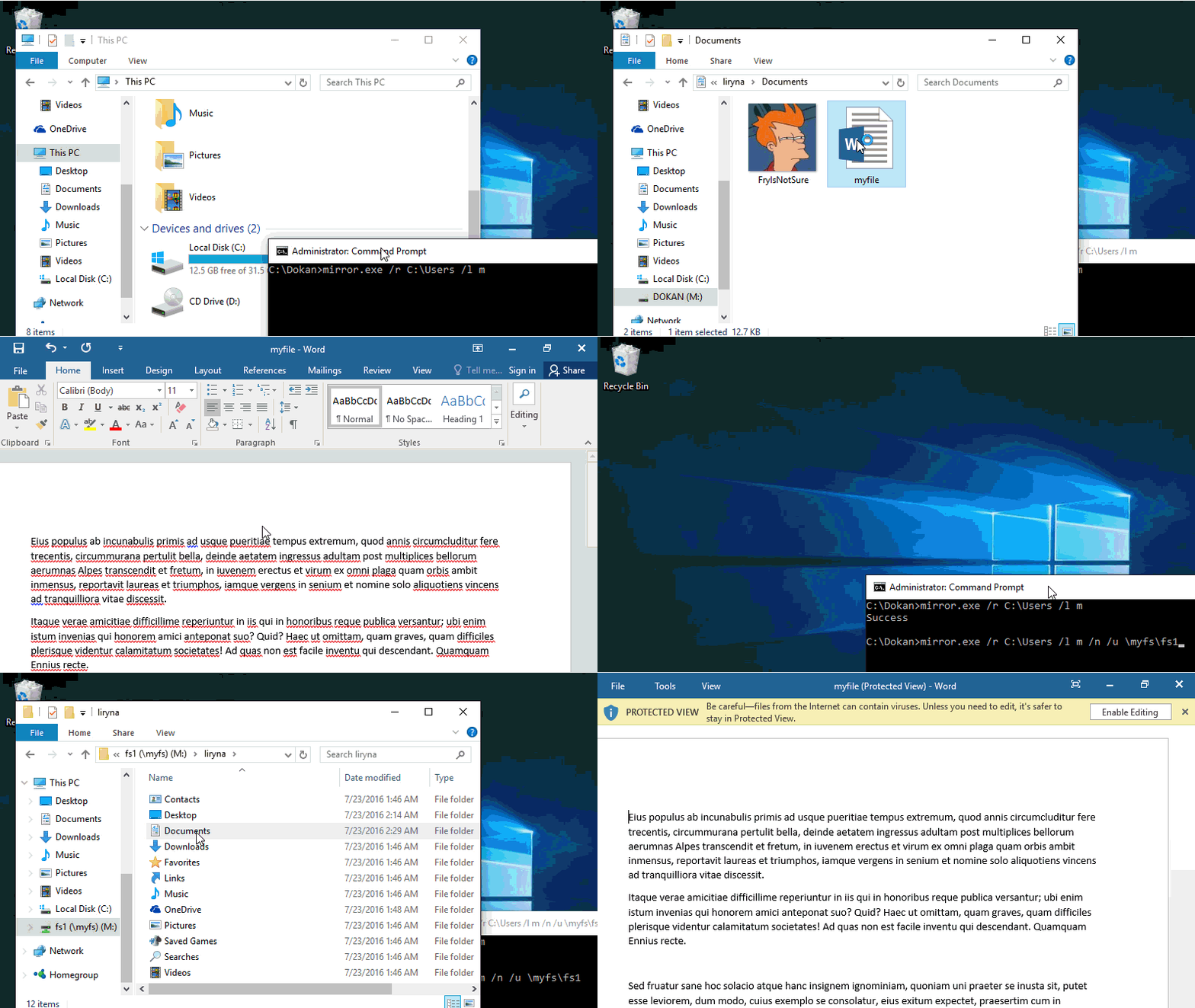
## What is Dokan
When you want to create a new file system on Windows, other than FAT or NTFS, you need to develop a file system
driver. Developing a device driver that works in kernel mode on
windows is extremely technical. By using Dokan, you can create
your own file systems very easily without writing device drivers. Dokan
is similar to FUSE (Linux file system in user space) but works on Windows.
Moreover dokany include a [FUSE wrapper](https://github.com/dokan-dev/dokany/wiki/FUSE) that help you to port your FUSE filesystems without changes
## What is Dokany
*Dokany is a fork of Dokan 0.6.0 with bug fixes, clean change history and updated to build with latest tools.*
Because the original Dokan Legacy (< 0.6.0) project is no longer maintained.
Since version 0.8.0, dokany break dokan API compatibility.
See [Choose a version](https://github.com/dokan-dev/dokany/wiki/Installation#choose-a-version) for more informations.
**Signed x86 / x64 drivers** are provided at each release.
## Licensing
Dokan contains LGPL and MIT licensed programs.
- user-mode library (dokan1.dll) LGPL
- driver (dokan1.sys) LGPL
- network library (dokannp1.dll) LGPL
- fuse library (dokanfuse1.dll) LGPL
- installer (DokanSetup.exe) LGPL
- control program (dokanctl.exe) MIT
- samples (mirror.c) MIT
For details, please check license files.
* **LGPL** license.lgpl.txt
* **MIT** license.mit.txt
You can obtain source files from https://dokan-dev.github.io
## Environment
Dokan works on
* Windows 10
* Windows Server 2012 R2
* Windows 8.1
* Windows Server 2012
* Windows 8
* Windows Server 2008 R2 SP1
* Windows 7 SP1
## How it works
Dokan library contains a user mode DLL (dokan1.dll) and a kernel mode
file system driver (dokan1.sys). Once Dokan file system driver is
installed, you can create file systems which can be seen as normal
file systems in Windows. The application that creates file systems
using Dokan library is called File system application.
File operation requests from user programs (e.g., CreateFile, ReadFile,
WriteFile, ...) will be sent to the Windows I/O subsystem (runs in kernel
mode) which will subsequently forward the requests to the Dokan file system
driver (dokan1.sys). By using functions provided by the Dokan user mode
library (dokan1.dll), file system applications are able to register
callback functions to the file system driver. The file system driver
will invoke these callback routines in order to response to the
requests it received. The results of the callback routines will be
sent back to the user program.
For example, when Windows Explorer requests to open a directory, the
CreateFile with Direction option request will be sent to Dokan file system
driver and the driver will invoke the CreateFile callback provided by
the file system application. The results of this routine are sent back
to Windows Explorer as the response to the CreateFile request. Therefore,
the Dokan file system driver acts as a proxy between user programs and
file system applications. The advantage of this approach is that it allows
programmers to develop file systems in user mode which is safe and
easy to debug.
To learn more about Dokan file system development, see the [API documentation](https://dokan-dev.github.io/dokany-doc/html/).
## Build
In short, download and install the [Visual Studio 2015](https://www.visualstudio.com/en-us/downloads/download-visual-studio-vs.aspx) with [SDK 10](https://dev.windows.com/en-us/downloads/windows-10-sdk) & [WDK 10](https://msdn.microsoft.com/en-us/windows/hardware/hh852365.aspx)
For details, see the [build page](https://github.com/dokan-dev/dokany/wiki/Build).
## Installation
For manual installation, see the [installation page](https://github.com/dokan-dev/dokany/wiki/Installation).
## Contribute
You want Dokan to get better? Contribute!
Learn the code and suggest your changes on [GitHub repository](https://github.com/dokan-dev).
Detect defects and report them on [GitHub issue tracker](https://github.com/dokan-dev/dokany/issues).
Ask and answer questions on [Google discussion group](https://groups.google.com/forum/#!forum/dokan).