https://github.com/infinitypaul/laravel-uptime
Keep track of critical endpoints with this command-line uptime monitor. Add an endpoint, set a frequency and listen to an event if something goes down.
https://github.com/infinitypaul/laravel-uptime
Last synced: over 1 year ago
JSON representation
Keep track of critical endpoints with this command-line uptime monitor. Add an endpoint, set a frequency and listen to an event if something goes down.
- Host: GitHub
- URL: https://github.com/infinitypaul/laravel-uptime
- Owner: infinitypaul
- License: mit
- Created: 2020-08-16T12:53:20.000Z (almost 6 years ago)
- Default Branch: master
- Last Pushed: 2020-08-16T14:37:52.000Z (almost 6 years ago)
- Last Synced: 2025-02-28T07:36:51.818Z (over 1 year ago)
- Language: PHP
- Size: 93.8 KB
- Stars: 7
- Watchers: 2
- Forks: 2
- Open Issues: 0
-
Metadata Files:
- Readme: README.md
- Changelog: CHANGELOG.md
- Contributing: CONTRIBUTING.md
- License: LICENSE.md
Awesome Lists containing this project
README
# Laravel Uptime - Stay Up And Running
[](https://packagist.org/packages/infinitypaul/laravel-uptime)
[](https://travis-ci.org/infinitypaul/laravel-uptime)
[](https://scrutinizer-ci.com/g/infinitypaul/laravel-uptime)
[](https://packagist.org/packages/infinitypaul/laravel-uptime)
Keep track of critical endpoints with this command-line uptime monitor. Add an endpoint, set a frequency and listen to an event if something goes down.
## Installation
You can install the package via composer:
```bash
composer require infinitypaul/laravel-uptime
```
## Configuration
To publish Uptime's configuration and migration files, run the vendor:publish command.
``` php
php artisan vendor:publish --provider="Infinitypaul\LaravelUptime\LaravelUptimeServiceProvider"
```
This will create a uptime.php in your config directory. The default configuration should work just fine for you, but you can take a look at it, if you want to customize the table / model names Uptime will use
Run the migration command, to generate all tables needed for Uptime.
```
php artisan migrate
```
After the migration, 2 new tables will be created:
* endpoints - stores endpoint records
* statuses - store the ping status of the endpoint
### Commands
Once Package is Installed, The Following Commands Will Be Available To You
| Command | Descriptions | Argument | Options
|----------|:-------------:|------:|------:|
| endpoint:add | Add An Endpoint To Monitor | url eg: https://infinitypaul.com | Frequency in Minutes eg 20, default is 5 |
| endpoint:remove | Remove An Endpoint | id of the end endpoint eg 2 | null |
| uptime:status | Display The Status Of All Endpoint | null | force : check for the status of the endpoint and display as well
| uptime:run | Run The Whole Endpoint To Get Status | null | force : get an immediate response of the endpoint irrespective of the minutes
## Add An Endpoint
``` bash
php artisan endpoint:add https://infinitypaul.com -f 5
```
Add Infinitypaul.com as a frequency of 5
``` bash
php artisan endpoint:add own -f 5
```
Add The Base URL of your laravel project
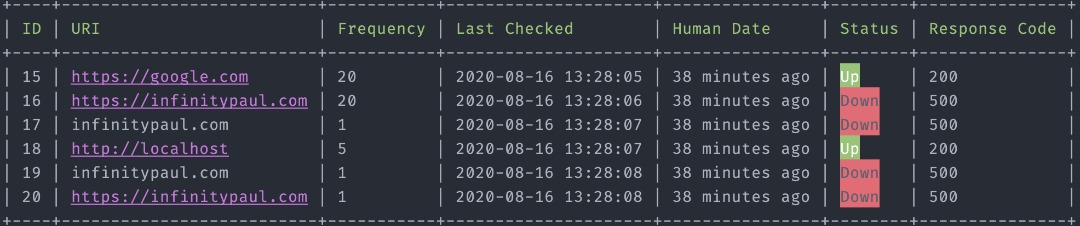
## Display All Endpoint
```bash
php artisan uptime:status
```
Display All the Endpoint And Status In A Beautiful Table
```bash
php artisan uptime:status --force
```
Check The Status Of The Endpoint Irrespective Of Their Frequency And Display As Well
## Remove An Endpoint
```bash
php artisan endpoint:remove
```
Remove An Endpoint From The List Of EndPoint To Be Monitored
## Ping All Endpoint
```bash
php artisan uptime:run
```
Ping All The Endpoint And Get The Up Or Down Status In Order Of Their Frequency
```bash
php artisan uptime:run --force
```
Ping All The Endpoint And Get The Up Or Down Status Irrespective Of Their Frequency
### Scheduling
You can add the run command in your task scheduling to run every minute
```
php artisan uptime:run
```
### Endpoints Down/Up Events
If you need to run additional processes when an endpoint is down or back up, you can Listen for these events:
```
\Infinitypaul\LaravelUptime\Events\EndpointIsBackUp
\Infinitypaul\LaravelUptime\Events\EndpointIsDown
```
In your `EventServiceProvider` add your listener(s):
```php
/**
* The event listener mappings for the application.
*
* @var array
*/
protected $listen = [
...
\Infinitypaul\LaravelUptime\Events\EndpointIsBackUp::class => [
App\Listeners\URLIsBack::class,
],
\Infinitypaul\LaravelUptime\Events\EndpointIsDown::class => [
App\Listeners\YourEndPointIsDown::class,
],
];
```
The EndpointIsBackUp and EndpointIsDown event exposes the Endpoint and Status. In your listener, you can access them like so:
```php
getEndpointStatus();
// $EndpointDetails = $event->getEndpoint();
// Do something with the Endpoint and Status.
}
}
```
## How can I thank you?
Why not star the github repo? I'd love the attention! Why not share the link for this repository on Twitter or HackerNews? Spread the word!
Don't forget to [follow me on twitter](https://twitter.com/infinitypaul)!
Thanks!
Edward Paul.
## License
The MIT License (MIT). Please see [License File](LICENSE.md) for more information.