https://github.com/inflex/bk-390a
BK Precision 390A Series multimeter CLI data capture software for OBS/logging
https://github.com/inflex/bk-390a
Last synced: about 1 year ago
JSON representation
BK Precision 390A Series multimeter CLI data capture software for OBS/logging
- Host: GitHub
- URL: https://github.com/inflex/bk-390a
- Owner: inflex
- License: bsd-3-clause
- Created: 2018-01-28T02:43:41.000Z (over 8 years ago)
- Default Branch: master
- Last Pushed: 2021-08-16T16:37:05.000Z (almost 5 years ago)
- Last Synced: 2025-03-29T05:12:23.774Z (about 1 year ago)
- Language: C
- Size: 2.99 MB
- Stars: 26
- Watchers: 9
- Forks: 8
- Open Issues: 1
-
Metadata Files:
- Readme: README.md
- License: LICENSE
Awesome Lists containing this project
README
# PREFACE
This software is still in the early beta phase but has been tested and seems to be working fine now, particularly the win-bk390a GUI version.
A linux version of this software would be very easy to make, the only change would be the serial port related code (setup and data acquisition).
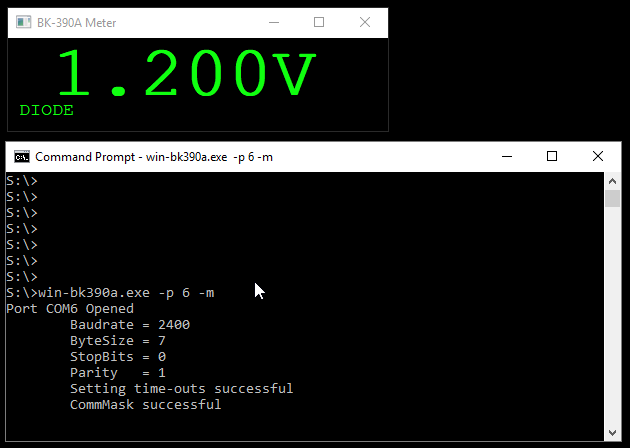
# BK-390A
win-bk390a.exe - GUI windowed application
bk390a.exe - BK Precision 390A Series multimeter CLI data capture software for OBS/logging on Windows
# Requirements
If you want to build this software on Windows, you'll require MinGW https://sourceforge.net/projects/mingw-w64/
# Setup
1) Build win-bk390a or bk390a ( Linux mingw64 install required, or mingw64 for Windows)
make win-bk390a
(or)
make bk390a
An example of compiling on Windows using mingw-w64 would be:
mingw32-make -f Makefile.win win-bk390a
2) Run from the command line
win-bk390a.exe -p 4 -m
The program will display in text the current meter display and also generate a text file called "bk390a.txt" which can be read in to programs like OpenBroadcaster so you can have a live on-screen-display of the multimeter.
# Usage
win-bk390a [-p ] [-s ] [-m] [-fn ] [-fc <#rrggbb>] [-fw ] [-bc <#rrggbb>] [-wx ] [-wy ] [-d] [-q]
-h: This help
-p : Set the com port for the meter, eg: -p 2
-s <[9600|4800|2400|1200]:[7|8][o|e|n][1|2]>, eg: -s 2400:7o1
-m: show multimeter mode (second line of text)
-z: Font size (default 72, max 256pt)
-fn : Font name (default 'Andale')
-fc <#rrggbb>: Font colour
-bc <#rrggbb>: Background colour
-fw : Font weight, typically 100-to-900 range
-wx : Force Window width (normally calculated based on font size)
-wy : Force Window height
-d: debug enabled
-q: quiet output
-v: show version
Defaults: -s 2400:7o1 -z 72 -fc #10ff10 -bc #000000 -fw 600 -fn Andale
example: win-bk390a.exe -z 120 -p 4 -m -fc #ff1010 -bc #000000 -fw 600
bk390a.exe -p [-s ] [-t] [-o ] [-l ] [-m] [-d] [-q]
BK-Precision 390A Multimeter serial data decoder
By Paul L Daniels / pldaniels@gmail.com
v0.1Alpha / January 27, 2018
-h: This help
-p : Set the com port for the meter, eg: -p 2
-s <[9600|4800|2400|1200]:[7|8][o|e|n][1|2]>, eg: -s 2400:7o1
-t: Generate a text file containing current meter data (default to bk390a.txt)
-o : Set the filename for the meter data ( overrides 'bk390a.txt' )
-l : Set logging and the filename for the log
-d: debug enabled
-m: show multimeter mode
-q: quiet output
-v: show version
example: bk390a.exe -p 2 -t -o obsdata.txt