https://github.com/infrablocks/terraform-aws-vpc-auto-peering-lambda
Terraform module for automatically peering VPCs
https://github.com/infrablocks/terraform-aws-vpc-auto-peering-lambda
aws lambda peering terraform terraform-modules vpc
Last synced: 10 months ago
JSON representation
Terraform module for automatically peering VPCs
- Host: GitHub
- URL: https://github.com/infrablocks/terraform-aws-vpc-auto-peering-lambda
- Owner: infrablocks
- License: mit
- Created: 2017-06-06T09:17:44.000Z (about 9 years ago)
- Default Branch: main
- Last Pushed: 2025-04-22T18:56:17.000Z (over 1 year ago)
- Last Synced: 2025-08-11T14:43:53.430Z (12 months ago)
- Topics: aws, lambda, peering, terraform, terraform-modules, vpc
- Language: Python
- Homepage:
- Size: 617 KB
- Stars: 8
- Watchers: 12
- Forks: 2
- Open Issues: 5
-
Metadata Files:
- Readme: README.md
- Changelog: CHANGELOG.md
- License: LICENSE.txt
- Code of conduct: CODE_OF_CONDUCT.md
Awesome Lists containing this project
README
Terraform AWS VPC Auto Peering Lambda
=====================================
[](https://circleci.com/gh/infrablocks/terraform-aws-vpc-auto-peering-lambda)
A Terraform module for automatically peering VPCs based on dependency
information stored in tags.
The VPC auto peering lambda requires:
* An SNS topic which receives events whenever a VPC is created or destroyed
* A role to assume in order to create or destroy the peering connection and
routes
The VPC auto peering lambda consists of:
* A lambda function which responds to VPC lifecycle events on the SNS topic
* A subscription to the SNS topic
* IAM roles and policies allowing the lambda to function
The VPC auto peering lambda:
* automatically configures VPC peering both within and across regions and both
within and across accounts; and
* configures unidirectional or bidirectional routing between the peered VPCs, as
required.
Architecture
------------
The VPC auto-peering lambda automatically creates peering connections and routes
between VPCs based on relationships declared by each VPC via tags. In order to
achieve this, the lambda needs to know when VPCs are provisioned and destroyed.
Since AWS doesn't provide any built in events for VPC lifecycle, the lambda
relies on an alternative approach for such events, as provided by the
[`terraform-aws-vpc-lifecycle-event`](https://github.com/infrablocks/terraform-aws-vpc-lifecycle-event)
and
[`terraform-aws-infrastructure-events`](https://github.com/infrablocks/terraform-aws-infrastructure-events)
modules.
The `terraform-aws-infrastructure-events` module uses S3 objects to represent
provisions and destroys of pieces of infrastructure, converting the
corresponding object creations and deletions into messages in an SNS topic. In
this way, Terraform configurations can signal changes to infrastructure by
creating or deleting an S3 object whose key includes information about that
infrastructure.
The `terraform-aws-vpc-lifecycle-event` module uses this mechanism to notify of
a VPC lifecycle change, such as when a VPC is provisioned or destroyed.
The diagram below shows how these modules work together:
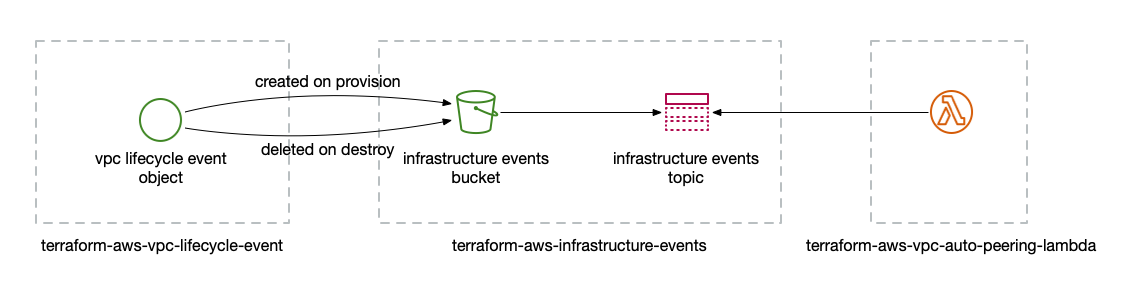
Note that for this to work, the `terraform-aws-infrastructure-events` and
`terraform-aws-vpc-auto-peering-lambda` modules should be created in one
Terraform configuration while the `terraform-aws-vpc-lifecycle-event` module
should be used in the configuration that manages the VPC.
In addition to the event infrastructure, the VPC auto peering lambda also needs
a role to be available in each of the accounts in which it should manage
peering, with the same name. The
[`terraform-aws-vpc-auto-peering-role`](https://github.com/infrablocks/terraform-aws-vpc-auto-peering-role)
module can provision a role with the required policy.
The `terraform-aws-vpc-auto-peering-lambda` module additionally expects a
certain tag protocol to be followed on created VPCs and route tables as
described in the [Implementation](#implementation) section below. The
[`terraform-aws-base-networking`](https://github.com/infrablocks/terraform-aws-base-networking)
module implements this protocol and is designed to work with this module.
Implementation
--------------
### Declaring dependencies
The dependents and dependencies of each VPC are defined in terms of the VPC's
"component deployment identifier" which is the concatenation of the values of
the `Component` and `DeploymentIdentifier` tags on the VPC. For example, given a
VPC with the following tags:
```hcl
resource "aws_vpc" "vpc_1" {
// ...
tags = {
Component = "application-network"
DeploymentIdentifier = "development-1"
// ...
}
}
```
the component deployment identifier would be
`"application-network-development-1"`.
Using these component deployment identifiers, VPC dependencies are then defined
using the `Dependencies` tag. For example, in the following, `vpc_1` is both
dependent on `vpc_2` and `vpc_3` and is also a dependency of `vpc_3`:
```hcl
resource "aws_vpc" "vpc_1" {
// ...
tags = {
Component = "application-network"
DeploymentIdentifier = "development-1"
Dependencies = "integration-network-development-1, connectivity-network-development-1"
// ...
}
}
resource "aws_vpc" "vpc_2" {
// ...
tags = {
Component = "integration-network"
DeploymentIdentifier = "development-1"
// ...
}
}
resource "aws_vpc" "vpc_3" {
// ...
tags = {
Component = "connectivity-network"
DeploymentIdentifier = "development-1"
Dependencies = "application-network-development-1"
// ...
}
}
```
As can be seen in the example above, the `Dependencies` tag value is a comma
separated string of component deployment identifiers (whitespace ignored),
allowing more than one dependency to be defined.
### On VPC provisioning
Upon receiving an event indicating VPC creation, the VPC auto peering lambda
looks up both the created VPC based on the account ID and VPC ID in the VPC
lifecycle event as well as all other VPCs within its search regions and
accounts. Using the discovered VPCs, it determines the set of VPCs dependent on
the newly created VPC and the set of VPCs on which the newly created VPC
depends.
Once the set of dependencies and dependents has been determined, the auto
peering lambda requests and accepts peering connections to satisfy the overall
dependencies given the introduction of the new VPC. For the example given in
[declaring dependencies](#declaring-dependencies) above, if `vpc_1` had just
been created, peering connections would be established between `vpc_1` and
`vpc_2` as well as between `vpc_1` and `vpc_3`.
Once peering connections have been established, the auto peering lambda creates
a route for each defined dependency in any route tables found in the dependent
VPC that have a `Tier` tag with value `"private"`. When doing so, the auto
peering lambda uses the full CIDR of each VPC within the route definition.
In this way, any routing between VPCs is only bidirectional if both VPCs declare
a dependency on each other, otherwise the routing is unidirectional. For the
example given in [declaring dependencies](#declaring-dependencies) above, a
route will be created in each of `vpc_1`'s private route tables to each of
`vpc_2` and `vpc_3`'s CIDRs. A route will also be created in `vpc_3`'s private
route tables back to `vpc_1`'s CIDR. However, no route will be created in
`vpc_2`'s private route tables.
### On VPC destruction
Upon receiving an event indicating VPC deletion, the VPC auto peering lambda
performs the reverse operation. It looks up both the deleted VPC based on the
account ID and VPC ID in the VPC lifecycle event as well as all other VPCs
within its search regions and accounts. Using the discovered VPCs, it determines
the set of VPCs that were dependent on the newly deleted VPC and the set of VPCs
on which the deleted VPC depended.
Using this information, the auto peering lambda deletes the corresponding routes
from the private route tables of any VPCs that previously had a relationship
with the deleted VPC, before deleting any peering connections.
Usage
-----
To use the module, include something like the following in your Terraform
configuration:
```hcl
module "vpc-auto-peering" {
source = "infrablocks/vpc-auto-peering/aws"
version = "2.0.0"
region = "eu-west-2"
deployment_identifier = "1bc5defe"
search_regions = ["eu-west-2", "us-east-1"]
search_accounts = ["554132201093", "554132201093"]
peering_role_name = "auto-peering-role"
infrastructure_events_topic_arn = "arn:aws:sns:eu-west-2:579878096224:infrastructure-events-topic-eu-west-2-335e1e54"
}
```
Note:
* If the `search_regions` variable is not supplied, it defaults to the value of
the `region` variable, i.e., the region in which the lambda is deployed
* If the `search_accounts` variable is not supplied, it defaults to the account
in which the lambda is deployed
* If the `peering_role_name` variable is not supplied, it defaults to
`"vpc-auto-peering-role"` which is the name of the role created by the
[`terraform-aws-vpc-auto-peering-role`](https://github.com/infrablocks/terraform-aws-vpc-auto-peering-role)
module.
See the
[Terraform registry entry](https://registry.terraform.io/modules/infrablocks/vpc-auto-peering-lambda/aws/latest)
for more details.
### Inputs
| Name | Description | Default | Required |
|---------------------------------|----------------------------------------------------------------------------|:-------:|:--------:|
| region | The region into which the VPC auto peering lambda is being deployed. | - | Yes |
| deployment_identifier | An identifier for this instantiation. | - | Yes |
| infrastructure_events_topic_arn | The ARN of the SNS topic containing VPC events. | - | Yes |
| search_regions | AWS regions to search for dependency and dependent VPCs. | `[]` | No |
| search_accounts | IDs of AWS accounts to search for dependency and dependent VPCs. | `[]` | No |
| peering_role_name | The name of the role to assume to create peering relationships and routes. | `""` | No |
### Outputs
| Name | Description |
|------------------------------|------------------------------------------------------|
| lambda_role_arn | The ARN of the created lambda. |
### Compatibility
This module is compatible with Terraform versions greater than or equal to
Terraform 1.0.
Development
-----------
### Machine Requirements
In order for the build to run correctly, a few tools will need to be installed
on your development machine:
* Ruby (3.1.1)
* Bundler
* git
* git-crypt
* gnupg
* direnv
* aws-vault
#### Mac OS X Setup
Installing the required tools is best managed by [homebrew](http://brew.sh).
To install homebrew:
```
ruby -e "$(curl -fsSL https://raw.githubusercontent.com/Homebrew/install/master/install)"
```
Then, to install the required tools:
```
# ruby
brew install rbenv
brew install ruby-build
echo 'eval "$(rbenv init - bash)"' >> ~/.bash_profile
echo 'eval "$(rbenv init - zsh)"' >> ~/.zshrc
eval "$(rbenv init -)"
rbenv install 3.1.1
rbenv rehash
rbenv local 3.1.1
gem install bundler
# git, git-crypt, gnupg
brew install git
brew install git-crypt
brew install gnupg
# aws-vault
brew cask install
# direnv
brew install direnv
echo "$(direnv hook bash)" >> ~/.bash_profile
echo "$(direnv hook zsh)" >> ~/.zshrc
eval "$(direnv hook $SHELL)"
direnv allow
```
### Running the build
Running the build requires an AWS account and AWS credentials. You are free to
configure credentials however you like as long as an access key ID and secret
access key are available. These instructions utilise
[aws-vault](https://github.com/99designs/aws-vault) which makes credential
management easy and secure.
To provision module infrastructure, run tests and then destroy that
infrastructure, execute:
```bash
aws-vault exec -- ./go
```
To provision the module prerequisites:
```bash
aws-vault exec -- ./go deployment:prerequisites:provision[]
```
To provision the module contents:
```bash
aws-vault exec -- ./go deployment:root:provision[]
```
To destroy the module contents:
```bash
aws-vault exec -- ./go deployment:root:destroy[]
```
To destroy the module prerequisites:
```bash
aws-vault exec -- ./go deployment:prerequisites:destroy[]
```
Configuration parameters can be overridden via environment variables:
```bash
DEPLOYMENT_IDENTIFIER=testing aws-vault exec -- ./go
```
When a deployment identifier is provided via an environment variable,
infrastructure will not be destroyed at the end of test execution. This can
be useful during development to avoid lengthy provision and destroy cycles.
By default, providers will be downloaded for each terraform execution. To
cache providers between calls:
```bash
TF_PLUGIN_CACHE_DIR="$HOME/.terraform.d/plugin-cache" aws-vault exec -- ./go
```
### Common Tasks
#### Generating an SSH key pair
To generate an SSH key pair:
```
ssh-keygen -m PEM -t rsa -b 4096 -C integration-test@example.com -N '' -f config/secrets/keys/bastion/ssh
```
#### Generating a self-signed certificate
To generate a self signed certificate:
```
openssl req -x509 -newkey rsa:4096 -keyout key.pem -out cert.pem -days 365
```
To decrypt the resulting key:
```
openssl rsa -in key.pem -out ssl.key
```
#### Add a git-crypt user
To adding a user to git-crypt using their GPG key:
```
gpg --import ~/path/xxxx.pub
git-crypt add-gpg-user --trusted GPG-USER-ID
```
#### Managing CircleCI keys
To encrypt a GPG key for use by CircleCI:
```bash
openssl aes-256-cbc \
-e \
-md sha1 \
-in ./config/secrets/ci/gpg.private \
-out ./.circleci/gpg.private.enc \
-k ""
```
To check decryption is working correctly:
```bash
openssl aes-256-cbc \
-d \
-md sha1 \
-in ./.circleci/gpg.private.enc \
-k ""
```
Contributing
------------
Bug reports and pull requests are welcome on GitHub at
https://github.com/infrablocks/terraform-aws-vpc-auto-peering-lambda. This
project is intended to be a safe, welcoming space for collaboration, and
contributors are expected to adhere to the
[Contributor Covenant](http://contributor-covenant.org) code of conduct.
License
-------
The library is available as open source under the terms of the
[MIT License](http://opensource.org/licenses/MIT).