https://github.com/infusion/pcd8544
A Nokia 5110 display driver library
https://github.com/infusion/pcd8544
arduino arduino-library display microcontroller nokia5110
Last synced: about 1 month ago
JSON representation
A Nokia 5110 display driver library
- Host: GitHub
- URL: https://github.com/infusion/pcd8544
- Owner: infusion
- Created: 2020-11-24T09:45:01.000Z (over 5 years ago)
- Default Branch: master
- Last Pushed: 2021-06-25T22:08:21.000Z (almost 5 years ago)
- Last Synced: 2025-09-25T20:58:32.864Z (9 months ago)
- Topics: arduino, arduino-library, display, microcontroller, nokia5110
- Language: C++
- Homepage:
- Size: 30.3 KB
- Stars: 0
- Watchers: 1
- Forks: 0
- Open Issues: 0
-
Metadata Files:
- Readme: readme.md
Awesome Lists containing this project
README
# Nokia 5110 Display Driver for Arduino
**PCD8544** is a library for the [Arduino](http://arduino.cc/) to interface with LCDs based on the
Philips PCD8544 controller. These displays are commonly found on monochrome mobile phones, such as the
[Nokia 3310](http://en.wikipedia.org/wiki/Nokia_3310) or [5110](http://en.wikipedia.org/wiki/Nokia_5110).
The library has a small memory footprint and is optimized a lot for fast refresh rates.
A full description to set up your display can be found [here](https://www.xarg.org/2014/06/how-to-use-a-nokia-5110-graphical-display-with-arduino/).
# Functionality
## Constructor
Initialize with software SPI with explicit CS pin
```
PCD8544(int8_t rst, int8_t sce, int8_t dc, int8_t din, int8_t sclk)
```
Initialize with software SPI with CS tied to ground. Saves a pin but the other pins can't be shared with other hardware
```
PCD8544(int8_t rst, int8_t dc, int8_t din, int8_t sclk)
```
Initialize with hardware SPI with hardware controlled SCK (SCLK) and MOSI (DIN). SCE is controlled by IO pin
```
PCD8544(int8_t rst, int8_t sce, int8_t dc)
```
## Methods
### Initialize the module with default settings
```
init(uint8_t contrast = 60, uint8_t bias = 0x03, uint8_t tempCoeff = 0x02)
```
### Set contrast within interval `[0-127]`
```
setContrast(uint8_t contrast)
```
### Set bias within interval [0-7]
```
setBias(uint8_t bias)
```
### Set temperature coefficent within interval [0-3]
```
setTempCoeff(uint8_t temp)
```
### Turn module on or off
```
setPower(bool on)
```
### Set display mode
- PCD8544_DISPLAY_BLANK: All pixels blank
- PCD8544_DISPLAY_NORMAL: Normal operation
- PCD8544_DISPLAY_ALL_ON: All pixels set
- PCD8544_DISPLAY_INVERTED: All pixels inverted
```
setDisplayMode(pcd8544_display_t mode)
```
### Set a pixel
```
setPixel(uint8_t x, uint8_t y, uint8_t color = 1)
```
### Get pixel at position
```
getPixel(uint8_t x, uint8_t y)
```
### Draw outline of a rectangle
```
strokeRect(uint8_t x1, uint8_t y1, uint8_t width, uint8_t height, uint8_t color = 1)
```
### Draw a filled rectangle
```
fillRect(uint8_t x1, uint8_t y1, uint8_t width, uint8_t height, uint8_t color = 1)
```
### Draw outline of a circl
```
strokeCircle(uint8_t x0, uint8_t y0, uint8_t radius, uint8_t color = 1)
```
### Draw a filled circle
```
fillCircle(uint8_t x0, uint8_t y0, uint8_t radius, uint8_t color = 1)
```
### Draw a line from point (x1, y1) to (x2, y2)
```
strokeLine(int8_t x1, int8_t y1, int8_t x2, int8_t y2, uint8_t color = 1)
```
### Set a font face
```
setFont(uint8_t *font)
```
### Write characters or strings at position (x, y)
- FONT_MODE_DEFAULT: Default behavior of font
- FONT_MODE_TRANSPARENT: Unset pixels of a font are transparent
- FONT_MODE_INVERTED: The written text is inverted
- FONT_MODE_AUTO_LINEBREAK: make linebreak when necessary (not good for marquees)
- FONT_MODE_IGNORE_NEWLINE: Replaces a `\n` character with a space.
```
print(char c, int16_t x, int16_t y, pcd8544_fontmode_t mode = FONT_MODE_DEFAULT)
```
```
print(char *c, int16_t x, int16_t y, pcd8544_fontmode_t mode = FONT_MODE_DEFAULT)
```
```
print(String st, int16_t x, int16_t y, pcd8544_fontmode_t mode = FONT_MODE_DEFAULT)
```
### Send drawn buffer to the device
```
update()
```
### Send a bitmap to the device
```
updateImage(const uint8_t *image)
```
### Clears the canvas
```
clearBuffer()
```
### Clears the display pixels
```
clear()
```
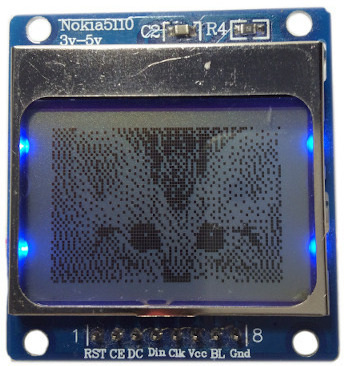
# Bitmap support
You can easily generate images using our [LCD image generator](https://www.xarg.org/tools/lcd-image-generator/) and put them on the display:
# Geometry support
You can easily draw geometries like lines, rectangles or circles:

# Installation
Clone this repo directly into your Arduino libraries folder:
```
cd ~/Documents/Arduino/libraries
git clone https://github.com/infusion/PCD8544
```
Alternatively download this repo as a zip file and open it from the `Sketch > Include Library > Add .ZIP Library...` menu inside the Arduino IDE.
Copyright and licensing
===
Copyright (c) 2014, [Robert Eisele](https://www.xarg.org/)
Dual licensed under the MIT or GPL Version 2 licenses.