https://github.com/inmite/android-grid-wichterle
This app will show grid overlay over whole system which helps you to verify your excellent app design.
https://github.com/inmite/android-grid-wichterle
Last synced: 10 months ago
JSON representation
This app will show grid overlay over whole system which helps you to verify your excellent app design.
- Host: GitHub
- URL: https://github.com/inmite/android-grid-wichterle
- Owner: inmite
- License: apache-2.0
- Created: 2013-10-16T17:30:42.000Z (almost 13 years ago)
- Default Branch: master
- Last Pushed: 2014-01-21T19:59:10.000Z (over 12 years ago)
- Last Synced: 2025-05-19T17:15:07.939Z (about 1 year ago)
- Language: Java
- Size: 804 KB
- Stars: 405
- Watchers: 32
- Forks: 70
- Open Issues: 4
-
Metadata Files:
- Readme: README.md
- Changelog: CHANGELOG.md
- License: LICENSE.txt
Awesome Lists containing this project
- awesome-android-ui - https://github.com/inmite/android-grid-wichterle
README
# GridWichterle for Android
This app will show grid overlay over whole system which helps you to verify your excellent app design.
## Download:
[](https://play.google.com/store/apps/details?id=eu.inmite.android.gridwichterle)
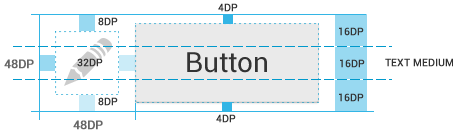
## What is the grid good for?
- makes adhering to [Android Design Guidelines - Metrics and Grids](http://developer.android.com/design/style/metrics-grids.html) easy
- your app will look aesthetically pleasing
- designers use grid to create designs, use this app to verify design implementation
## How to use:
- Run the app and see the grid over whole system
- Remove the grid or go to settings via notification

## Customization in settings:
- Grid size in dp (default is 8dp)
- Grid color and transparency
- Fullscreen mode (if the grid should start on the very top of the screen)
## How to build the project:
With Maven:
- `mvn clean package`
Or:
- clone the project and create project from existing sources in IDE
## Why 'Wichterle'?
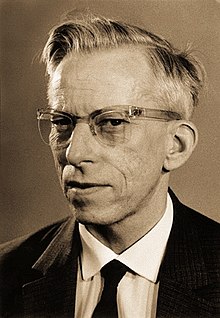
[Otto Wichterle](http://en.wikipedia.org/wiki/Otto_Wichterle) was a famous Czech inventor, best known for his invention of contact lenses.
You can see more details with contact lenses, just like with this app. You won't miss any misaligned views in your app.
See [**our other Czech personalities**](http://inmite.github.io) who help with [#AndroidDev](https://plus.google.com/s/%23AndroidDev).