https://github.com/innei/nestjs-pretty-logger
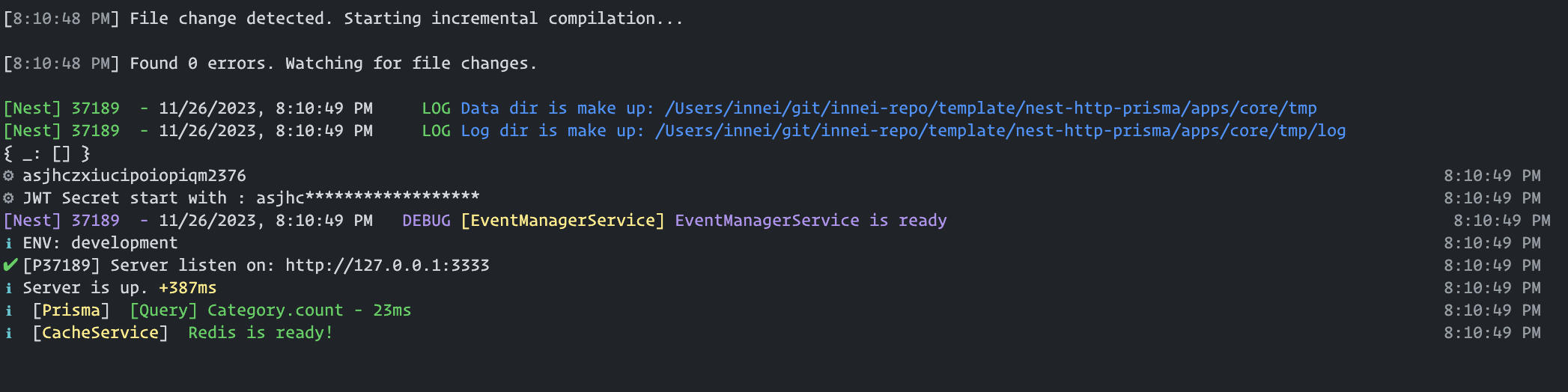
🌟 Elevate NestJS logging with stylish, file-redirected, and real-time capable logging based on consola. Compact, powerful, and easy to integrate.
https://github.com/innei/nestjs-pretty-logger
Last synced: 11 months ago
JSON representation
🌟 Elevate NestJS logging with stylish, file-redirected, and real-time capable logging based on consola. Compact, powerful, and easy to integrate.
- Host: GitHub
- URL: https://github.com/innei/nestjs-pretty-logger
- Owner: Innei
- Created: 2023-11-26T12:14:06.000Z (over 2 years ago)
- Default Branch: main
- Last Pushed: 2024-08-01T03:27:38.000Z (almost 2 years ago)
- Last Synced: 2025-04-14T16:47:04.742Z (about 1 year ago)
- Language: TypeScript
- Size: 608 KB
- Stars: 22
- Watchers: 2
- Forks: 1
- Open Issues: 1
-
Metadata Files:
- Readme: readme.md
- Changelog: CHANGELOG.md
Awesome Lists containing this project
README
# NestJS Pretty Logger
## Introduction
"NestJS Pretty Logger" is a versatile and visually appealing global Logger module for NestJS applications. This module extends the functionality of the default NestJS logger by utilizing the [consola](https://github.com/unjs/consola) library for enhanced aesthetics and includes features like file redirection and real-time logging capabilities.
## Features
- **Aesthetic and Functional Logging**: Integrates [consola](https://github.com/unjs/consola) for an enhanced logging experience.
- **Log File Redirection**: Ability to redirect `stdout` to files, allowing for organized log management.
- **App-Wide Logging Coverage**: Capable of covering the entire application's console and `stdout.write` functionalities.
- **Real-Time Logging Support**: Provides the `onData()` hook for real-time logging implementations, such as custom log recorders or WebSocket real-time log streaming.
## Installation
To install, run the following command:
```bash
npm i @innei/pretty-logger-nestjs
```
## Usage
### Basic Setup
In your `main.ts`:
```typescript
// main.ts
import { Logger } from '@innei/pretty-logger-nestjs'
import { NestFactory } from '@nestjs/core'
import { AppModule } from './app.module'
async function bootstrap() {
const app = await NestFactory.create(AppModule)
app.useLogger(app.get(Logger))
await app.listen(3000)
}
bootstrap()
```
In your `app.module.ts`:
```typescript
// app.module.ts
import { LoggerModule } from '@innei/pretty-logger-nestjs'
import { Module } from '@nestjs/common'
import { AppController, AppService } from './app.controller'
@Module({
imports: [LoggerModule],
controllers: [AppController],
providers: [AppService],
})
export class AppModule {}
```
### Custom Logger Configuration
Configure and utilize advanced features:
```typescript
// Custom Logger Setup
import path from 'path'
import { createLogger, Logger } from '@innei/pretty-logger-nestjs'
import { NestFactory } from '@nestjs/core'
import { AppModule } from './app.module'
const customLogger = createLogger({
writeToFile: {
loggerDir: path.resolve(__dirname, './logs'),
},
})
// Wrap all console and stdout.write with customLogger
customLogger.wrapAll()
// Implement onData hook for real-time logging or custom actions
customLogger.onData((data) => {
// Your custom implementation here
})
// Only error log
customLogger.onStdErr((data) => {
// Your custom implementation here
})
// Only non-error log
customLogger.onStdOut((data) => {
// Your custom implementation here
})
async function bootstrap() {
const app = await NestFactory.create(AppModule)
Logger.setLoggerInstance(customLogger)
app.useLogger(app.get(Logger))
await app.listen(3000)
}
bootstrap()
```
**Note**: After invoking `wrapAll()`, avoid using `console.log` or similar stdout functions within `onData()` to prevent potential infinite loops.
## Configuration Options
The `createLogger` method includes the `FileReporterConfig` interface for file redirection:
```typescript
interface FileReporterConfig {
loggerDir: string // Required: Log file directory
stdoutFileFormat?: string // Optional: Default 'stdout_%d%.log'
stderrFileFormat?: string // Optional: Default 'error.log'
cron?: string // Optional: Default '0 0 * * *' for daily log rotation
}
```
This configuration is crucial for directing `stdout` to log files, with `loggerDir` being mandatory for specifying the log directory. The other parameters are optional, offering defaults for file formats and log rotation, which can be changed through the `cron` setting.
## Contributions
Contributions to "NestJS Pretty Logger" are highly appreciated. Whether it's through pull requests or issue discussions, your feedback and contributions are valuable to the project.
## License
2024 © Innei, MIT License.
> [Personal Site](https://innei.in/) · GitHub [@Innei](https://github.com/innei/)