https://github.com/inspectr-hq/mcplab
MCPLab - Test and evaluate MCP servers with LLMs.
https://github.com/inspectr-hq/mcplab
agents ai cli evaluation llm mcp model-context-protocol testing
Last synced: 3 months ago
JSON representation
MCPLab - Test and evaluate MCP servers with LLMs.
- Host: GitHub
- URL: https://github.com/inspectr-hq/mcplab
- Owner: inspectr-hq
- License: mit
- Created: 2026-02-06T21:02:04.000Z (5 months ago)
- Default Branch: main
- Last Pushed: 2026-03-01T14:16:13.000Z (4 months ago)
- Last Synced: 2026-03-01T17:43:08.186Z (4 months ago)
- Topics: agents, ai, cli, evaluation, llm, mcp, model-context-protocol, testing
- Language: TypeScript
- Homepage:
- Size: 2.68 MB
- Stars: 0
- Watchers: 0
- Forks: 0
- Open Issues: 0
-
Metadata Files:
- Readme: README.md
- License: LICENSE
Awesome Lists containing this project
README
# MCPLab 🧪
> **Test, debug and evaluate Model Context Protocol servers with LLMs**
Test how well LLM agents use your MCP tools, compare different models, and track quality over time with automated testing and detailed reports.


---
## What is MCPLab?
MCPLab is a testing and evaluation framework for [MCP servers](https://modelcontextprotocol.io). It helps you:
- **Validate** that LLM agents correctly use your MCP tools
- **Compare** different LLMs (Claude, GPT-4, etc.) on the same tasks
- **Track** tool usage patterns, success rates, and performance metrics
- **Automate** quality assurance in CI/CD pipelines
- **Debug** agent behavior with detailed execution traces
Perfect for MCP server developers who want to ensure their tools work reliably across different AI models.
[](https://mcplab.inspectr.dev/)
Visit [mcplab.inspectr.dev](https://mcplab.inspectr.dev/) to learn more.
---
## ✨ Features
### Core Capabilities
- **HTTP SSE Transport** - Test MCP servers over Streamable HTTP
- **Multi-LLM Support** - OpenAI, Anthropic Claude, Azure OpenAI
- **Rich Assertions** - Validate tool usage, sequences, and response content
- **Variance Testing** - Run multiple iterations to measure stability
- **Detailed Traces** - JSONL logs of every tool call and LLM response
### Analysis & Reporting
- **Trend Analysis** - Track pass rates and performance over time
- **LLM Comparison** - Built-in tools to compare agent behavior
- **Multiple Outputs** - HTML report, JSON results, Markdown summary, JSONL trace
- **Custom Metrics** - Extract values and track domain-specific KPIs
- **Markdown Reports** - Store and browse custom analysis notes alongside runs
### AI-Powered Tools (App Mode)
- **Scenario Assistant** - AI chat to help design and refine eval scenarios
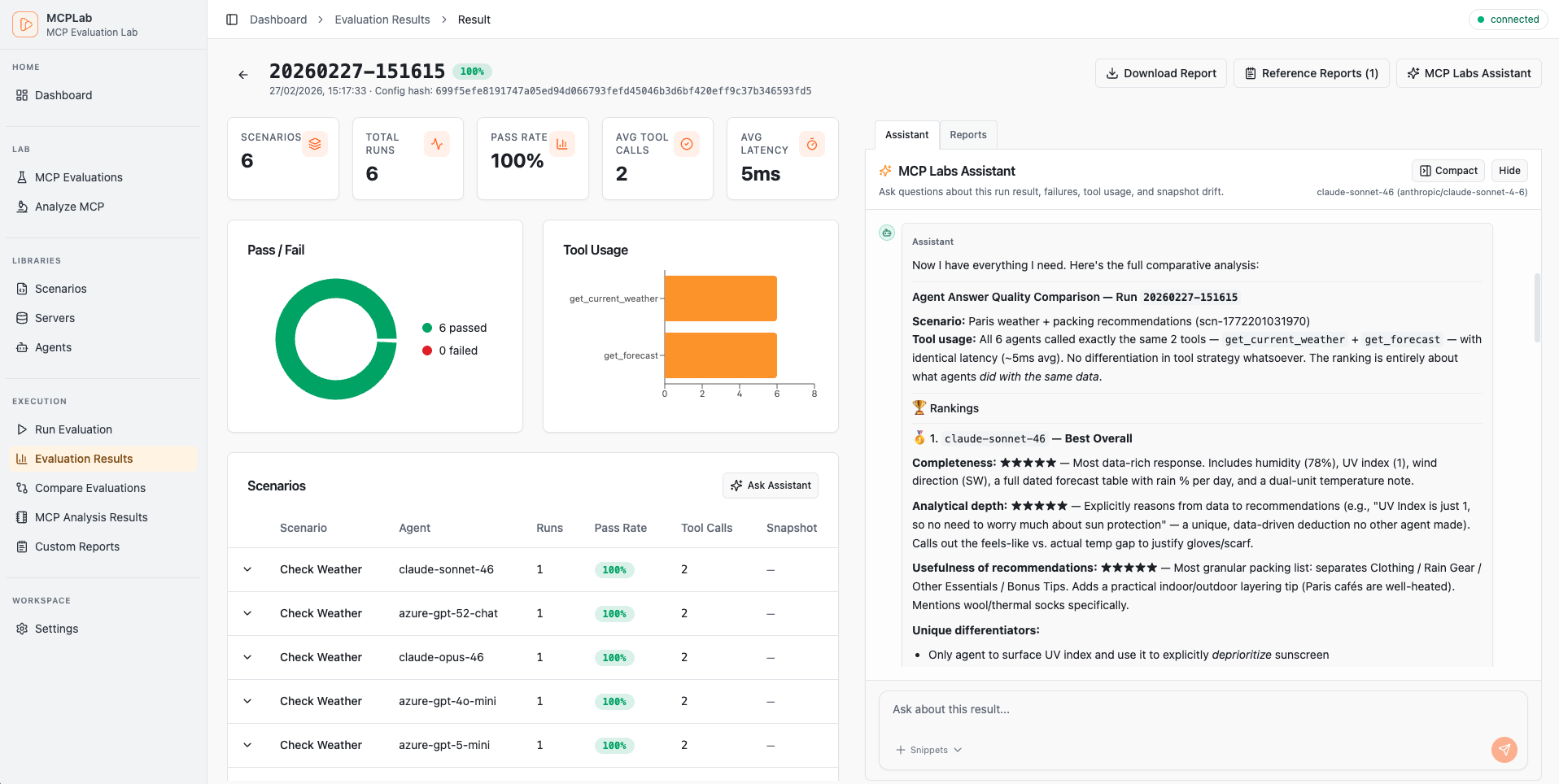
- **Result Assistant** - AI chat to analyze and explain completed run results
- **MCP Tool Analysis** - Automated review of MCP tool quality and safety
### Developer Experience
- **Watch Mode** - Auto-rerun tests when configs change
- **YAML Configuration** - Declarative, version-controllable eval specs
- **Interactive Reports** - Self-contained HTML with filtering and drill-down
- **Multi-Agent Testing** - Compare LLMs with a single CLI flag
- **Scenario Isolation** - Run specific tests or full suites
---
## 🚀 Quick Start
### 1. Install
```bash
npx @inspectr/mcplab --help
```
Or install globally:
```bash
npm install -g @inspectr/mcplab
```
### 2. Set up environment
```bash
cp .env.example .env
# Edit .env and add your API keys:
# ANTHROPIC_API_KEY=sk-ant-...
# OPENAI_API_KEY=sk-...
```
Add your API keys to `.env`. See [Environment Variables](#-environment-variables) for full examples.
### 3. Run your first evaluation
```bash
# Run the app (frontend + local API bridge)
npx @inspectr/mcplab app --open
# Run an evaluation from a config file
npx @inspectr/mcplab run -c mcplab/evals/eval.yaml
# View the results
open mcplab/results/evaluation-runs/$(ls -t mcplab/results/evaluation-runs | head -1)/report.html
```
### 4. Create your own test
Create `my-eval.yaml`:
```yaml
servers:
- id: my-server
transport: "http"
url: "http://localhost:3000/mcp"
agents:
- id: claude
provider: "anthropic"
model: "claude-haiku-4-5-20251001"
temperature: 0
max_tokens: 2048
scenarios:
- id: "basic-test"
servers: ["my-server"]
prompt: "Use the available tools to complete this task..."
eval:
tool_constraints:
required_tools: ["my_tool"]
response_assertions:
- type: "regex"
pattern: "success|completed"
```
Run it:
```bash
mcplab run -c my-eval.yaml
```
---
## 📖 Configuration Guide
### Structure Overview
Add this at the top of your eval file for editor validation/autocomplete:
```yaml
# yaml-language-server: $schema=./config-schema.json
```
```yaml
servers: # MCP servers to test against
- id: local-server
transport: "http"
url: "http://localhost:3000/mcp"
- ref: "shared-server"
agents: # LLM agents to use for testing
- id: local-agent
provider: "anthropic"
model: "claude-sonnet-4-6"
- ref: "claude-sonnet-46"
scenarios: # Test scenarios to run
- id: "basic-test"
servers: ["local-server"]
prompt: "..."
- ref: "scn-shared-basic"
```
### Servers
Define MCP servers with connection details and authentication:
```yaml
servers:
- id: my-server
transport: "http"
url: "https://api.example.com/mcp"
auth:
type: "bearer"
token: ${MCP_TOKEN} # env var reference
# token: my-secret-token # or direct value
```
**Authentication types:**
**Bearer Token:**
```yaml
auth:
type: "bearer"
token: ${MCP_TOKEN} # env var reference
# token: my-secret-token # or direct value
```
**API Key:**
```yaml
auth:
type: "api_key"
header_name: "X-API-Key" # optional, defaults to X-API-Key
value: ${MY_API_KEY}
```
**OAuth Client Credentials:**
```yaml
auth:
type: "oauth_client_credentials"
token_url: "https://auth.example.com/token"
client_id_env: "CLIENT_ID"
client_secret_env: "CLIENT_SECRET"
scope: "read:data" # Optional
audience: "https://api.example.com" # Optional
```
### Agents
Configure LLM agents with provider-specific settings:
**Anthropic (Claude):**
```yaml
agents:
- id: claude-sonnet
provider: "anthropic"
model: "claude-sonnet-4-6"
temperature: 0
max_tokens: 2048
system: "You are a helpful assistant."
```
**OpenAI (ChatGPT):**
```yaml
agents:
- id: gpt-4
provider: "openai"
model: "gpt-4o-mini"
temperature: 0
max_tokens: 2048
system: "You are a helpful assistant."
```
**Azure OpenAI:**
```yaml
agents:
- id: azure-gpt
provider: "azure_openai"
model: "gpt-4o" # Deployment name
temperature: 0
max_tokens: 2048
system: "You are a helpful assistant."
```
**Required environment variables:**
- Anthropic: `ANTHROPIC_API_KEY`
- OpenAI: `OPENAI_API_KEY`
- Azure: `AZURE_OPENAI_ENDPOINT`, `AZURE_OPENAI_API_KEY`, `AZURE_OPENAI_DEPLOYMENT`
### Scenarios
Define test scenarios with prompts and evaluation criteria:
```yaml
scenarios:
- id: "search-and-analyze"
servers: ["my-server"]
prompt: |
Search for items matching criteria X,
then analyze the results and provide insights.
eval:
# Validate tool usage
tool_constraints:
required_tools: ["search", "analyze"]
forbidden_tools: ["delete"]
# Validate tool sequence
tool_sequence:
allow:
- ["search", "analyze"]
- ["search", "search", "analyze"]
# Validate response content
response_assertions:
- type: "regex"
pattern: "found \\d+ items"
- type: "jsonpath"
path: "$.summary.count"
equals: 10
# Extract metrics
extract:
- name: "item_count"
from: "final_text"
regex: "found (?\\d+) items"
run_defaults:
selected_agents:
- claude-sonnet
```
**Evaluation options:**
- **`tool_constraints`** - Which tools must/must not be used
- `required_tools`: Tools that must be called
- `forbidden_tools`: Tools that must not be called
- **`tool_sequence`** - Valid sequences of tool calls
- `allow`: List of allowed sequences (e.g., `[["search", "analyze"]]`)
- **`response_assertions`** - Validate the final response
- `regex`: Pattern matching on response text
- `jsonpath`: Query and validate JSON responses
- **`extract`** - Extract metrics from responses
- Capture values using regex named groups: `(?...)`
---
## 🔑 Environment Variables
Add your LLM Agent API keys to `.env` for each provider you want to use:
**Anthropic (Claude models):**
```env
# -----------------------------------------------------------------------------
# Anthropic Configuration
# -----------------------------------------------------------------------------
# Required for testing Claude models (claude-haiku-4, claude-sonnet-4)
ANTHROPIC_API_KEY=sk-ant-api03-XXXXXXXXXXXXXXXXXXXXXXXXXXXXXXXXXXXXXXXXXXXXXXXX
```
**Azure OpenAI (GPT models):**
```env
# -----------------------------------------------------------------------------
# Azure OpenAI Configuration
# -----------------------------------------------------------------------------
# Required for testing GPT models (gpt-4o-mini, gpt-4o, etc.)
AZURE_OPENAI_API_KEY=XXXXXXXXXXXXXXXXXXXXXXXXXXXXXXXXXXXXXXXXXXXXXXXX
AZURE_OPENAI_ENDPOINT=https://your-resource.openai.azure.com
AZURE_OPENAI_DEPLOYMENT="gpt-5.2-chat"
AZURE_OPENAI_API_VERSION="2025-04-01-preview"
```
**OpenAI:**
```env
# -----------------------------------------------------------------------------
# OpenAI Configuration
# -----------------------------------------------------------------------------
OPENAI_API_KEY=sk-XXXXXXXXXXXXXXXXXXXXXXXXXXXXXXXXXXXXXXXXXXXXXXXX
```
---
## 💡 Usage Examples
### Basic Usage
```bash
# Run all scenarios
mcplab run -c mcplab/evals/eval.yaml
# Interactive mode (choose config + agents)
mcplab run --interactive
# Run specific scenario
mcplab run -c mcplab/evals/eval.yaml -s basic-test
# Run with variance testing (5 iterations)
mcplab run -c mcplab/evals/eval.yaml -n 5
```
### App Mode
Serve the web app and local API in one process:
```bash
mcplab app --open
# Interactive startup (host/port/paths prompt + summary)
mcplab app --interactive
```
Optional custom paths:
```bash
mcplab app --evals-dir mcplab/evals --runs-dir mcplab/results/evaluation-runs --port 8787 --open
```
Optional development mode (proxy frontend to Vite, keep API local):
```bash
mcplab app --dev
```
### Multi-LLM Testing
Compare how different LLMs perform on the same tasks:
```bash
# Test with multiple agents
mcplab run -c examples/eval.yaml \
--agents claude-haiku,gpt-4o-mini,gpt-4o
# This runs each scenario with each agent automatically
# 3 scenarios × 3 agents = 9 tests
# Compare results
node scripts/compare-llm-results.mjs mcplab/results/evaluation-runs/LATEST/results.json
```
Output:
```
📊 LLM Performance Comparison
LLM | Pass Rate | Avg Tools/Run | Avg Duration (ms)
-----------------|-----------|---------------|------------------
claude-haiku | 100.0% | 2.5 | 850
gpt-4o-mini | 88.9% | 2.8 | 950
gpt-4o | 88.9% | 3.2 | 1200
💡 Key Insights
• Highest Pass Rate: claude-haiku (100.0%)
• Fastest: claude-haiku (850ms avg)
• Most Efficient: claude-haiku (2.5 tools/run)
```
### Watch Mode
Auto-rerun tests when config changes:
```bash
mcplab watch -c examples/eval.yaml
# With multi-agent testing
mcplab watch -c examples/eval.yaml \
--agents claude-haiku,gpt-4o-mini
```
### Snapshot Baselines
Create a smart baseline from a fully passing run, then compare later runs against it:
```bash
# Create a snapshot (source run must be fully passing)
mcplab snapshot create --run 20260208-140213 --name "weather-api-baseline-v1"
# List snapshots
mcplab snapshot list
# Compare run against snapshot
mcplab snapshot compare --id --run 20260208-150045
```
Optional: compare immediately after a run:
```bash
mcplab run -c mcplab/evals/eval.yaml --compare-snapshot
```
Config-first snapshot eval workflow:
```bash
# Initialize snapshot eval policy in a config from a fully passing run
mcplab snapshot eval-init --config mcplab/evals/eval.yaml --run 20260208-140213 --name "baseline-v1"
# Update snapshot eval policy mode
mcplab snapshot eval-policy --config mcplab/evals/eval.yaml --enabled true --mode fail_on_drift
# Apply config snapshot policy during run (warn or fail_on_drift)
mcplab run -c mcplab/evals/eval.yaml --snapshot-eval
```
### Generate Reports
```bash
# Regenerate HTML report from previous run
mcplab report --input mcplab/results/evaluation-runs/20260206-212239
# Interactive run selection from recent runs
mcplab report --interactive
```
---
## 🤖 AI-Powered Features
These features are available through the web app (`mcplab app`).
### Scenario Assistant
An interactive AI chat that helps you design and refine evaluation scenarios. Given a scenario, it can suggest improvements to the prompt, evaluation rules, and extraction patterns — and can call your MCP server's tools directly to demonstrate expected behavior.
Open the app, navigate to an eval, and open the **Scenario Assistant** panel on any scenario.
### Result Assistant
An AI chat that analyzes completed evaluation runs. Ask it to explain failures, identify patterns across scenarios, or summarize what went wrong in a specific run. It has read-only access to run artifacts, traces, and results.
Open a run in the app and click **Result Assistant**.
### MCP Tool Analysis
Automated quality review of your MCP server's tools. Connects to your server, discovers all tools, and produces a report covering:
- Name and description quality
- Schema completeness
- Safety classification (read-like vs. potentially destructive)
- Sample call behavior (optional — runs real calls against your server)
Reports are saved to `mcplab/results/tool-analysis/` and viewable in the app.
Navigate to **Tool Analysis** in the app sidebar to start an analysis job.
### Markdown Reports
Store and browse custom analysis notes, comparison docs, or generated reports alongside your eval runs. Place `.md` files in `mcplab/reports/` and they become accessible in the app under **Reports**.
---
## 📚 Reusable configurations
Define servers, agents, and scenarios once and reuse them across multiple eval files.
```
mcplab/
├── servers.yaml # Shared MCP server definitions
├── agents.yaml # Shared LLM agent definitions
└── scenarios/
├── scenario-a.yaml
└── scenario-b.yaml
```
Reference library items in eval configs:
```yaml
servers:
- ref: "my-server" # from servers.yaml
agents:
- ref: "claude-sonnet" # from agents.yaml
scenarios:
- ref: "scenario-a" # from scenarios/scenario-a.yaml
```
Libraries can be managed through the app's **Libraries** page.
---
## 📂 Output Structure
Each evaluation run creates a timestamped directory:
```
mcplab/results/evaluation-runs/20260206-212239/
├── trace.jsonl # Detailed execution log (every tool call, LLM response)
├── results.json # Structured results (pass/fail, metrics, aggregates)
├── summary.md # Human-readable summary table
└── report.html # Interactive HTML report (self-contained)
```
Other output directories:
```
mcplab/
├── evals/ # Eval definition YAML files
├── results/
│ ├── evaluation-runs/ # Run artifacts
│ └── tool-analysis/ # Saved tool analysis reports
├── snapshots/ # Snapshot baselines
├── reports/ # Custom markdown reports
├── servers.yaml # Library: shared server definitions
├── agents.yaml # Library: shared agent definitions
└── scenarios/ # Library: shared scenario files
```
### Trace Format (JSONL)
```jsonl
{"type":"run_started","run_id":"...","ts":"2026-02-06T20:03:54.585Z"}
{"type":"scenario_started","scenario_id":"search-tags","agent":"claude-haiku","ts":"..."}
{"type":"llm_request","messages_summary":"user:Search for tags...","ts":"..."}
{"type":"llm_response","raw_or_summary":"tool_calls:search_tags","ts":"..."}
{"type":"tool_call","server":"demo","tool":"search_tags","args":{...},"ts_start":"..."}
{"type":"tool_result","server":"demo","tool":"search_tags","ok":true,"result_summary":"...","ts_end":"...","duration_ms":1114}
{"type":"final_answer","text":"Found 42 tags matching...","ts":"..."}
{"type":"scenario_finished","scenario_id":"search-tags","pass":true,"metrics":{...},"ts":"..."}
```
### Results Format (JSON)
```json
{
"metadata": {
"run_id": "20260206-212239",
"timestamp": "2026-02-06T20:22:39.000Z",
"config_hash": "abc123...",
"git_commit": "def456..."
},
"summary": {
"total_scenarios": 8,
"total_runs": 8,
"pass_rate": 1.0,
"avg_tool_calls_per_run": 2.5,
"avg_tool_latency_ms": 950
},
"scenarios": [...]
}
```
---
## 🎓 Real-World Examples
### Example 1: Weather MCP Server
Test a weather data MCP server:
```bash
# Run comprehensive test suite (9 scenarios)
mcplab run -c examples/eval-weather-comprehensive.yaml
# Test a specific scenario
mcplab run -c examples/eval-weather-comprehensive.yaml \
-s forecast-accuracy
# Compare Claude vs GPT-4 on all scenarios
mcplab run -c examples/eval-weather-simple.yaml \
--agents claude-haiku,gpt-4o-mini
```
**Included scenarios:**
- Current conditions lookup
- Multi-day forecast retrieval
- Location search and resolution
- Severe weather alerts
- Historical data queries
- Unit conversion (metric/imperial)
### Example 2: Multi-Agent Comparison
Create `multi-agent-eval.yaml` with one agent defined:
```yaml
agents:
- id: claude-haiku
provider: anthropic
model: claude-haiku-4-5-20251001
- id: gpt-4o-mini
provider: openai
model: gpt-4o-mini
- id: gpt-4o
provider: openai
model: gpt-4o
scenarios:
- id: "complex-task"
prompt: "..."
run_defaults:
selected_agents:
- claude-haiku
```
Run with all agents:
```bash
mcplab run -c multi-agent-eval.yaml \
--agents claude-haiku,gpt-4o-mini,gpt-4o \
-n 5
# 1 scenario × 3 agents × 5 runs = 15 tests
```
### Example 3: CI/CD Integration
Add to `.github/workflows/mcp-eval.yml`:
```yaml
name: MCP Evaluation
on: [push, pull_request]
jobs:
evaluate:
runs-on: ubuntu-latest
steps:
- uses: actions/checkout@v4
- uses: actions/setup-node@v4
with:
node-version: '22'
- run: npm install
- run: npm run build
- name: Run evaluations
run: mcplab run -c examples/eval.yaml -n 3
env:
ANTHROPIC_API_KEY: ${{ secrets.ANTHROPIC_API_KEY }}
OPENAI_API_KEY: ${{ secrets.OPENAI_API_KEY }}
- name: Upload results
uses: actions/upload-artifact@v4
with:
name: evaluation-results
path: mcplab/results/evaluation-runs/
```
---
## 🛠️ Advanced Features
### Custom Analysis Scripts
Analyze results with custom logic:
```javascript
// my-analysis.mjs
import { readFileSync } from 'fs';
const results = JSON.parse(readFileSync('mcplab/results/evaluation-runs/LATEST/results.json'));
// Calculate custom metrics
for (const scenario of results.scenarios) {
const efficiency = scenario.pass_rate / scenario.runs[0].tool_call_count;
console.log(`${scenario.scenario_id}: ${efficiency.toFixed(2)} success/tool`);
}
```
### Generate Multi-LLM Configs
Auto-generate multi-agent configs:
```bash
# Creates eval-weather-multi-llm.yaml
node scripts/generate-multi-llm-config.mjs examples/eval-weather.yaml
```
### Compare LLM Performance
Built-in comparison script:
```bash
node scripts/compare-llm-results.mjs mcplab/results/evaluation-runs/20260206-212239/results.json
```
Shows:
- Pass rates by LLM
- Tool usage efficiency
- Response times
- Scenario-by-scenario breakdown
---
## 🔧 Development
### Project Structure
```
mcp-evaluation/
├── packages/
│ ├── cli/ # CLI tool (run, watch, report, app commands)
│ ├── app/ # Web frontend (React)
│ ├── core/ # Evaluation engine, agent adapters, MCP client
│ └── reporting/ # HTML report generation
├── examples/ # Example evaluation configs
├── scripts/ # Utility scripts (multi-LLM, comparison)
├── mcplab/results/ # Evaluation results + analysis (gitignored)
└── .claude/ # Claude Code skills (optional)
```
### Run in Development Mode
```bash
# Build all packages
npm run build
# Run CLI directly with tsx (no build needed)
npm run dev -- app --dev
# Or run just the frontend dev server
npm run app:dev:ui
```
### Run Tests
```bash
npm test
```
---
## 🤝 Contributing
Contributions welcome! Please:
1. Fork the repository
2. Create a feature branch (`git checkout -b feature/amazing-feature`)
3. Commit your changes (`git commit -m 'Add amazing feature'`)
4. Push to the branch (`git push origin feature/amazing-feature`)
5. Open a Pull Request
---
## License
MIT License - see [LICENSE](LICENSE) for details.
---
## Acknowledgments
Built with:
- [Model Context Protocol SDK](https://github.com/modelcontextprotocol/sdk)
- [Anthropic SDK](https://github.com/anthropics/anthropic-sdk-typescript)
- [OpenAI SDK](https://github.com/openai/openai-node)
---
## Support
- [Issue Tracker](https://github.com/inspectr-hq/mcplab/issues)
- [Discussions](https://github.com/inspectr-hq/mcplab/discussions)
- [MCP Protocol](https://modelcontextprotocol.io)
---
**⭐ Star this repo if you find it useful!**
Made with ❤️ by [Inspectr](https://inspectr.dev) for the MCP community