https://github.com/instantiator/semantic-kernel-experiment
A simple experimental project with sample code for using the Semantic Kernel and Planner to complete a task by invocation of a text completion LLM. Fully commented.
https://github.com/instantiator/semantic-kernel-experiment
ai csharp dotnet gpt llm ml openai semantic-kernel text-completion
Last synced: 2 months ago
JSON representation
A simple experimental project with sample code for using the Semantic Kernel and Planner to complete a task by invocation of a text completion LLM. Fully commented.
- Host: GitHub
- URL: https://github.com/instantiator/semantic-kernel-experiment
- Owner: instantiator
- License: mit
- Created: 2023-04-17T12:52:09.000Z (about 3 years ago)
- Default Branch: main
- Last Pushed: 2023-04-17T23:22:42.000Z (about 3 years ago)
- Last Synced: 2025-01-14T21:01:23.783Z (over 1 year ago)
- Topics: ai, csharp, dotnet, gpt, llm, ml, openai, semantic-kernel, text-completion
- Language: C#
- Homepage: https://instantiator.dev/post/you-too-can-llm/
- Size: 892 KB
- Stars: 2
- Watchers: 2
- Forks: 0
- Open Issues: 0
-
Metadata Files:
- Readme: README.md
- License: LICENSE
Awesome Lists containing this project
README
# semantic-kernel-experiment
The [Semantic Kernel](https://learn.microsoft.com/en-us/semantic-kernel/whatissk) is a .NET SDK that simplifies a number of machine learning tasks.
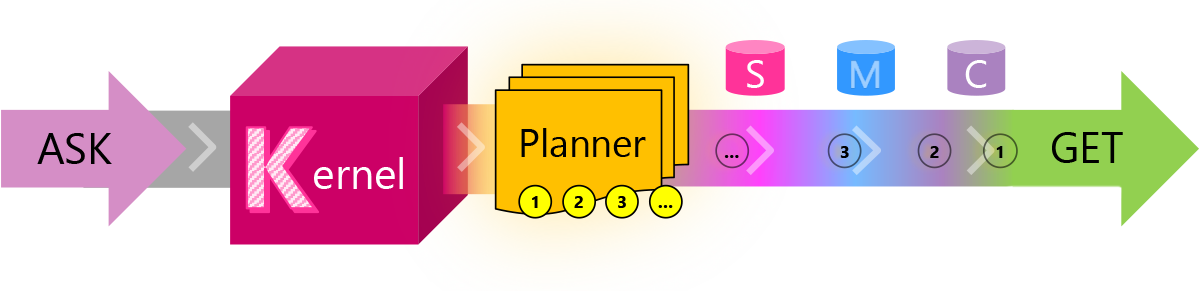
This solution is fully commented, and illustrates a simple use of the Semantic Kernel:
* Defines 1 or more skills, each with 1 or more functions
* Creates a plan from an ask presented to the Kernel
* Executes that plan, to get to a final result
## Configuration
Config is stored in 2 files:
* `SKE/.env` - configuration specifying `serviceId` and `modelId`
* `SKE/.secret.env` - configuration specifying your secret `apiKey`
You'll need to create `SKE/.secret.env` file and provide your API key from OpenAI:
```env
apiKey=
```
### OpenAI vs. Azure OpenAI
NB. The solution is currently set up to use text completion services from OpenAI. Semantic Kernel can also access similar services through Azure OpenAI - you'll need to modify the code a little to do that... It's the difference between this:
```csharp
kernel.Config.AddOpenAITextCompletionService(serviceId, modelId, apiKey, orgId);
```
and this:
```csharp
kernel.Config.AddAzureOpenAITextCompletionService(serviceId, modelId, azureEndpoint, apiKey);
```
## Getting started
* Place an API key from your OpenAI subscription in `.secret.env`
* Run the application:
```sh
dotnet run --project SKE/SKE.csproj
```
## Skills, Functions, and the Planner
You can define any number of [semantic functions](https://learn.microsoft.com/en-us/semantic-kernel/howto/semanticfunctions) and [native functions](https://learn.microsoft.com/en-us/semantic-kernel/howto/nativefunctions), and these are bundled into groups called skills.
Each skill is found in its own directory, and in this solution these are all grouped inside the `Skills/` directory.
You can invoke functions directly through the Kernel, or use the Planner - a special skill that can determine which functions to use to fulfil an ask you make of it.
`KernelSkillsExtensions.cs` provides a number of helpful utility methods for importing skills, importing the planner, and then using it to create a plan and execute it.
## Creating skills
To add a new semantic function, create the directory structure for it: `Skills//`
Then, add the `skprompt.txt` prompt file, and (optionally) a `config.json` file for the function itself:
* `Skills///skprompt.txt`
* `Skills///config.json`
_NB. Ensure that your `skprompt.txt` and `config.json` files are copied alongside the compiled binary by setting their "copy to output directory" property._
To add native functions, create the skill directory, and then a C# class file inside that skill directory. Provide each method that you wish to import as a native function with the `SKFunction` attribute, and provide a description of the function as its parameter, eg.
```csharp
public class CharacterManipulationSkill
{
[SKFunction("Return the text in all uppercase (aka capitals)")]
public string Uppercase(string input)
=> input.ToUpper();
}
```
NB. A skill can contain any combination of native or semantic functions.
The code in `KernelSkillsExtensions.ImportAllSemanticSkills` and `KernelSkillsExtensions.ImportAllNativeSkills` will locate and import all skills defined in the solution.
## `Microsoft.SemanticKernel` NuGet package
NB. The `Microsoft.SemanticKernel` package is in preview right now, so you'll need to enable 'include prereleases' in your package selector to see it.

## See also
* [microsoft/semantic-kernel](https://github.com/microsoft/semantic-kernel) (GitHub repository)