https://github.com/intellabs/mmpano
Official implementation of L-MAGIC
https://github.com/intellabs/mmpano
diffusion llms
Last synced: about 1 year ago
JSON representation
Official implementation of L-MAGIC
- Host: GitHub
- URL: https://github.com/intellabs/mmpano
- Owner: IntelLabs
- License: apache-2.0
- Created: 2024-04-02T17:04:16.000Z (about 2 years ago)
- Default Branch: main
- Last Pushed: 2024-08-08T22:23:58.000Z (almost 2 years ago)
- Last Synced: 2025-03-26T08:51:32.866Z (over 1 year ago)
- Topics: diffusion, llms
- Language: Python
- Homepage:
- Size: 11.6 MB
- Stars: 127
- Watchers: 3
- Forks: 6
- Open Issues: 2
-
Metadata Files:
- Readme: README.md
- License: LICENSE
Awesome Lists containing this project
README
# [CVPR 2024] Official implementation of the paper: "L-MAGIC: Language Model Assisted Generation of Images with Coherence"
We present a novel method that can generate 360 degree panorama from different types of zero-shot inputs (e.g., a single image, text description, hand-drawing etc.). Our Huggingface space is now available. Feel free to try it out!

- [Paper](https://arxiv.org/abs/2406.01843)
- [Project Page](https://zhipengcai.github.io/MMPano/)
- [Youtube Video](https://youtu.be/XDMNEzH4-Ec)
- [Huggingface demo (now available!)](https://huggingface.co/spaces/MMPano/MMPano)
## Industrial Impact
- Our work has been selected as **one of the 5 Intel featured live demos** at [ISC HPC 2024](https://www.intel.com/content/www/us/en/events/supercomputing.html).
- Our work has been featured by [Intel Community Blog](https://community.intel.com/t5/Blogs/Tech-Innovation/Artificial-Intelligence-AI/Advancing-Gen-AI-on-Intel-Gaudi-AI-Accelerators-with-Multi-Modal/post/1603746)!
- Our work has been featured by [Intel Labs Linkedin](https://www.linkedin.com/feed/update/urn:li:activity:7203797143831076864/)!


## 📌 Reference
```bibtex
@inproceedings{
zhipeng2024lmagic,
title={L-MAGIC: Language Model Assisted Generation of Images with Coherence},
author={Zhipeng Cai and Matthias Müller and Reiner Birkl and Diana Wofk and Shao-Yen Tseng and JunDa Cheng and Gabriela Ben-Melech Stan and Vasudev Lal and Michael Paulitsch},
booktitle={The IEEE/CVF Conference on Computer Vision and Pattern Recognition},
year={2024}
}
```
## ⭐️ Show Your Support
If you find this project helpful or interesting, please consider giving it a star! Your support is greatly appreciated and helps others discover the project.
## Environment
This code has been tested on linux with python 3.9. It should be compatible with also other python versions.
## Run on Intel Gaudi
This codebase has been developed and deployed on Intel Gaudi on Intel Developer Cloud
- [Intel Gaudi](https://habana.ai/)
- [Intel Developer Cloud](https://www.intel.com/content/www/us/en/developer/tools/devcloud/overview.html)
#### Setup Docker environment
```bash
# Build docker image
./docker_build.sh
# Start the container. Following the instruction on the script, you may modify
# the `HABANA_VISIBLE_DEVICES` and `HABANA_VISIBLE_MODULES` to run on different Gaudi device.
./docker_run-hpu.sh
```
## Run on other device
You can also run it on Nvidia GPU. After a proper Nvidia environment setup with pytorch installed (ex: `conda`, `venv`, `docker` ...etc)
Install the necessary packages by running the following command:
```bash
pip install -r requirements.txt
```
## Run the code
#### Note
- If you are running on Gaudi, you will encouter a slower performance because Gaudi requires at least 2 warmup cycles. If you want to build your own application using this codebase, please to warmup the Gaudi at least 2 times.
- The best performance is enabled by using ChatGPT as the LLM controller, which requires you to apply for an [OpenAI API key](https://platform.openai.com/docs/overview).
- If you are in areas that cannot access the ChatGPT API, we also provided a way to use a free open sourced LLM controller (e.g., Llama3). Please see below for instructions on how to enable it. You may need to set the `HF_TOKEN` or pass a huggingface token. Feel free to also contribute to the code and enable other LLMs.
#### (Optional) Start a TGI LLM server
If user wants to use the TGI to do LLM serving, the code provides a script to pull the docker image and start a TGI LLM serving on Gaudi. Once the TGI is on, please make sure to pass `--llm_model_name tgi` when running the MM Pano command line in the next step.
We've only validated the listed LLM models ("meta-llama/Meta-Llama-3-8B-Instruct", "mistralai/Mistral-7B-Instruct-v0.2"). We encourage users to try out new models and add them to the supported list.
```bash
# Modify the model name and pass Huggingface token if needed. You can also change the `num_shard` if you like.
vi mm_pano/tgi_gaudi/run_tgi_gaudi.sh
# Pull and start the TGI-Gaudi in the container
(cd mm_pano/tgi_gaudi && ./run_tgi_gaudi.sh)
```
If user wants to run the TGI on other devices, please make sure the default TGI url:port is set to `http://127.0.0.1:8080`.
#### Command
There are different choices when running the code, a simple example for
- image-to-panorama task
- ChatGPT LLM (GPT4)
- Gaudi accelerator as the hardware
```bash
python3 mm_pano/mmpano.py \
--init_image exp/example/0.png \
--output_folder exp/outputs \
--dtype bfloat16 --device hpu \
--llm_model_name gpt-4 \
--api_key \
--save_pano_img \ # To save the generated panorama picture
--gen_video # To generate and save the video
```
To change the setups, e.g.
- perform "text-to-panorama", change `--init_image exp/example/0.png` to `--init_prompt 'maple autum forest'`, also the `--init_prompt` can be used together with `--init_image` to provide a user specified scene description.
- use other LLMs, change `--llm_model_name gpt-4` to `--llm_model_name [other LLM names]`. Currently the available choices are `"gpt-4", "gpt-3.5-turbo", "meta-llama/Meta-Llama-3-8B-Instruct", "mistralai/Mistral-7B-Instruct-v0.2", "tgi"`,
where TGI can be a [TGI Gaudi](https://github.com/huggingface/tgi-gaudi) or [TGI](https://github.com/huggingface/text-generation-inference) server to run bigger model like Llama3-70B. Note that the `--api_key` is only used for gpt models.
- use cuda, change `--device hpu` to `--device cuda`
- specify camera intrinsic for the input image, add `--intrinsitc float, float, float, float`
## Results (see more on our project page and paper)
After running the code, you will see in the output_folder (exp/outputs) a panoramic image "pano.png" (see below for examples) and a immersive video "video.mp4".


## Contact
Feel free to send an email to Zhipeng (czptc2h@gmail.com) or Joey (Tien Pei) Chou (joey.t.p.chou@gmail.com) if you have any questions and comments.
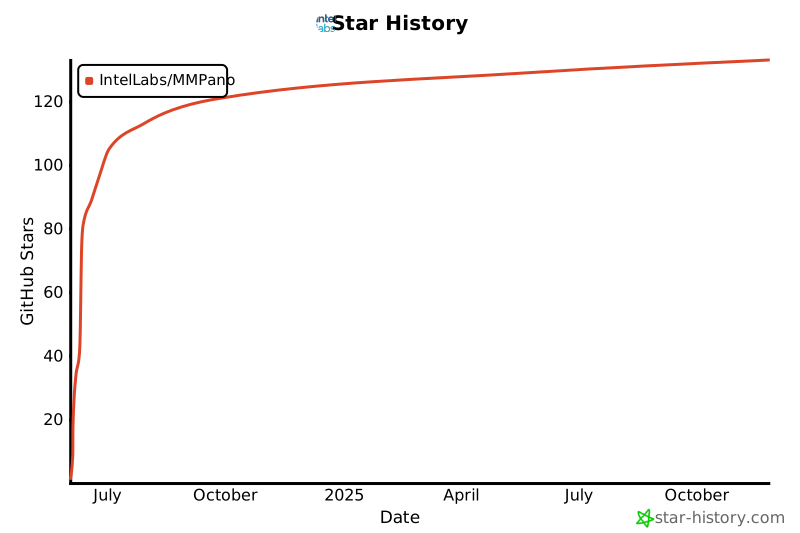
## 📈 Star History
[](https://star-history.com/#IntelLabs/MMPano)