https://github.com/interjc/invoify
https://github.com/interjc/invoify
Last synced: 4 months ago
JSON representation
- Host: GitHub
- URL: https://github.com/interjc/invoify
- Owner: interjc
- License: mit
- Created: 2025-07-19T12:55:45.000Z (12 months ago)
- Default Branch: main
- Last Pushed: 2026-02-20T12:39:06.000Z (4 months ago)
- Last Synced: 2026-02-20T15:56:30.530Z (4 months ago)
- Language: TypeScript
- Homepage: https://invoice.vibany.com
- Size: 14.5 MB
- Stars: 10
- Watchers: 0
- Forks: 2
- Open Issues: 0
-
Metadata Files:
- Readme: README.md
- License: LICENSE
Awesome Lists containing this project
README
# Invoify
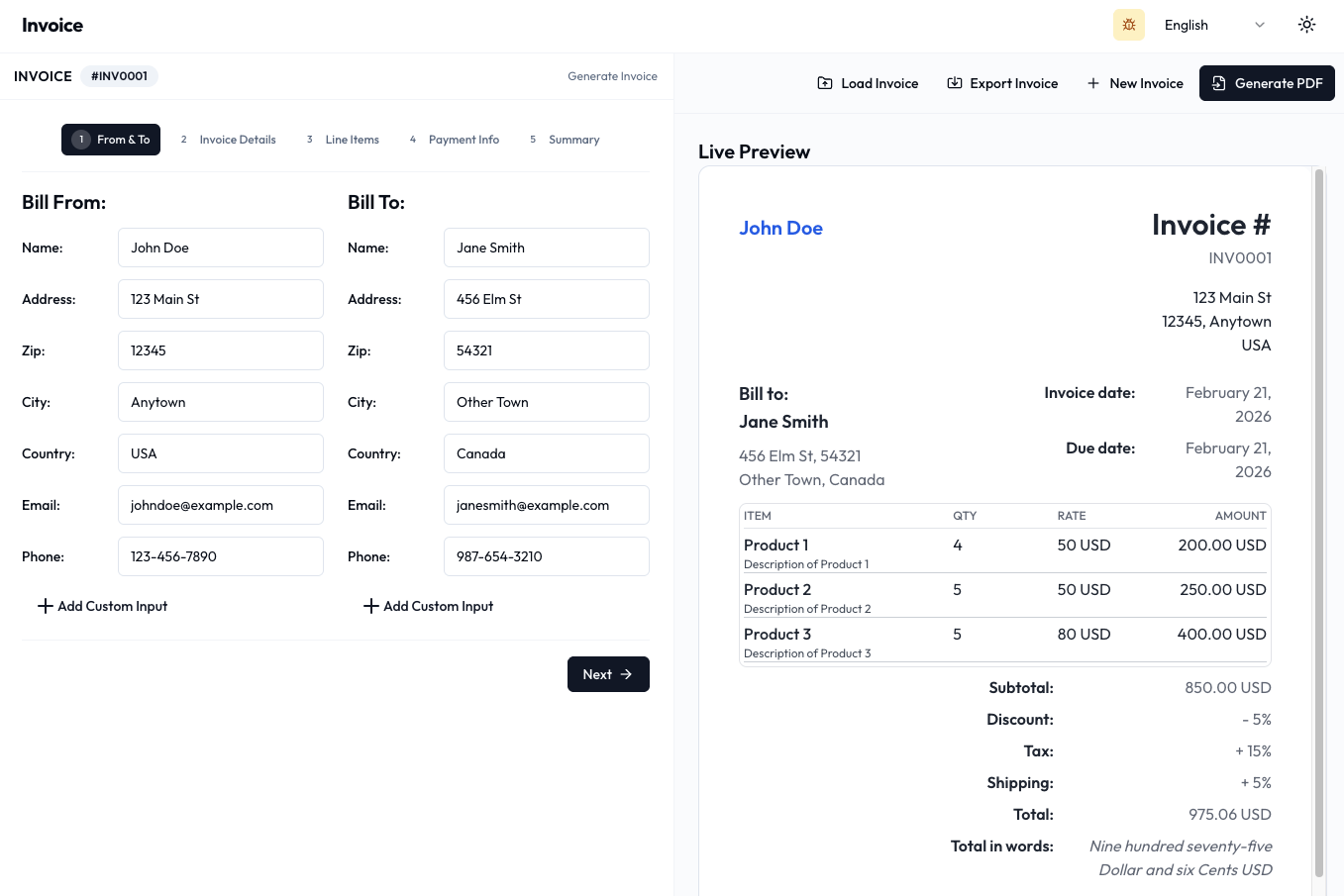
Invoify is a web-based invoice generator application built with Next.js 16, TypeScript, React 19, and the Shadcn UI library. It provides an easy way to create and manage professional invoices with PDF generation, email support, and multi-language capabilities.
## Table of Contents
- [Invoify](#invoify)
- [Table of Contents](#table-of-contents)
- [Features](#features)
- [Technologies](#technologies)
- [Core Technologies](#core-technologies)
- [Additional Dependencies](#additional-dependencies)
- [Roadmap](#roadmap)
- [Demo](#demo)
- [Getting Started](#getting-started)
- [Prerequisites](#prerequisites)
- [Installation](#installation)
- [Environment Variables](#environment-variables)
- [Development](#development)
- [Available Scripts](#available-scripts)
- [Bundle Analysis](#bundle-analysis)
- [Deployment](#deployment)
- [Cloudflare Workers (Recommended)](#cloudflare-workers-recommended)
- [Other Platforms](#other-platforms)
- [License](#license)
- [Discord](#discord)
## Features
- **Invoice Creation**: Simple form-based interface to quickly generate professional invoices
- **Multiple Templates**: Choose from multiple invoice templates
- **Live Preview**: Real-time preview as you edit the form
- **PDF Generation**: Generate PDFs using @react-pdf/renderer
- **Export Formats**: Export invoices in JSON, XLSX, CSV, and XML formats
- **Email Support**: Send invoices via email with PDF attachments
- **Multi-Language Support (i18n)**: Available in 15+ languages including English, Spanish, French, German, Japanese, Portuguese, Italian, Arabic, and more
- **Dark/Light Theme**: Built-in theme switching support
- **Signature Support**: Draw, type, or upload signatures
- **Drag & Drop**: Reorder line items with drag and drop
- **Local Storage**: Save invoices in browser for easy retrieval
- **Tax & Discount Calculations**: Automatic calculations for tax, discounts, and shipping
## Technologies
### Core Technologies
- **Next.js 16**: React framework with App Router and Turbopack support
- **React 19**: Latest React version with improved performance
- **TypeScript 5.2**: JavaScript superset with static typing
- **Tailwind CSS 3.3**: Utility-first CSS framework
- **Shadcn/UI**: Modern UI component library built on Radix UI
- **React Hook Form**: Form management with validation
- **Zod**: TypeScript-first schema validation
- **@react-pdf/renderer**: PDF generation library
### Additional Dependencies
- **next-intl**: Internationalization (i18n) for Next.js
- **Nodemailer**: Email sending functionality
- **@react-email/components**: React components for email templates
- **Lucide React**: Collection of customizable SVG icons
- **@dnd-kit**: Drag and drop toolkit for React
- **react-signature-canvas**: Signature drawing component
- **xlsx**: Excel file generation
- **@json2csv/node**: CSV export functionality
- **xml2js**: XML parsing and building
- **number-to-words**: Convert numbers to words
- **react-use-wizard**: Step wizard component
## Roadmap
- [x] Easily Create Invoices
- [x] Save for Future Access
- [x] Retrieve Invoices Effortlessly
- [x] Flexible Download Options
- [x] Template Variety
- [x] Live Preview
- [x] Export in Various Formats (JSON, XLSX, CSV, XML)
- [x] I18N Support with 15+ Languages
- [ ] Themeable Templates: Select a theme color for the invoice
- [ ] Custom Inputs: Define your own inputs (Ex: VAT number)
- [ ] Individual Tax for Line Items
## Demo
Visit the [live demo](https://invoice.vibany.com/) to see Invoify in action.
## Getting Started
### Prerequisites
- Node.js 20+ and pnpm installed on your system
- For email functionality: SMTP email credentials
### Installation
1. Clone the repository:
```bash
git clone https://github.com/al1abb/invoify.git
cd invoify
```
2. Create an `.env.local` file (see Environment Variables section below)
3. Start the development server using the dev script:
```bash
./dev.sh
```
> **Note**: This script requires `pnpm` to be installed. It will automatically install dependencies and start the dev server with Turbopack.
4. Open your browser at [http://localhost:3000](http://localhost:3000)
### Environment Variables
For email functionality, create `.env.local`:
```env
NODEMAILER_EMAIL=your_email@example.com
NODEMAILER_PW=your_email_password
```
## Development
### Available Scripts
- `pnpm dev` - Start development server with Turbopack
- `pnpm build` - Build the application
- `pnpm start` - Start production server
- `pnpm lint` - Run ESLint
### Bundle Analysis
```bash
ANALYZE=true pnpm build
```
## Deployment
### Cloudflare Workers (Recommended)
This project is optimized for deployment to Cloudflare Workers:
```bash
# Build and preview locally
pnpm preview
# Build and deploy to production
pnpm deploy
```
**Requirements**:
- Cloudflare account
- `wrangler` CLI configured with your account
- Environment variables in `.dev.vars` or Cloudflare dashboard
### Other Platforms
Standard Next.js deployment is also supported:
```bash
pnpm build
pnpm start
```
## License
Distributed under the MIT License. See `LICENSE` for more information.
## Discord
Join the Discord server [here](https://s.zhaikr.com/d-course-public)