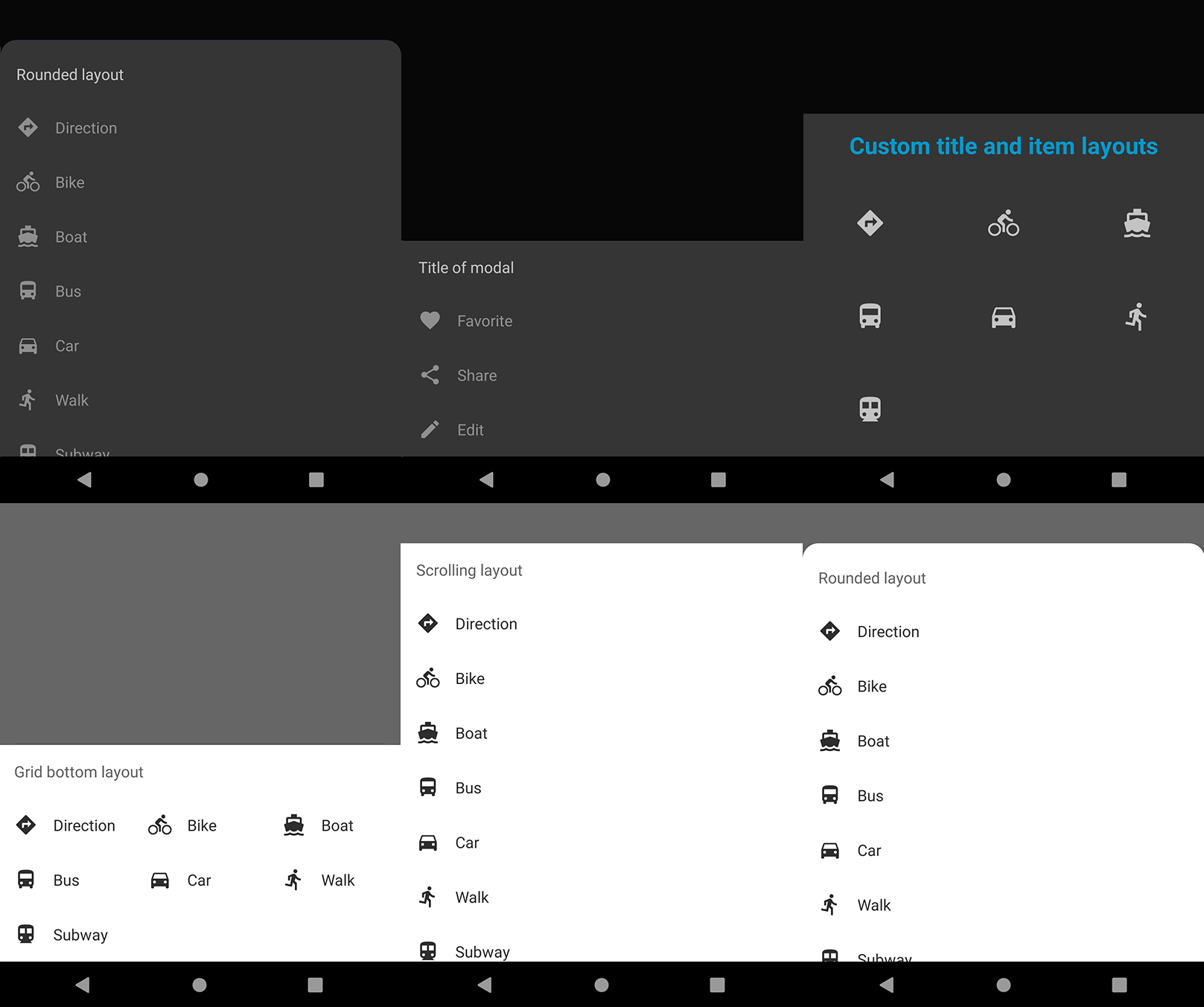
https://github.com/invissvenska/modalbottomsheetdialog
Another BottomSheetDialog for Android
https://github.com/invissvenska/modalbottomsheetdialog
android android-library bottomsheetdialog ui-widget
Last synced: 6 months ago
JSON representation
Another BottomSheetDialog for Android
- Host: GitHub
- URL: https://github.com/invissvenska/modalbottomsheetdialog
- Owner: invissvenska
- License: lgpl-3.0
- Created: 2020-06-07T13:19:20.000Z (about 6 years ago)
- Default Branch: master
- Last Pushed: 2021-12-15T12:13:56.000Z (over 4 years ago)
- Last Synced: 2025-11-27T13:44:39.830Z (7 months ago)
- Topics: android, android-library, bottomsheetdialog, ui-widget
- Language: Java
- Homepage:
- Size: 5.61 MB
- Stars: 72
- Watchers: 3
- Forks: 12
- Open Issues: 0
-
Metadata Files:
- Readme: README.md
- License: LICENSE
Awesome Lists containing this project
README
# ModalBottomSheetDialog
[](https://android-arsenal.com/api?level=16)
[](https://jitpack.io/#invissvenska/ModalBottomSheetDialog)
[]( https://android-arsenal.com/details/1/8133 )



## Prerequisites
Add this in your root `build.gradle` file (**not** your module `build.gradle` file):
```gradle
allprojects {
repositories {
...
maven { url "https://jitpack.io" }
}
}
```
## Dependency
Add this to your module's `build.gradle` file (make sure the version matches the JitPack badge above):
```gradle
dependencies {
...
implementation 'com.github.invissvenska:ModalBottomSheetDialog:VERSION'
}
```
## Configuration
Implement the ModalBottomSheetDialog Listener interface on your Activity or Fragment:
Implements listener in Activity
```java
public class MainActivity extends AppCompatActivity implements ModalBottomSheetDialog.Listener {
// some code
}
```
Implements listener in Fragment
```java
public class Fragment implements ModalBottomSheetDialog.Listener {
// some code
}
```
Override onItemSelected method
```java
@Override
public void onItemSelected(String tag, Item item) {
Toast.makeText(getApplicationContext(), "Tag: " + tag + ", clicked on: " + item.getTitle(),
Toast.LENGTH_SHORT).show();
}
```
Create the dialog
```java
new ModalBottomSheetDialog.Builder()
.setHeader(String title) // optional
.setHeaderLayout(@LayoutRes int layoutResource) // optional (TextView must have id 'header' in layout)
.add(@MenuRes int menuResource) // can be used more then once
.setItemLayout(@LayoutRes int layoutResource) // optional (TextView with id 'title' or ImageView with id 'icon' must be defined in layout)
.setColumns(int columns) // optional (default is 1)
.setRoundedModal(boolean roundedModal) // optional (default is false)
.show(FragmentManager fragmentManager, String tag);
```
Extend you theme with on of the DayNight variants to support a dark styled ModalBottomSheetDialog. For example `styles.xml`:
```xml
<!-- Customize your theme here. -->
<item name="colorPrimary">@color/colorPrimary</item>
<item name="colorPrimaryDark">@color/colorPrimaryDark</item>
<item name="colorAccent">@color/colorAccent</item>
```
## Usage
### Fragment
When you use the ModalBottomSheetDialog in a Fragment and want to show the bottom dialog:
```java
dialog.show(getChildFragmentManager(), "WithHeader");
```
### Activity
When you use the ModalBottomSheetDialog in an Activity and want to show the bottom dialog:
```java
dialog.show(getSupportFragmentManager(), "WithHeader");
```
### Options
To create a ModalBottomSheetDialog and display it later in code:
``` java
ModalBottomSheetDialog dialog = new ModalBottomSheetDialog.Builder()
.setHeader("Title of modal")
.add(R.menu.options)
.build();
// some other code in between
dialog.show(FragmentManager fragmentManager, "WithHeader");
```
To display a ModalBottomSheetDialog directly:
``` java
new ModalBottomSheetDialog.Builder()
.setHeader("Title of modal")
.add(R.menu.options)
.show(FragmentManager fragmentManager, "WithHeader");
```
To display a ModalBottomSheetDialog with items from multiple menu resources:
``` java
new ModalBottomSheetDialog.Builder()
.add(R.menu.options)
.add(R.menu.options)
.show(FragmentManager fragmentManager, "WithoutHeader");
```
To display a ModalBottomSheetDialog in a grid layout:
``` java
new ModalBottomSheetDialog.Builder()
.setHeader("Grid bottom layout")
.add(R.menu.lot_of_options)
.setColumns(3)
.show(FragmentManager fragmentManager, "Grid Layout");
```
To display a ModalBottomSheetDialog with custom layout:
``` java
new ModalBottomSheetDialog.Builder()
.setHeader("Custom title and item layouts")
.setHeaderLayout(R.layout.alternate_bottom_sheet_fragment_header)
.add(R.menu.lot_of_options)
.setItemLayout(R.layout.alternate_bottom_sheet_fragment_item)
.setColumns(3)
.show(FragmentManager fragmentManager, "Custom Layout");
```
To display a ModalBottomSheetDialog with rounded corners:
``` java
new ModalBottomSheetDialog.Builder()
.setHeader("Rounded bottom layout")
.add(R.menu.lot_of_options)
.setRoundedModal(true)
.show(FragmentManager fragmentManager, "Rounded Layout");
```
If you want to close a ModalBottomSheetDialog:
``` java
dialog.dismiss();
```
## Screenshots
**Please click the image below to enlarge.**