https://github.com/iobroker-community-adapters/iobroker.webui
UI using WebComponents
https://github.com/iobroker-community-adapters/iobroker.webui
iobroker visualization web-components
Last synced: about 2 months ago
JSON representation
UI using WebComponents
- Host: GitHub
- URL: https://github.com/iobroker-community-adapters/iobroker.webui
- Owner: iobroker-community-adapters
- License: mit
- Created: 2020-08-23T09:06:37.000Z (almost 6 years ago)
- Default Branch: master
- Last Pushed: 2025-03-30T18:02:46.000Z (about 1 year ago)
- Last Synced: 2025-05-02T14:54:10.414Z (about 1 year ago)
- Topics: iobroker, visualization, web-components
- Language: TypeScript
- Homepage:
- Size: 70.3 MB
- Stars: 16
- Watchers: 9
- Forks: 6
- Open Issues: 8
-
Metadata Files:
- Readme: README.md
- Funding: .github/FUNDING.yml
- License: LICENSE
Awesome Lists containing this project
README
# ioBroker.webui


[](https://www.npmjs.com/package/iobroker.webui)
[](https://www.npmjs.com/package/iobroker.webui)
[](https://nodei.co/npm/iobroker.webui/)
webui for ioBroker
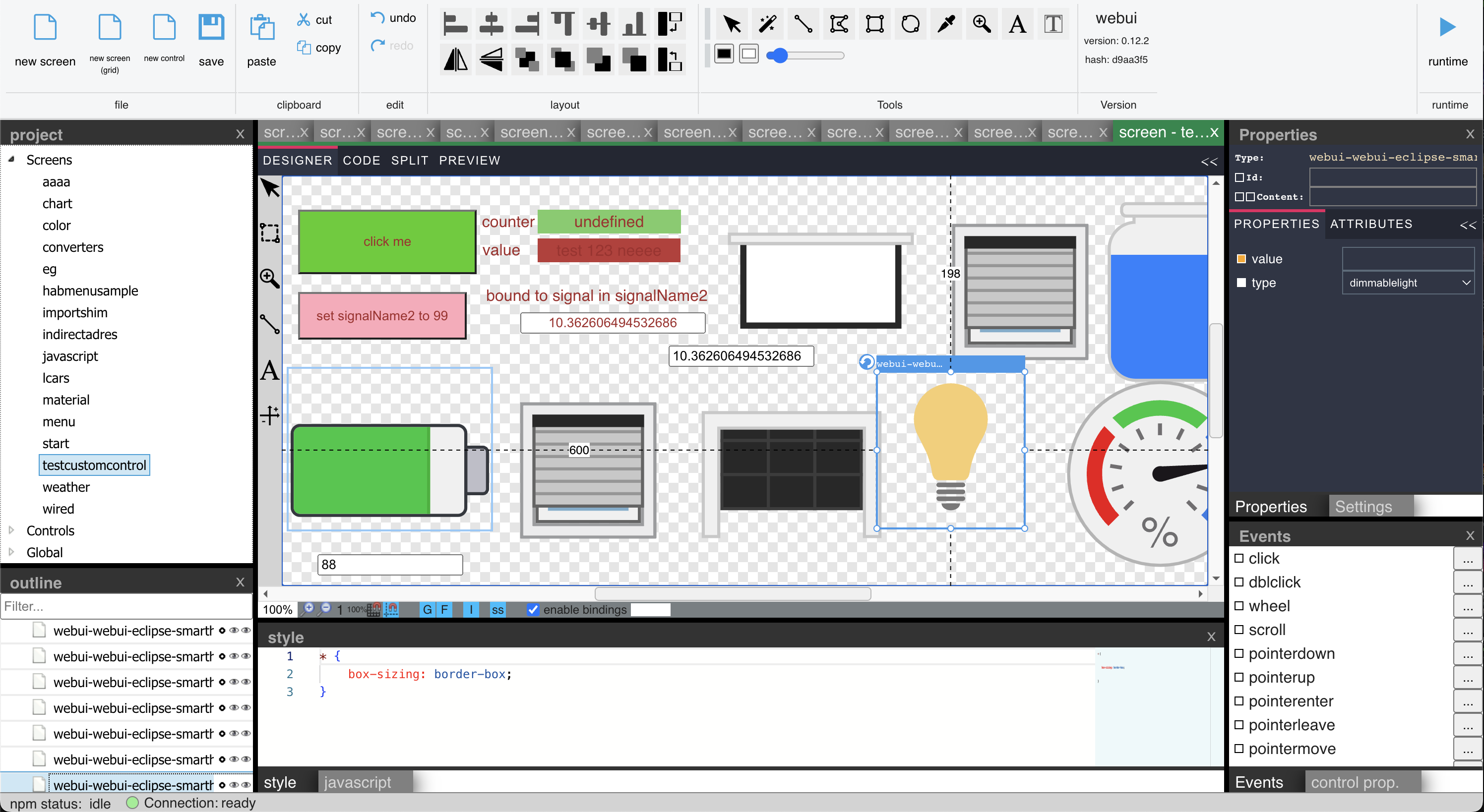
## Tutorial Videos (atm. in german only)
https://www.youtube.com/@jogibear9988
## Description
This is a complete visualization system for ioBroker.
It includes features like:
- simple scripting language
- binding to ioBroker objects including converters & javascript expressions
- pasting of images from clipboard
- drag&drop of external images
- drag&drop of ioBroker objects to automaticy create bindings
- drag&drop of ioBroker objects to Properties to create Bindings to them
- relative signal paths to ioBroker objects in screens (the full path can be handed over from outside into the screen)
- split view editing of layout and html code
- global stylesheet support
- usage of npm packages containing webcomponents
- screens inside of screens
- use all icon packages from ioBroker
- use charts from ioBroker
- use combined signals object id's e.g. "webui.0.test3.{webui.0.test3.select}" -> this will use the value from webui.0.test3.select for the signal name
There is more information about specific topics in the [wiki](https://github.com/iobroker-community-adapters/ioBroker.webui/wiki) (the German section has a few more articles than the English one).
## Installation
### Dependecies
- You need the Web Adapter installed. It works with the following settings: 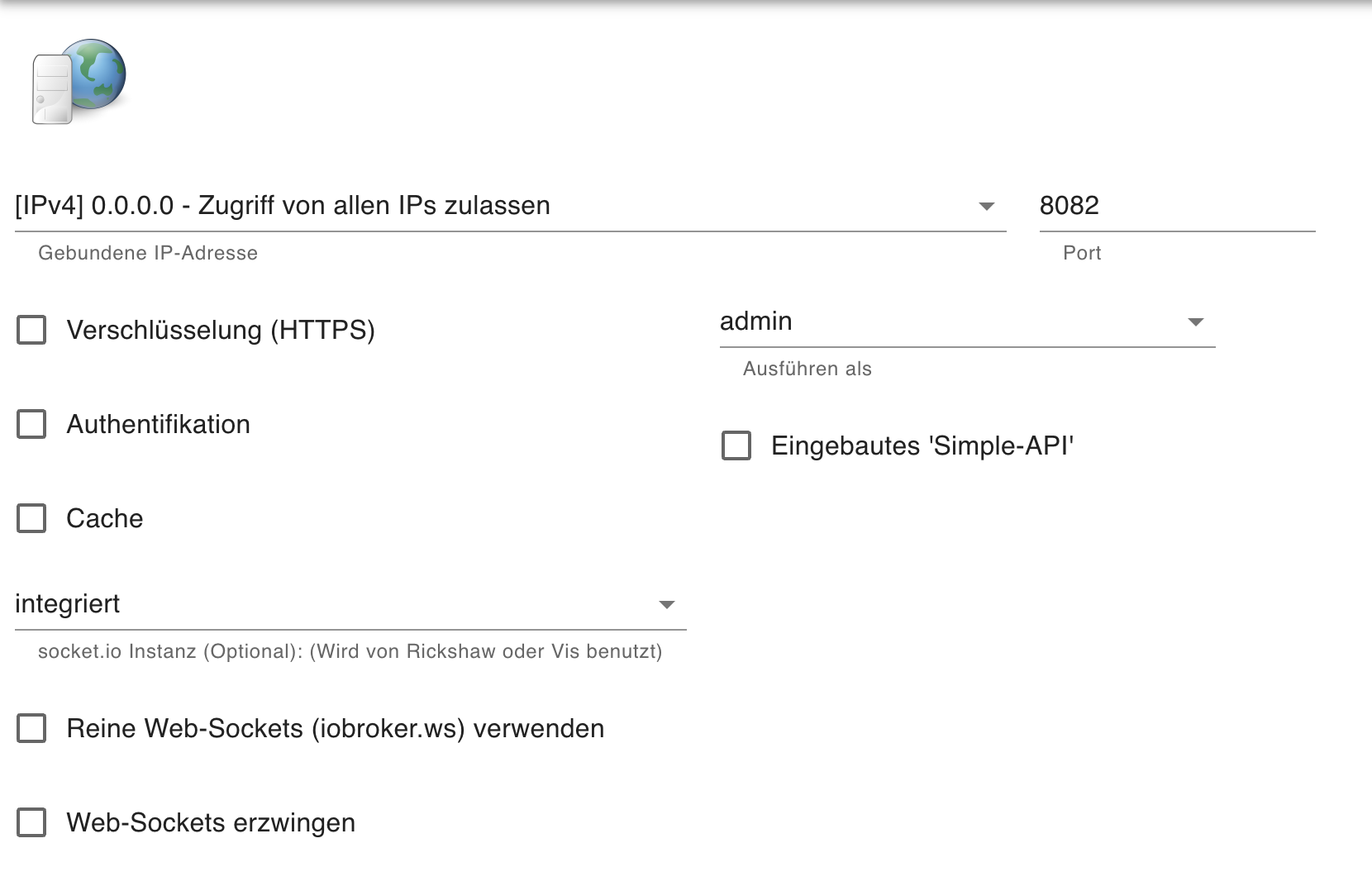
## Concepts
### Description
The Designer uses Web Components, so the HTML you design is inside of a Shadowroot of a Webcomponent. This means, you cannot style or inside of the Stylesheet. To style the outer Layout, use the ":host" selector.
This also means, you cannot use "on..." eventhandlers. Use the "@..." event assignment.
### Custom Controls in WebUI
You can create your own reusable CustomControls in WebUI, each of which can have its own Javascript, Properties and a template.
You can use Double-Bracket Syntax and Double-Curly-Bracket Syntax of the "BaseCustomWebcomponent" to create bindings from the Template to the properties defined in the Designer. Curylbrackets create two way Bindings.
If you use the Bindings Dialog, you can Bind to a Property with ??Propertyname and to IoBroker Object in the Property via ?Propertyname.
In Scripts you can also write to Signals defined in Custom Properties.
You can include Javascript in your CustomControl or Screen.
In addition, you can export a function `init(instance)` wich will be called when your CustomControl will be instantiated.
Finally, `connected()` and `disconnected()` functions can be defined to be called when ...
## Sponsoring
If you want to help the development, sponsor this project at https://github.com/sponsors/jogibear9988
## Developing
* Install Repository as Adapter in IOBroker
* Download the Repository to an extra "dev" directory, do not develop inside the ioBroker Node_modules directory.
* Do the following steps inside of the "dev" dirctory.
* Install dependencies
```
$ npm install
```
* Compile Typescript after doing changes (or press Ctrl + Shift + B in VsCode and select "tsc watch")
```
$ npm run tsc
```
* Adjust 'config.js' to match you ip-adress and port for your iobroker
(The config.js in the repository root will be replaced with the one in '/config' when running 'npm build')
```
window.iobrokerHost = '192.168.1.2';
window.iobrokerPort = '8082';
window.iobrokerSocketScriptUrl = 'http://' + window.iobrokerHost + ':' + window.iobrokerPort + '/lib/js/socket.io.js';
```
* Run the app in a local server
```
$ npm start
```
* Navigate Chrome to [localhost:8000]() to see the app.
### More about Development
- Run
```
$ npm run reflection
```
to recreate reflection files for Scripting wich are used for the property grid
- Run
```
$ npm run build
```
to copy compiled files and node_modules to www folder so adapter is installable via github
- Run
```
$ npm run release
$ npm publish
```
to create correct release commit for iobroker, Be carefull this also pushes to git repo.
Be sure to edit "CHANGELOG.md" before, the text in "## **WORK IN PROGRESS**" in README.Md will be used for version info
## Info about the Adapter.
The Adapter is based on the following Designer component:
https://github.com/node-projects/web-component-designer
You need to create a screen "start", this is the first one called when you open runtime.html,
but you can change this via query parameter:
runtime.html?screenName=screen2
## Changelog
### 1.43.1 (2026-04-28)
- bugfix release
### 1.43.0 (2026-04-27)
- fix script system after upgrade
### 1.42.1 (2026-04-26)
- fix missing mopnaco font
### 1.42.0 (2026-04-26)
- update designer
### 1.41.3 (2026-04-14)
- need css parser at runtime
## License
The MIT License (MIT)
Copyright (c) 2026 iobroker-community-adapters
Copyright (c) 2025 jogibear9988