https://github.com/ireddragonicy/booruprompt
A simple web application built with NextJS to extract tags from booru websites. Just paste the URL of a booru post, and this tool will fetch and display the associated tags, ready for you to copy.
https://github.com/ireddragonicy/booruprompt
booru cleaning-data crawler nextjs noobai tags typescript web
Last synced: 2 months ago
JSON representation
A simple web application built with NextJS to extract tags from booru websites. Just paste the URL of a booru post, and this tool will fetch and display the associated tags, ready for you to copy.
- Host: GitHub
- URL: https://github.com/ireddragonicy/booruprompt
- Owner: IRedDragonICY
- License: mit
- Created: 2025-02-19T10:43:55.000Z (over 1 year ago)
- Default Branch: main
- Last Pushed: 2025-03-03T09:15:35.000Z (over 1 year ago)
- Last Synced: 2025-03-03T09:33:51.427Z (over 1 year ago)
- Topics: booru, cleaning-data, crawler, nextjs, noobai, tags, typescript, web
- Language: TypeScript
- Homepage: https://booruprompt.vercel.app
- Size: 69.3 KB
- Stars: 0
- Watchers: 1
- Forks: 0
- Open Issues: 0
-
Metadata Files:
- Readme: README.md
- License: LICENSE
Awesome Lists containing this project
README

BooruPrompt — Booru Tag Extractor & Image Metadata Toolkit
Extract, categorize, filter, and copy tags from popular booru sites — fast, accurate, and delightful.





%20%C2%B7%20Android-0ea5e9.svg?style=flat-square)







Features ·
Supported Sites ·
API ·
Getting Started ·
Desktop & Android ·
FAQ
---
## Why BooruPrompt?
Designed for creators, curators, and prompt engineers who need reliable tags quickly. Paste a post URL, get clean, categorized tags and a preview — ready to copy into your workflow.
## Features

Automatic Extraction
Paste a post URL and let the app extract tags instantly (auto/manual modes).

Smart Categorization
Organized into Copyright, Character, General, Meta, and Other.

Intuitive Filtering
Toggle categories and blacklist unwanted keywords.

One‑Click Copy
Copy clean, comma‑separated tags in one click or via keyboard.

Responsive UI
Optimized for desktop, tablet, and mobile — fluid and fast.

Dark Mode & Themes
System/dark mode plus color theme customization.

PNG Metadata
Extract Positive/Negative prompts and parameters from PNG files.

Flexible Fetching
Server proxy by default; optional client proxies (AllOrigins, etc.).
### Highlights
- Real‑world resilient: Handles site quirks, timeouts, referers (Pixiv), and fallback flows.
- History: Optional local history for extractions and image metadata.
- Privacy‑aware: No analytics; data stays on your device (server proxy only fetches, doesn’t store).
## Supported Sites
The extractor currently supports these sites and post formats:
| Site | Status |
|:--|:--|
| Danbooru | Supported |
| Safebooru (Donmai) | Supported |
| Hijiribe (Donmai) | Supported |
| Safebooru (Org) | Supported |
| Gelbooru | Supported |
| Rule34 | Supported |
| TBIB | Supported |
| Scatbooru | Supported |
| Garycbooru | Supported |
| e621 | Supported |
| AIBooru | Supported |
| Yande.re | Supported |
| Konachan | Supported |
| Anime‑Pictures | Supported |
| Zerochan | Supported |
| E‑Shuushuu | Supported |
| Pixiv | Supported (JSON/pximg fallbacks) |
| Fur Affinity | Supported |
> Tip: You can enable a similarity fallback for some unsupported `donmai.us` subdomains in settings.
## Architecture at a Glance
```mermaid
graph LR;
A[Browser UI] -->|POST extract| B[Next API];
B -->|Fetch HTML with UA and Referer| C[Target Site];
B -->|Extract tags, image, title| D[JSON Response];
A -->|GET image proxy| B;
B -->|Stream media with cache| A;
```
## API
Base URL: `https://booruprompt.vercel.app/api/fetch-booru`
### 1) Extract From Page (POST)
- Endpoint: `/api/fetch-booru`
- Method: `POST`
- Headers: `Content-Type: application/json`
- Body:
```json
{ "targetUrl": "https://safebooru.org/index.php?page=post&s=view&id=12345" }
```
- Success 200:
```json
{ "siteName": "Gelbooru", "tags": { "general": ["1girl", "smile"], "character": ["..." ] }, "imageUrl": "https://...jpg", "title": "..." }
```
- Errors: `400 | 422 | 502 | 504` with `{ error, status }` message.
### 2) Proxy Image (GET)
- Endpoint: `/api/fetch-booru?imageUrl=...` (URL‑encode the value)
- Returns raw image/video with `Content-Type` and `Cache-Control` preserved.
Notes:
- Uses a mainstream browser User‑Agent and sets `Referer` for `i.pximg.net` (Pixiv).
- Request timeout: 25s.
#### Curl Examples
```bash
# POST: extract page
curl -X POST "https://booruprompt.vercel.app/api/fetch-booru" \
-H "Content-Type: application/json" \
-d '{"targetUrl":"https://gelbooru.com/index.php?page=post&s=view&id=123"}'
# GET: proxy image
curl "https://booruprompt.vercel.app/api/fetch-booru?imageUrl=https%3A%2F%2Fe621.net%2Fdata%2F...jpg" -o out.jpg
```
## Getting Started
Prerequisites: Node.js ≥ 18
```bash
git clone https://github.com/IRedDragonICY/booruprompt.git
cd booruprompt
npm install
npm run dev
```
Open `http://localhost:3000`.
### Usage
1. Paste a booru post URL (e.g. `https://danbooru.donmai.us/posts/123456`).
2. Auto‑extract will run (or click Extract Manually).
3. Toggle categories and optional blacklist.
4. Copy tags.
Keyboard: `Ctrl/Cmd + C` copies filtered tags when the extractor view is active.
## Desktop & Android
This project ships with a Tauri app configuration and Android tooling.
### Desktop (Tauri)
```bash
# Dev (opens a desktop window pointing to localhost)
npm run tauri:dev
# Production build (bundles app installers)
npm run tauri:build
```
Static export helper used by Tauri:
```bash
npm run tauri:export
```
### Android (Experimental)
```bash
# One‑time setup
npm run android:init
# Run on device / emulator
npm run android:dev
# Build APK/AAB (debug)
npm run android:build
```
## Tech Stack
- Next.js 15 (App Router), React 19, TypeScript 5
- Tailwind CSS 4, Framer Motion 12
- Tauri 2 for desktop bundling
## SEO — Keywords
booru tag extractor, danbooru tags, gelbooru tags, e621 tags, pixiv tags, rule34 tags, booru prompt generator, copy booru tags, booru tag parser, tag categorization, booru proxy api, anime tags extractor, ai prompt tags, image metadata prompt extractor
## FAQ
- Why do some pages fail? Some sites require login, use anti‑bot protections (e.g., Cloudflare), or return empty HTML via proxies.
- Is my data stored? No server‑side storage. Optional local history is stored in your browser only.
- Pixiv images don’t load? The proxy sets a Pixiv `Referer` and prefers `i.pximg.net`. See API image proxy notes.
## Contributing
Issues and PRs are welcome. Please follow the linting rules and update documentation where relevant.
1. Fork → 2. Feature branch → 3. Commit → 4. PR
## License
MIT — see `LICENSE`.
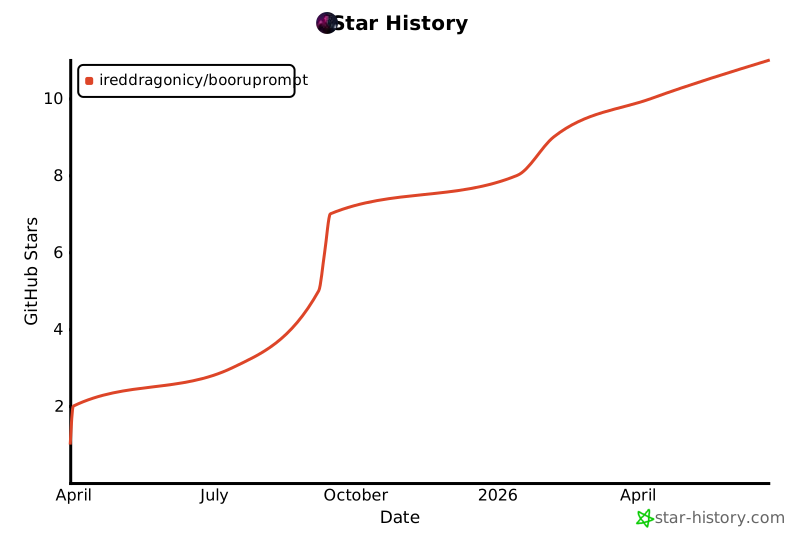
## Star History
---
Built by IRedDragonICY
•
Hosted on Vercel
•
Desktop by Tauri