https://github.com/iris-eval/mcp-server
The agent eval standard for MCP — score output quality, catch safety failures, enforce cost budgets
https://github.com/iris-eval/mcp-server
agent-evaluation ai-agent claude eval evaluation llm mcp mcp-server model-context-protocol observability security tracing
Last synced: about 2 months ago
JSON representation
The agent eval standard for MCP — score output quality, catch safety failures, enforce cost budgets
- Host: GitHub
- URL: https://github.com/iris-eval/mcp-server
- Owner: iris-eval
- License: mit
- Created: 2026-03-14T06:39:43.000Z (4 months ago)
- Default Branch: main
- Last Pushed: 2026-03-29T04:56:44.000Z (3 months ago)
- Last Synced: 2026-03-29T06:30:04.974Z (3 months ago)
- Topics: agent-evaluation, ai-agent, claude, eval, evaluation, llm, mcp, mcp-server, model-context-protocol, observability, security, tracing
- Language: TypeScript
- Homepage: https://iris-eval.com
- Size: 2.43 MB
- Stars: 5
- Watchers: 1
- Forks: 1
- Open Issues: 10
-
Metadata Files:
- Readme: README.md
- Changelog: CHANGELOG.md
- Contributing: CONTRIBUTING.md
- Funding: .github/FUNDING.yml
- License: LICENSE
- Code of conduct: CODE_OF_CONDUCT.md
- Codeowners: .github/CODEOWNERS
- Security: SECURITY.md
- Roadmap: docs/roadmap.md
- Cla: .github/CLA.md
Awesome Lists containing this project
- awesome-mcp-devtools - iris-eval/mcp-server - MCP-native eval & observability. 12 built-in eval rules, trace logging, cost tracking. Agents discover it automatically — zero code changes. (Testing Tools / Common Lisp)
README
# Iris — The Agent Eval Standard for MCP
[](https://glama.ai/mcp/servers/iris-eval/mcp-server)
[](cursor://anysphere.cursor-deeplink/mcp/install?name=server&config=eyJjb21tYW5kIjoibnB4IiwiYXJncyI6WyIteSIsIkBpcmlzLWV2YWwvbWNwLXNlcnZlciJdLCJlbnYiOnsiSVJJU19MT0dfTEVWRUwiOiJpbmZvIn19)
[](https://npmjs.com/package/@iris-eval/mcp-server)
[](https://npmjs.com/package/@iris-eval/mcp-server)
[](https://github.com/iris-eval/mcp-server)
[](https://github.com/iris-eval/mcp-server/actions/workflows/ci.yml)
[](LICENSE)
[](https://github.com/iris-eval/mcp-server/pkgs/container/mcp-server)
[](https://www.pulsemcp.com/servers/iris-eval)
[](https://mcp.so/server/iris/iris-eval)
**Know whether your AI agents are actually good enough to ship.** Iris is an open-source MCP server that scores output quality, catches safety failures, and enforces cost budgets across all your agents. Any MCP-compatible agent discovers and uses it automatically — no SDK, no code changes.
## The Problem
Your agents are running in production. Infrastructure monitoring sees `200 OK` and moves on. It has no idea the agent just:
- Leaked a social security number in its response
- Hallucinated an answer with zero factual grounding
- Burned $0.47 on a single query — 4.7x your budget threshold
- Made 6 tool calls when 2 would have sufficed
Iris evaluates all of it.
## What You Get
| | |
|---|---|
| **Trace Logging** | Hierarchical span trees with per-tool-call latency, token usage, and cost in USD. Stored in SQLite, queryable instantly. |
| **Output Evaluation** | 13 built-in rules across 4 categories: completeness, relevance, safety, cost. PII detection (10 patterns: SSN, credit card, phone, email, IBAN, DOB, MRN, IP, API key, passport), prompt injection (13 patterns), stub-output detection, hallucination markers (17 hedging phrases + fabricated-citation heuristic). Add custom rules with Zod schemas. |
| **Cost Visibility** | Aggregate cost across all agents over any time window. Set budget thresholds. Get flagged when agents overspend. |
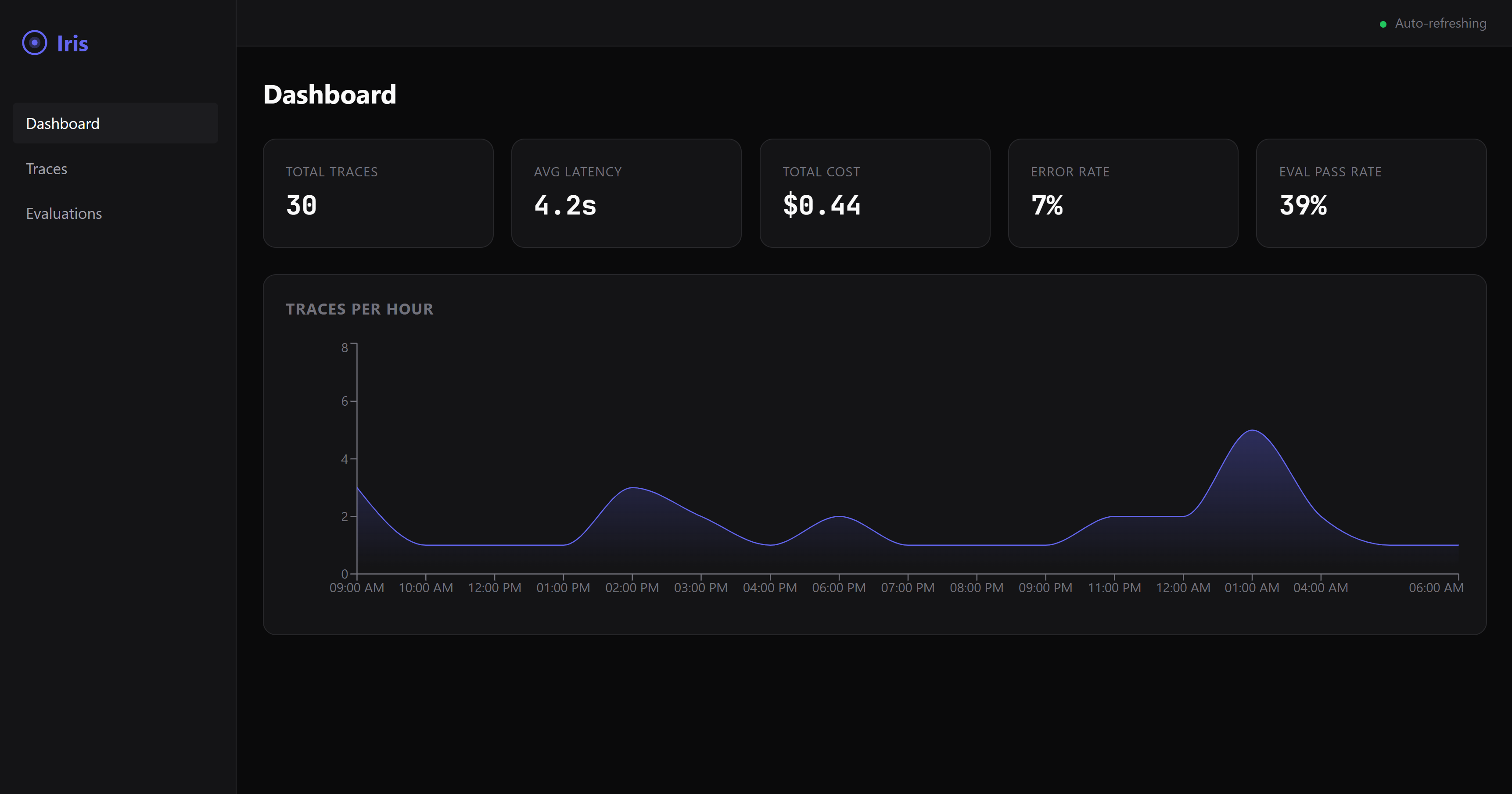
| **Web Dashboard** | Real-time dark-mode UI with trace visualization, eval results, and cost breakdowns. |
**Requires Node.js 20 or later.** Check with `node --version`.
## Quickstart
Add Iris to your MCP config. Works with Claude Desktop, Cursor, Windsurf, and any MCP-compatible agent.
```json
{
"mcpServers": {
"iris-eval": {
"command": "npx",
"args": ["@iris-eval/mcp-server"]
}
}
}
```
That's it. Your agent discovers Iris and starts logging traces automatically.
### Turn on the dashboard
Iris ships with a real-time web dashboard showing traces, eval results, cost breakdowns, and rule pass-rates. It's off by default so the MCP server stays lightweight — flip it on with a flag.
```json
{
"mcpServers": {
"iris-eval": {
"command": "npx",
"args": ["@iris-eval/mcp-server", "--dashboard"]
}
}
}
```
Then open **http://localhost:6920** after your agent runs a trace. The same dashboard is available via CLI:
```bash
npx @iris-eval/mcp-server --dashboard
```
Setup by tool
#### Claude Desktop
Edit your MCP config file:
- **macOS:** `~/Library/Application Support/Claude/claude_desktop_config.json`
- **Windows:** `%APPDATA%\Claude\claude_desktop_config.json`
Add the JSON config above, then restart Claude Desktop.
#### Claude Code
```bash
claude mcp add --transport stdio iris-eval -- npx @iris-eval/mcp-server
```
Then restart the session (`/clear` or relaunch) for tools to load.
> **Windows note:** Do *not* use `cmd /c` wrapper — it causes path parsing issues. The `npx` command works directly.
#### Cursor / Windsurf
Add to your workspace `.cursor/mcp.json` or global MCP settings using the JSON config above.
### Other Install Methods
```bash
# Global install (recommended for persistent data and faster startup)
npm install -g @iris-eval/mcp-server
iris-mcp --dashboard
# Docker
docker run -p 3000:3000 -v iris-data:/data ghcr.io/iris-eval/mcp-server
```
> **Tip:** Global install (`npm install -g`) stores traces persistently at `~/.iris/iris.db`. With `npx`, traces persist in the same location, but startup is slower due to package resolution.
## MCP Tools
Iris registers nine tools that any MCP-compatible agent can invoke — full rule + trace lifecycle + LLM-as-judge + semantic citation verification:
- **`log_trace`** — Log an agent execution with spans, tool calls, token usage, and cost
- **`evaluate_output`** — Score output quality against completeness, relevance, safety, and cost rules (heuristic, deterministic, free)
- **`get_traces`** — Query stored traces with filtering, pagination, and time-range support
- **`list_rules`** — Enumerate deployed custom eval rules (read-only)
- **`deploy_rule`** — Register a new custom eval rule so it fires on every `evaluate_output` of that category
- **`delete_rule`** — Remove a deployed custom rule (destructive, idempotent)
- **`delete_trace`** — Remove a single stored trace by ID (destructive, tenant-scoped)
- **`evaluate_with_llm_judge`** — Semantic eval via LLM (Anthropic or OpenAI). Five templates: accuracy, helpfulness, safety, correctness, faithfulness. Cost-capped, per-eval pricing disclosed. **Bring your own API key** (`IRIS_ANTHROPIC_API_KEY` or `IRIS_OPENAI_API_KEY`) — Iris doesn't proxy or relay LLM calls.
- **`verify_citations`** — Extract citations from output (numbered, author-year, URLs, DOIs), fetch sources behind an SSRF-guarded + domain-allowlisted resolver, and use an LLM judge to check whether each source actually supports the cited claim. Opt-in outbound HTTP. Same BYOK requirement as `evaluate_with_llm_judge`.
When `IRIS_OTEL_ENDPOINT` is configured, `log_trace` calls also emit a best-effort OTLP/HTTP JSON export to any OpenTelemetry collector (Jaeger, Grafana Tempo, Datadog OTLP, Honeycomb, etc). See [docs/otel-integration.md](docs/otel-integration.md).
Full tool schemas and configuration: [iris-eval.com](https://iris-eval.com)
## Cloud Tier (Coming Soon)
Self-hosted Iris runs on your machine with SQLite. As your team's eval needs grow, the cloud tier adds PostgreSQL, team dashboards, alerting on quality regressions, and managed infrastructure.
[Join the waitlist](https://iris-eval.com#waitlist) to get early access.
## Examples
- [Claude Desktop setup](examples/claude-desktop/) — MCP config for stdio and HTTP modes
- [TypeScript — MCP SDK client](examples/typescript/basic-usage.ts) — connect and invoke tools
- [HTTP transport (TS + Python)](examples/http-transport/) — full client code for REST-style integration
- [LangChain instrumentation (Python, conceptual)](examples/langchain/observe-agent.py) — scaffold showing the shape; needs your agent code to be runnable
- [CrewAI instrumentation (Python, conceptual)](examples/crewai/observe-crew.py) — scaffold; same caveat
## Community
- [GitHub Issues](https://github.com/iris-eval/mcp-server/issues) — Bug reports and feature requests
- [GitHub Discussions](https://github.com/iris-eval/mcp-server/discussions) — Questions and ideas
- [Contributing Guide](CONTRIBUTING.md) — How to contribute
- [Roadmap](docs/roadmap.md) — What's coming next
Configuration & Security
### CLI Arguments
| Flag | Default | Description |
|------|---------|-------------|
| `--transport` | `stdio` | Transport type: `stdio` or `http` |
| `--port` | `3000` | HTTP transport port |
| `--db-path` | `~/.iris/iris.db` | SQLite database path |
| `--config` | `~/.iris/config.json` | Config file path |
| `--api-key` | — | API key for HTTP authentication |
| `--dashboard` | `false` | Enable web dashboard |
| `--dashboard-port` | `6920` | Dashboard port |
### Environment Variables
| Variable | Description |
|----------|-------------|
| `IRIS_TRANSPORT` | Transport type (`stdio` or `http`) |
| `IRIS_PORT` | HTTP transport port |
| `IRIS_HOST` | HTTP transport host (default `127.0.0.1`) |
| `IRIS_DB_PATH` | SQLite database path |
| `IRIS_LOG_LEVEL` | Log level: `debug`, `info`, `warn`, `error` |
| `IRIS_DASHBOARD` | Enable web dashboard (`true`/`false`) |
| `IRIS_DASHBOARD_PORT` | Dashboard port (default `6920`) |
| `IRIS_API_KEY` | API key for HTTP authentication |
| `IRIS_ALLOWED_ORIGINS` | Comma-separated allowed CORS origins |
CLI flags take precedence over environment variables when both are set.
### Security
When using HTTP transport, Iris includes:
- API key authentication with timing-safe comparison
- CORS restricted to localhost by default
- Rate limiting (100 req/min API, 20 req/min MCP)
- Helmet security headers
- Zod input validation on all routes
- ReDoS-safe regex for custom eval rules
- 1MB request body limits
```bash
# Production deployment
iris-mcp --transport http --port 3000 --api-key "$(openssl rand -hex 32)" --dashboard
```
Troubleshooting
### Iris won't start / `ERR_MODULE_NOT_FOUND`
You may have a cached older version. Clear the npx cache and retry:
```bash
npx --yes @iris-eval/mcp-server@latest
```
Or install globally to avoid cache issues entirely:
```bash
npm install -g @iris-eval/mcp-server@latest
```
### Tools not showing up in Claude Code
MCP tools only load at session start. After adding iris-eval, restart the session with `/clear` or relaunch the terminal.
### Version check
Verify which version is running:
```bash
npx @iris-eval/mcp-server --help
# Shows "Iris — MCP-Native Agent Eval Server vX.Y.Z"
```
### Updating
```bash
# If using npx (clears cache and fetches latest)
npx --yes @iris-eval/mcp-server@latest
# If installed globally
npm update -g @iris-eval/mcp-server
```
### Node.js version
Iris requires Node.js 20 or later. Node 18 reached EOL in April 2025 and is not supported.
```bash
node --version # Must be v20.x or v22.x+
```
### Windows: `cmd /c` not needed
Claude Code's `/doctor` may suggest wrapping npx with `cmd /c`. This is not needed and causes path parsing issues. Use `npx` directly:
```bash
# Correct
claude mcp add --transport stdio iris-eval -- npx @iris-eval/mcp-server
# Wrong (causes /c to be parsed as a path)
claude mcp add --transport stdio iris-eval -- cmd /c "npx @iris-eval/mcp-server"
```
---
If Iris is useful to you, [consider starring the repo](https://github.com/iris-eval/mcp-server) — it helps others find it.
[](https://github.com/iris-eval/mcp-server)
MIT Licensed.