https://github.com/isaced/react-native-cupertino-list
a Cupertino/iOS list for React Native
https://github.com/isaced/react-native-cupertino-list
cupertino react-native react-native-component
Last synced: about 1 year ago
JSON representation
a Cupertino/iOS list for React Native
- Host: GitHub
- URL: https://github.com/isaced/react-native-cupertino-list
- Owner: isaced
- Created: 2022-05-29T16:15:59.000Z (about 4 years ago)
- Default Branch: main
- Last Pushed: 2023-03-15T12:33:57.000Z (over 3 years ago)
- Last Synced: 2024-09-17T01:43:38.357Z (almost 2 years ago)
- Topics: cupertino, react-native, react-native-component
- Language: Java
- Homepage:
- Size: 517 KB
- Stars: 7
- Watchers: 2
- Forks: 1
- Open Issues: 0
-
Metadata Files:
- Readme: README.md
Awesome Lists containing this project
README
react-native-cupertino-list
A Cupertino/iOS list for React Native.


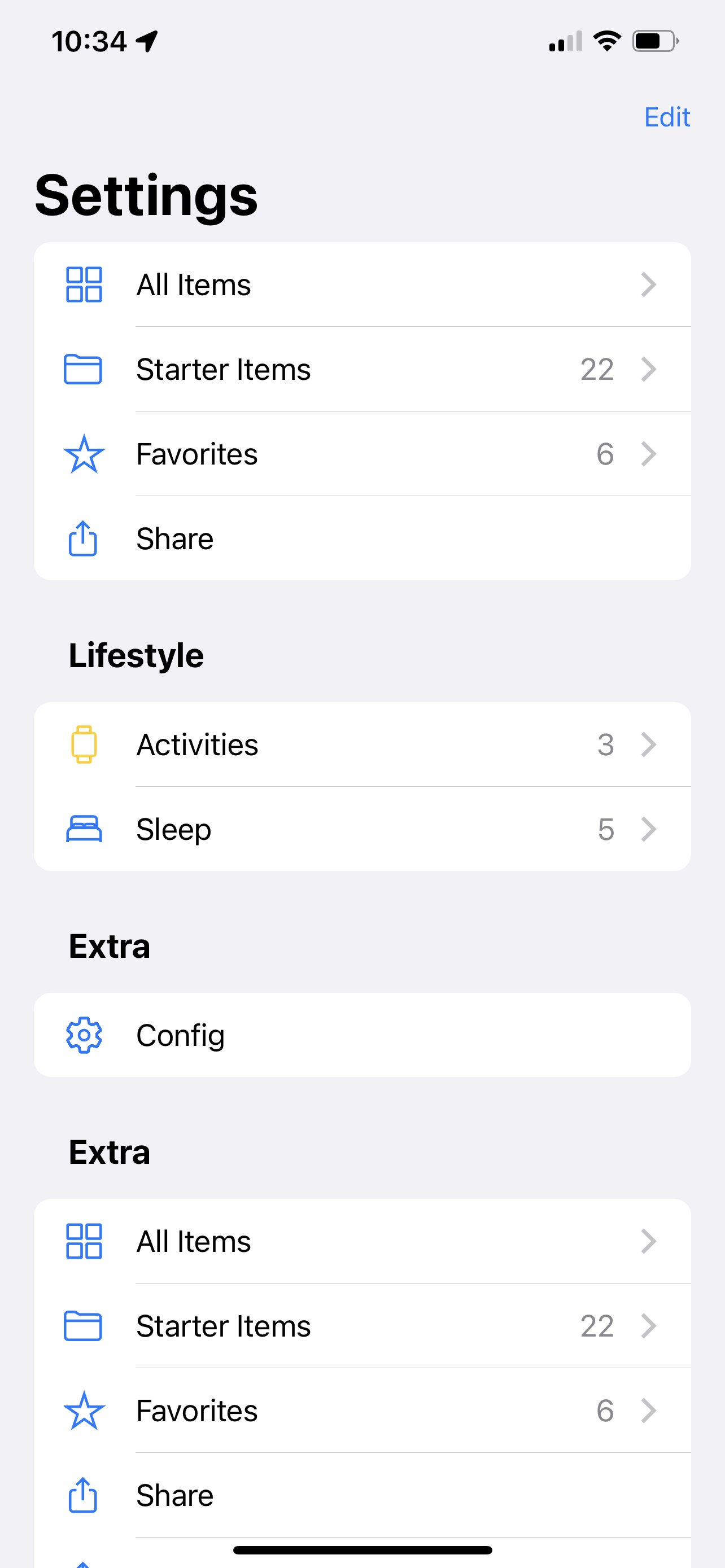
> Currently only tested on iOS.
## Feature
- High-reduction iOS system design style (Cupertino)
- Dark mode support
- Easily customize icons based on [react-native-vector-image](https://github.com/oblador/react-native-vector-icons)
- Based on SectionList, supports all SectionList's own features (such as List header support, Pull to Refresh...)
## Install
npm
```
npm install react-native-cupertino-list
```
yarn
```
yarn add react-native-cupertino-list
```
> You also need to install [react-native-vector-image](https://github.com/oblador/react-native-vector-icons#installation) to display the icons.
## Usage
```javascript
import {CupertinoSectionList} from 'react-native-cupertino-list';
export function HomeScreen() {
return (
);
}
```
### API
#### CupertinoSectionList.sections
| Property | Description | Type | Default |
|:--------:|:-------------------------------------:|:-----------------:|:-------:|
| title | Title of this row | string | - |
| icon | Customized row icon (left) | CupertinoCellIcon | - |
| forward | The element on the right in this row | ForwardType | - |
| onPress | Callback executed when select one row | function(event) | - |
#### CupertinoCellIcon
type: `string | { name?: string; color?: ColorValue } | JSX.Element`
1. string - render by react-native-vector-icons (Ionicons)
```json
{
"icon": "bulb-outline"
}
```
2. if you want to customize the color
```json
{
"icon": {
"name": "bulb-outline"
"color": "#000"
}
}
```
3. If you want to fully customize
```jsx
{
"icon": (
...
)
}
```
#### ForwardType
type: `{ title?: string; icon?: CupertinoCellIcon; arrowHidden?: boolean; }`
| Property | Description | Type | Default |
|-------------|------------------------------------------------|-------------------|-----------------------------|
| title | Text displayed to the right of the current row | string | - |
| icon | Icon displayed to the right of the current row | CupertinoCellIcon | ">" - `ios-chevron-forward` |
| arrowHidden | hide the icon on the right | boolean | false |
example:
```json
{
"title": "22",
"icon": "ios-chevron-forward"
}
```
### Custom Icon
You can find the icon you need at [react-native-vector-icons directory](https://oblador.github.io/react-native-vector-icons/), fill the icon name into the `data.icon` field, note that only **Ionicons** are currently supported.
## Other
Inspired by [Evan Bacon](https://twitter.com/Baconbrix/status/1526578286783893505), Tanks.