https://github.com/ishaanadarsh/ezmail
An open-source user-friendly Web application with 50+ pre-designed easily customisable email templates for effective communication
https://github.com/ishaanadarsh/ezmail
hacktober hacktoberfest hacktoberfest2023 javascript sveltekit tailwindcss
Last synced: 10 months ago
JSON representation
An open-source user-friendly Web application with 50+ pre-designed easily customisable email templates for effective communication
- Host: GitHub
- URL: https://github.com/ishaanadarsh/ezmail
- Owner: IshaanAdarsh
- License: gpl-3.0
- Created: 2022-12-27T11:11:56.000Z (over 3 years ago)
- Default Branch: main
- Last Pushed: 2024-07-09T05:07:15.000Z (almost 2 years ago)
- Last Synced: 2024-12-07T18:08:52.006Z (over 1 year ago)
- Topics: hacktober, hacktoberfest, hacktoberfest2023, javascript, sveltekit, tailwindcss
- Language: Svelte
- Homepage: https://ezmail-home.vercel.app/
- Size: 615 KB
- Stars: 19
- Watchers: 2
- Forks: 43
- Open Issues: 0
-
Metadata Files:
- Readme: README.md
- Contributing: CONTRIBUTING.md
- Funding: .github/FUNDING.yml
- License: LICENSE
- Code of conduct: CODE_OF_CONDUCT.md
- Security: SECURITY.md
Awesome Lists containing this project
README

About Ezmail
We are excited to introduce our new email template website, designed to promote a culture of effective and efficient communication among college students. The website offers a wide range of templates for various scenarios, such as requesting information from professors, scheduling meetings, and networking with professionals.
We would love for you to check out our website and let us know what you think. We are always looking for feedback and suggestions on how to improve our service.
This repository contains the code used to create our website - "Ezmail".
## 🛠️ Technology Stack






## How to **contribute**?
If you're not comfortable with the command line, [here are tutorials using GUI tools.](https://docs.github.com/en/desktop/installing-and-configuring-github-desktop/overview/getting-started-with-github-desktop). If you don't have git on your machine, [install it](https://help.github.com/articles/set-up-git/).
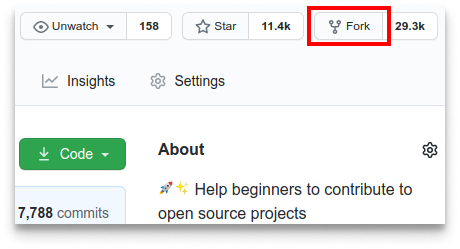
**1.** Fork [this](https://github.com/IshaanAdarsh/ezmail) repository.
**2.** Clone your forked copy of the project.
```
git clone https://github.com//ezmail.git
```
**3.** Navigate to the project directory :file_folder: .
```
cd ezmail
```
**4.** Add a reference(remote) to the original repository.
```
git remote add upstream https://github.com/IshaanAdarsh/ezmail
```
**5.** Check the remotes for this repository.
```
git remote -v
```
**6.** Always take a pull from the upstream repository to your master branch to keep it at par with the main project(updated repository).
```
git pull upstream main
```
**7.** Create a new branch.
```
git checkout -b
```
**8.** Perform your desired changes to the code base on that branch.
**9.** Track your changes :heavy_check_mark: .
```
git add .
```
**10.** Commit your changes.
```
git commit -m "Relevant message"
```
**11.** Push the committed changes in your feature branch to your remote repo.
```
git push -u origin
```
**12.** To create a pull request, click on `compare and pull requests. Please ensure you compare your feature branch to the desired branch of the repository you are supposed to make a PR to.
**13.** Add an appropriate title and description to your pull request explaining your changes and efforts.
**14.** Click on `Create Pull Request`.
**15** Voila! You have made a PR to Bug Buster's Community Website. Sit back patiently and relax while your PR is reviewed.
## How to **add a template**
After the above setup is done follow these steps to a template
**1.** Navigate to `/src` and then to the section you want to contribute to, for example `/prof`
**2.** Open the `data.js` file.
**3.** You will see a javascript object with the fields `slug` - the url of the template
`title` - the subject if the email
`subject` - a short summary of the main purpose of the email
`content` - the body of the email
> Please note that the `content` field can only have a string value and strings can not have new lines. Add a `\n` wherever a new line is to added.
> You can also join multiple strings by simply adding a plus sign ` "hello"+" world"`
**4.** After doing the necessary formatting. Check the working of the changes made and ensure that everything else is also working fine by running it locally.
**5.** Create a pull request
## How to **run project the project**?
Please make sure you have vs code editor installed. If you don't have it, [download it](https://code.visualstudio.com/download).
**1.** Open VS code and clone the repo .
```
git clone https://github.com/IshaanAdarsh/ezmail
```
**2.** Open all files in vs code.
```
cd ezmail
```
**3.** Install dependencies
```
npm i
```
**4.** Start development server
```
npm run dev -- --open
```
Project Maintainers & Admins

Ishaan Adarsh

Abhinav Srinivas
Project Contributors