https://github.com/isislab-unisa/sof
Simulation Optimization and exploration Framework on the cloud: SOF
https://github.com/isislab-unisa/sof
agent-based-simulation hadoop java mapreduce optimization-process simulation-model simulation-optimization sof
Last synced: over 1 year ago
JSON representation
Simulation Optimization and exploration Framework on the cloud: SOF
- Host: GitHub
- URL: https://github.com/isislab-unisa/sof
- Owner: isislab-unisa
- Created: 2015-01-08T15:06:17.000Z (over 11 years ago)
- Default Branch: master
- Last Pushed: 2022-10-03T21:24:35.000Z (almost 4 years ago)
- Last Synced: 2025-03-26T14:50:25.918Z (over 1 year ago)
- Topics: agent-based-simulation, hadoop, java, mapreduce, optimization-process, simulation-model, simulation-optimization, sof
- Language: Java
- Homepage:
- Size: 245 MB
- Stars: 9
- Watchers: 7
- Forks: 4
- Open Issues: 1
-
Metadata Files:
- Readme: README.md
Awesome Lists containing this project
README
SOF: Zero Configuration Simulation Optimization Framework on the Cloud
==================
Simulation models are becoming an increasingly popular tool for the analysis and optimization of complex real systems in different fields. Finding an optimal system design requires performing a large parameter sweep. Hence, the model tuning process is extremely demanding from a computational point of view, as it requires careful, time-consuming, complex orchestration of coordinated executions. In this paper, we present the design of SOF (Simulation Optimization and exploration framework on the cloud), a framework which exploits the computing power of a cloud computational environment in order to realize effective and efficient simulation optimization strategies.
SOF offers several attractive features: firstly, SOF requires "**zero configuration**" as it does not require _any_ additional software installed on the remote node (only standard [Apache Hadoop](http://hadoop.apache.org/) and a SSH access are sufficient). Secondly, SOF is transparent to the user, since the user is totally unaware that system operates on a distributed environment. Finally, SOF is highly customizable and programmable, since it enables the running of different simulation toolkits and/or the ability to exploit diverse programming languages -- provided that the hosting platform support them -- under two different simulation optimization scenarios, as developed by the modeler.
The framework core has been fully developed and is available under the Apache public licence. It has been tested and validated on several private platforms, such as a dedicated cluster of workstations, as well as on public platforms, including the Hortonworks Data Platform ([Hortonworks](http://hortonworks.com/)).
SOF was designed in [ISISLab](http://www.isislab.it) and allows the simulation modeller to run and collect results in two kinds of scenario parameter space exploration (PSE) and simulation optimization (SO) considering the computational resources as available for a not fixed time and subjects to failure.
SOF was designed to manage three kinds of simulation engine: [MASON](http://cs.gmu.edu/~eclab/projects/mason/), [NetLogo](https://ccl.northwestern.edu/netlogo/) and a generic simulator. SOF provides some software facilities for the first simulators like the automatic simulation input setting and automatic output generating (that does not provide for the generic simulator, for obvious reasons). The generic simulator must be an executable compliant with the cluster machine used.
SOF is a framework to exploit simulation optimization on Hadoop cluster. SOF is divided in two main functional blocks: core and client. The core component provides all functionality to write out Java based client application. The client is a command line Java application that shown the features of the core component and allows to execute PSE and SO process on a [Apache Hadoop](http://hadoop.apache.org/) cluster.
The SOF system presents two main entities: the SOF client and the remote host machine on which is installed Hadoop, also named the Hadoop master node. Respectively on the left and on the right of the above figure.
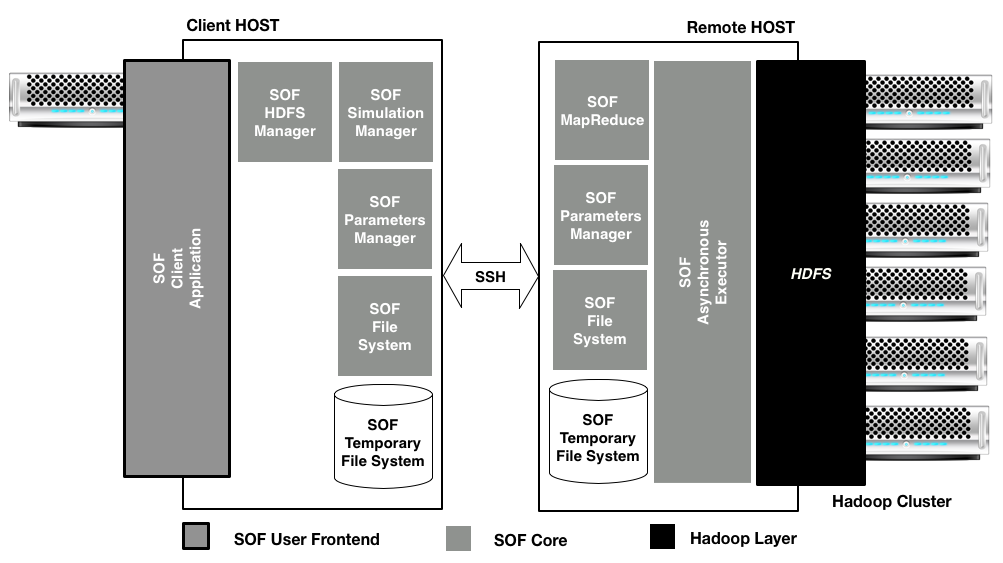
SOF architecture is divided in three main software block: a user frontend that is the SOF application for running and managing the simulation on the Hadoop infrastructure, used only on the client side; the Hadoop layer that encloses softwares and libraries provided from Hadoop infrastructure, used on the remote side; and the SOF core that is the main software block composed of six functional blocks, that are used on the client and on the remote side.
#### SOF System workflow
SOF was designed to execute simulation optimization and parameter space exploration process on Apache Hadoop. In order to execute a simulation optimization process the user must provide a well formatted input:
* the simulation executable, MASON/NetLogo model or an executable file;
* the selection and evaluation functions written in any languages supported by the cluster machine (in this case the user must also define the interpreter program path for languages like Python, Groovy etc.);
* the domain/input/output/evaluate format for the parameters of the simulation.
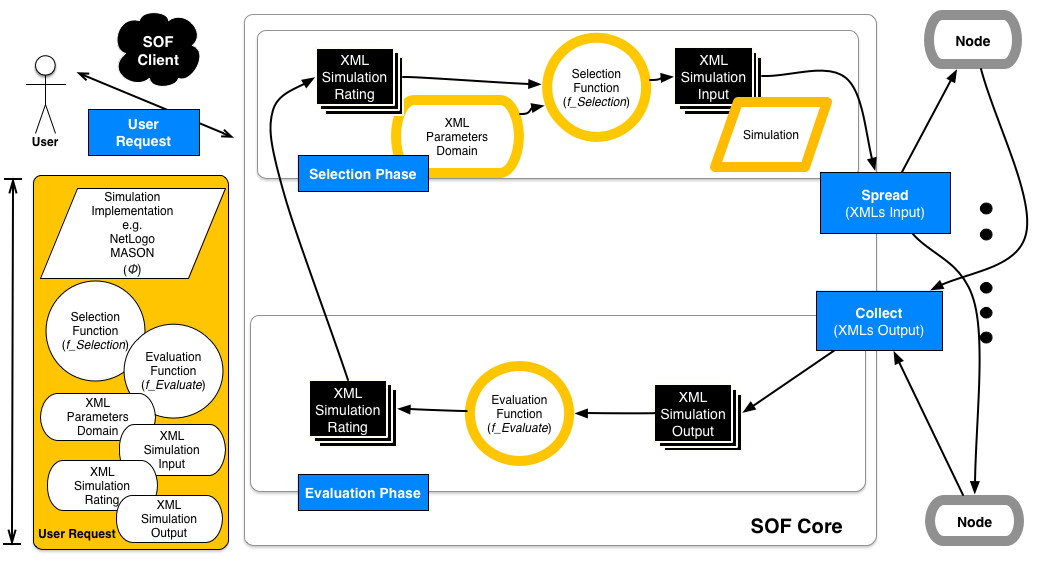
A SOF process, shown in the figure, consists in many optimization loops in which are executed simulations on a set of inputs (generated executing the selection function program) in order to generate the outputs set. The outputs set are evaluated using the evaluate function program. At end the selection program is used again to generate a new inputs set for the next optimization loop (obviously the process ends when the selection function program does not generate a new inputs set). By this computational schema is possible to realize many of the simulation optimization algorithms available literature.
##System Requirements
* [Apache Hadoop](http://hadoop.apache.org/) on Linux based Cluster version 2.4.0 or greater.
* Java Runtime Environment version 7 or greater.
* An account on the cluster over SSH.
-
## Compiling the SOF core library and SOF application from src/ to target/ by Apache Maven
If you would like to add features to the library, you will have to change the code in `src/` and then compile the library using Maven, in the project folder:
$ mvn compile
$ mvn package
After that yoy have updated `SOF.jar` and `SOF-RUNNER.jar` in the folder `SOF-resources`. Those files are runnable jar file: the former with `SOF.java` for the main class in the `MANIFEST` and the last with `SOF-RUNNER.java`. Both the classes are located in the package `it.isislab.sof.core.engine.hadoop.sshclient.utils.simulation.executor`.
To release the final build you must run the command:
$ mvn package
The output files will be in `target/`:
.
├── SOF-1.0-library.jar
├── SOF-client-shell.jar
├── SOF-client-ui.jar
├── archive-tmp
├── classes
├── examples
├── generated-sources
├── lib
├── maven-archiver
├── maven-status
└── SOF-resources
# SOF on test environment
To easily test the SOF environment you can set up a virtual machine with Apache Hadoop infrastructure on your local machine. A popular example of that is a **Hortonworks Data Platform (HDP)**, an open source Apache Hadoop data platform, architected for the enterprise, developed from [Hortonworks](http://hortonworks.com/). The HDP 2.2 Sandbox is provided as a self-contained virtual machine with Hadoop 2.6.0. No data center, no cloud service and no internet connection needed in order to the SOF framework.
Download the virtual machine at Hortonworks [download page](http://hortonworks.com/products/releases/hdp-2-2/#install), and install your prefered available virtual machine in order to set up the environment.
### How to execute SOF using VirtualBox HDP 2.2 Sandbox
After you have installed [VirtualBox](https://www.virtualbox.org/) and downloaded the virtual machine for VirtualBox, follow this steps:
* Execute HortonWorks SandBox 2.2;
* Boot the virtual machine (follow the instructions on the Hortonworks's site);
* usually the user's credentials are login: **root** and password: **hadoop** (please check it on Hortonworks's site).
Afterwards you must enable network on the VirtualBox [Settings-> Network-> Enable Network Adapter, choose Bridged Adapter for "Attached To" option]. Reboot the machine and check the connection availability.
In both SOF clients are needed some system configuration parameters:
* *Node IP address* [`-h`]: IP of Hadoop Master node (in this scenario the IP address of the virtual machine, you can find it by running the command: `ifconfig`);
* *Hadoop home directory* [`-bindir`]: the folder that contains the bin directory of Hadoop infrastructure, where you can find all the Hadoop commands, in this case `/usr/`;
* *Home directory* [`-homedir`]: folder where you create SOF temporary directory on the remote machine (Hadoop Master node), in this case the virtual machine home like `/root`;
* *Java bin directory* [`-javabindir`]: folder that cointains `/bin` directory of Java installation, in this case `/usr/bin/`;
* *SOF home directory* [`-sofhomedir`]: SOF installation folder on the HDFS, in this case `/user/root/`.
###### Examples:
* **SOF Simple Java Client** change the parameters setting in the Java class and run it (see [Getting Started SOF Java Client](https://github.com/isislab-unisa/sof/blob/master/README.md#getting-started-sof-simple-java-client) section).
* **SOF Shell Client** `$ java -jar SOF-Client.jar -h 192.168.0.2 -bindir /usr/ -homedir /root/ -javabindir /usr/bin/ -sofhomedir /user/root/` (see [Getting Started SOF GUI Client](https://github.com/isislab-unisa/sof/blob/master/README.md#getting-started-sof-schell-client) section).
* **SOF GUI Client** provides the parameters setting in the GUI (see [Getting Started SOF Schell Client](https://github.com/isislab-unisa/sof/blob/master/README.md#getting-started-sof-gui-client) section).
## Define Model Parameters Domain-Input-Output-Rating (Evaluate): SOF XML schemas
SOF support two executions modes, as mentioned above, PSE and SO.
In PSE mode the input to the simulation and the output must be in XML, compliant with input/output schemas. In the SO mode the user must not provide the input files but must declare the parameters domain in XML using the domain schema.
In the following there are shown the SOF parameters XML schemas:
* **XML Domain**
To [this](https://github.com/isislab-unisa/sof/blob/master/xml/schema/domain.xsd) link there is the domain XML schema for the simulation model parameters.
- - -
* **XML Input**
To [this](https://github.com/isislab-unisa/sof/blob/master/xml/schema/input.xsd) link there is the input XML schema for the simulation model parameters.
- - -
* **XML Output**
To [this](https://github.com/isislab-unisa/sof/blob/master/xml/schema/output.xsd) link there is the output XML schema for the simulation model parameters.
- - -
* **XML Ratings**
To [this](https://github.com/isislab-unisa/sof/blob/master/xml/schema/ratings.xsd) link there is the ratings XML schema for the simulation model parameters.
- - -
## Define Evaluation Function
You have to write your evaluation function in order to define a SO simulation process. You can write this program in all programming languages how you have read in previous sections. In the following example we show how to write an evaluation function in Java language.
Below we show how to print all output parameters defined in the output.xml file of NetLogo Fire example and how to create and to print new output parameters. We define a HashTable(a container) of items. Any item has a key (the name of variable defined in the output.xml file) and a value(the outputs' value returned by simulation step). We print all these parameters and at the end in the last section of code we show how to create a new parameter for our NetLogo Fire example and how to print it in a SOF legal format.
```java
package it.isislab.sof.example.function.evaluation;
/**
* An example of evaluation function for our NetLogo Fire example with Java language
* At the end of a step of simulations, the evaluatuation program extracts and prints
* all parameters contained into output.xml file with associated value from simulation
*/
public class EvaluationFunctionExample{
public static void main(String[] args) throws SAXException, ParserConfigurationException {
DocumentBuilderFactory dbFactory = DocumentBuilderFactory.newInstance();
DocumentBuilder dBuilder = dbFactory.newDocumentBuilder();
Document doc;
/******************************************************************************************************************
**
* This code inserts in a HashTable all output parameters of simulation
*
/******************************************************************************************************************/
try {
doc = dBuilder.parse(new File(args[0]));
NodeList params=doc.getElementsByTagName("param");
Hashtable simulationOutputValues=new Hashtable();
int paramSize=params.getLength();
for(int j=0; j
* calling simulationValue.get("nameVariable"); where nameVariable is the name of variabl
* You can find nameVariabile and its type into output.xml that you created
*
*
* Example
* At the end of a simulation step of NetLogo Fire example i want to calculate percentage of burned trees.
* You must:
* -Define the name of new parameter. For Example burnedPercentage
* -Calculate new parameter in Java code(you must parse in a right Java type)
* -Print new parameter into file in a correct SOF Evaluator File Format "ParameterName:ParameterValue;"
*/
/*For example, i want to calculate burned trees percentage at the end of a step of simulation,
* i called this parameter burnedPercentage */
/*Calculate new parameter burnedPercentage*/
double percentage= (Double.parseDouble(simulationOutputValues.get("burned-trees"))*100)/Double.parseDouble(simulationOutputValues.get("initial-trees"));
/*Print 'burnedPercentage:percentage;' in a correct format where percentage is the value */
System.out.printf("burnedPercentage:%.2f;",percentage);
} catch (IOException e) {
System.err.println("Error occurred "+e.getMessage());
}
}
/*****************************************************************************************************************************/
}
```
## Getting Started SOF Client
#### Getting Started _**SOF Simple Java Client**_
Here is a minimum example of defining a client application using the SOF core. The program create new simulation job in SO mode, submit the job to the system and wait until the process are finished.
After build the project by Maven `mvn package`, you are able to run the example in the class `SOFCoreSimpleApplication.java`.
This simple application shows some SOF core features:
* create new simulation optimization process;
* submit the process;
* wait until the simulation optimization process ends.
In the `examples/netlogo-aids` folder project is available all files of a simulation optimization example. This example use a NetLogo simulation named aids.logo, that is based on a simple propagation model of AIDS disease. The optimization process used is defined by the file selection and evaluation functions (respectively `examples/netlogo-aids/selection.jar` and `examples/netlogo-aids/evaluation.jar`), this toy optimization process experiment runs until all agents are sick.
Below we show a code example of a toy sof application ([link](https://github.com/isislab-unisa/sof/blob/master/src/main/java/it/isislab/sof/client/application/SOFCoreSimpleApplication.java)).
```java
package it.isislab.sof.client.application;
import it.isislab.sof.core.engine.hadoop.sshclient.connection.SOFManager;
import it.isislab.sof.core.engine.hadoop.sshclient.utils.environment.EnvironmentSession;
import it.isislab.sof.core.engine.hadoop.sshclient.utils.simulation.Simulation;
import it.isislab.sof.core.engine.hadoop.sshclient.utils.simulation.Simulations;
import java.io.File;
import java.io.FileInputStream;
import com.jcraft.jsch.SftpException;
public class SOFCoreSimpleApplication {
public static int PORT=22;
public static String host= "127.0.0.1";
public static String pstring="password";
public static String bindir="/isis/hadoop-2.4.0";
public static String homedir="/isis/";
public static String javabindir ="/usr/local/java/bin/";
public static String name="isis";
public static String sofhomedir="/";
public static String toolkit="netlogo";
public static String simulation_name="aids";
public static String domain_pathname="examples-sim-aids/domain.xml";
public static String bashCommandForRunnableFunctionSelection="/usr/local/java/bin/java";
public static String bashCommandForRunnableFunctionEvaluate="/usr/local/java/bin/java";
public static String output_description_filename="examples-sim-aids/output.xml";
public static String executable_selection_function_filename="examples-sim-aids/selection.jar";
public static String executable_rating_function_filename="examples-sim-aids/evaluate.jar";
public static String description_simulation="this a simple simulation optimization process for AIDS NetLogo simulation example";
public static String executable_simulation_filename="examples-sim-aids/aids.nlogo";
/**
* @param args
* @throws SftpException
*/
public static EnvironmentSession session;
public static void main(String[] args) throws SftpException{
Simulations sims=null;
try {
SOFManager.setFileSystem(bindir,System.getProperty("user.dir"), sofhomedir, homedir, javabindir ,name);
if ((session=SOFManager.connect(name, host, pstring, bindir,PORT,
new FileInputStream(System.getProperty("user.dir")+File.separator+"SOF-resources"+File.separator+"SOF.jar"),
new FileInputStream(System.getProperty("user.dir")+File.separator+"SOF-resources"+File.separator+"SOF-RUNNER.jar")
))!=null)
{
System.out.println("Connected. Type \"help\", \"usage \" or \"license\" for more information.");
}else{
System.err.println("Login Correct but there are several problems in the hadoop environment, please contact your hadoop admin.");
System.exit(-1);
}
} catch (Exception e) {
System.err.println("Login Error. Check your credentials and ip:port of your server and try again .. ");
}
//CREATE SIMULATION FROM EXAMPLE IN SO MODE
try {
SOFManager.makeSimulationFolderForLoop(session, toolkit, simulation_name, domain_pathname, bashCommandForRunnableFunctionSelection,bashCommandForRunnableFunctionEvaluate,
output_description_filename, executable_selection_function_filename, executable_rating_function_filename, description_simulation, executable_simulation_filename,""/*param exacutable param for generic mode, not required for netlogo and mason*/);
} catch (Exception e) {
// TODO Auto-generated catch block
e.printStackTrace();
}
System.out.println("SIMULATION AVAILABLE LIST: ");
sims = SOFManager.getSimulationsData(session);
if(sims == null){
System.err.println("No such simulations.");
}
System.out.println("******************************************************");
for(int i=1; i<=sims.getSimulations().size(); i++){
int simID= i-1;
Simulation s = sims.getSimulations().get(simID);
System.err.println("sim-id:"+i+") name: "+s.getName()+" state: "+s.getState()+" time: "+s.getCreationTime()+" id: "+s.getId()+"\n");
}
System.out.println("******************************************************");
System.out.println("Start the simulation with sim-id "+(sims.getSimulations().size()));
sims = SOFManager.getSimulationsData(session);
Simulation s = sims.getSimulations().get(sims.getSimulations().size()-1);
if(s == null){
System.err.println("No such simulation with ID "+sims.getSimulations().size());
System.exit(-1);
}
SOFManager.runAsynchronousSimulation(session,s);
System.out.println("Waiting for simulation ends.");
Simulation sim=null;
do{
sims = SOFManager.getSimulationsData(session);
sim = sims.getSimulations().get(sims.getSimulations().size()-1);
}while(!(sim.getState().equals(Simulation.FINISHED)));
System.exit(0);
}
}
```
#### Getting Started **_SOF GUI Client_**
SOF framework provides a Java command line client available in the release (`SOF-client-ui.jar, SOFClientUI.java`):
$ java -jar SOF-client-ui.jar
#### Getting Started _**SOF Shell Client**_
SOF framework provides a Java command line client available in the release (`SOF-client-shell.jar, SOFCoreSimpleApplication.java`):
$ java -jar SOF-client-shell.jar
This client application use SSH to connect to the Hadoop cluster. The application parameters are the following:
* `-h HOST NAME` cluster master node IP address. The default value is `localhost (127.0.0.1)`;
* `-port PORT NUMBER` listening port for SHH process on cluster. The default value is `22`;
* `-bindir PATH BIN DIRECTORY` the bin installation path (absolute) of Hadoop. The default value is `/bin`;
* `-homedir PATH DIRECTORY` the home directory of the user on the master node. The default value is `~/temp`;
* `-javabindir PATH JAVA BIN DIRECTORY` the bin installation path of the Java Virtual Machine. The default value is `/usr/bin`;
* `-sofhomedir USER SOF HOME DIRECTORY` the Hadoop distributed File system directory which will be the root directory for the SOF application. The default value is `/`.
Usage:
$ java -jar SOF-Client.jar -h 192.168.0.1 -port 1022 -bindir /home/hadoop -homedir /home/user -javabindir /home/java/bin -sofhomedir /home/user/app/SOFtmp
After login this is the command shell:
sof$ 18:00:01 >>>
---
#### SOF Client commands overview
* **`help`** shows the name and a brief use description of SOF commands.
- - -
* **`exit`** exits from SOF application and disconnects the user.
- - -
* **`createsimulation`** creates a simple simulation in parameter space exploration mode. This command takes following parameters input:
- ``model`` mason-netlogo-generic
- ``simulation name``
- ``input XML absolute path``
- ``output XML absolute path``
- ``brief simualtion description``
- ``absolute path of bin file for simulation executable model``
* usage ``createsimulation netlogo mysim /home/pippo/input.xml /home/pippo/output.xml "the description" /home/pippo/mysim.nlogo``
- - -
* **`createsimulationloop`** creates a simulation in simulation optimization mode. This command takes following parameters input:
- ``model`` mason-netlogo-generic
- ``simulation name``
- ``domain XML absolute path``
- ``absolute path for bin command to exec the selection and evaluation``
- ``output XML absolute path``
- ``absolute path for the selection function file``
- ``absolute path for the evaluate function file``
- ``brief simualtion description``
- ``absolute path of bin file for simulation executable model``
* usage ``createsimulationloop mason mysim /home/pippo/domain.xml /bin/java /home/pippo/output.xml /home/pippo/selection_function.jar /home/pippo/evaluate_function.jar my description /home/pippo/mysim.jar``
- - -
* **``getsimulations``** prints states and data for all simulations.
Returns for each simulation the following information:
- `simulation hdfs identifier` an alphanumeric number associated to the simulation. Note: this is the simulation identifier to identify a simulation on distributed file system.
- ``simulation name``
- ``simulation author``
- ``creation time of simulation``
- ``the simulation description``
- ``loop status list``:
* ``created``, the simulation has been created but not running yet.
* ``running``, the simulation are running.
* ``finished``, the simulation has been finished correctly.
* ``aborted``, the simulation has been finished not correctly: the process was aborted from the system or the user.
- - -
* **`list`** prints a list of all simulations.
Returns for each simulation the following information:
- `simulation identifier` an integer number associated to the simulation. Note: this is the simulation identifier to use for all command to refer a simulation.
- `simulation name`
- ``status of simulation``:
* ``created``, the simulation has been created but not running yet.
* ``running``, the simulation are running.
* ``finished``, the simulation has been finished correctly.
* ``aborted``, the simulation has been finished not correctly: the process was aborted from the system or the user.
- `creation time of simulation`
- `simulation identifier on hadoop file system`
- - -
* **`start`** start a simulation execution or restart from last loop if you have stopped simulation(see stop command). This command takes the following input parameters:
- `simulation identifier` an integer number associated to the simulation. Note: this is the simulation identifier to use for all command to refer a simulation (given in the list command).
* usage `start x` where x is your simulation identifier.
- - -
* **`stop`** stop simulation execution(you can use start command to restart). This command takes the following input parameters:
- `simulation identifier` an integer number associated to the simulation. Note: this is the simulation identifier to use for all command to refer a simulation (given in the list command).
* usage `stop x` where x is your simulation identifier.
- - -
* **`getsimulation`** shows all data information of a simulation and loops. This command takes the following input parameters:
- `simulation identifier` an integer number associated to the simulation. Note: this is the simulation identifier to use for all command to refer a simulation (given in the list command).
Command returns the following information:
* `simulation hdfs identifier` an alphanumeric number associated to the simulation. Note: this is the simulation identifier to identify a simulation on distributed file system.
* `simulation name`
* `simulation author`
* `creation time of simulation`
* `the simulation description`
* ``status of simulation``:
- ``created``, the simulation has been created but not running yet.
- `running`, the simulation are running.
- ``finished``, the simulation has been finished correctly.
- ``aborted``, the simulation has been finished not correctly: the process was aborted from the system or the user.
* `number of loops executed by the process`
- - -
* **`getresult`** download all data of a simulation in zip archive. This command takes the following input parameters:
- `simulation identifier` an integer number associated to the simulation. Note: this is the simulation identifier to use for all command to refer a simulation (given in the list command).
- `localpath` absolute local path where you will save the tar file. If it isn't specified, it will download on current directory.
* usage ``getresult x /home`` download the data of simulation with identifier 2 in the `/home` directory.
- - -
* **`kill`** stop the SOF process of particular simulation. This command takes the following input parameters:
- `simulation identifier` an integer number associated to the simulation. Note: this is the simulation identifier to use for all command to refer a simulation (given in the list command).
- `localpath`, absolute local path where you will save the tar file.
* usage ``kill x `` interrupt the process of simulation with identifier x.
- - -
* **`makexml`** this command start a tool to generate the XML files for the SOF process:
- ``input.xml`` contains input parameters (name of variable and initial value) of simulation
- ``ouput.xml`` contains output parameters (name of variable and value) of simulation
- ``domain.xml`` domain file for input parameters (only in SO mode)
**Xml Scope**
This command takes the following input parameters:
* - ``help`` shows command list
* - ``list`` shows the corresponding list to the given xml kind [input, output, domain]
* - ``new`` generate a new [input,output,domain] xml file
* - ``remove`` remove the corresponding given element
* - ``generatexml`` generate the xml file of the corresponding xml kind in the given directory
* - ``exit`` go back at previously SOF shell scope
**Parameters Scope**
* - ``help`` shows command list
* - ``add``: adds a new parameter for following entities :
- `Simulation` add [-author | -name | -description | -toolkit] value
- `input` add [-string | -double | -long] varName value
- `ouput` add [-string | -double | -long] varName
- `domain` add [ -discrete varName min max increment| -continuous varName min max increment | -list string varName | -list double varName]
* - ``remove`` remove the corresponding given element
* - ``list`` shows the corresponding list to the given xml kind [input, output, domain]
* - ``exit`` go back at previously SOF shell scope
- - -
### License
Copyright ISISLab, 2017 Università degli Studi di Salerno.
Licensed under the Apache License, Version 2.0 (the "License"); You may not use this file except in compliance with the License. You may obtain a copy of the License at
http://www.apache.org/licenses/LICENSE-2.0
Unless required by applicable law or agreed to in writing, software distributed under the License is distributed on an "AS IS" BASIS, WITHOUT WARRANTIES OR CONDITIONS OF ANY KIND, either express or implied. See the License for the specific language governing permissions and limitations under the License.