https://github.com/islandcontroller/euc2mqtt
MQTT Publisher for Eaton UPS Companion status messages to Home Assistant
https://github.com/islandcontroller/euc2mqtt
eaton-ups homeassistant mqtt python3
Last synced: 6 months ago
JSON representation
MQTT Publisher for Eaton UPS Companion status messages to Home Assistant
- Host: GitHub
- URL: https://github.com/islandcontroller/euc2mqtt
- Owner: islandcontroller
- License: mit
- Created: 2024-04-20T18:24:21.000Z (about 2 years ago)
- Default Branch: master
- Last Pushed: 2024-05-20T13:46:19.000Z (about 2 years ago)
- Last Synced: 2025-01-26T16:32:56.857Z (over 1 year ago)
- Topics: eaton-ups, homeassistant, mqtt, python3
- Language: Python
- Homepage: https://pypi.org/project/euc2mqtt/
- Size: 131 KB
- Stars: 0
- Watchers: 1
- Forks: 0
- Open Issues: 0
-
Metadata Files:
- Readme: README.md
- License: LICENSE
Awesome Lists containing this project
README
# euc2mqtt
[](LICENSE) 
A tool for publishing status data from a local Eaton UPS Companion service to Homeassistant.
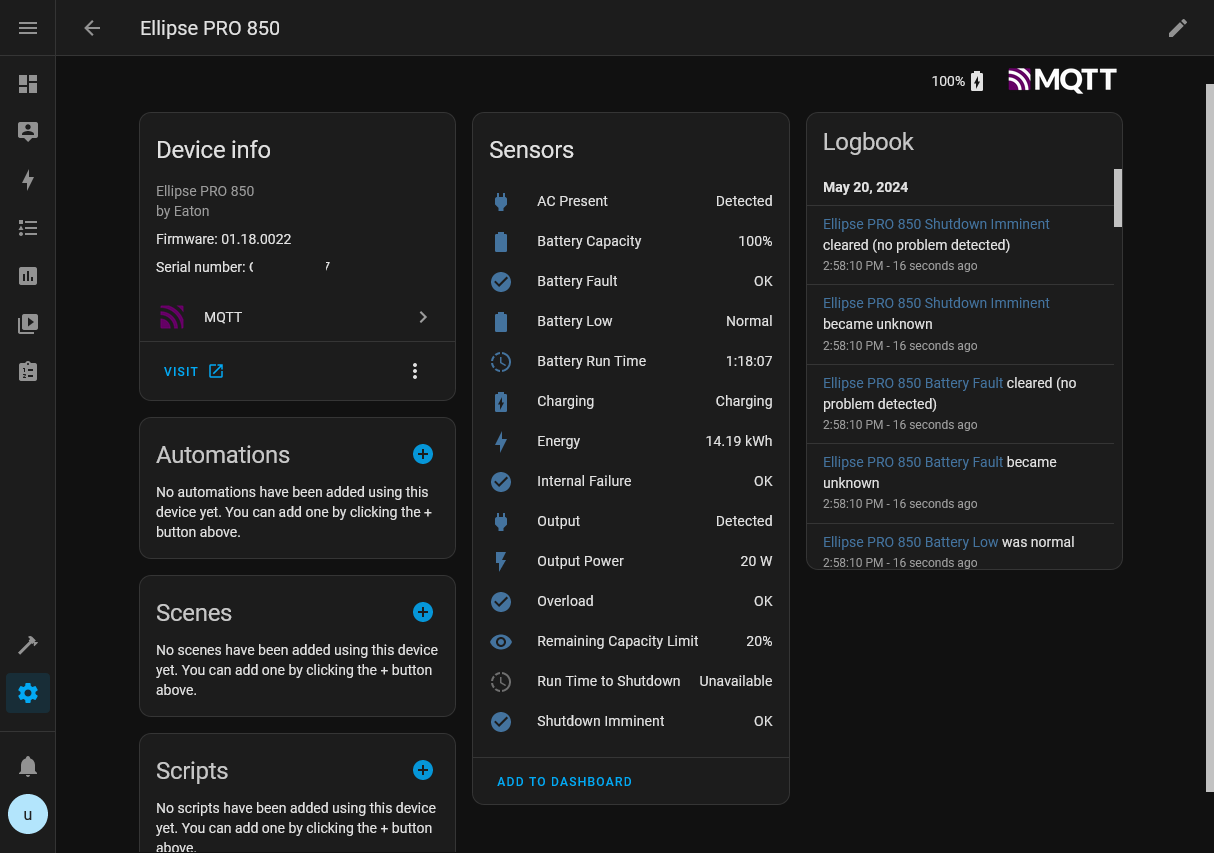
## Quick Start
The following quick start guide should get you up and running from a blank Homeassistant installation. Feel free to skip a step if your system is already configured.
### Install mosquitto
1. In Homeassistant, navigate to *Settings*, *Add-ons*
2. Click the *Add-on store* button
3. Search for *Mosquitto broker* and select the result
4. Click on *Install*
> [!NOTE]
> When using the *Mosquitto broker* Add-on, your MQTT broker hostname will be the same as your Homeassistant's, e.g. "`homeassistant.local`".
### Create a new Homeassistant user for data ingest
As mosquitto requires authentication, I heavily suggest creating a new user for data ingest.
1. In Homeassistant, navigate to *Settings*, *People*
2. Click on *Add person*, input a user name
3. Check *Allow person to log in*
4. Enter all required fields
5. Check *Can only log in from local network*
### Get the application
Windows binaries are provided on the [GitHub Releases](https://github.com/islandcontroller/euc2mqtt/releases) page.
If you prefer to use your own Python insallation, a pre-built package is hosted on [PyPI](https://pypi.org/project/euc2mqtt/) and can be installed and updated using the [`pip`](https://pip.pypa.io/en/stable/getting-started/) utility:
pip install -U euc2mqtt
### Run it!
> [!NOTE]
> This tool needs to run on the same host as Eaton UPS Companion, as EUC in its default configuration only accepts connections on `localhost:4679`.
Open a terminal and run the tool, providing the broker hostname (your Homeassistant hostname), username and the password!
*Option 1: Standalone application*
.\euc2mqtt --mqtt --username --password
*Option 2: Run as Python module*
python -m euc2mqtt --mqtt --username --password
### More info
A more in-depth description of available command line parameters can be viewed by appending `-h` at the end of your input. For example:
```
> .\euc2mqtt -h
usage: euc2mqtt [-h] [--name NAME] [--mqtt MQTT] [--euc EUC] [--username USERNAME] [--password PASSWORD] [--interval INTERVAL] [--full-update FULL_UPDATE] [--logfile LOGFILE] [--verbose]
MQTT Publisher for Eaton UPS Companion status messages to Home Assistant. See https://github.com/islandcontroller/euc2mqtt for more info!
options:
-h, --help show this help message and exit
--name NAME Device name
--mqtt MQTT MQTT broker hostname and port (hostname[:port])
--euc EUC Eaton UPS Companion hostname and port (hostname[:port])
--username USERNAME Username for MQTT broker authentication
--password PASSWORD Password for MQTT broker authentication
--interval INTERVAL Update interval in seconds
--full-update FULL_UPDATE
Number of incremental dataset fetches between full updates
--logfile LOGFILE Output log messages to a file
--verbose Enable verbose logging
```
## Running as a Windows Task
1. Open *Task Scheduler* and select *Create New Task...*
2. Select the following options on the *General* tab:
- Check *Run whether user is logged in or not*
- Uncheck *Do not store password*
3. On the *Triggers* tab, create a "At startup" trigger
4. On the *Actions* tab, add the standalone application as a program to run:
- Action: *Start a program*
- Program/Script: (Navigate to your `euc2mqtt.exe` here)
- Add arguments: `--mqtt --username --password `
5. On the *Settings* tab, select the following options:
- Check *Allow task to be run on demand*
- Select *If task fails, restart every: 1 minute*
- Uncheck *Stop the task if it runs longer than: ...*
- Select *If the task is already running: Do not start a new instance*
6. Click *OK*. You will be prompted for a username and password to run the task as.
## Configuring bind address for Eaton UPS Companion
> [!WARNING]
> Exposing the EUC service may pose a security risk.
> [!NOTE]
> When euc2mqtt is run on the same host as EUC, it is not required to expose the EUC service.
1. Start a `notepad` instance with Admin privileges
2. Open `C:\Program Files (x86)\Eaton\UPSCompanion\configs\config.js`
3. Edit the "`httpServers`" line to listen on all interfaces:
"httpServers": {"http": {"port": 4679, "hostname": "0.0.0.0"}},
## Legal Information
The contents of this repository are licensed under the MIT License. The full license text is provided in the [`LICENSE`](LICENSE) file.
SPDX-License-Identifier: MIT
"Eaton" is a trademark of Eaton Corporation. "Windows" is a trademark of Microsoft Corporation. All trademarks are property of their respective owners.