https://github.com/isometry/f5-totp
TOTP for F5 APM
https://github.com/isometry/f5-totp
f5 f5-apm irule rfc-6238 totp
Last synced: 4 months ago
JSON representation
TOTP for F5 APM
- Host: GitHub
- URL: https://github.com/isometry/f5-totp
- Owner: isometry
- License: mit
- Created: 2018-01-20T21:01:30.000Z (over 8 years ago)
- Default Branch: master
- Last Pushed: 2018-01-20T21:01:57.000Z (over 8 years ago)
- Last Synced: 2025-05-29T08:08:04.151Z (about 1 year ago)
- Topics: f5, f5-apm, irule, rfc-6238, totp
- Language: Tcl
- Size: 79.1 KB
- Stars: 3
- Watchers: 3
- Forks: 0
- Open Issues: 0
-
Metadata Files:
- Readme: README.md
- License: LICENSE
Awesome Lists containing this project
README
# TOTP for F5 APM
## Overview
This APM iRule implements the [RFC 6238 TOTP: Time-Based One-Time Password Algorithm](https://tools.ietf.org/html/rfc6238) for use with F5 APM access policies; for example, with an F5 SSL-VPN implementation.
#### Features
- Configurable storage backend (LDAP, Active Directory or Data Group List)
- Per-user TOTP algorithm, digits and period
- Configurable clock-drift tolerance and rate-limiting
- Differentiation between users with and without TOTP metadata
## Configuration
### totp_apm iRule
Create a new _Local Traffic ➡︎ iRules ➡︎ iRule List_ iRule named `totp_apm`, containing the entire [totp_apm.tcl](https://github.com/isometry/f5-totp/blob/master/totp_apm.tcl) TCL script, to be customised for your chosen backend, as below.
#### Backend configuration
The backend used for storage of user metadata is selected by modifying the value of the `totp_key_storage` in the `totp_apm` iRule ([totp_apm.tcl](https://github.com/isometry/f5-totp/blob/master/totp_apm.tcl#L7)).
All backends expect the metadata to be in the following format:
```
ALGORITHM SECRET DIGITS PERIOD
```
where
* `ALGORITHM` is `sha1`, `sha256` or `sha512` (lowercase);
* `SECRET` is the user's TOTP secret (a Base32-encoded string with length an integer multiple of 8 characters, see below);
* `DIGITS` is the number of digits expected from the user (normally `6` or `8`);
* `PERIOD` is the frequency at which the code changes (normally `30` or `60` seconds).
For both `ldap` and `ad` backends, the metadata is expected to be accessible in an attribute of the user object, the attribute name configurable via [`totp_key_ldap_attr`](https://github.com/isometry/f5-totp/blob/master/totp_apm.tcl#L10) or [`totp_key_ad_attr`](https://github.com/isometry/f5-totp/blob/master/totp_apm.tcl#L13) variables, respectively, and both defaulting to `totp_auth_key`.
The Data Group List backend requires a String-type datagroup, configurable via the [`totp_key_dg`](https://github.com/isometry/f5-totp/blob/master/totp_apm.tcl#L16) variable (default: `totp_auth_keys`), with the key being the user's username and the value being the users' TOTP metadata.
#### TOTP Secrets
User secrets take the form of a Base32-encoded random value with length a multiple of 8 characters. They can be easily generated using `pyotp`:
```
pip3 install pyotp
python3 -c "import pyotp; print(pyotp.random_base32(32))
```
These are normally communicated in the form of a QR Code encoding of an `otpauth://` string unique to the user:
```
otpauth://totp/USERNAME@DOMAIN?secret=SECRET&algorithm=ALGORITHM&digits=DIGITS&period=PERIOD&issuer=DOMAIN
```
Note: `ALGORITHM` is all uppercase in the `otpauth://` string.
##### otpauth example
```
otpauth://totp/user@example.com?secret=FYNLSPTBTQPZJYEMB3QOZLDW34ZWX7TD&algorithm=SHA256&digits=8&period=30&issuer=example.com
```
#### Clock-drift tolerance, rate-limiting and lockout
* Client clock-drift tolerance (the width of the window of codes that will be accepted) is configured via [`totp_tolerance`](https://github.com/isometry/f5-totp/blob/master/totp_apm.tcl#L52) (default = `1`, )
* TOTP rate-limiting lockout are configured via [`totp_lockout_period`](https://github.com/isometry/f5-totp/blob/master/totp_apm.tcl#L54) (default = `90` seconds) and [`totp_lockout_rate`](https://github.com/isometry/f5-totp/blob/master/totp_apm.tcl#L56) (default = `3`)
Note: already used codes and lockout state are stored with the [`totp_used_codes_table`](https://github.com/isometry/f5-totp/blob/master/totp_apm.tcl#L58) and [`totp_lockout_state_table`](https://github.com/isometry/f5-totp/blob/master/totp_apm.tcl#L59) tables.
### Access Policy
The associated access policy consists of three main blocks:
1. retrieve the user's TOTP metadata from the configured backend via an _iRule Event_ ([`get_totp_key`](https://github.com/isometry/f5-totp/blob/master/totp_apm.tcl#L3)),
2. prompt for the user's code via a _Logon Page_,
3. verify the supplied code via another _iRule Event_ ([`check_totp_code`](https://github.com/isometry/f5-totp/blob/master/totp_apm.tcl#L45)).
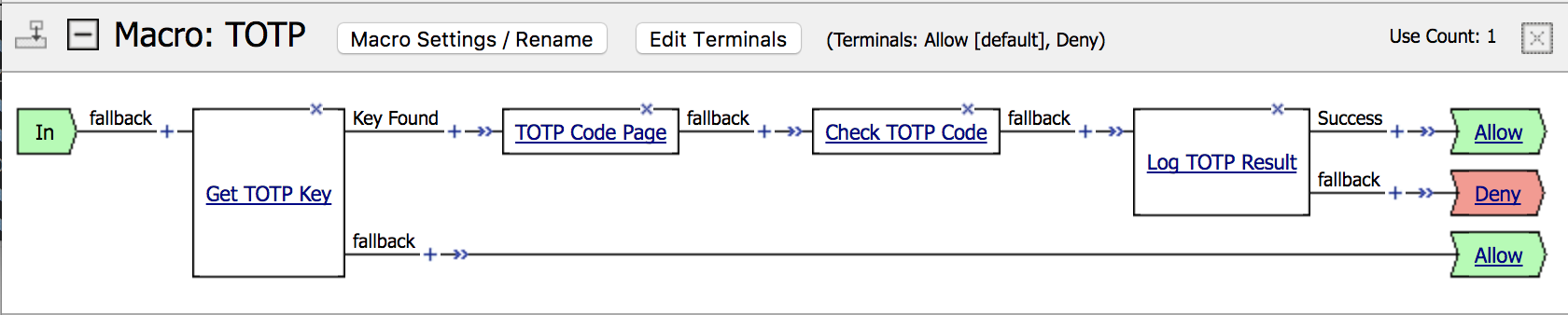
The two iRule Event agents can also be integrated into alternate login workflows, for example prompting all users for a TOTP code alongside their main credentials.
#### Creating the Access Policy
1. Add a new _Macro_ named `TOTP` to the relevant APM _Access Policy_ through the _Visual Policy Editor_ (VPE).
2. Within the TOTP Macro, add a _General Purpose ➡︎ iRule Event_ block with _Name_ `Get TOTP Key` and _ID_ `get_totp_key`; add a _Branch Rule_ named `Key Found` with the _Expression_ `mcget -secure {session.custom.totp.key}`.
The `fallback` branch from the `Get TOTP Key` block will be followed by any user for whom TOTP metadata cannot be found; associate with either the `Allow` or `Deny` terminal dependent on local policy.
3. On the `Key Found` branch add a _Logon ➡︎ Logon Page_ block named `TOTP Code Page`. _Field 1_ must be configured with _Type_ = `Text`, _Post Variable Name_ = `totp_code` and _Session Variable Name_ = `totp_code` (customisable via [`totp_code_form_field`](https://github.com/isometry/f5-totp/blob/master/totp_apm.tcl#L49)). All other fields should have _Type_ = `None`. Customise _Form Header Text_, _Logon Page Input Field #1_ and _Logon Button_ text as appropriate.
4. On the `fallback` branch of the `TOTP Code Page` block, add another _General Purpose ➡︎ iRule Event_ block with _Name_ `Check TOTP Code` and _ID_ `check_totp_code`.
5. On the `fallback` branch of the `Check TOTP Code` block, add a _General Purpose ➡︎ Logging_ block with name `Log TOTP Result`. Set an appropriate _Log Message_ (e.g. "TOTP Verification Complete") and a _Custom_ entry with value `session.custom.totp.result`; add a _Branch Rule_ named `Success` with the _Expression_ `expr {[mcget {session.custom.totp.result}] eq "success"}`.
The `Success` branch from the `Check TOTP Code` block will be followed only when the user supplied code matches that calculated from their metadata, and should normally be associated with the `Allow` terminal. `fallback` should be associated with the `Deny` terminal.
6. Plumb the `TOTP` macro in immediately after the primary authentication block or macro (tested with _AD Auth_ and _SAML Auth_).
#### tmsh
Via `tmsh`, assuming configuration within the `VPN` partition for an access policy named `vpn`, configuration will resemble the following:
```
apm policy agent irule-event totp_act_irule_event_ag {
id get_totp_key
partition VPN
}
apm policy agent irule-event totp_act_irule_event_1_ag {
id check_totp_code
partition VPN
}
apm policy agent logon-page totp_act_logon_page_ag {
customization-group totp_act_logon_page_ag
field-type2 none
partition VPN
post-var-name1 totp_code
sess-var-name1 totp_code
}
apm policy policy-item totp_act_irule_event {
agents {
totp_act_irule_event_ag {
type irule-event
}
}
caption "Get TOTP Key"
color 1
item-type action
partition VPN
rules {
{
caption "Key Found"
expression "mcget -secure {session.custom.totp.key}"
next-item totp_act_logon_page
}
{
caption fallback
next-item totp_ter_out
}
}
}
apm policy policy-item totp_act_irule_event_1 {
agents {
totp_act_irule_event_1_ag {
type irule-event
}
}
caption "Check TOTP Code"
color 1
item-type action
partition VPN
rules {
{
caption fallback
next-item totp_act_logging
}
}
}
apm policy policy-item totp_act_logging {
agents {
totp_act_logging_ag {
type logging
}
}
caption "Log TOTP Result"
color 1
item-type action
partition VPN
rules {
{
caption Success
expression "expr {[mcget {session.custom.totp.result}] eq \"success\"}"
next-item totp_ter_out
}
{
caption fallback
next-item totp_ter_totp_verification_failed
}
}
}
apm policy policy-item totp_act_logon_page {
agents {
totp_act_logon_page_ag {
type logon-page
}
}
caption "TOTP Code Page"
color 1
item-type action
partition VPN
rules {
{
caption fallback
next-item totp_act_irule_event_1
}
}
}
apm policy policy-item totp_ent_in {
caption In
color 1
partition VPN
rules {
{
caption fallback
next-item totp_act_irule_event
}
}
}
apm policy policy-item totp_ter_out {
caption Allow
color 1
item-type terminal-out
partition VPN
}
apm policy policy-item totp_ter_totp_verification_failed {
caption Deny
color 2
item-type terminal-out
partition VPN
}
apm policy access-policy totp {
caption TOTP
default-ending totp_ter_out
items {
totp_act_irule_event { }
totp_act_irule_event_1 { }
totp_act_logging { }
totp_act_logon_page { }
totp_ent_in { }
totp_ter_out {
priority 8
}
totp_ter_totp_verification_failed {
priority 9
}
}
partition VPN
start-item totp_ent_in
type macro
}
```
This is then referenced as a macro within the `vpn` access policy:
```
apm policy access-policy vpn {
…
macros { … /VPN/totp … }
}
```