https://github.com/itsarvinddev/map_location_picker
Map location picker for flutter Based on google_maps_flutter
https://github.com/itsarvinddev/map_location_picker
hacktoberfest hacktoberfest-accepted
Last synced: 4 months ago
JSON representation
Map location picker for flutter Based on google_maps_flutter
- Host: GitHub
- URL: https://github.com/itsarvinddev/map_location_picker
- Owner: itsarvinddev
- License: apache-2.0
- Created: 2022-04-07T17:41:44.000Z (about 4 years ago)
- Default Branch: master
- Last Pushed: 2025-10-05T11:03:20.000Z (9 months ago)
- Last Synced: 2025-10-23T03:54:35.259Z (8 months ago)
- Topics: hacktoberfest, hacktoberfest-accepted
- Language: Dart
- Homepage:
- Size: 26.5 MB
- Stars: 48
- Watchers: 2
- Forks: 83
- Open Issues: 1
-
Metadata Files:
- Readme: README.md
- Changelog: CHANGELOG.md
- Funding: .github/FUNDING.yml
- License: LICENSE
Awesome Lists containing this project
README
# map_location_picker:
[](https://pub.dev/packages/map_location_picker)
[](https://github.com/itsarvinddev/map_location_picker/stargazers)
[](https://github.com/itsarvinddev/map_location_picker/fork)
[](https://github.com/itsarvinddev/map_location_picker/issues)
[](https://github.com/itsarvinddev/map_location_picker/graphs/contributors)
## Modern Location Picker for Flutter with Enhanced UI & Customization
**Version 2.0 introduces a complete overhaul with:**
**Check migration guide from 1.x to 2.x [map_location_picker/MIGRATION_GUIDE](https://github.com/itsarvinddev/map_location_picker/blob/master/MIGRATION_GUIDE.md)**
- 🍎 New Cupertino-style UI components
- 🌗 Built-in dark/light theme support
- 🧩 Modular configuration architecture
- 🚀 Performance optimizations
- 🗺️ Advanced map customization options
- 🧭 Improved navigation and UI flow
**_Check out the more screenshots [here](https://github.com/itsarvinddev/map_location_picker/tree/master/assets)_**
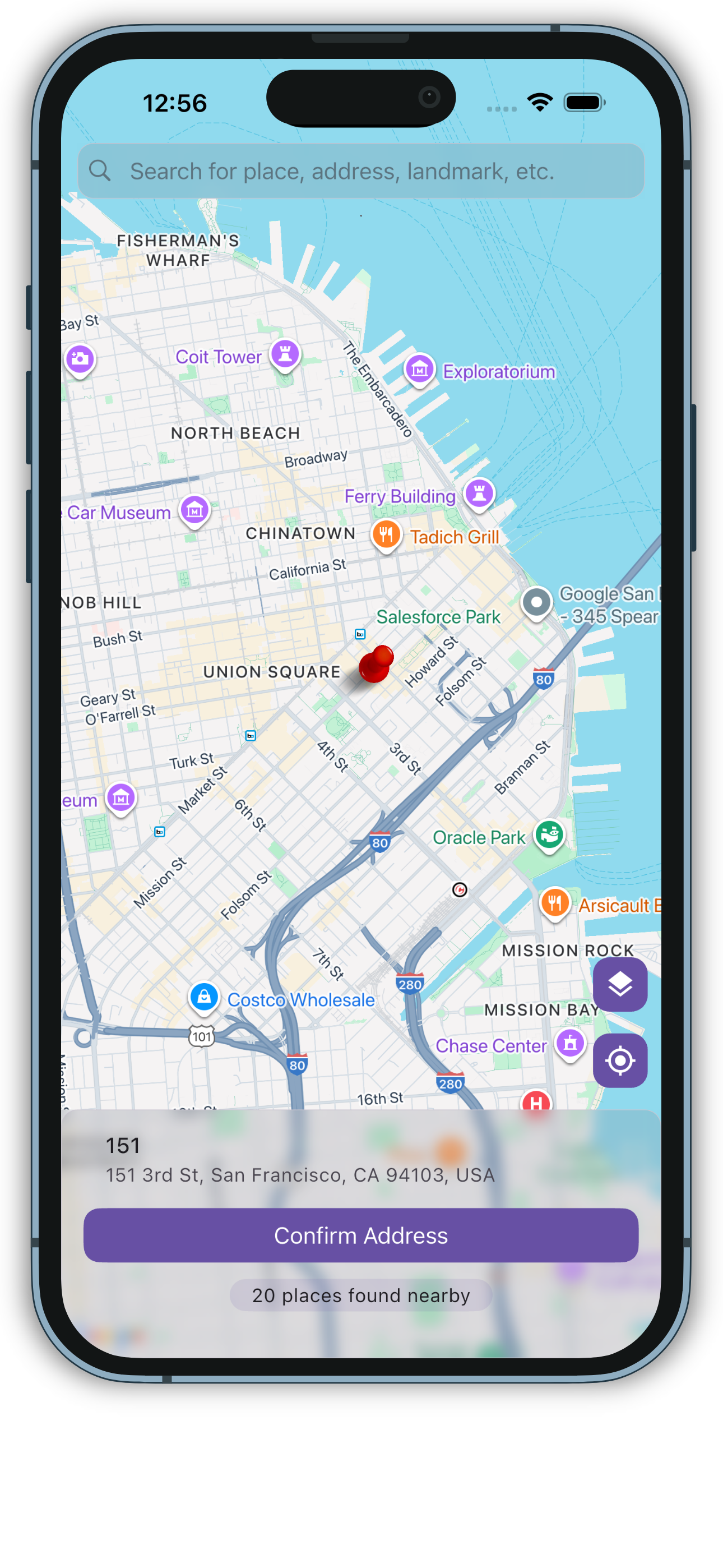
Default View
Dark Mode
Custom Markers
Custom Map Type
Liquid Card
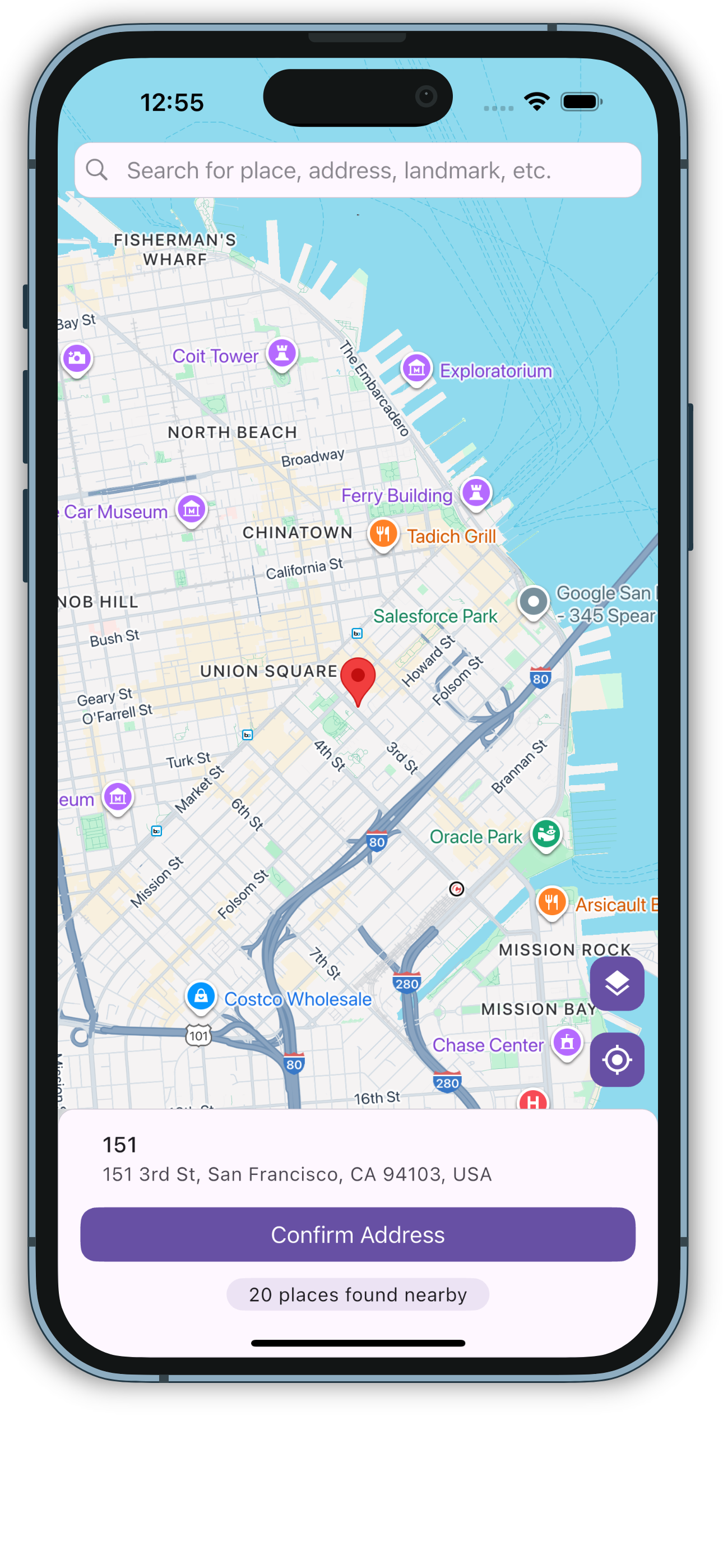
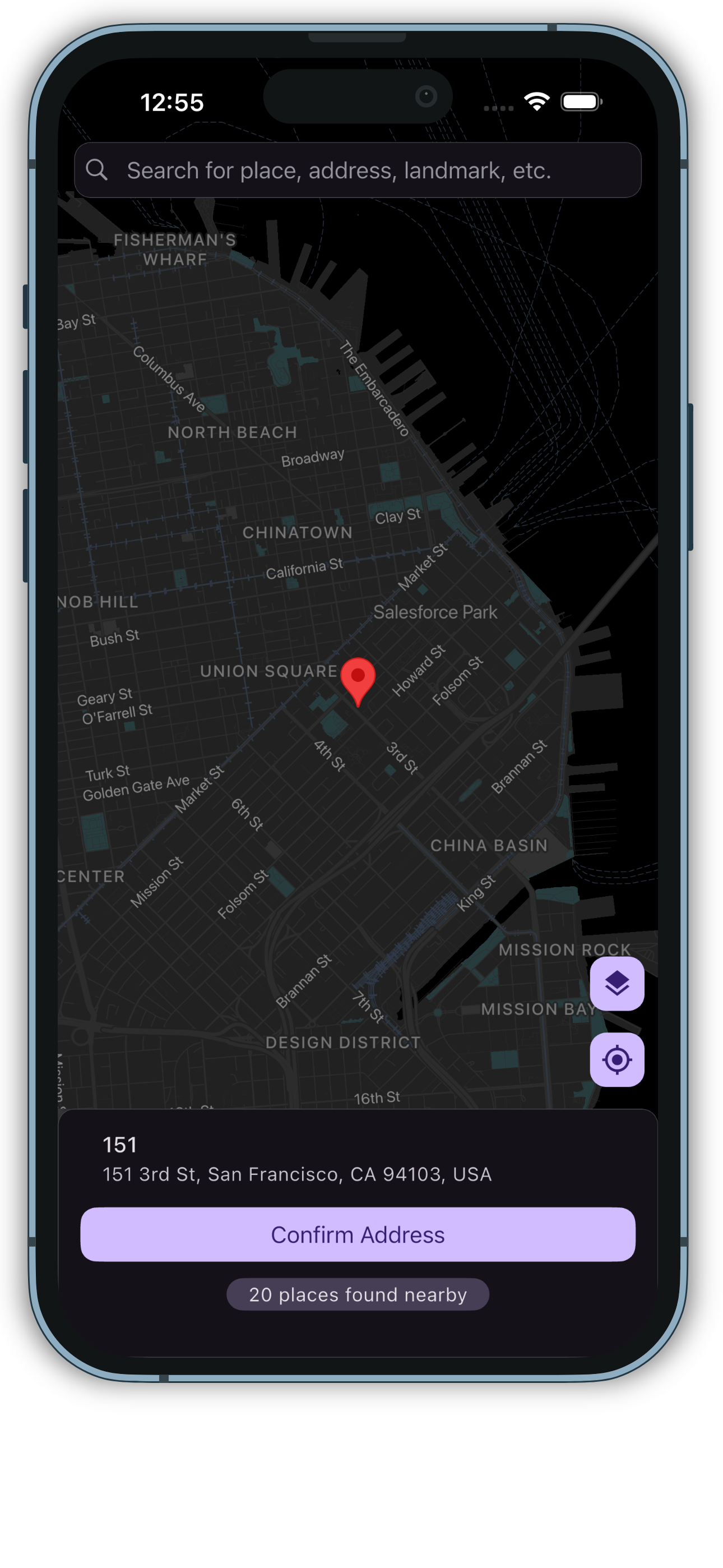
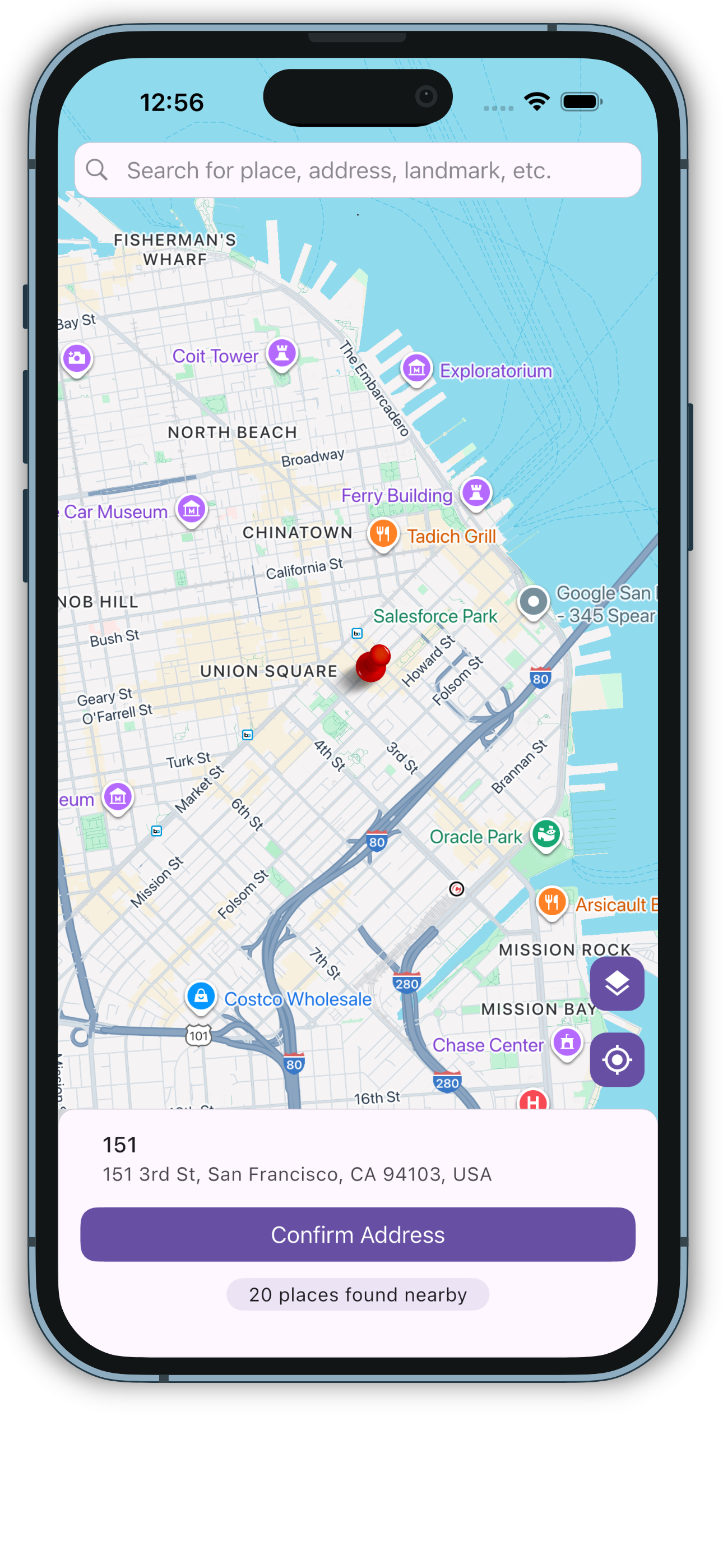
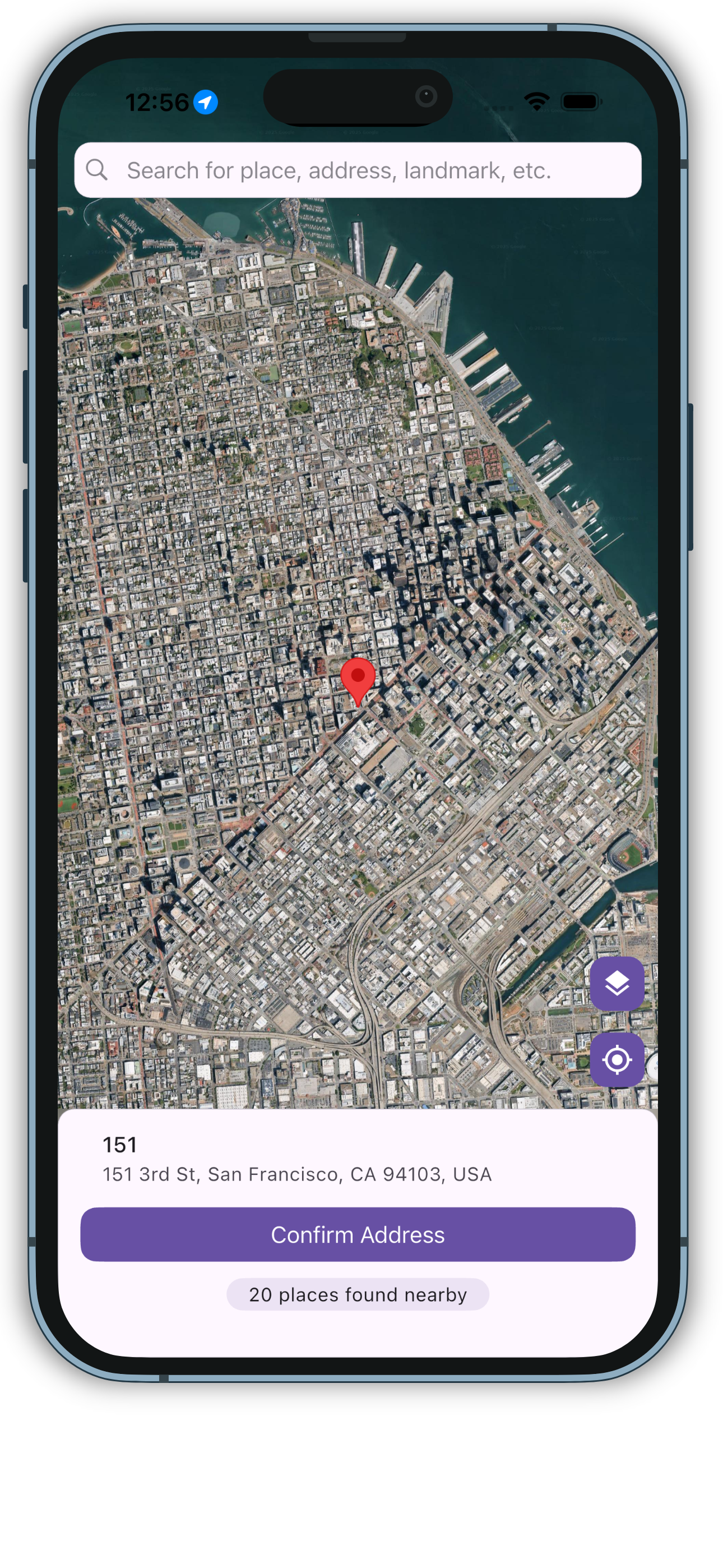
## 🚀 Getting Started
### Installation
Add to your `pubspec.yaml`:
```yaml
dependencies:
map_location_picker: ^3.1.0
```
## Setup Guide
- Get an API key at .
- And don't forget to enable the following APIs in
- Maps SDK for Android
- Maps SDK for iOS
- Places API
- Geocoding API
- Maps JavaScript API
- And ensure to enable billing for the project.
For more details, see [Getting started with Google Maps Platform](https://developers.google.com/maps/gmp-get-started).
### Android
1. Set the `minSdkVersion` in `android/app/build.gradle`:
```groovy
android {
defaultConfig {
minSdkVersion 20
}
}
```
This means that app will only be available for users that run Android SDK 20 or higher.
2. Specify your API key in the application manifest `android/app/src/main/AndroidManifest.xml`:
```xml
```
#### Hybrid Composition
To use [Hybrid Composition](https://flutter.dev/docs/development/platform-integration/platform-views)
to render the `GoogleMap` widget on Android, set `AndroidGoogleMapsFlutter.useAndroidViewSurface` to
true.
```dart
if (defaultTargetPlatform == TargetPlatform.android) {
AndroidGoogleMapsFlutter.useAndroidViewSurface = true;
}
```
### iOS
To set up, specify your API key in the application delegate `ios/Runner/AppDelegate.m`:
```objectivec
#include "AppDelegate.h"
#include "GeneratedPluginRegistrant.h"
#import "GoogleMaps/GoogleMaps.h"
@implementation AppDelegate
- (BOOL)application:(UIApplication *)application
didFinishLaunchingWithOptions:(NSDictionary *)launchOptions {
[GMSServices provideAPIKey:@"YOUR KEY HERE"];
[GeneratedPluginRegistrant registerWithRegistry:self];
return [super application:application didFinishLaunchingWithOptions:launchOptions];
}
@end
```
Or in your swift code, specify your API key in the application delegate `ios/Runner/AppDelegate.swift`:
```swift
import UIKit
import Flutter
import GoogleMaps
@UIApplicationMain
@objc class AppDelegate: FlutterAppDelegate {
override func application(
_ application: UIApplication,
didFinishLaunchingWithOptions launchOptions: [UIApplication.LaunchOptionsKey: Any]?
) -> Bool {
GMSServices.provideAPIKey("YOUR KEY HERE")
GeneratedPluginRegistrant.register(with: self)
return super.application(application, didFinishLaunchingWithOptions: launchOptions)
}
}
```
### Recommended: Restricting Api Keys to your Android or IOS bundle identifiers:

You must then send the following in the headers:
```
Map headers = {};
if (Platform.isIOS || Platform.isMacOS) {
headers['X-Ios-Bundle-Identifier'] = 'Your Bundle Identifier';
}
if (Platform.isAndroid) {
headers['X-Android-Package'] = 'Your Bundle Identifier';
headers['X-Android-Cert'] = 'Your Sha-1';
}
MapLocationPicker(
geoCodingApiHeaders: headers,
...
)
```
### Web View
Modify `web/index.html`
Get an API Key for Google Maps JavaScript API. Get
started [here](https://developers.google.com/maps/documentation/javascript/get-api-key).
Modify the `` tag of your `web/index.html` to load the Google Maps JavaScript API, like so:
```html
```
### Note
The following permissions are not required to use Google Maps Android API v2, but are recommended.
`android.permission.ACCESS_COARSE_LOCATION` Allows the API to use WiFi or mobile cell data (or both) to determine the
device's location. The API returns the location with an accuracy approximately equivalent to a city block.
`android.permission.ACCESS_FINE_LOCATION` Allows the API to determine as precise a location as possible from the
available location providers, including the Global Positioning System (GPS) as well as WiFi and mobile cell data.
---
You must also explicitly declare that your app uses the android.hardware.location.network or
android.hardware.location.gps hardware features if your app targets Android 5.0 (API level 21) or higher and uses the
ACCESS_COARSE_LOCATION or ACCESS_FINE_LOCATION permission in order to receive location updates from the network or a
GPS, respectively.
```xml
```
---
The following permissions are defined in the package manifest, and are automatically merged into your app's manifest at
build time. You **don't** need to add them explicitly to your manifest:
`android.permission.INTERNET` Used by the API to download map tiles from Google Maps servers.
`android.permission.ACCESS_NETWORK_STATE` Allows the API to check the connection status in order to determine whether
data can be downloaded.
## Restricting Autocomplete Search to Region
The `Result`s returned can be restricted to certain countries by passing an array of country codes into the `components`
parameter of `MapLocationPicker`. Countries must be two character, `ISO 3166-1 Alpha-2` compatible.
You can find code information
at [Wikipedia: List of ISO 3166 country codes](https://en.wikipedia.org/wiki/List_of_ISO_3166_country_codes) or
the [ISO Online Browsing Platform](https://www.iso.org/obp/ui/#search).
### Basic Usage
```dart
import 'package:map_location_picker/map_location_picker.dart';
MapLocationPicker(
config: MapPickerConfig(
apiKey: "YOUR_API_KEY",
initialPosition: LatLng(37.7749, -122.4194),
),
searchConfig: PlacesAutocompleteConfig(
apiKey: "YOUR_API_KEY",
searchHintText: "Search locations...",
),
);
```
## 🆕 What's New in 2.0.0
### 1. Cupertino-Style UI
The entire UI has been redesigned with Cupertino components for a native iOS feel:
```dart
PlacesAutocomplete(
config: PlacesAutocompleteConfig(
// Uses CupertinoTypeAheadField internally
searchHintText: "Search locations...",
),
);
```
### 2. Theme Support
Built-in support for light/dark themes with automatic switching:
```dart
final _themeMode = ValueNotifier(ThemeMode.light);
MapLocationPicker(
config: MapPickerConfig(
// Automatically adapts to current theme
),
);
```
### 3. Enhanced Configuration
More granular control with expanded configuration objects:
```dart
MapPickerConfig(
mapTypeButton: CustomMapTypeButton(), // Fully customizable buttons
locationButton: CustomLocationButton(),
bottomCardBuilder: (ctx, result, address, isLoading, onNext) {
return CustomBottomCard(address: address);
},
);
```
### 4. Improved Map Previews
New static map previews for selected locations:
```dart
Image.network(
googleStaticMapWithMarker(
_pickedLocation!.latitude,
_pickedLocation!.longitude,
18,
apiKey: YOUR_API_KEY,
),
);
```
### 5. Advanced Marker Support
Custom markers with asset-based icons:
```dart
void _createMarkerIcon() async {
_customMarkerIcon = await BitmapDescriptor.asset(
const ImageConfiguration(size: Size(48, 48)),
'assets/marker.webp',
);
}
MapPickerConfig(
mainMarkerIcon: _customMarkerIcon,
);
```
## 🌟 Key Features
### Cupertino-Styled Search
```dart
PlacesAutocomplete(
config: PlacesAutocompleteConfig(
searchHintText: "Search locations...",
itemBuilder: (context, prediction) => CupertinoListTile(
title: Text(prediction.description ?? ""),
subtitle: Text(prediction.secondaryText ?? ""),
),
),
);
```
### Theme-Aware Components
```dart
// Automatically adapts to light/dark themes
MapLocationPicker(
config: MapPickerConfig(
floatingControlsColor: Theme.of(context).colorScheme.primary,
floatingControlsIconColor: Theme.of(context).colorScheme.onPrimary,
),
);
```
### Customizable Bottom Sheets
```dart
MapPickerConfig(
bottomCardBuilder: (context, result, address, isLoading, onNext) {
return CupertinoActionSheet(
title: const Text("Selected Location"),
actions: [
CupertinoActionSheetAction(
onPressed: onNext,
child: Text(address),
),
],
);
},
);
```
### Advanced Marker Configuration
```dart
MapPickerConfig(
additionalMarkers: const {
"landmark1": LatLng(37.422, -122.084),
"landmark2": LatLng(37.426, -122.083),
},
customMarkerIcons: {
"landmark1": BitmapDescriptor.defaultMarkerWithHue(BitmapDescriptor.hueYellow),
"landmark2": BitmapDescriptor.defaultMarkerWithHue(BitmapDescriptor.hueBlue),
},
customInfoWindows: const {
"landmark1": InfoWindow(title: "Golden Gate Bridge"),
},
);
```
## 🛠 Setup Guide
### API Keys Setup
1. Get an API key at [Google Cloud Console](https://cloud.google.com/maps-platform/)
2. Enable required APIs:
- Maps SDK for Android/iOS
- Places API
- Geocoding API
- Maps JavaScript API (for web)
### Android Setup
Add to `AndroidManifest.xml`:
```xml
```
### iOS Setup
Add to `AppDelegate.swift`:
```swift
GMSServices.provideAPIKey("YOUR_IOS_API_KEY")
```
### Web Setup
Add to `web/index.html`:
```html
```
## 💻 Example App
```dart
import 'package:example/key.dart';
import 'package:flutter/material.dart';
import 'package:map_location_picker/map_location_picker.dart';
void main() => runApp(const MyApp());
final _themeMode = ValueNotifier(ThemeMode.light);
class MyApp extends StatelessWidget {
const MyApp({super.key});
@override
Widget build(BuildContext context) {
return ValueListenableBuilder(
valueListenable: _themeMode,
builder: (context, themeMode, child) {
return MaterialApp(
theme: ThemeData.light(),
darkTheme: ThemeData.dark(),
themeMode: themeMode,
home: const LocationPickerScreen(),
);
},
);
}
}
class LocationPickerScreen extends StatefulWidget {
const LocationPickerScreen({super.key});
@override
State createState() => _LocationPickerScreenState();
}
class _LocationPickerScreenState extends State {
LatLng? _pickedLocation;
String _formattedAddress = "No location selected";
BitmapDescriptor? _customMarkerIcon;
@override
void initState() {
super.initState();
_createMarkerIcon();
}
void _createMarkerIcon() async {
_customMarkerIcon = await BitmapDescriptor.asset(
const ImageConfiguration(size: Size(48, 48)),
'assets/marker.webp',
);
}
@override
Widget build(BuildContext context) {
return Scaffold(
appBar: AppBar(title: const Text('Location Picker')),
body: SingleChildScrollView(
child: Column(
children: [
// Map preview
Container(
height: 200,
child: _pickedLocation == null
? Center(child: Text("Select a location"))
: Image.network(
googleStaticMapWithMarker(
_pickedLocation!.latitude,
_pickedLocation!.longitude,
16,
apiKey: YOUR_API_KEY,
),
fit: BoxFit.cover,
),
),
// Address display
ListTile(
leading: Icon(Icons.location_on),
title: Text(_formattedAddress),
),
// Picker options
_buildOptionCard(
icon: Icons.map,
title: "Standard Picker",
onTap: () => _openPicker(standardConfig),
),
// More options...
],
),
),
);
}
void _openPicker(MapPickerConfig config) async {
await Navigator.push(
context,
MaterialPageRoute(
builder: (context) => MapLocationPicker(
config: config.copyWith(
initialPosition: _pickedLocation,
onNext: (result) {
if (result != null) {
setState(() {
_pickedLocation = LatLng(
result.geometry.location.lat,
result.geometry.location.lng,
);
_formattedAddress = result.formattedAddress ?? "";
});
}
},
),
searchConfig: PlacesAutocompleteConfig(
apiKey: YOUR_API_KEY,
),
),
),
);
}
}
```
## 💰 Support the Project
[](https://buymeacoffee.com/rvndsngwn)
[](https://paypal.me/rvndsngwn)
[](https://github.com/sponsors/itsarvinddev)
## 👨💻 Contribute
We welcome contributions! Please see our [contribution guidelines](https://github.com/itsarvinddev/map_location_picker/blob/master/CONTRIBUTING.md).
## 👥 Contributors
