https://github.com/itsloopyo/easy-delivery-co-headtracking
An OpenTrack compatible head tracking mod for Easy Delivery Co
https://github.com/itsloopyo/easy-delivery-co-headtracking
Last synced: 13 days ago
JSON representation
An OpenTrack compatible head tracking mod for Easy Delivery Co
- Host: GitHub
- URL: https://github.com/itsloopyo/easy-delivery-co-headtracking
- Owner: itsloopyo
- License: other
- Created: 2026-04-26T10:46:24.000Z (2 months ago)
- Default Branch: main
- Last Pushed: 2026-06-07T19:05:18.000Z (21 days ago)
- Last Synced: 2026-06-07T19:06:30.924Z (21 days ago)
- Language: C#
- Size: 14.4 MB
- Stars: 0
- Watchers: 0
- Forks: 0
- Open Issues: 0
-
Metadata Files:
- Readme: README.md
- Changelog: CHANGELOG.md
- License: LICENSE
Awesome Lists containing this project
README
# Easy Delivery Co Head Tracking
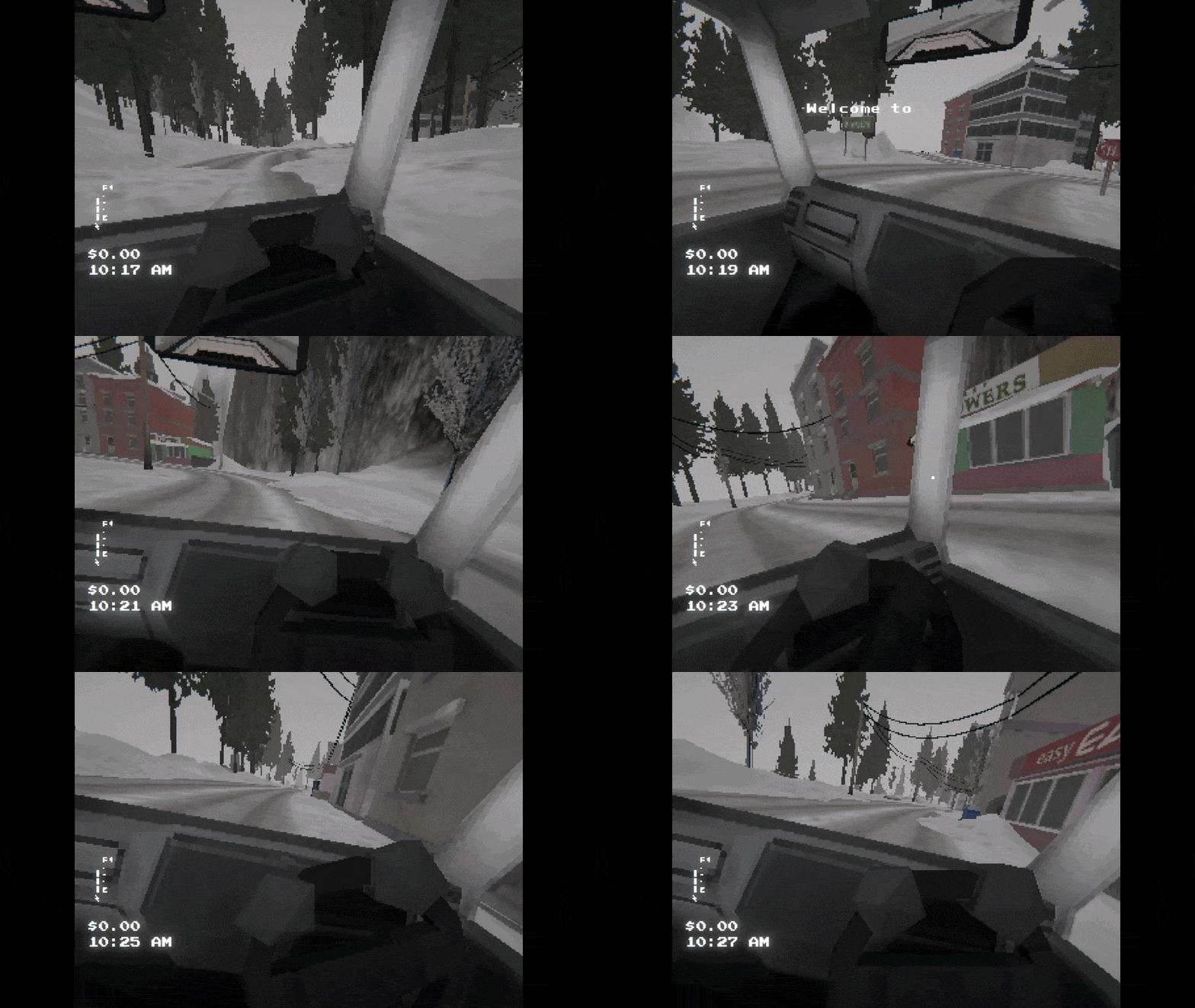
An unofficial BepInEx mod that adds OpenTrack head tracking to Easy Delivery Co, so you can look around naturally in game just by moving your heaad.
## Features
- **Decoupled look and aim** - head tracking moves the camera; steering stays on your mouse/controller
- **6DOF positional tracking** - lean and peek with head position
## Requirements
- [Easy Delivery Co](https://store.steampowered.com/app/3293010/Easy_Delivery_Co/) (Steam or Xbox/Game Pass)
- [OpenTrack](https://github.com/opentrack/opentrack) or a compatible head tracking app (smartphone, webcam, or dedicated hardware)
- Windows 10/11
## Installation
1. Download the latest installer ZIP from the [Releases page](https://github.com/itsloopyo/easy-delivery-co-headtracking/releases)
2. Extract the ZIP anywhere
3. Double-click `install.cmd`
4. Configure OpenTrack to output UDP to `127.0.0.1:4242`
5. Launch the game
The installer auto-detects your game via Steam registry lookup. If it can't find your install:
- Set the `EASY_DELIVERY_CO_PATH` environment variable to your game folder, or
- Run from a command prompt: `install.cmd "D:\Games\Easy Delivery Co"`
### Manual Installation
For users who prefer to place files by hand, or who download the Nexus ZIP (which contains only the mod DLLs):
1. Install [BepInEx 5.4.23.5 x64](https://github.com/BepInEx/BepInEx/releases/tag/v5.4.23.5) to your game folder
2. Run the game once to let BepInEx initialize
3. Copy these DLLs to `BepInEx/plugins/`:
- `EasyDeliveryCoHeadTracking.dll`
- `CameraUnlock.Core.dll`
- `CameraUnlock.Core.Unity.dll`
## Setting Up OpenTrack
1. Download and install [OpenTrack](https://github.com/opentrack/opentrack/releases)
2. Configure your tracker as input
3. Set output to **UDP over network**
4. Host: `127.0.0.1`, Port: `4242`
5. Start tracking before launching the game
### Webcam Setup
No special hardware needed - OpenTrack's built-in **neuralnet tracker** uses any webcam for 6DOF face tracking.
1. In OpenTrack, set the input to **neuralnet tracker**
2. Select your webcam in the tracker settings
3. Set output to **UDP over network** (`127.0.0.1:4242`)
4. Start tracking before launching the game
5. Recenter in OpenTrack via its hotkey, and press **Home** in-game to recenter the mod as needed
### Phone App Setup
This mod includes built-in smoothing for network jitter, so you can send directly from your phone on port 4242 without needing OpenTrack on PC.
1. Install an OpenTrack-compatible head tracking app (SmoothTrack, Head Tracker, etc.)
2. Configure it to send to your PC's IP on port 4242 (run `ipconfig` to find it)
3. Set the protocol to OpenTrack/UDP
**With OpenTrack (optional):** If you want curve mapping or visual preview, route through OpenTrack. Set OpenTrack's input to "UDP over network" on a different port (e.g. 5252), point your phone app at that port, and set OpenTrack's output to `127.0.0.1:4242`. Make sure your firewall allows incoming UDP on the input port.
## Controls
Two equivalent binding sets - use whichever your keyboard has:
| Action | Nav-cluster | Chord |
|------------------------------|-------------|-----------------|
| Recenter | `Home` | `Ctrl+Shift+T` |
| Toggle tracking | `End` | `Ctrl+Shift+Y` |
| Cycle tracking mode | `Page Up` | `Ctrl+Shift+G` |
| Toggle yaw mode | `Page Down` | `Ctrl+Shift+H` |
| Toggle aim reticle | `Insert` | `Ctrl+Shift+U` |
`Page Up` / `Ctrl+Shift+G` cycles tracking mode:
1. Normal head-tracked gameplay (rotation + position)
2. Rotation only (positional tracking disabled)
3. Position only (rotational tracking disabled)
4. Back to normal
The `Ctrl+Shift+` chords are provided for keyboards without a navigation cluster (laptops, 60% / TKL layouts). Both bindings fire the same action.
## Configuration
The mod creates a config file at `BepInEx/config/com.cameraunlock.easydeliveryco.headtracking.cfg` on first run. Edit it to customize:
```ini
[General]
EnabledOnStartup = true # Start with tracking enabled
ShowStartupNotification = true # Show controls on startup
WorldSpaceYaw = true # true = horizon-locked yaw, false = camera-local
[UI]
ShowConnectionNotifications = true
ShowReticle = false # Aim reticle (not needed for driving)
[Keybindings]
ToggleKey = End
RecenterKey = Home
ToggleReticleKey = Insert
CycleTrackingModeKey = PageUp # Cycle: full -> rotation only -> position only
YawModeKey = PageDown # Toggle world-locked vs camera-local yaw
[Network]
UDPPort = 4242 # Must match OpenTrack output port
[Sensitivity]
YawSensitivity = 1.0 # Horizontal rotation (0.1-3.0)
PitchSensitivity = 1.0 # Vertical rotation (0.1-3.0)
RollSensitivity = 1.0 # Head tilt (0.0-3.0)
[Smoothing]
Smoothing = 0.0 # 0 = responsive, 1 = heavy (adds latency)
[Position]
PositionEnabled = true # Enable lean/positional tracking
PositionSensitivityX = 1.0 # Lateral sensitivity (0.0-5.0)
PositionSensitivityY = 1.0 # Vertical sensitivity (0.0-5.0)
PositionSensitivityZ = 1.0 # Depth sensitivity (0.0-5.0)
PositionLimitX = 0.30 # Max lateral offset in meters
PositionLimitY = 0.20 # Max vertical offset in meters
PositionLimitZ = 0.40 # Max forward offset in meters
PositionLimitZBack = 0.10 # Max backward offset in meters
PositionSmoothing = 0.15 # Position smoothing (0.0-1.0)
TrackerPivotForward = 0.08 # Neck-to-face distance, compensates yaw orbit
```
## Troubleshooting
**Mod not loading:**
- Ensure `winhttp.dll` exists in the game folder (installed by BepInEx)
- Make sure all 3 DLLs are in `BepInEx/plugins/`
- Check `BepInEx/LogOutput.log` for errors
- On Xbox Game Pass: the installer checks `C:\XboxGames\Easy Delivery Co\Content\` automatically; otherwise set `EASY_DELIVERY_CO_PATH` to your game folder
**No tracking response:**
- Verify OpenTrack is running and outputting data
- Check the UDP port matches (default 4242)
- Press `End` to enable tracking, `Home` to recenter
- Check that your firewall isn't blocking UDP port 4242
**Jittery / unstable tracking:**
- Increase `Smoothing` in the config (try 0.2-0.4)
- For wireless phone trackers, prefer 5GHz Wi-Fi or USB tethering
- Lower the tracker's send rate if it's saturating the network
**Wrong rotation axis:**
- Pitch inverted: set `PitchSensitivity` to a negative value, or invert pitch in OpenTrack's output mapping
- Yaw feels wrong at extreme up/down angles: toggle between world-locked and camera-local yaw with `Page Down`. World-locked (default) is horizon-stable; camera-local follows the camera's current up-axis
## Updating
Download the new release and run `install.cmd` again. Your config is preserved.
## Uninstalling
Run `uninstall.cmd` from the release folder. This removes the mod DLLs. BepInEx is only removed if the installer put it there. Use `uninstall.cmd /force` to remove BepInEx anyway.
## Building from Source
### Prerequisites
- [.NET SDK](https://dotnet.microsoft.com/download) (any recent version)
- [pixi](https://pixi.sh) task runner
- Easy Delivery Co installed (for Unity/BepInEx DLL references)
### Build
```bash
git clone --recurse-submodules https://github.com/itsloopyo/easy-delivery-co-headtracking.git
cd easy-delivery-co-headtracking
# Build and install to game
pixi run install
# Build only
pixi run build
# Package for release
pixi run package
```
### Available Tasks
| Task | Description |
|------|-------------|
| `pixi run build` | Build the mod (Release configuration) |
| `pixi run install` | Build and install to game directory |
| `pixi run uninstall` | Remove the mod from the game |
| `pixi run uninstall -- --force` | Remove the mod and BepInEx |
| `pixi run package` | Create release ZIP |
| `pixi run clean` | Clean build artifacts |
| `pixi run release` | Version bump, build, tag, and push |
## License
MIT License - see [LICENSE](LICENSE) for details.
## Credits
- [Sam C](https://samcameron.notion.site/) / [Oro Interactive](https://www.orointeractive.com/) - [Easy Delivery Co](https://store.steampowered.com/app/3293010/Easy_Delivery_Co/)
- [BepInEx](https://github.com/BepInEx/BepInEx) - Unity modding framework
- [OpenTrack](https://github.com/opentrack/opentrack) - Head tracking software
- [CameraUnlock](https://github.com/itsloopyo/cameraunlock-core) - Shared head tracking library