https://github.com/itsloopyo/peak-headtracking
An OpenTrack compatible head tracking mod for PEAK
https://github.com/itsloopyo/peak-headtracking
gamemod headtracking immersive
Last synced: about 2 months ago
JSON representation
An OpenTrack compatible head tracking mod for PEAK
- Host: GitHub
- URL: https://github.com/itsloopyo/peak-headtracking
- Owner: itsloopyo
- License: mit
- Created: 2026-04-06T15:26:13.000Z (3 months ago)
- Default Branch: main
- Last Pushed: 2026-04-29T19:15:40.000Z (2 months ago)
- Last Synced: 2026-04-29T20:32:02.371Z (2 months ago)
- Topics: gamemod, headtracking, immersive
- Language: C#
- Homepage:
- Size: 26.2 MB
- Stars: 0
- Watchers: 0
- Forks: 0
- Open Issues: 0
-
Metadata Files:
- Readme: README.md
- Changelog: CHANGELOG.md
- License: LICENSE
- Agents: AGENTS.md
Awesome Lists containing this project
README
# Peak Head Tracking
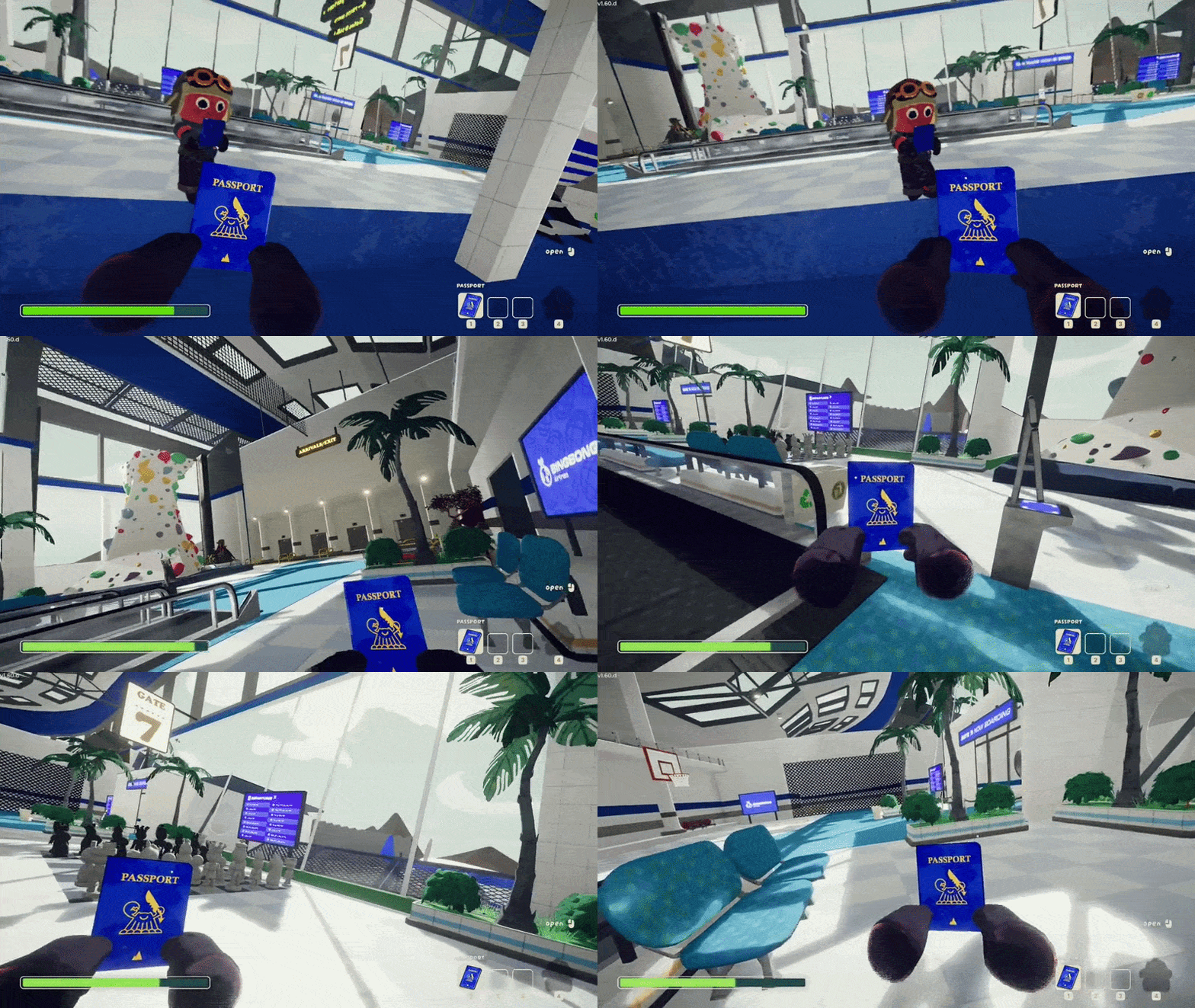
An **unofficial** BepInEx mod that adds head tracking to PEAK via OpenTrack. Look around naturally with your head while your aim stays independent.
## Features
- **Decoupled look + aim**: Look around freely with your head while your crosshair stays where you're aiming
- **6DOF head tracking**: Full rotation (yaw, pitch, roll) and positional tracking via OpenTrack UDP protocol
## Requirements
- [PEAK](https://store.steampowered.com/app/3527290/PEAK/) (Steam)
- [OpenTrack](https://github.com/opentrack/opentrack) or a compatible head tracking app (smartphone, webcam, or dedicated hardware)
- Windows 10/11 (x64)
## Installation
1. Download the latest release from the [Releases page](https://github.com/itsloopyo/peak-headtracking/releases)
2. Extract the ZIP anywhere
3. Double-click `install.cmd`
4. Configure OpenTrack to output UDP to `127.0.0.1:4242`
5. Launch the game
The installer automatically finds your game via Steam registry lookup. If it can't find the game:
- Set the `PEAK_PATH` environment variable to your game folder, or
- Run from command prompt: `install.cmd "D:\Games\PEAK"`
### Manual Installation
If you prefer to install manually or the installer doesn't work for you:
1. Install [BepInExPack_PEAK](https://thunderstore.io/c/peak/p/BepInEx/BepInExPack_PEAK/) into your game folder:
- Download and extract the archive
- Copy the contents of the `BepInExPack_PEAK` folder to your game root (where `Peak.exe` lives) — this includes `winhttp.dll`, `doorstop_config.ini`, and the `BepInEx` folder
2. Download the **Nexus** release ZIP (the one ending in `-nexus.zip`)
3. Extract it into your game folder — the DLLs will land in `BepInEx/plugins/`:
- `PeakHeadTracking.dll`
- `CameraUnlock.Core.dll`
- `CameraUnlock.Core.Unity.dll`
4. Configure your tracker to output UDP to `127.0.0.1:4242`
5. Launch the game
## Setting Up OpenTrack
1. Download and install [OpenTrack](https://github.com/opentrack/opentrack/releases)
2. Configure your tracker as input
3. Set output to **UDP over network**
4. Host: `127.0.0.1`, Port: `4242`
5. Start tracking before launching the game
### Webcam Setup
No special hardware needed — OpenTrack's built-in **neuralnet tracker** uses any webcam for 6DOF face tracking.
1. In OpenTrack, set the input to **neuralnet tracker**
2. Select your webcam in the tracker settings
3. Set output to **UDP over network** (`127.0.0.1:4242`)
4. Start tracking before launching the game
5. Recenter in OpenTrack via its hotkey, and press **Home** in-game to recenter the mod as needed
### Phone App Setup
This mod includes built-in smoothing for network jitter, so you can send directly from your phone on port 4242 without needing OpenTrack on PC.
1. Install an OpenTrack-compatible head tracking app
2. Configure it to send to your PC's IP on port 4242 (run `ipconfig` to find it)
3. Set the protocol to OpenTrack/UDP
**With OpenTrack (optional):** If you want curve mapping or visual preview, route through OpenTrack. Set OpenTrack's input to "UDP over network" on a different port (e.g. 5252), output to `127.0.0.1:4242`, and point your phone at port 5252. Make sure your firewall allows incoming UDP on the input port.
## Controls
Two equivalent binding sets - use whichever your keyboard has:
| Action | Nav-cluster | Chord |
|---------------------|-------------|-----------------|
| Recenter | `Home` | `Ctrl+Shift+T` |
| Toggle tracking | `End` | `Ctrl+Shift+Y` |
| Cycle tracking mode | `Page Up` | `Ctrl+Shift+G` |
| Toggle yaw mode | `Page Down` | `Ctrl+Shift+H` |
`Page Up` / `Ctrl+Shift+G` cycles tracking mode:
1. Normal head-tracked gameplay
2. Positional tracking disabled, rotational tracking enabled
3. Rotational tracking disabled, positional tracking enabled
4. Back to normal
## Configuration
The mod creates a config file at `BepInEx/config/com.cameraunlock.peak.headtracking.cfg` on first run.
```ini
[Connection]
UDP Port = 4242 # Must match OpenTrack output port (1024-65535)
Reconnect Timeout = 5 # Seconds before reconnection attempt (1-60)
Packet Buffer Size = 100 # Max packets to buffer (10-500)
[General]
Tracking Enabled = true # Start with tracking enabled
Position Enabled = true # Enable lean/positional tracking (6DOF)
Enable Audio Feedback = true # Play sounds for tracking state changes
World Space Yaw = true # true = horizon-locked yaw (default), false = camera-local yaw
[Sensitivity]
Yaw Sensitivity = 1.0 # Horizontal rotation (0.1-5.0)
Pitch Sensitivity = 1.0 # Vertical rotation (0.1-5.0)
Roll Sensitivity = 1.0 # Head tilt (0.1-5.0)
Invert Yaw = false
Invert Pitch = false
Invert Roll = false
Position Sensitivity X = 2.0 # Lateral sensitivity (0.0-5.0)
Position Sensitivity Y = 2.0 # Vertical sensitivity (0.0-5.0)
Position Sensitivity Z = 2.0 # Depth sensitivity (0.0-5.0)
Position Limit X = 0.30 # Max lateral offset in meters (0.01-0.5)
Position Limit Y = 0.20 # Max vertical offset in meters (0.01-0.5)
Position Limit Z = 0.40 # Max depth offset in meters (0.01-0.5)
[Limits]
Enable Pitch Limits = true # Clamp pitch rotation
Minimum Pitch = -85 # Max look-down angle (-90 to 0)
Maximum Pitch = 85 # Max look-up angle (0 to 90)
Enable Roll = true # Enable head tilt
Enable Roll Limits = true # Clamp roll rotation
Maximum Roll = 30 # Max tilt angle (0-90)
[Smoothing]
Smoothing = 0.0 # 0 = responsive, 1 = heavy (adds latency)
Position Smoothing = 0.15 # Position smoothing (0.0-1.0)
[Deadzone]
Enable Deadzone = false # Ignore small movements near center
Yaw Deadzone = 0 # Yaw deadzone in degrees (0-10)
Pitch Deadzone = 0 # Pitch deadzone in degrees (0-10)
Roll Deadzone = 0 # Roll deadzone in degrees (0-10)
[Hotkeys]
Toggle Tracking = End
Recenter View = Home
Toggle Position = PageUp
Yaw Mode Key = PageDown
[Advanced]
Debug Logging = false # Enable detailed debug logging
Update Rate = 60 # Target update rate in Hz (30-120)
Maintain Relative Position = true
Near Clip Override = 0.15 # Prevents seeing through player model during head bob (0.01-0.5)
```
## Troubleshooting
**Game crashes on startup after installing BepInEx:**
- PEAK requires the [BepInExPack_PEAK](https://thunderstore.io/c/peak/p/BepInEx/BepInExPack_PEAK/) build (ships with a PEAK-specific doorstop). Our `install.cmd` downloads this automatically.
- If the game crashes on startup, add `-force-vulkan` to your Steam launch options (game Properties > General > Launch Options) to bypass DX12
**Mod not loading:**
- Check `BepInEx/LogOutput.log` for errors
- Ensure all three DLLs are in `BepInEx/plugins/`: `PeakHeadTracking.dll`, `CameraUnlock.Core.dll`, `CameraUnlock.Core.Unity.dll`
- Verify `winhttp.dll` is in the game folder
**No tracking response:**
- Verify OpenTrack is running and outputting data
- Check UDP port matches (default 4242)
- Press **End** to enable tracking, **Home** to recenter
- Check firewall isn't blocking UDP port 4242
**Jittery movement:**
- Increase `Smoothing` in the config file (remote connections auto-use 0.15 minimum)
- Enable deadzones in the `[Deadzone]` section
- Improve lighting for webcam-based tracking
**Yaw feels wrong when looking up or down at extreme angles:**
- Try toggling between world-locked and camera-local yaw with `Page Down`. World-locked (default) is horizon-stable; camera-local follows the camera's current up-axis.
## Updating
Download the new release and run `install.cmd` again.
## Uninstalling
Run `uninstall.cmd` from the release folder. This removes the mod DLLs. BepInEx is only removed if it was originally installed by this mod. To force-remove BepInEx:
```
uninstall.cmd /force
```
## Building from Source
### Prerequisites
- [.NET SDK](https://dotnet.microsoft.com/download) (any recent version)
- [pixi](https://pixi.sh) task runner
- PEAK installed (for Unity/BepInEx DLL references)
### Build
```bash
git clone --recurse-submodules https://github.com/itsloopyo/peak-headtracking.git
cd peak-headtracking
# Build and install to game
pixi run install
# Build only
pixi run build
# Package for release
pixi run package
```
### Available Tasks
| Task | Description |
|------|-------------|
| `pixi run build` | Build the mod (Release configuration) |
| `pixi run install` | Build and install to game directory |
| `pixi run uninstall` | Remove the mod from the game |
| `pixi run uninstall -- --force` | Remove the mod and BepInEx |
| `pixi run package` | Create release ZIPs |
| `pixi run clean` | Clean build artifacts |
| `pixi run release` | Version bump, build, tag, and push |
## License
MIT License - see [LICENSE](LICENSE) for details.
## Credits
- [Aggro Crab](https://aggrocrab.com/) / [Landfall](https://landfall.se/) - PEAK
- [BepInEx](https://github.com/BepInEx/BepInEx) - Unity modding framework
- [OpenTrack](https://github.com/opentrack/opentrack) - Head tracking software
- [Harmony](https://github.com/pardeike/Harmony) - Runtime patching library
## Disclaimer
This mod is not affiliated with, endorsed by, or supported by Aggro Crab Games or Landfall. Use at your own risk.