https://github.com/itsloopyo/subnautica-2-headtracking
Subnautica 2
https://github.com/itsloopyo/subnautica-2-headtracking
Last synced: 29 days ago
JSON representation
Subnautica 2
- Host: GitHub
- URL: https://github.com/itsloopyo/subnautica-2-headtracking
- Owner: itsloopyo
- License: mit
- Created: 2026-05-15T16:52:54.000Z (about 1 month ago)
- Default Branch: main
- Last Pushed: 2026-05-24T10:42:32.000Z (about 1 month ago)
- Last Synced: 2026-05-24T12:25:08.208Z (about 1 month ago)
- Language: Python
- Size: 31.4 MB
- Stars: 0
- Watchers: 0
- Forks: 0
- Open Issues: 1
-
Metadata Files:
- Readme: README.md
- Changelog: CHANGELOG.md
- License: LICENSE
Awesome Lists containing this project
README
# Subnautica 2 Head Tracking
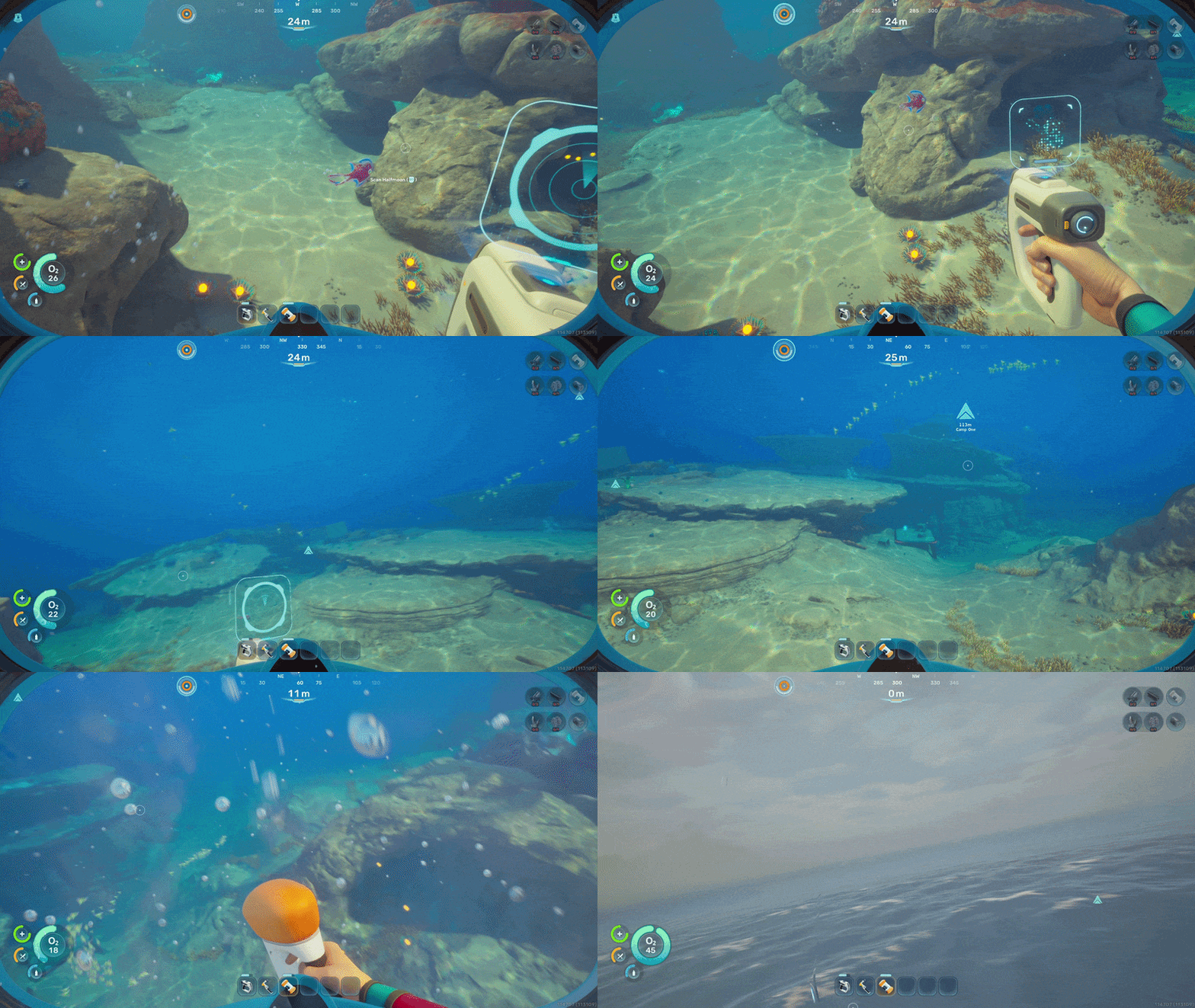
An unofficial decoupled look+aim head tracking mod for Subnautica 2, look around naturally with your head while your mouse or controller controls your aim, with no VR headset required.
## Features
- **Decoupled look and aim** - your head moves the camera while the mouse or controller keeps controlling aim, so weapons still fire where the reticle points.
- **6DOF position tracking** - lean and move your head in space, with asymmetric forward/back limits to prevent clipping through the player.
## Requirements
- Subnautica 2, either the [Steam build](https://store.steampowered.com/app/1962700/Subnautica_2/) or the Game Pass / Xbox app build. Both store versions are supported; the installer auto-detects whichever (or both) you have.
- An [OpenTrack](https://github.com/opentrack/opentrack)-compatible head tracker (VR headset, webcam, or phone app).
- Windows 10 or 11, 64-bit.
## Installation
1. Download `Subnautica2HeadTracking-vX.Y.Z-installer.zip` from the [Releases page](https://github.com/itsloopyo/subnautica-2-headtracking/releases).
2. Extract it anywhere.
3. Double-click `install.cmd`.
4. Configure OpenTrack to output UDP to `127.0.0.1:4242`.
5. Launch the game.
`install.cmd` finds every installed copy of Subnautica 2 on your machine
and deploys to all of them. If you have both Steam and Game Pass
installed, both are mod-enabled in one pass.
If the installer cannot find your game, point it at the install root
directly with a positional argument:
```powershell
install.cmd "D:\Games\Subnautica 2" :: Steam-layout root
install.cmd "C:\XboxGames\Subnautica 2\Content" :: Game Pass root
```
or set the `SUBNAUTICA_2_PATH` environment variable to your install root.
### Game Pass / Xbox App Notes
The Xbox app install is more locked down than the Steam install. Use the
game's `Content` folder as the root, normally:
```cmd
C:\XboxGames\Subnautica 2\Content
```
The mod files must end up here:
```cmd
C:\XboxGames\Subnautica 2\Content\Subnautica2\Binaries\WinGDK\
```
`install.cmd` copies the mod there and also plants `dxgi_orig.dll` from
your own Windows install. If Windows denies the copy, close the Xbox app,
right-click `install.cmd`, choose **Run as administrator**, and pass the
Content path if auto-detection still fails:
```cmd
install.cmd "C:\XboxGames\Subnautica 2\Content"
```
### Manual Installation
If you would rather place the files by hand, drop the mod into the
binaries folder for whichever build you have:
| Store | Target folder |
|-----------|---------------|
| Steam | `\steamapps\common\Subnautica2\Subnautica2\Binaries\Win64\` |
| Game Pass | `C:\XboxGames\Subnautica 2\Content\Subnautica2\Binaries\WinGDK\` |
You need three files in that folder:
1. `dxgi.dll` - the mod itself (from the release ZIP's `plugins/`). This
is a DXGI proxy: every DXGI call the game makes flows through us,
which is how we hook the camera path. The same `dxgi.dll` works for
both Steam and Game Pass; the proxy fingerprints the running exe and
selects the right RVA profile at load time.
2. `dxgi_orig.dll` - **a copy of your own `C:\Windows\System32\dxgi.dll`**.
The mod's exports forward here, so the game still reaches the real
DXGI through us. Copy it yourself, matching whichever build you have:
```cmd
:: Steam
copy C:\Windows\System32\dxgi.dll "\steamapps\common\Subnautica2\Subnautica2\Binaries\Win64\dxgi_orig.dll"
:: Game Pass
copy C:\Windows\System32\dxgi.dll "C:\XboxGames\Subnautica 2\Content\Subnautica2\Binaries\WinGDK\dxgi_orig.dll"
```
3. `HeadTracking.ini` - mod configuration.
The Nexus ZIP contains both `Binaries\Win64\` and `Binaries\WinGDK\`
trees in one bundle. Extract it at the package root and the files land
in the right place for whichever build you have - the unused folder is
harmless. You still need to do the `dxgi_orig.dll` copy step above. The
GitHub installer ZIP's `install.cmd` does the copy automatically and
hits both builds at once if both are installed.
For the Xbox app build, extract the Nexus ZIP into:
```cmd
C:\XboxGames\Subnautica 2\Content
```
Then run this from an administrator Command Prompt:
```cmd
copy "C:\Windows\System32\dxgi.dll" "C:\XboxGames\Subnautica 2\Content\Subnautica2\Binaries\WinGDK\dxgi_orig.dll"
```
## Setting Up OpenTrack
In OpenTrack, set the **Output** to "UDP over network" and target
`127.0.0.1:4242`. That is all the mod needs - it listens for the standard
OpenTrack UDP packet stream.
### VR Headset Setup
1. Connect your headset to the PC with Air Link or Virtual Desktop and start SteamVR.
2. In OpenTrack, choose the SteamVR input plugin so it reads your headset pose.
3. Set Output to UDP over network, `127.0.0.1:4242`.
### Webcam Setup
1. In OpenTrack, set the input to the `neuralnet` tracker.
2. Aim your webcam at your face and calibrate per the OpenTrack tracker guide.
3. Set Output to UDP over network, `127.0.0.1:4242`.
### Phone App Setup
If your phone app smooths its own output, send directly to your PC on
port `4242`. If you want OpenTrack's curve mapping and filtering, point
the app at a local OpenTrack instance and let OpenTrack relay to
`127.0.0.1:4242`.
## Controls
Two equivalent binding sets - use whichever your keyboard has:
| Action | Nav-cluster | Chord |
|---------------------------------|-------------|----------------|
| Recenter | `Home` | `Ctrl+Shift+T` |
| Toggle tracking | `End` | `Ctrl+Shift+Y` |
| Cycle tracking mode | `Page Up` | `Ctrl+Shift+G` |
| Toggle yaw mode (world / local) | `Page Down` | `Ctrl+Shift+H` |
`Page Up` / `Ctrl+Shift+G` cycles tracking mode:
1. Normal head-tracked gameplay
2. Positional tracking disabled, rotational tracking enabled
3. Rotational tracking disabled, positional tracking enabled
4. Back to normal
## Configuration
Settings live in `HeadTracking.ini`, next to the game executable
(`Subnautica2\Binaries\Win64\` for Steam, `Subnautica2\Binaries\WinGDK\`
for Game Pass). Edit it and restart the game to apply changes. If both
builds are installed, each has its own copy of the file.
On the Xbox app build, Windows may block normal saves under the game
folder. Open Notepad as administrator, then open:
```cmd
C:\XboxGames\Subnautica 2\Content\Subnautica2\Binaries\WinGDK\HeadTracking.ini
```
If you installed the game to another drive or folder, use that install's
`Content\Subnautica2\Binaries\WinGDK\HeadTracking.ini` path instead.
```ini
[Network]
Port = 4242 ; OpenTrack UDP port
BindAddress = 0.0.0.0 ; listen on all interfaces
[Tracking]
EnableOnStartup = true ; start with tracking active
YawSensitivity = 1.0 ; multiplier for left/right look
PitchSensitivity = 1.0 ; multiplier for up/down look
RollSensitivity = 1.0 ; multiplier for head tilt
InvertYaw = false
InvertPitch = false
InvertRoll = false
Smoothing = 0.0 ; 0.0 = responsive, 1.0 = heavy (0.15 floor applied internally)
AimDecoupling = true ; head moves view, mouse/controller still aims
ShowReticle = true ; draw the aim-compensated reticle
WorldSpaceYaw = true ; true = horizon-locked yaw (default), false = camera-local
[Position]
Enabled = true ; 6DOF head position tracking
SensitivityX = 1.0
SensitivityY = 1.0
SensitivityZ = 1.0
InvertX = true ; sideways lean direction
InvertY = false ; vertical move direction
InvertZ = true ; forward/back lean direction
LimitX = 0.30 ; max sideways lean in meters
LimitY = 0.20 ; max vertical move in meters
; Z limits are swapped because InvertZ = true: with inversion, forward maps to
; +z (the LimitZBack bound) and backward maps to -z (the LimitZ bound). Keeping
; forward generous (0.40) and backward restricted (0.10) avoids clipping through
; the player, so LimitZBack holds the generous value here.
LimitZ = 0.10 ; backward lean limit in meters
LimitZBack = 0.40 ; forward lean limit in meters
Smoothing = 0.15
[Hotkeys]
; Recenter (Home), toggle tracking (End), and cycle tracking mode (Page Up)
; are fixed, each also reachable with a Ctrl+Shift chord. Only the yaw-mode
; toggle is rebindable here. VK code: PageDown = 0x22.
ToggleYawMode = 0x22
```
## Troubleshooting
**Mod not loading**
- Confirm `dxgi.dll`, `dxgi_orig.dll`, and `HeadTracking.ini` are all in the binaries folder for your build - `Subnautica2\Binaries\Win64\` for Steam, `Subnautica2\Binaries\WinGDK\` for Game Pass. Missing `dxgi_orig.dll` is the most common cause - the proxy forwards every DXGI export there, so without it the game crashes on launch.
- Windows may block the downloaded DLL: right-click `dxgi.dll`, Properties, then Unblock.
- Check the mod log next to the DLL for a `build-check: PASS - matched profile ...` line.
**No tracking response**
- Verify OpenTrack is running and its Output is sending to `127.0.0.1:4242`.
- A firewall may be blocking UDP on port 4242; allow it.
**Jittery / unstable tracking**
- Raise `Smoothing` in `[Tracking]` toward 0.3-0.5.
- On a wireless or phone tracker, expect more jitter; the built-in 0.15 smoothing floor helps but more smoothing reduces it further.
**Wrong rotation axis**
- If a look axis goes the wrong way, set the matching `Invert` flag (`InvertYaw` / `InvertPitch` / `InvertRoll`) to `true`.
**Yaw feels wrong when looking up or down at extreme angles**
- Try toggling between world-locked and camera-local yaw with `Page Down`. World-locked (default) is horizon-stable; camera-local follows the camera's current up-axis.
## Updating
Download the new release and run `install.cmd` again. Your config is
preserved.
## Uninstalling
Run `uninstall.cmd`. This removes `dxgi.dll`, `dxgi_orig.dll`, and
`HeadTracking.ini` from the binaries folder of every detected install
(Steam and / or Game Pass). If you had a pre-existing `dxgi.dll` (e.g.
ReShade) when you installed the mod, the original is restored from its
`.backup` copy. Pass `/force` to discard the backup instead.
## Building from Source
Requires Visual Studio 2022 with the Desktop C++ workload and CMake.
```powershell
git clone --recursive https://github.com/itsloopyo/subnautica-2-headtracking
cd subnautica-2-headtracking
pixi run build
pixi run install
```
## License
MIT License - see [LICENSE](LICENSE) for details.
## Credits
- [Unknown Worlds Entertainment](https://unknownworlds.com/) for [Subnautica 2](https://store.steampowered.com/app/1962700/Subnautica_2/).
- The [OpenTrack](https://github.com/opentrack/opentrack) contributors for the head-tracking UDP protocol.
- The [CameraUnlock shared core](https://github.com/itsloopyo/cameraunlock-core) for the head-tracking processing pipeline used across all our mods.
## Disclaimer
This mod is not affiliated with, endorsed by, or supported by Unknown
Worlds Entertainment or KRAFTON. Use at your own risk.