https://github.com/itsmeares/staaash
Self-hosted personal cloud drive built with Next.js, Prisma, PostgreSQL, and a worker runtime.
https://github.com/itsmeares/staaash
cloud-drive file-management files google-drive homelab nextjs pnpm postgresql prisma self-hosted self-hosting storage turborepo typescript
Last synced: 27 days ago
JSON representation
Self-hosted personal cloud drive built with Next.js, Prisma, PostgreSQL, and a worker runtime.
- Host: GitHub
- URL: https://github.com/itsmeares/staaash
- Owner: itsmeares
- License: agpl-3.0
- Created: 2026-03-28T22:01:56.000Z (3 months ago)
- Default Branch: main
- Last Pushed: 2026-05-31T00:06:02.000Z (27 days ago)
- Last Synced: 2026-05-31T01:10:00.847Z (27 days ago)
- Topics: cloud-drive, file-management, files, google-drive, homelab, nextjs, pnpm, postgresql, prisma, self-hosted, self-hosting, storage, turborepo, typescript
- Language: TypeScript
- Homepage:
- Size: 2.56 MB
- Stars: 3
- Watchers: 1
- Forks: 1
- Open Issues: 0
-
Metadata Files:
- Readme: .github/README.md
- Contributing: .github/CONTRIBUTING.md
- License: LICENSE
- Code of conduct: .github/CODE_OF_CONDUCT.md
- Security: .github/SECURITY.md
Awesome Lists containing this project
README
# Staaash
[](./LICENSE)
[](https://github.com/itsmeares/staaash/releases)
[](https://github.com/itsmeares/staaash/pkgs/container/staaash)
[](#installation)
> [!IMPORTANT]
> **Staaash is in beta.** Expect some bugs and breaking changes between pre-releases. Do not use it as your only copy of important files — set up a [3-2-1 backup strategy](https://www.backblaze.com/blog/the-3-2-1-backup-strategy/) before you start.
Staaash is a self-hosted file drive for people who want their files on their own server.


## Why Use It
- Your files stay on storage you control.
- Sharing is built in, with public links for files and folders.
- Invite friends or family and give them their own space.
- Built for real home use: uploads, folders, sharing, backups, and restore checks.
Upload files, organize folders, invite trusted users, and share links without handing the whole thing to someone else's cloud. It is built for self-hosters who want something small enough to understand and useful enough to run at home.
If [Immich](https://github.com/immich-app/immich) is your self-hosted photo library, Staaash aims to be your self-hosted file drive.
## Installation
Requirements: [Docker](https://docs.docker.com/get-docker/) with the Compose plugin.
### Windows and Linux
1. Go to the [releases page](https://github.com/itsmeares/staaash/releases) and download `docker-compose.yml` and `example.env` into the same folder. Use the latest release, or pick a specific version if you need one. Files on `main` may include unreleased changes.
2. Rename `example.env` to `.env`, open it, set `DB_PASSWORD` to a secure value (you can use something like pwgen), and change any other values you want.
3. Run:
```console
docker compose up -d
```
Staaash is now running at `http://localhost:2113`.
The first account you register becomes the owner. Subsequent accounts require an invite from the owner.
### Reverse proxies
If you put Staaash behind Caddy, Nginx, Traefik, or another reverse proxy, preserve the original `Host` header. Staaash rejects cross-origin mutating requests by comparing the browser `Origin` host to the request `Host`.
Use one public address consistently. Loading the app from `https://staaash.example.com` and posting to a direct server IP, LAN IP, or different port can fail by design.
`SECURE_COOKIES` is optional. By default, Staaash uses secure cookies on HTTPS and non-secure cookies on plain HTTP. Only set `SECURE_COOKIES` if you need to force cookie behavior. If your HTTPS proxy forwards traffic to Staaash over HTTP, make sure it sends `x-forwarded-proto: https`.
### Upgrading
```console
docker compose pull
docker compose up -d
```
Migrations run automatically on startup.
### Data locations
| What | Default path |
| -------------- | ------------ |
| Uploaded files | `./library` |
| Database | `./postgres` |
Both paths are relative to where `docker-compose.yml` lives. Change them in `.env` before first run.
## Backup And Restore
Back up both the database and uploaded files. In the default Docker setup, that means backing up `./postgres` and `./library` together.
See [`docs/operations/backup-restore.md`](../docs/operations/backup-restore.md) for the restore checklist.
## Documentation
- [`docs/architecture.md`](../docs/architecture.md) - system shape, storage model, and design boundaries
- [`docs/operations/backup-restore.md`](../docs/operations/backup-restore.md) - simple backup and restore checklist
## Local Development
Staaash is a PNPM workspace monorepo.
Next.js · TypeScript · Prisma · PostgreSQL
### Repository Layout
- `apps/web` - web app and server routes
- `apps/worker` - background worker runtime
- `packages/config` - shared TypeScript config
- `packages/db` - Prisma schema and DB helpers
- `docs` - architecture reference
### Development Setup
1. Copy `dev.example.env` to `.env.local` at the repo root.
2. Start PostgreSQL.
The default `.env.local` expects `postgresql://staaash:staaash@localhost:5432/staaash`.
If you want a local Docker container that matches those values, run:
```console
docker run --name staaash-postgres -e POSTGRES_USER=staaash -e POSTGRES_PASSWORD=staaash -e POSTGRES_DB=staaash -p 5432:5432 -v staaash-postgres-data:/var/lib/postgresql -d postgres:16
```
After that first run, you can restart it later with `docker start staaash-postgres`.
If you already have PostgreSQL running another way, just update `DATABASE_URL` in `.env.local`.
3. Run `pnpm i`.
4. Run `pnpm db:generate`.
5. Run `pnpm db:push`.
6. Start the web app with `pnpm web:dev`.
7. Start the worker with `pnpm worker:dev`.
### Resetting Local Data
If you need to reset your local database and file uploads during development:
```console
pnpm app:reset-local-data
```
This will:
- Delete all local file uploads (`.data/files`)
- Reset the Prisma database schema with `prisma db push --force-reset`
**Note:** Use this script to reset your database please, you may have data remain if you do it manually.
## Testing And Quality
- staged files are auto-formatted on commit
- `pnpm format:check`
- `pnpm format` for one-off repo-wide formatting or intentional normalization
- `pnpm lint`
- `pnpm test`
- `pnpm build`
## AI Use
AI is being used in this project as part of the development and documentation workflow.
That does not change the quality bar. Generated code or generated docs still need to be reviewed, tested, and kept consistent with the repo's actual behavior.
## Contributing And Feedback
- read [`CONTRIBUTING.md`](./CONTRIBUTING.md) before opening work
- use the GitHub issue forms for bug reports and feature requests
- use the PR template when opening changes
- report security problems privately as described in [`SECURITY.md`](./SECURITY.md)
## Star History
[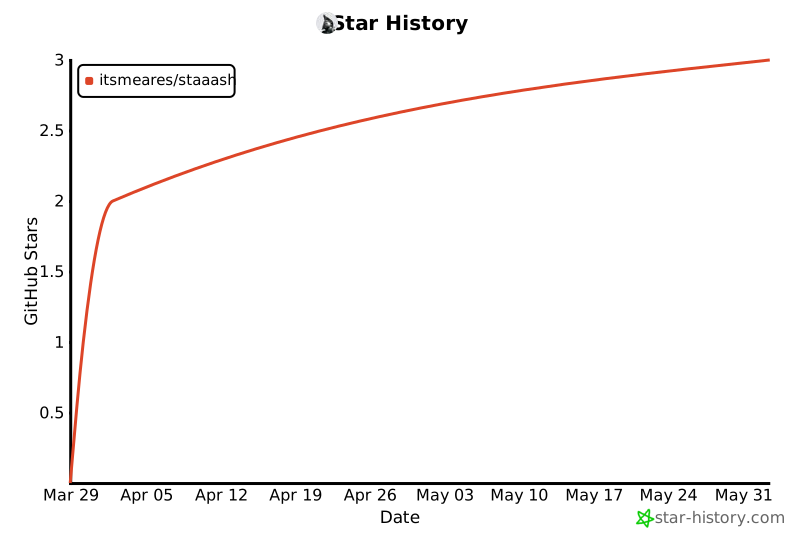](https://star-history.com/#itsmeares/staaash&Date)
## License
AGPL-3.0 — see [LICENSE](../LICENSE).