https://github.com/iudicium/pryingdeep
Prying Deep - An OSINT tool to collect intelligence on the dark web.
https://github.com/iudicium/pryingdeep
crawler darkweb go gocolly golang-osint onion osint osint-tools pryingdeep security-tools
Last synced: 5 months ago
JSON representation
Prying Deep - An OSINT tool to collect intelligence on the dark web.
- Host: GitHub
- URL: https://github.com/iudicium/pryingdeep
- Owner: iudicium
- License: gpl-3.0
- Archived: true
- Created: 2023-10-01T12:43:17.000Z (over 2 years ago)
- Default Branch: main
- Last Pushed: 2024-09-03T09:13:38.000Z (almost 2 years ago)
- Last Synced: 2025-09-04T14:43:50.557Z (10 months ago)
- Topics: crawler, darkweb, go, gocolly, golang-osint, onion, osint, osint-tools, pryingdeep, security-tools
- Language: Go
- Homepage:
- Size: 35.3 MB
- Stars: 530
- Watchers: 5
- Forks: 43
- Open Issues: 1
-
Metadata Files:
- Readme: README.md
- License: LICENSE
Awesome Lists containing this project
- awesome-starred - iudicium/pryingdeep - Prying Deep - An OSINT tool to collect intelligence on the dark web. (Go)
- cybersources - Prying Deep
README
Table of Contents
## Translation (Перевод)
- [Click](./docs/RU_README.MD)
## IMPORTANT
- This repo is no longer active, sorry guys, I no longer want to keep working on this :)
## About The Project
I've seen multiple projects out there in GitHub, that are crawlers for the deep web,
but most of them did not meet *my* standards of OSINT on the deep web.
So I decided to create my own deep web OSINT tool.
This tool serves as a reminder that the best practices of OPSEC should always be followed in the deep web.
The author of this project is not responsible for any possible harm caused by the usage of this tool.
## What does this tool do?
*Prying Deep crawls dark/clear net platforms and extracts as much intelligence as possible effectively.*
---
## Getting Started
### Prerequisites
Before you can use our OSINT tool, please ensure you have the following dependencies installed:
1. **Docker: (optional)**
- You can download and install Docker by following the official installation instructions for your specific operating system:
- [Docker Installation Guide](https://docs.docker.com/get-docker/).
2. **Go: (required)**
- [Golang Installation Guide](https://go.dev/doc/install).
3. **PostgresSQL: (required if you don't use docker)**
- Make sure your `pryingdeep.yaml` environment variables match the environment in `docker-compose.yaml`
- [PostgreSQL Installation](https://www.postgresql.org/download/)
### Binary Installation
1. Install the binary via:
```Sh
go install -v github.com/iudicium/pryingdeep/cmd/pryingdeep@latest
```
2. Run the following command:
```sh
pryingdeep install
```
3. Adjust the values inside the config folder to your needs.
### Manual Installation
1. Clone the repo:
```sh
git clone https://github.com/iudicium/pryingdeep.git
```
2. Adjust the values in the .yaml configuration either through flags or manually.
`Database`, `logger`, `tor` all require manual configuration.
You *will need to read* [Colly Docs](https://github.com/gocolly/colly/blob/v1.2.0/colly.go). Also, refer to [Config Explanation](./docs/CONFIG.MD#table-of-contents)
3. Build the binary via:
- `go build` -> inside the `cmd/pryingdeep` directory
- `go build cmd/pryingdeep/pryingdeep.go` -> root directory, binary will also be there.
## Docker
To start run *pryingdeep* inside a docker container use this command:
```sh
docker-compose up
```
## Config
Read more each parameter here:
[config](./docs/CONFIG.MD#table-of-contents)
## Tor
Read more about building and running our tor container here:
[Tor](./build/package/tor/README.MD#build)
## Usage
```
Pryingdeep specializes in collecting information about dark-web/clearnet websites.
This tool was specifically built to extract as much information as possible from a .onion website
Usage:
pryingdeep [command]
Available Commands:
completion Generate the autocompletion script for the specified shell
crawl Start the crawling process
export Export the collected data into a file.
help Help about any command
install Installation of config files
Flags:
-c, --config string Path to the .yaml configuration. (default "pryingdeep.yaml")
-h, --help help for pryingdeep
-z, --save-config Save chosen options to your .yaml configuration
-s, --silent -s to disable logging and run silently
```
## Roadmap
- [x] Add a user to the "tor" docker container so that it doesn't run as root
- [ ] Acquire a shodan api key for testing the favicon module
- [ ] Think of a way to acquire IP address of the server
- [ ] Implement scan command
- [ ] Implement file identification and search
- [ ] Move tests into their corresponding packages
## Contributing
1. Fork the Project
2. Checkout the dev branch (`git checkout dev`)
3. Add proper documentation to your code.
4. Use `goimports` to lint your code
5. Submit a pull requests and add a detailed description of what has been changed.
## License
Distributed under the GPL-3.0 license. See `LICENSE` for more information.
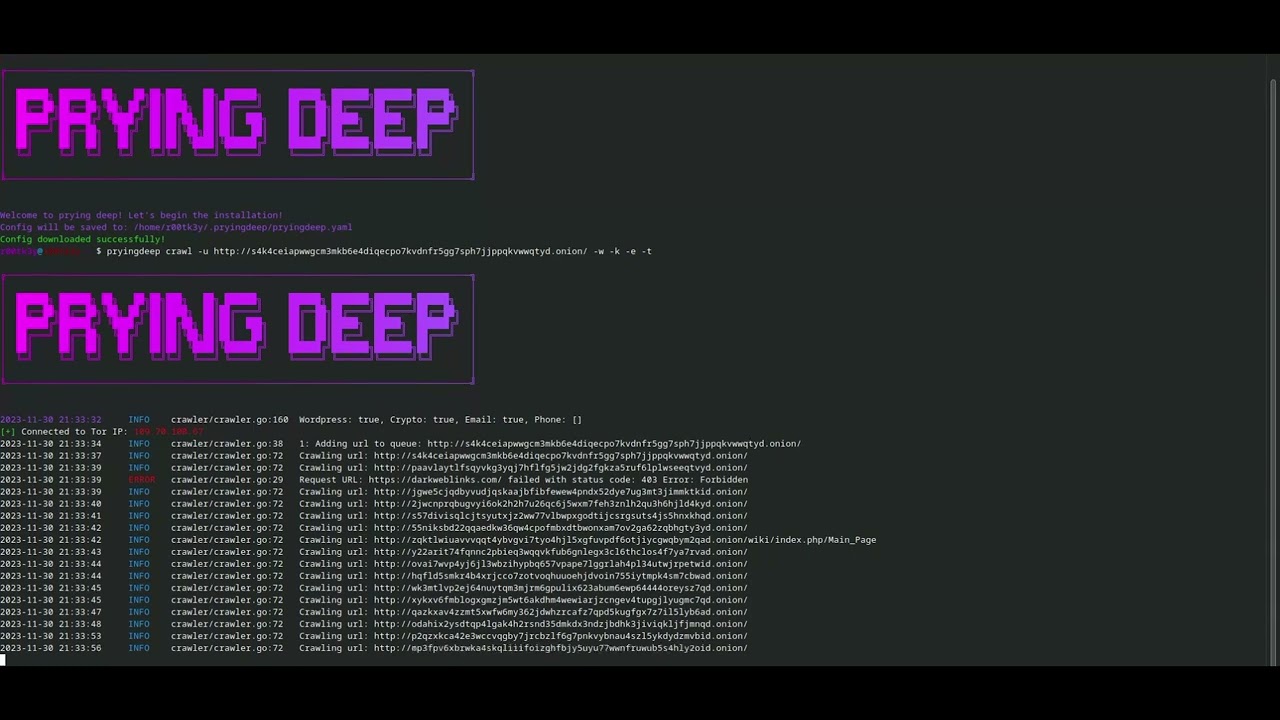
## Video Preview
[](https://www.youtube.com/watch?v=TvRT_lvixI0)
---
## Preview


## Support
If you have found this repository useful and feel generous, you can donate some Monero (XMR) to the following address:
48bEkvkzP3W4SGKSJAkWx2V8s4axCKwpDFf7ZmwBawg5DBSq2imbcZVKNzMriukuPqjCyf2BSax1D3AktiUq5vWk1satWJt
Thank you!