https://github.com/ivaquero/oxidizer
Simple & Extensible Dotfile Manager That Unifies Your Terminal Operations
https://github.com/ivaquero/oxidizer
cross-platform dotfiles-manager homebrew powershell scoop wezterm zsh
Last synced: 4 months ago
JSON representation
Simple & Extensible Dotfile Manager That Unifies Your Terminal Operations
- Host: GitHub
- URL: https://github.com/ivaquero/oxidizer
- Owner: ivaquero
- License: gpl-3.0
- Created: 2022-02-15T14:33:28.000Z (over 4 years ago)
- Default Branch: master
- Last Pushed: 2026-03-18T07:40:27.000Z (4 months ago)
- Last Synced: 2026-04-04T07:44:40.960Z (4 months ago)
- Topics: cross-platform, dotfiles-manager, homebrew, powershell, scoop, wezterm, zsh
- Language: Shell
- Homepage:
- Size: 1.37 MB
- Stars: 147
- Watchers: 4
- Forks: 14
- Open Issues: 0
-
Metadata Files:
- Readme: README.md
- License: LICENSE
Awesome Lists containing this project
README
# oxidizer
[](https://github.com/ivaquero/oxidizer/actions/workflows/main.yml)
[](https://github.com/ivaquero/oxidizer/blob/master/LICENSE)


A Simple & Extensible Dotfile and Computing Environments Manager That Facilitates Your Terminal Operations
一个简单 & 可扩展的,用于简化操作的 dotfile 和计算环境管理工具
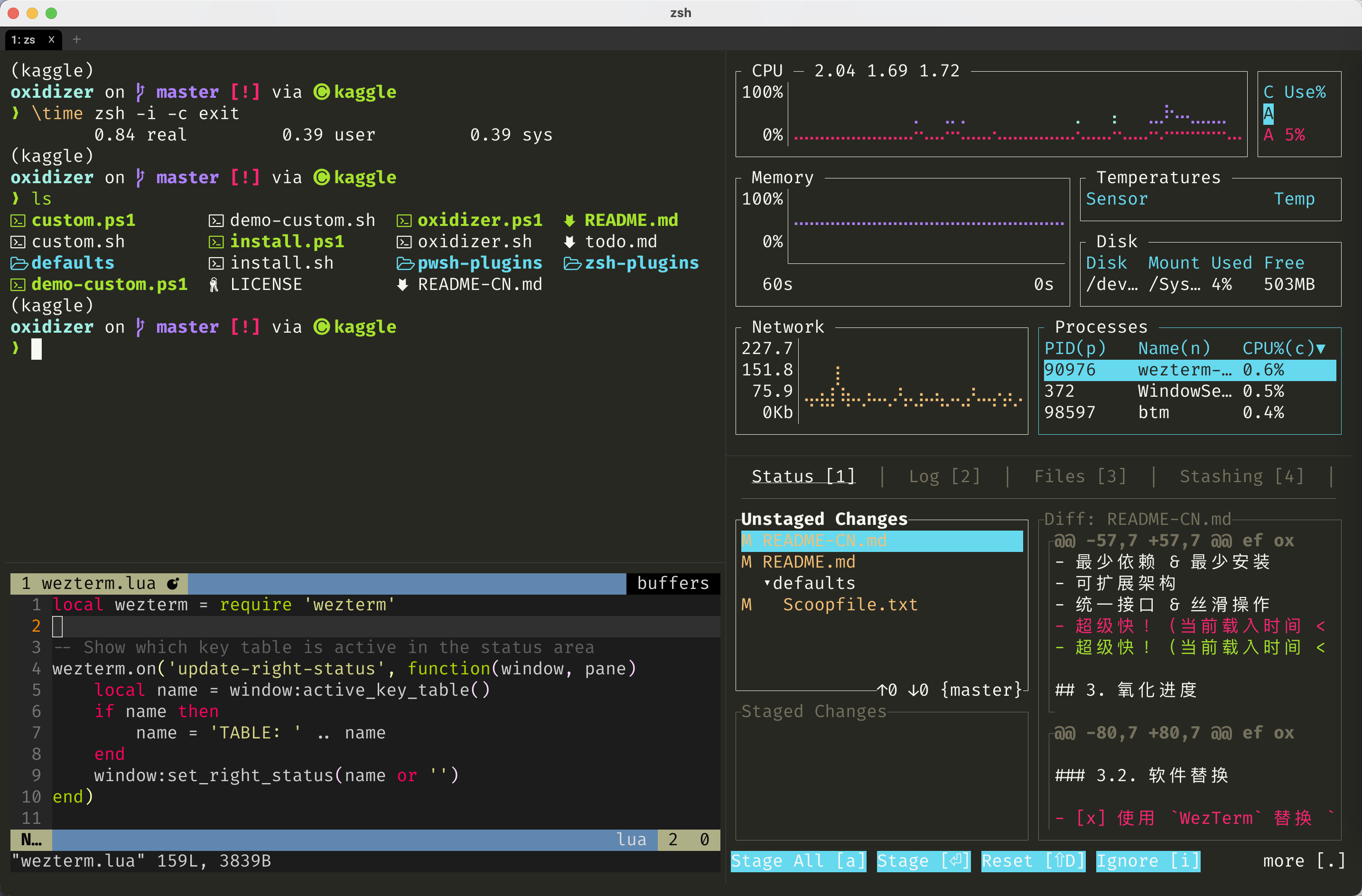
## 1. Motivation 动机
`oxidizer` is originally designed for **non-administrator** users. It saves your time from repetitive and tedious setups of coding environments, and it aims to provide with following features:
- Cross-Platform (mainly Rust toolchains)
- Minimal Dependencies & Minimal Installation
- Extensible Architecture
- Unified Interface & Smooth Usage
- Barely affect loading (loading time < 1 s)
`oxidizer` 起初主要为**非管理员用户**设计(在实验室的不同计算机上反复搭建环境真的很烦),用于快速搭建跨平台统一的工作环境,避免重复和繁琐的环境配置劳动,其具有特点
- 跨平台(主要基于 Rust 工具链)
- 最少依赖 & 最少安装
- 可扩展架构
- 统一接口 & 丝滑操作
- 几乎不影响加载!(载入时间 < 1 秒)
Although this toy program uses a lot of rust-based CLI, its name just came out of the pattern "element-oxidizer-oxide" when I was a student in biochemistry.
虽然这个玩具程序使用了很多基于 rust 的 CLI,但它的名字只是在我还是生化专业的学生时从模式"单质 - 氧化剂 - 氧化物"中冒出来的。
## 2. File Management 文件管理
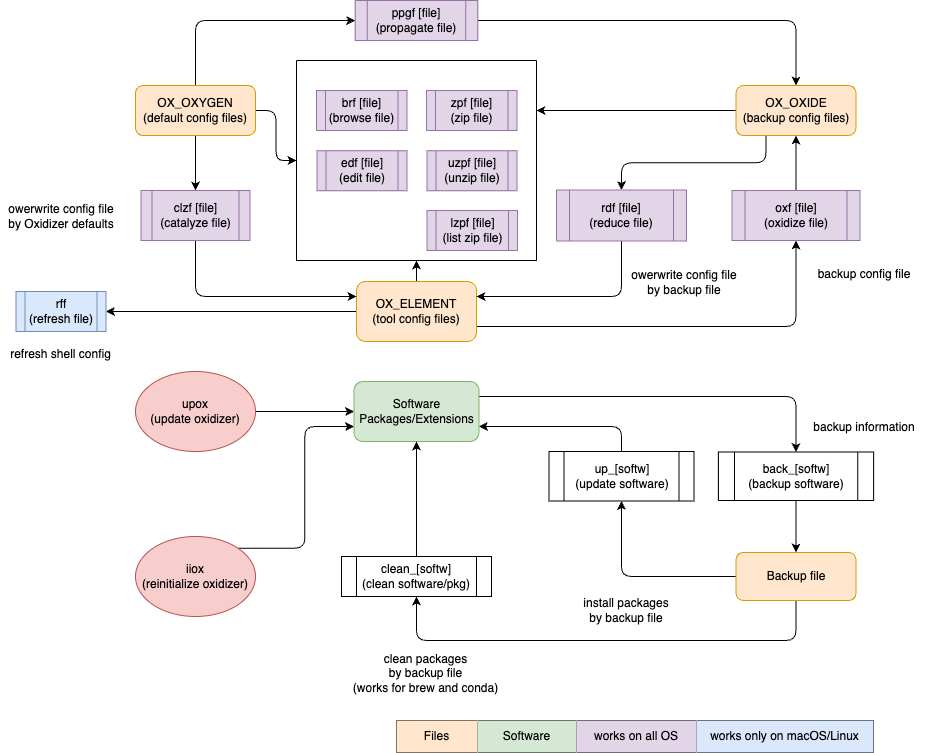
Based on the name origin of the program, the program creates 3 main variables
- OX_ELEMENT: config files of softwares
- OX_OXIDE: backup of the config files
- OX_OXYGEN: config files in `oxidizer`
根据程序的名称起源,程序会创建 3 个主要变量
- OX_ELEMENT: 软件的配置文件
- OX_OXIDE: 配置文件的备份
- OX_OXYGEN: `oxidizer` 自带的配置文件
- `rff`
- refresh file by `source`
- `edf`
- edit file by `$EDITOR` (default: VSCode)
- `brf`
- file: browse by `bat` / `cat`
- folder: browse by `lsd` / `ls`
- `ipf` (import file, alias: `rdf`)
- reduce file: overwrite configuration file by backup (customized) file
- `epf` (export file, alias: `oxf`)
- oxidize file: backup configuration file to backup folder
- `iif` (initialize file, alias: `clzf`)
- catalyze file: overwrite configuration file by `oxidizer` defaults
- `ppgf`
- propagate file: backup `oxidizer` defaults to backup folder
For example, if you want to edit `~/.zshrc`, you can type `edf zs`.
When you `epf zs` (export file), `~/.zshrc` will be copied and save in folder backup folder
As mentioned in **Get Started**, you can open `custom.json` simply by `edf ox`.
In the `custom.json`, edit the `oxides` map to predefine the specific backup path, where `oxide_folder` is the backup root path relative to `$HOME`. Note that the key should be set as `bk` + `[key in OX_ELEMENT]`.
```json
{
"oxide_folder": "Documents",
"oxides": {
"bkox": "shell/custom.json",
"bkoxw": "shell/custom.json",
"bkoxj": "shell/custom.json",
"bkb": "unix/Brewfile",
"bkvi": "shell/.vimrc",
"bkss": "shell/starship.toml",
"bkg": "../notes/.gitconfig",
"bkzs": "shell/.zshrc",
"bkbs": "shell/.bash_profile"
}
}
```
The table below lists the information of specific configuration files:
> `_` denotes a folder, and you can check these abbreviations closely by `brf [Plugin Abbr.]` | `edf [Plugin Abbr.]`.
`oxidizer` uses [ouch](https://github.com/ouch-org/ouch) to deal with compression and decompression, and provides with 3 shortcuts
- `zpf`: compress file
- `zpfr`: decompress file
- `zpfls`: list items in the compressed file
## 3. Installation 安装
For macOS / Linux (Intel)
```sh
export OXIDIZER=$HOME/oxidizer
git clone --depth=1 https://github.com/ivaquero/oxidizer.git $OXIDIZER && bash oxidizer/install.sh
```
Note that Homebrew is an essential dependency for oxidizer on macOS / Linux.
- 对中国大陆用户,可设置 `BREW_CN` 变量来下载安装 Homebrew:
```sh
export BREW_CN=1
```
For Windows
```powershell
$env:OXIDIZER = "$HOME\oxidizer"
git clone --depth=1 https://github.com/ivaquero/oxidizer.git $env:OXIDIZER; . oxidizer\install.ps1
```
- 对中国大陆用户,可设置 `SCOOP_CN` 变量来下载安装
```powershell
$env:scoop_mirror = 1
```
> For Cmderrs, you need to remove the `-Options ReadOnly` from `Set-Item -Path function:\prompt -Value $Prompt -Options ReadOnly` in the last line of `%CMDER_ROOT%\vendor\profile.ps1`.
>
> 对于 Cmder 用户,你需要删除`%CMDER_ROOT%\vendor\profile.ps1`的最后一行`Set-Item -Path function:\prompt -Value $Prompt -Options ReadOnly`中的`-Options ReadOnly`。
After installation, you might personalize your preference in `custom.json`, check [defaults.json](https://github.com/ivaquero/oxidizer/blob/master/defaults.json). Open `custom.json` by following command
安装之后,您可以在`custom.json`中个性化您的系统环境(请参考[defaults.json](https://github.com/ivaquero/oxidizer/blob/master/defaults.json),通过一下命令打开
```bash
edf ox
```
To keep up the updates, simply `upox` function.
可使用 `upox` 命令来更新 `oxidizer`
## 2. Motivation 动机
Oxidizer 的主要目标
Oxidizer is originally designed for **non-administrator** users. It saves your time from repetitive and tedious setups of coding environments, and it aims to provide with following features:
- Cross-Platform (mainly Rust toolchains)
- Minimal Dependencies & Minimal Installation
- Extensible Architecture
- Unified Interface & Smooth Usage
- Super-Fast! (loading time < 1 s)
Oxidizer 起初主要为**非管理员用户**设计,用于快速搭建跨平台统一的工作环境,避免重复和繁琐的环境配置劳动,其具有特点
- 跨平台(主要基于 Rust 工具链)
- 最少依赖 & 最少安装
- 可扩展架构
- 统一接口 & 丝滑操作
- 超级快!(载入时间 < 1 秒)
## 3. Tool Chains 工具链
### 4.1. CLI Tools Replacement
> ☑️ means required in the installation.
- coreutils
- [x] [bat](https://github.com/sharkdp/bat) ⟶ `cat`
- [x] [lsd](https://github.com/Peltoche/lsd) ⟶ `ls`
- [ ] [uutils-coreutils](https://github.com/uutils/coreutils) ⟶ `coreutils`
- non-coreutils
- [x] [dust](https://github.com/bootandy/dust) ⟶ `du`
- [x] [fd](https://github.com/sharkdp/fd) ⟶ `find`
- [x] [ripgrep](https://github.com/BurntSushi/ripgrep) ⟶ `grep`
- [x] [sd](https://github.com/chmln/sd) ⟶ `sed`
- [x] [tlrc](https://github.com/tldr-pages/tlrc) ⟶ `tldr` | `man`
- [x] [zoxide](https://github.com/ajeetdsouza/zoxide) ⟶ `cd` | `z`
- [x] [hyperfine](https://github.com/sharkdp/hyperfine) ⟶ `time`
- [ ] [choose](https://github.com/theryangeary/choose) ⟶ `cut`
- [ ] [starship](https://github.com/starship/starship) ⟶ `powerline10k` | `ohmyposh`
- [ ] [yazi](https://github.com/sxyazi/yazi) ⟶ `ranger`
- [ ] [tokei](https://github.com/XAMPPRocky/tokei) ⟶ `cloc`
### 4.2. GUI Tools Replacement
- [ ] [WezTerm](https://github.com/wez/wezterm) | [alacritty](https://github.com/alacritty/alacritty) ⟶ `iterm2` | `windows terminal`
> `WezTerm` is more recommended because it has a built-in multiplexer.
### 4.3. Otherful Rust Tools
- [x] [fresh-editor](https://sinelaw.github.io/fresh): A terminal text editor you can just use.
- [ ] [ouch](https://github.com/ouch-org/ouch): Painless compression and decompression tool
### 4.4. Summary of Plugins
`oxidizer` is designed to be extensible, you can personalize `plugin_load` in `config.json` to load the plugins by your need.
Of course, you are allowed to write your own plugins, see [Writing A Plugin](https://github.com/ivaquero/oxidizer/blob/master/docs/plugins.md) for details.
The plugins are hosted in [oxplugins](https://github.com/ivaquero/oxplugins) as well as [oxplugins-powershell](https://github.com/ivaquero/oxplugins-pwsh).
插件位于 [oxplugins](https://github.com/ivaquero/oxplugins) 和 [oxplugins-powershell](https://github.com/ivaquero/oxplugins-pwsh)
To load a plugin, simply add its abbreviation into the `OX_PLUGINS` array of `~/oxidizer/config.json`, like
```json
{
"plugin_load": [
"cli_espanso",
"cli_ollama",
"cli_vscode",
"lang_julia",
"lang_rust",
"pkg_conda",
"pkg_npm",
"pkg_tlmgr"
]
}
```
You can check available builtin plugins by function `lsox`.
| Filename | Category | Support |
|:----------------:|:---------------:|:----------------------------:|
| `os_macos` | OS Shortcuts | macOS |
| `os_debian` | OS Shortcuts | Debian-Based Systems |
| `os_redhat` | OS Shortcuts | RedHat-Based Systems |
| `os_windows` | OS Shortcuts | Windows (include winget) |
| `pkg_brew` | Package Manager | Homebrew (macOS & Linux) |
| `pkg_scoop` | Package Manager | Scoop (Windows) |
| `pkg_conda` | Package Manager | Conda (Multi-Languages) |
| `pkg_npm` | Package Manager | NPM + PNPM (JavaScript) |
| `pkg_tlmgr` | Package Manager | tlmgr (TeXLive) |
| `cli_bitwarden` | App CLI | Bitwarden |
| `cli_espanso` | App CLI | Espanso |
| `cli_ollama` | App CLI | Ollama |
| `cli_vscode` | App CLI | VSCode |
| `cli_multiplex` | App Utils | Zellij & TMux |
| `lang_julia` | Language | Julia |
| `lang_rust` | Language | Rust (include cargo, rustup) |
| `utils_files` | System Utils | File Operation |
| `utils_formats` | System Utils | Formats Conversion |
| `utils_networks` | System Utils | Network Configuration |
## 5. Package Management 包管理
oxidizer aims to provide a unified interface for all package manager-related commands to reduce typing and memory burden of command-liners.
| Suffix | Action | brew `b` | scoop `s` | conda `c` | npm `n` | cargo `cg` | rustup `rs` | julia `jl` | pixi `px` | gem `rb` | tlmgr `tl` |
|:------:|:-----------:|:--------:|:---------:|:---------:|:-------:|:----------:|:-----------:|:----------:|:---------:|:--------:|:----------:|
| `*h` | help | ✅ | | ✅ | ✅ | ✅ | ✅ | ✅ | ✅ | ✅ | ✅ |
| `*cf` | config | ✅ | | ✅ | ✅ | | | | ✅ | | |
| `*is` | install | ✅ | ✅ | ✅ | ✅ | ✅ | ✅ | ✅ | ✅ | ✅ | ✅ |
| `*us` | uninstall | ✅ | ✅ | ✅ | ✅ | ✅ | ✅ | ✅ | ✅ | ✅ | ✅ |
| `*up` | update | ✅ | ✅ | ✅ | ✅ | ✅ | ✅ | ✅ | ✅ | ✅ | ✅ |
| `*ups` | update self | ✅ | ✅ | | | | | | | | ✅ |
| `*ls` | list | ✅ | ✅ | ✅ | ✅ | ✅ | ✅ | ✅ | ✅ | ✅ | ✅ |
| `*lv` | leaves | ✅ | ✅ | ✅ | ✅ | ✅ | | ✅ | ✅ | | |
| `*sc` | search | ✅ | ✅ | ✅ | ✅ | ✅ | | | ✅ | ✅ | |
| `*cl` | clean | ✅ | ✅ | ✅ | ✅ | ✅ | | ✅ | ✅ | ✅ | |
| `*if` | info | ✅ | ✅ | ✅ | ✅ | ✅ | | | | | ✅ |
| `*st` | status | ✅ | ✅ | | ✅ | | | ✅ | | | |
| `*ck` | check | ✅ | ✅ | ✅ | ✅ | ✅ | ✅ | | | ✅ | ✅ |
| `*pn` | pin | ✅ | ✅ | | | | | ✅ | | | |
| `*upn` | unpin | ✅ | ✅ | | | | | ✅ | | | |
| `*dp` | depends | ✅ | ✅ | ✅ | | ✅ | | ✅ | | ✅ | |
| `*dpr` | needs | | | ✅ | | | | ✅ | | | |
| `*xa` | add repo | ✅ | ✅ | ✅ | | | | | | | |
| `*xrm` | remove repo | ✅ | ✅ | ✅ | | | | | | | |
| `*xls` | list repo | | | ✅ | | | | | | | |
Some package managers also have functionality of project management
| Suffix | Action | brew `b` | scoop `s` | conda `c` | npm `n` | cargo `cg` | rustup `rs` | julia `jl` | pixi `px` | gem `rb` |
|:------:|:-------:|:--------:|:---------:|:---------:|:-------:|:----------:|:-----------:|:----------:|:---------:|:--------:|
| `*ii` | init | | | ✅ | ✅ | ✅ | | | ✅ | |
| `*cr` | create | ✅ | ✅ | | ✅ | ✅ | | | | |
| `*b` | build | | | | | ✅ | | ✅ | | ✅ |
| `*r` | run | | | ✅ | ✅ | ✅ | ✅ | ✅ | ✅ | |
| `*ed` | edit | ✅ | | | | | | | | |
| `*ct` | cat | ✅ | ✅ | | | | | | | ✅ |
| `*ln` | link | ✅ | | | | | | | | |
| `*ts` | test | ✅ | | | ✅ | ✅ | | ✅ | | |
| `*au` | audit | ✅ | | | ✅ | | | | | |
| `*fx` | fix | ✅ | | | ✅ | ✅ | | | | |
| `*pb` | publish | | | | ✅ | ✅ | | | | |
Some of the package managers shortcuts are included in corresponding system plugins.
- `ox-os-macos`: auto-loaded, contains alias and functions for `mas`
- `ox-os-debians`: auto-loaded, contains alias and functions for `apt`
- `ox-os-windows`: auto-loaded, contains alias and functions for `winget` and `wsl`
| Suffix | Action | mas `m` | apt `a` | winget `w` | wsl `wl` |
|:------:|:-----------:|:-------:|:-------:|:----------:|:--------:|
| `*h` | help | ✅ | ✅ | ✅ | ✅ |
| `*is` | install | ✅ | ✅ | ✅ | ✅ |
| `*us` | uninstall | ✅ | ✅ | ✅ | ✅ |
| `*up` | update | ✅ | ✅ | ✅ | ✅ |
| `*ups` | update self | | ✅ | ✅ | ✅ |
| `*ls` | list | | ✅ | ✅ | ✅ |
| `*lv` | leaves | | | | |
| `*sc` | search | ✅ | ✅ | | |
| `*cl` | clean | | ✅ | ✅ | ✅ |
| `*if` | info | ✅ | ✅ | ✅ | |
| `*st` | status | ✅ | | | |
| `*ck` | check | | ✅ | | |
| `*dp` | depends | | ✅ | | |
| `*xa` | add repo | | ✅ | ✅ | |
| `*xrm` | remove repo | | ✅ | ✅ | |
| `*xls` | list repo | | ✅ | ✅ | |
### 5.1. Homebrew
- `bis`: brew install
- `bris`: brew reinstall
suffix `c` is a flag to specify brew commands only work on casks
- `bisc`: brew install --cask
- `brisc`: brew reinstall --cask
- `bupc`: brew upgrade --cask
- `brp [cask]`: replace brew cache file by pre-downloaded file
### 5.2. Conda
Note that some shortcuts of the `ox-conda` plugin is based on the package `conda-tree` that you need to install
```sh
conda install -c conda-forge conda-tree
```
Besides the shortcuts mentioned above in **Package Management**, the conda plugin also provides with Conda environment management shortcuts which start with `ce`
- `ceat`: activate environment
- `$1` length = 0: activate `base` env
- `$1` length = 1 | 2: activate predefined env `OX_CONDA_ENV`
- `$1` length > 2: activate new env
`OX_CONDA_ENV` can be personalized in `custom.json`
For example, assume your environment's name is `hello`, you can set
```sh
# macOS / Linux
OX_CONDA_ENV[h]="hello"
# Windows
$Global:OX_CONDA_ENV.h = "hello"
```
then, you will be able to manipulate the environment by
```sh
# create environment
cecr h
# remove environment
cerm h
# update all packages in the specific environment
cup h
# list all packages in the specific environment
cls h
```
- `cerat`: reactivate environment, works live `ceat`
- `ceq`: quit environment (`q` is for `kill/quit`)
- `cecr`: create
- `cerm`: remove environment, works live `ceat` but won't remove `base` env
- `cels`: environment list
- `cedf`: compare packages between conda environments
- `cern`: renames an existing environment
- `cesd`: change environment's `conda-forge subdir`
- `i`: for `osx-64` | `linux-64` | `win-64`
- `a`: for `osx-arm64` | `linux-aarch64` | `win-arm64`
- `p`: for `ppc64le`
- `s`: for `linux-s390x`
- `ceep`: export environment
## 6. Software Information Management
`back_*` and `up_*` work for `brew`, `scoop`, `conda`, `vscode` (only for windows), `julia`, `tlmgr`, `npm`. `clean_*` works for `brew` and `conda`.
- `back_*`
- file: export package/extension info into `$OX_BACKUP` folder
- `up_*`
- file: install packages/extensions by predefined files in `$OX_BACKUP`
- `clean_*`
- file: clean package/extension info by predefined files in `$OX_BACKUP` folder
## 7. Project Management **工程管理**
### 7.1. Git
- [x] `gclhs`: delete commit history
for aliases, check `.gitconfig` in `defaults` folder by `edf oxg`
## 8. Further Reading
- [Service Management](https://github.com/ivaquero/oxidizer/blob/master/docs/services.md)
- [Project Management](https://github.com/ivaquero/oxidizer/blob/master/docs/projects.md)
- [Utility Management](https://github.com/ivaquero/oxidizer/blob/master/docs/utilities.md)
- [System Management](https://github.com/ivaquero/oxidizer/blob/master/docs/systems.md)
- [Writing A Plugin](https://github.com/ivaquero/oxidizer/blob/master/docs/plugins.md)
## 9. Credits 致谢
- [Mario Catuogno's Clean-macOS](https://github.com/MarioCatuogno/Clean-macOS)
- [Mike McQuaid's dotfiles](https://github.com/MikeMcQuaid/dotfiles)
## 10. License 许可
This work is released under the GPL-v3 license.
这个项目在 GPL-v3 许可下发布