https://github.com/ivasik-k7/tfkit
A toolkit for analyzing, visualizing, and validating Terraform infrastructure code
https://github.com/ivasik-k7/tfkit
terrafrom tool
Last synced: 5 months ago
JSON representation
A toolkit for analyzing, visualizing, and validating Terraform infrastructure code
- Host: GitHub
- URL: https://github.com/ivasik-k7/tfkit
- Owner: ivasik-k7
- License: mit
- Created: 2025-10-25T14:57:16.000Z (8 months ago)
- Default Branch: main
- Last Pushed: 2025-12-19T11:15:51.000Z (6 months ago)
- Last Synced: 2025-12-22T04:12:25.286Z (6 months ago)
- Topics: terrafrom, tool
- Language: Python
- Homepage: https://tfkit.netlify.app/
- Size: 1.83 MB
- Stars: 21
- Watchers: 0
- Forks: 0
- Open Issues: 0
-
Metadata Files:
- Readme: README.md
- Contributing: CONTRIBUTING.md
- License: LICENSE
- Code of conduct: CODE_OF_CONDUCT.md
Awesome Lists containing this project
README
# TFKit - Terraform Intelligence & Analysis Suite
[](https://www.python.org/downloads/)
[](LICENSE)
[](https://github.com/ivasik-k7/tfkit/releases)
[](https://github.com/ivasik-k7/tfkit/actions)
[](https://codecov.io/gh/ivasik-k7/tfkit)
A comprehensive toolkit for analyzing, visualizing, and validating Terraform infrastructure code. TFKit provides deep insights into your Terraform projects with advanced dependency tracking, security scanning, and interactive visualizations.
## Overview
TFKit helps infrastructure teams understand, validate, and optimize their Terraform configurations through:
- **Quick Scanning**: Rapid project analysis with comprehensive metrics
- **Validation Suite**: Built-in validation with security and compliance checks
- **Multi-Format Export**: Flexible output formats for integration with other tools
- **Interactive Visualizations**: Rich graphical representations with multiple themes and layouts
- **CI/CD Ready**: SARIF output and automation-friendly interfaces
## Quick Start
### Installation
```bash
pip install tfkit-py
```
### Basic Usage
Get started with these essential commands:
```bash
# Quick project scan
tfkit scan
# Scan with visualization
tfkit scan --open --theme dark --layout graph
# Validate configurations
tfkit validate --all --strict
# Export analysis results
tfkit export --format json --format yaml
```
## Visualization Layouts
| Graph Layout | Dashboard Layout | Classic Layout |
| :----------------------------------------------------------------------------------------: | :--------------------------------------------------------------------------------------------: | :------------------------------------------------------------------------------------------: |
| [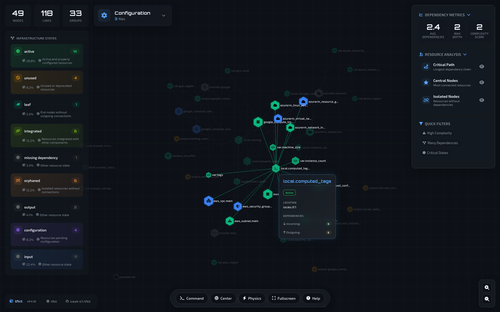](https://freeimage.host/i/KL7utRI) | [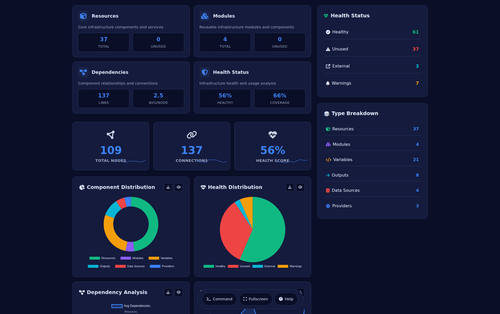](https://freeimage.host/i/KPV3mPa) | [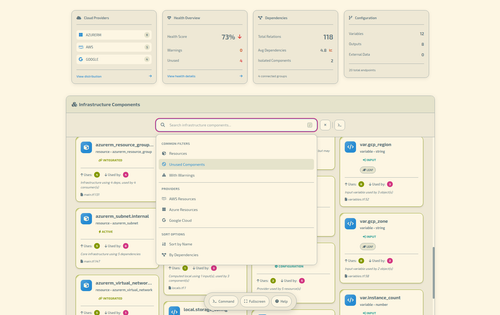](https://freeimage.host/i/KL7aYPe) |
| Force-directed graph showing resource relationships (Github-Dark Theme) | Dashboard with metrics and insights | Traditional hierarchical layout (Solirized-Light Theme) |
### Available Themes
- **Dark** (default) - Dark theme for extended viewing sessions
- **Light** - Light theme for printed reports
- **Cyber** - High-contrast theme for presentations
- **GitHub Dark** - GitHub's dark color scheme
- **Monokai** - Popular code editor theme
- **Solarized Light** - Eye-friendly light theme
- **Dracula** - Popular dark theme
- **Atom One Dark** - Atom editor's dark theme
- **Gruvbox Dark** - Retro groove color scheme
- **Night Owl** - Night-optimized theme
### Layout Options
- **Classic** - Traditional hierarchical tree layout
- **Graph** - Force-directed graph for complex relationships (default)
- **Dashboard** - Metrics-focused layout with key insights
## Command Reference
### Scan Command
Quick analysis for rapid insights into your Terraform project with comprehensive statistics and health assessment.
```bash
tfkit scan [PATH] [OPTIONS]
```
**Options:**
- `--output, -o DIR` - Output directory for reports
- `--format, -f FORMAT` - Output format: `table` (default), `json`, `yaml`, `simple`
- `--open, -O` - Open results in browser
- `--quiet, -q` - Minimal output
- `--save, -s FILE` - Save scan results to file
- `--theme THEME` - Visualization theme (default: dark)
- `--layout LAYOUT` - Visualization layout (default: graph)
**Examples:**
```bash
# Scan current directory
tfkit scan
# Scan specific path
tfkit scan /path/to/terraform
# Scan with JSON output
tfkit scan --format json
# Scan and open visualization
tfkit scan --open --theme cyber --layout dashboard
# Save results and open browser
tfkit scan --save scan.json --open
# Quiet mode with simple output
tfkit scan --quiet --format simple
```
**Output:**
The scan command provides:
- **Project Summary**: Total objects, resources, data sources, variables, outputs, providers
- **Health Assessment**: Overall health score, unused objects, orphaned outputs, incomplete resources
- **Resource Types**: Breakdown of resource types with counts
- **Potential Issues**: Unused objects, orphaned outputs, incomplete configurations
- **State Distribution**: Classification of all Terraform components
### Validate Command
Comprehensive validation of Terraform configurations with multiple check types and flexible output formats.
```bash
tfkit validate [PATH] [OPTIONS]
```
**Validation Options:**
- `--strict, -s` - Enable strict validation mode
- `--check-syntax` - Check HCL syntax
- `--check-references` - Validate references
- `--check-best-practices` - Check against best practices
- `--check-security` - Security validation
- `--all, -a` - Run all validation checks (recommended)
- `--fail-on-warning` - Treat warnings as errors (CI/CD mode)
- `--ignore RULE` - Ignore specific validation rules (can use multiple times)
**Output Options:**
- `--format, -f FORMAT` - Output format: `table` (default), `json`, `sarif`
**Examples:**
```bash
# Basic validation (syntax + references)
tfkit validate
# Full validation suite
tfkit validate --all
# Strict validation with all checks
tfkit validate --all --strict
# Security-focused validation
tfkit validate --check-security --strict
# CI/CD integration with SARIF output
tfkit validate --all --strict --fail-on-warning --format sarif > results.sarif
# Validation with ignored rules
tfkit validate --all --ignore TF020 --ignore TF021
# JSON output for programmatic use
tfkit validate --all --format json
```
**Validation Output:**
Results include:
- **Summary**: Count of errors, warnings, info messages, and passed checks
- **Issues Table**: Detailed list with severity, category, rule ID, location, resource name, and message
- **Suggestions**: Actionable recommendations for fixing issues
- **Passed Checks**: List of successfully validated rules
**Severity Levels:**
- ❌ **ERROR** - Critical issues that must be fixed
- ⚠️ **WARNING** - Issues that should be addressed
- ℹ️ **INFO** - Informational messages and suggestions
### Export Command
Export analysis data in multiple structured formats for integration with other tools and workflows.
```bash
tfkit export [PATH] [OPTIONS]
```
**Options:**
- `--format, -f FORMAT` - Export formats: `json`, `yaml`, `csv`, `xml`, `toml` (can specify multiple)
- `--output-dir, -o DIR` - Output directory (default: current directory)
- `--prefix, -p PREFIX` - Output filename prefix (default: "tfkit-export")
- `--split-by TYPE` - Split exports by category: `type`, `provider`, `module`
- `--include PATTERN` - Include specific components (can use multiple times)
- `--exclude PATTERN` - Exclude specific components (can use multiple times)
- `--compress, -c` - Compress output files into ZIP archive
**Examples:**
```bash
# Export as JSON (default)
tfkit export
# Export multiple formats
tfkit export --format json --format yaml --format csv
# Export to specific directory
tfkit export --format json --output-dir ./exports
# Split exports by provider
tfkit export --format csv --split-by provider
# Export with compression
tfkit export --format json --format yaml --compress
# Custom filename prefix
tfkit export --format json --prefix infrastructure-2024
```
**Exported Data:**
The export includes:
- **Summary**: Resource counts and project metadata
- **Health Metrics**: Health score and issue counts
- **Resource Types**: Detailed breakdown of all resource types
- **State Distribution**: Classification of components
- **Issues**: Unused objects, orphaned outputs, incomplete configurations
- **Providers**: List of used providers
### Examples Command
Display practical usage examples and common patterns for all TFKit commands.
```bash
tfkit examples
```
Shows real-world examples including:
- Quick scanning workflows
- Validation patterns
- Export strategies
- Complete analysis pipelines
## Advanced Usage
### Complete Analysis Pipeline
```bash
# 1. Quick project scan with health assessment
tfkit scan --save initial-scan.json
# 2. Full validation with all checks
tfkit validate --all --strict
# 3. Generate interactive visualization
tfkit scan --open --theme dark --layout graph
# 4. Export data for external tools
tfkit export --format json --format yaml --compress
```
### Security-Focused Workflow
```bash
# Security validation
tfkit validate --check-security --strict --fail-on-warning
# Scan with security assessment
tfkit scan --format json --save security-scan.json
# Generate security report
tfkit scan --open --theme cyber
```
### CI/CD Integration
```bash
# Pre-commit validation
tfkit validate --check-syntax --check-references --fail-on-warning
# Full CI validation with SARIF
tfkit validate --all --strict --fail-on-warning --format sarif > results.sarif
# Automated scanning with JSON output
tfkit scan --quiet --format json --save scan-results.json
```
### Multi-Format Export Workflow
```bash
# Export all formats with compression
tfkit export --format json --format yaml --format csv --compress
# Split by provider for large projects
tfkit export --format json --split-by provider --output-dir exports/
# Custom export with filtering
tfkit export --format yaml --prefix prod-infra --exclude "*.test.tf"
```
## Output Examples
### Scan Results (Table Format)
```
████████╗███████╗██╗ ██╗██╗████████╗
╚══██╔══╝██╔════╝██║ ██╔╝██║╚══██╔══╝
██║ █████╗ █████╔╝ ██║ ██║
██║ ██╔══╝ ██╔═██╗ ██║ ██║
██║ ██║ ██║ ██╗██║ ██║
╚═╝ ╚═╝ ╚═╝ ╚═╝╚═╝ ╚═╝
📊 TERRAFORM PROJECT SUMMARY
┏━━━━━━━━━━━━━━┳━━━━━━━┳━━━━━━━━━━━━━━━━━━━━━━━━┓
┃ Metric ┃ Count ┃ Details ┃
┡━━━━━━━━━━━━━━╇━━━━━━━╇━━━━━━━━━━━━━━━━━━━━━━━━┩
│ Total Objects│ 24 │ All Terraform components│
│ Resources │ 15 │ 8 unique types │
│ Data Sources │ 3 │ External data references│
│ Variables │ 12 │ 10 used │
│ Outputs │ 8 │ 2 orphaned │
│ Providers │ 3 │ aws, null, template │
└──────────────┴───────┴────────────────────────┘
🏥 HEALTH ASSESSMENT
┏━━━━━━━━━━━━━━━━┳━━━━━━━┳━━━━━━━━━━━━━━━━━━┓
┃ Category ┃ Count ┃ Status ┃
┡━━━━━━━━━━━━━━━━╇━━━━━━━╇━━━━━━━━━━━━━━━━━━┩
│ Overall Score │ 85.0% │ Excellent │
│ Unused Objects │ 2 │ Potential cleanup│
│ Orphaned Outputs│ 2 │ Unused outputs │
│ Incomplete │ 1 │ Missing values │
└────────────────┴───────┴──────────────────┘
```
### Validation Results (Table Format)
```
✓ Validating Configuration
Path: /path/to/terraform
Mode: STRICT
🔍 Checking syntax...
🔗 Validating references...
📋 Checking best practices...
🔒 Security validation...
┏━━━━━━━━━━┳━━━━━━━━━━━━┳━━━━━━━━┳━━━━━━━━━━━━━━━━┳━━━━━━━━━━━━━━━┳━━━━━━━━━━━━━━━━━━━━━━━━┓
┃ Severity ┃ Category ┃ Rule ┃ Location ┃ Resource ┃ Message ┃
┡━━━━━━━━━━╇━━━━━━━━━━━━╇━━━━━━━━╇━━━━━━━━━━━━━━━━╇━━━━━━━━━━━━━━━╇━━━━━━━━━━━━━━━━━━━━━━━━┩
│ ❌ ERROR │ Security │ TF101 │ main.tf:15 │ │ Missing security group │
│ ⚠️ WARNING│ References│ TF020 │ variables.tf:8 │ var.region │ Unused variable │
└──────────┴────────────┴────────┴────────────────┴───────────────┴────────────────────────┘
Validation Summary
Errors: 1 Warnings: 1 Info: 0 Passed: 45
✗ Validation failed
```
### Scan Results (Simple Format)
```
TERRAFORM SCAN RESULTS
📦 Total Objects: 24
🔧 Resources: 15 (8 types)
📊 Data Sources: 3
⚙️ Providers: aws, null, template
🏥 Health: 🟢 85.0%
⚠️ Unused: 2 objects
📤 Orphaned: 2 outputs
```
## Global Options
Available for all commands:
- `--version, -v` - Show version and exit
- `--welcome, -w` - Show welcome message with quick start guide
- `--debug` - Enable debug output for troubleshooting
- `--help, -h` - Show command help
## Development
### Installation from Source
```bash
git clone https://github.com/ivasik-k7/tfkit.git
cd tfkit
pip install -e .
```
### Running Tests
```bash
pytest tests/ -v
```
## Requirements
- Python 3.8+
- Click 8.0+
- Rich 13.0+
- python-hcl2 (for validation features)
- PyYAML (optional, for YAML export)
## License
This project is licensed under the MIT License - see the [LICENSE](LICENSE) file for details.
## Acknowledgments
- Built with [Rich](https://github.com/Textualize/rich) for beautiful terminal output
- Uses [Click](https://click.palletsprojects.com/) for CLI framework
- Inspired by Terraform best practices and community tools